

Your app just hit Product Hunt’s #1 spot. A celebrity tweeted about it. TechCrunch wrote a glowing review. Congratulations—you’re about to find out if your mobile app performance under load can actually handle success.
For most startups, this is where the dream dies. Not because the product wasn’t good enough, but because nobody thought about mobile app performance under load until it was too late. Poor mobile app performance under load doesn’t just frustrate users—it actively destroys the viral moment you worked so hard to create.
Your backend might be scaling beautifully with Kubernetes and auto-scaling groups, but your mobile clients are hammering your servers with retry storms, cache stampedes, and synchronized refresh requests that turn your infrastructure bill into a six-figure nightmare.
Here’s the uncomfortable truth about mobile app performance under load: most scaling advice focuses entirely on backend infrastructure while ignoring the fact that poorly designed mobile clients can amplify backend load by 10x to 100x. Your app isn’t just consuming your API—it’s potentially DDoS-ing it.
This article will show you exactly how mobile app performance under load either saves you during viral growth or accelerates your collapse. We’ll cover the specific patterns that break first, the hidden behaviors that multiply your backend load, and the battle-tested strategies that companies like Instagram, Uber, and Netflix use to handle millions of concurrent users without melting down.
Let’s start with what actually breaks when traffic spikes hit.
Free Consultation
Don’t Let Architecture
Be the Reason You Fail
Your app’s viral moment won’t wait for a better architecture. Neither should you. We’ve helped startups scale from thousands to millions of users — without the 3 AM crash alerts. Let’s make sure your app is ready before the spike hits, not after.
Schedule Strategic Consultation →The Hidden Client-Side Failures That Kill Mobile App Performance Under Load
When your user base explodes from 10,000 to 1,000,000 overnight, architectural weaknesses that were previously invisible suddenly become catastrophic. Here are the specific failure modes that kill apps during viral moments—and they almost always start on the client side.
Retry Storms: How They Destroy Mobile App Performance Under Load
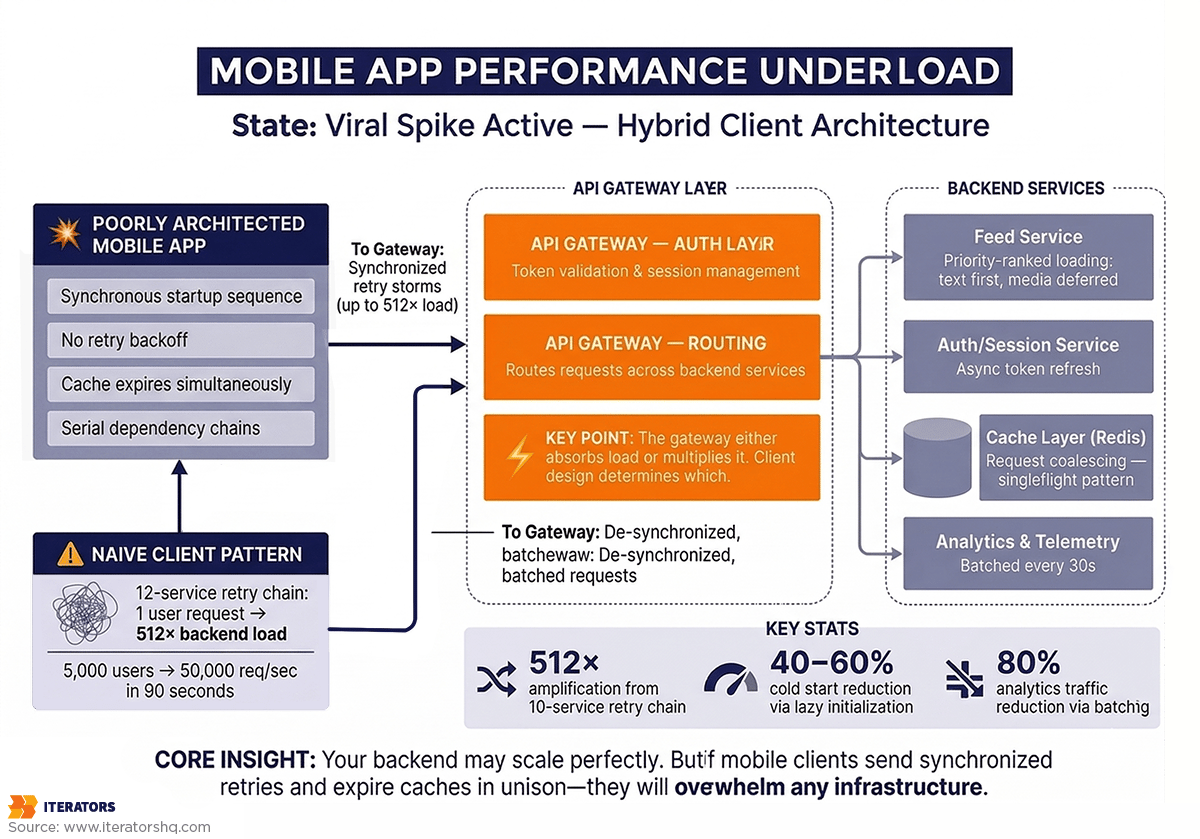
Picture this: your backend service starts experiencing slight latency—maybe 200ms instead of the usual 50ms. Nothing terrible, right? Wrong. This is where mobile app performance under load reveals its most dangerous failure mode. This is where poorly implemented retry logic transforms a minor hiccup into a complete system collapse.
Here’s what happens in a typical microservices architecture during a retry storm:
- Your mobile app makes a request that touches 10 different services
- Each service is wrapped in retry logic (because that’s “best practice”)
- The 10th service in the chain starts lagging
- Service 9 retries its call to Service 10
- Service 8 retries its call to Service 9 (which is now slower because it’s retrying)
- The API gateway retries the whole chain
- Your mobile client, seeing a timeout, retries the original request
The math here is brutal. If you have N services in a chain and each does a single retry, your tail service can receive up to 2^(N-1) times the original load. With 10 services, that’s potentially 512 times the original request volume.
I’ve seen this exact scenario play out with a fintech startup we worked with. Their payment processing flow touched 12 services. During a Black Friday spike, one service started returning 503s. Within 90 seconds, their backend was receiving 50,000 requests per second—for an app with only 5,000 active users. They were literally DDoS-ing themselves.
The fix for this mobile app performance under load crisis? Exponential backoff with jitter, circuit breakers, and strict retry budgets. But most teams don’t implement these until after their first catastrophic failure.
Session Management Collapse Under Load
Authentication seems simple until a million users try to log in simultaneously—and mobile app performance under load suddenly becomes a critical concern. During a viral spike, your authentication and session management layer often becomes the first bottleneck—and it’s entirely a client-side architecture problem.
Most apps enforce a synchronous “validate session before anything else” pattern. This means if your identity provider (IdP) experiences even a 500ms delay, your entire app launch process freezes. Multiply that across hundreds of thousands of cold starts, and you’ve created a cascading failure that prevents users from even opening your app.
Here’s what makes this worse: many apps refresh authentication tokens on every app launch. During a traffic spike, this means your IdP gets hammered with token refresh requests before users can even see your home screen. If the IdP can’t keep up, your app becomes a blank screen that users immediately close and uninstall.
The security implications are equally concerning. Research shows session hijacking attacks have increased 127% year-over-year, with attackers specifically targeting high-load events when security teams are overwhelmed. Apps that don’t implement proper token rotation or use predictable session IDs become vulnerable exactly when they’re most visible.
Cache Invalidation Cascades: A Critical Mobile App Performance Under Load Challenge
Caching is supposed to protect your backend and improve mobile app performance under load. But during traffic spikes, naive cache implementations become weapons of mass destruction through a phenomenon called the “thundering herd.”
Here’s the scenario: you have a trending post, a live sports score, or a flash sale item cached in Redis. That cache entry expires. Suddenly, every single client that requests that data encounters a cache miss simultaneously. They all hit your database at once.
Your database, which was previously protected by the cache layer, suddenly receives 10,000 identical queries in the same second. Connection pools max out. CPU spikes to 100%. Queries start timing out. Your app returns errors to users, who retry, making everything worse.
The irony is painful: the system you built to protect your database is what coordinates the killing blow.
We’ve seen this pattern repeatedly with on-demand apps during peak usage times. A food delivery app we worked with experienced this during dinner rush—their “restaurant availability” cache expired every 5 minutes, and each expiration triggered a stampede that took down their database for 30-45 seconds.
Background Work Amplification and Mobile App Performance Under Load
Here’s a failure mode that surprises most teams: background tasks that seem harmless at small scale become catastrophic amplifiers during traffic spikes.
Modern mobile apps integrate dozens of third-party SDKs—analytics, crash reporting, deep linking, attribution tracking, A/B testing frameworks. Each one typically fires network requests during app launch. When you have 1,000 users, this creates 1,000 background requests. When you have 1,000,000 users launching your app simultaneously, you’re suddenly handling millions of background requests that provide zero immediate value to the user experience.
These background tasks compete with critical user actions for limited device resources—CPU, memory, network bandwidth. During a traffic spike, this “noise floor” of non-essential traffic can account for 30-40% of your total backend load.
Instagram famously addressed this by implementing a priority-based task queue where analytics and prefetching requests are initially queued at “idle priority” and only elevated when the user scrolls near that content. This single change reduced their photo load times by 25% and cut server load by 15%.
The Timeout Configuration Disaster
Timeout configuration seems like a minor detail until it becomes the difference between your app surviving or collapsing during a spike.
Set timeouts too long, and your app hangs while users stare at loading spinners. They get frustrated, force-quit your app, and leave a 1-star review. Set timeouts too short, and you prematurely kill requests that might have succeeded, triggering unnecessary retries that amplify load.
During traffic spikes when latency increases globally, short timeouts create a vicious cycle: every request fails before completion, triggers a retry, which also fails, triggering another retry. Your app enters a state where zero requests ever succeed because none are given enough time to complete.
The solution isn’t just picking a “good” timeout value—it’s implementing adaptive timeouts that adjust based on observed latency patterns and using deadline propagation so downstream services know when to stop processing requests that have already timed out on the client.
How Mobile App Performance Under Load Creates Backend Multiplication
A sophisticated understanding of mobile app performance under load requires viewing the client not just as a consumer but as a potential traffic amplifier. The design choices you make in your mobile app determine whether 1,000,000 active users generate 1,000,000 backend requests or 100,000,000.
The Thundering Herd Problem: A Major Mobile App Performance Under Load Threat
The thundering herd is one of the most devastating mobile app performance under load problems—it’s not limited to cache expiration but is a general problem of synchronized behavior. Any time your app coordinates actions across millions of devices, you risk creating a stampede.
Common triggers include:
- Push notifications that wake up a million devices simultaneously
- Fixed-interval refresh logic where every app refreshes at the start of each minute
- Network recovery where delayed traffic floods your servers in a burst after an outage
The solution is introducing randomness—a concept called “jitter”—to de-synchronize requests across your user base. Instead of refreshing every 60 seconds, refresh every 60 seconds plus a random value between 0-30 seconds. This spreads the load over a 90-second window instead of concentrating it in a single moment.
Request Multiplication Through Poor Retry Logic
Without a coordinated retry policy, your mobile app performance under load degrades as your mobile client becomes a high-frequency hammer on your servers. Consider this scenario:
- User makes a request that fails
- Client retries 3 times immediately
- Each retry goes through a load balancer that retries once
- Each backend service retries once
A single user action that encounters a transient error now generates 12 requests instead of one. Multiply this across a viral user base, and your servers are hit by a wave of requests they can never clear.
The solution is implementing a retry budget—a global limit on how many retries the entire system can perform. If you’ve already retried at the network layer, don’t retry again at the application layer. If the load balancer is retrying, disable client-side retries for that endpoint.
Dependency Chains That Serialize Everything
Serialization is the enemy of mobile app performance under load. If your app must fetch A, wait for the response, then fetch B, wait for that response, then fetch C, your total time is T_A + T_B + T_C. Under load, where each T increases, this serial chain creates perceived slowness that far exceeds actual server delay.
This same logic applies to app initialization. If your app won’t show the home screen until the analytics SDK is ready, a delay in the analytics server becomes a delay in your app’s startup. During a traffic spike when every service is slower, these dependency chains create a compounding effect that makes your app feel unusable.
The solution is aggressive parallelization and lazy initialization. These techniques are fundamental to maintaining mobile app performance under load during traffic spikes. Load independent resources simultaneously. Defer non-critical SDK initialization until after the first frame renders. Show the UI immediately with cached data while fresh data loads in the background.
Cache Miss Storms During Invalidation
A specific subset of the thundering herd is the “cache miss storm” that happens during invalidation. If a backend engineer clears a large segment of cache to fix a data bug, they may inadvertently trigger an invalidation cascade where every subsequent client request hits the database.
The client architecture must be robust enough to handle these misses without collapsing. This means:
- Serving stale data with a visual indicator that fresh data is loading
- Implementing request coalescing so 1,000 concurrent cache misses generate only 1 database query
- Using probabilistic early expiration where cached items expire gradually rather than all at once
Architectural Patterns for Mobile App Performance Under Load

To combat load multiplication, you need to implement patterns that prioritize system stability and perceived performance. Here are the battle-tested approaches that separate apps that survive viral growth from those that collapse.
Optimistic UI Updates
Optimistic UI is one of the most powerful patterns for maintaining mobile app performance under load. When a user performs an action—liking a post, sending a message, adding an item to cart—update the UI immediately as if the request has already succeeded. The actual network request happens in the background.
If the request fails, roll back the UI gracefully with an error message. This pattern is critical during traffic spikes because it keeps your app feeling fast even when your backend takes 500ms or more to respond.
Instagram uses this extensively. When you like a post, the heart icon turns red instantly—even before the request reaches their servers. This creates a perception of zero latency for user actions, which is crucial for maintaining engagement during high-load events.
The implementation requires careful state management. You need to track optimistic updates separately from confirmed updates, handle rollbacks gracefully, and ensure idempotency so duplicate requests don’t cause problems.
Stale-While-Revalidate Caching
The Stale-While-Revalidate (SWR) strategy decouples user experience from network conditions. This is one of the most effective strategies for maintaining mobile app performance under load during traffic spikes. When data is requested, your app immediately serves the cached version while simultaneously fetching fresh data in the background.
Here’s the flow:
- User opens feed
- App instantly displays cached posts (even if they’re 5 minutes old)
- App fetches fresh posts in background
- UI updates seamlessly when fresh data arrives
This ensures users always see content instantly, even during backend lag or temporary unavailability. During viral spikes, this pattern prevents the “blank screen of death” that drives users to close your app.
The key is communicating staleness to users. Show a subtle indicator that data is refreshing. If data is very stale (e.g., hours old), show a banner that says “Showing cached data – having trouble connecting.”
Request Coalescing and Batching
Request coalescing, also called ‘singleflighting,’ is a critical technique for mobile app performance under load—it ensures that if ten different UI components all need the same data simultaneously, only one network request is sent. Subsequent requests wait for the result of the first call rather than generating redundant traffic.
This is particularly important for mobile apps where different screens might request user profile data, notifications, and settings simultaneously during app launch. Without coalescing, you’re making 3 network requests. With coalescing, you make 1.
Batching takes this further by combining multiple small requests into a single payload. Instead of sending 10 separate analytics events, batch them into one request. This reduces the overhead of establishing multiple TCP/TLS connections, which is expensive on congested mobile networks.
Facebook’s mobile app batches all analytics events and sends them in a single request every 30 seconds or when the batch reaches 50 events—whichever comes first. This reduced their analytics-related network traffic by 80%.
Progressive Data Loading
Progressive loading is essential for maintaining mobile app performance under load by prioritizing essential information delivery before secondary details. For a social media app, this means:
- Load text content first (lightest, fastest)
- Load low-resolution image placeholders
- Load full-resolution images as they become available
- Load comments and engagement data last
This ensures users can interact with critical content even during performance degradation. Instagram pioneered this approach, famously using a “blur-up” technique where low-resolution images load instantly and sharpen as full-resolution versions arrive.
The implementation requires careful API design. Instead of a single monolithic endpoint that returns everything, break it into tiered endpoints:
- /feed/essential returns IDs, text, and thumbnails
- /feed/media returns full-resolution images
- /feed/engagement returns likes, comments, and shares
During traffic spikes, you can prioritize the essential endpoint while throttling or caching the others.
Smart Prefetching Strategies
Prefetching can dramatically improve mobile app performance under load, but it must be handled carefully to avoid creating thundering herds. Instagram’s approach is instructive: they use a “prioritized task abstraction” where prefetch tasks are initially queued at “idle priority” and only escalated to “high priority” when a user scrolls near the content.
This sequential background prefetching led to a 25% reduction in photo load times and a 56% reduction in the time users spent waiting at the end of their feed—all while reducing server load because prefetch requests were spread over time rather than concentrated at app launch.
The key principles:
- Prioritize user-initiated requests over prefetch requests
- Cancel prefetch requests if the user navigates away
- Limit concurrent prefetches to avoid saturating the network
- Use idle time for prefetching, not critical path time
How Cold Start Performance Affects Mobile App Performance Under Load

The ‘cold start’—launching your app from scratch—is the most critical moment for mobile app performance under load and user retention. Almost 50% of users will uninstall an app if they encounter performance issues during launch, and 33% will leave if it takes more than 6 seconds to load.
During traffic spikes, mobile app performance under load becomes even more critical because backend latency increases globally. An app that normally starts in 3 seconds might take 8 seconds during a spike—crossing the threshold where users give up.
Dependency Initialization Ordering for Mobile App Performance Under Load
The primary bottleneck affecting mobile app performance under load during cold starts is usually a bloated initialization phase. Many apps fall into the “init everything on launch” trap, where every third-party SDK and local service is initialized on the main thread during onCreate().
Under load, if any of these initializations require a network call—fetching remote config, refreshing authentication tokens, loading feature flags—your app hangs. The user sees a blank screen or frozen splash screen while your app waits for network responses that might take 5-10 seconds during a traffic spike.
The solution is lazy initialization. Only initialize what’s absolutely necessary to render the first frame:
Critical Path (must complete before first frame):
- UI framework initialization
- Essential data models
- Cached data loading
Deferred (can happen after first frame):
- Analytics SDKs
- Crash reporting
- Remote config
- Feature flags
- Deep link handling
- Push notification registration
This approach can cut cold start time by 40-60% and makes your app dramatically more resilient during traffic spikes when every network call is slower.
Async vs Sync Startup Patterns
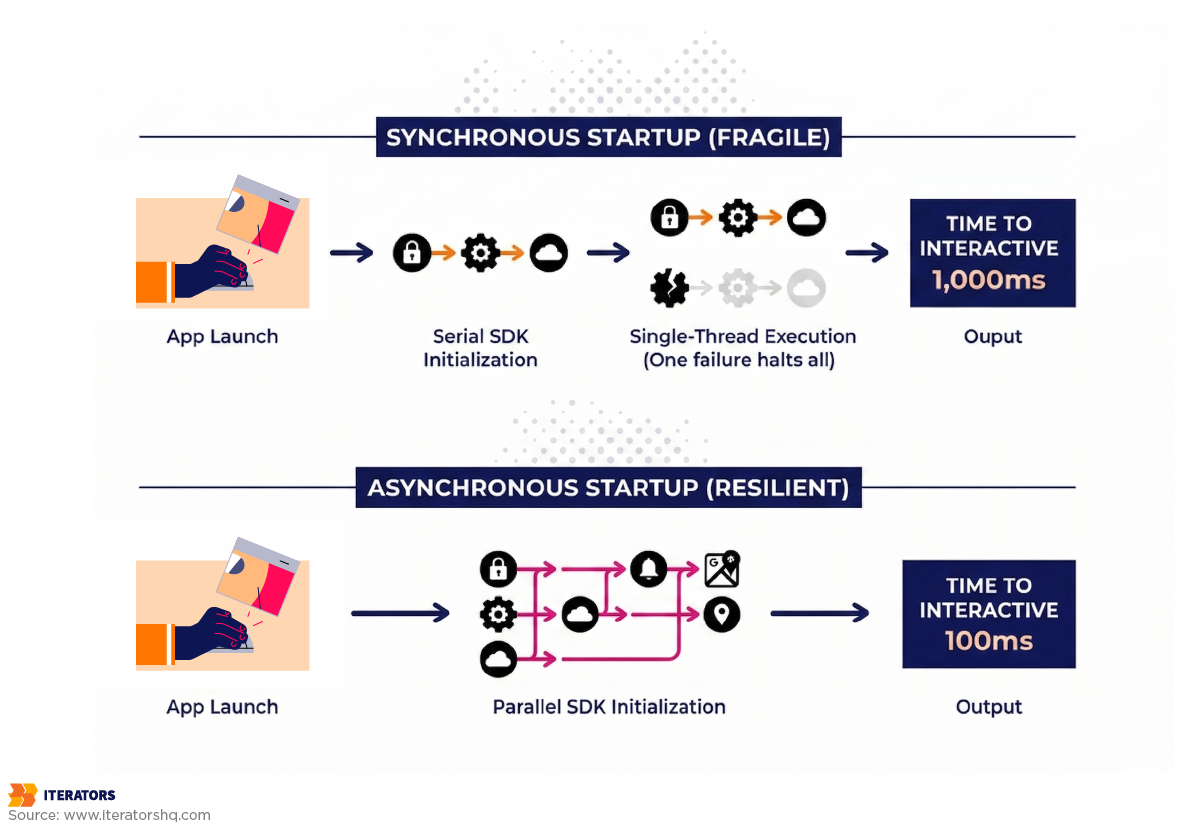
Synchronous startup patterns are brittle. If your app’s launch process is a single sequence of blocking calls, any failure in that sequence stops the launch completely.
Modern apps should use an asynchronous startup manager that can initialize independent modules in parallel. This ensures the UI can be drawn as soon as the minimal set of dependencies is met, while other services continue loading in the background.
Here’s a simplified example:
Synchronous (fragile):
1. Init analytics (200ms)
2. Init crash reporting (150ms)
3. Init remote config (300ms)
4. Init auth (250ms)
5. Render UI (100ms)
Total: 1000ms
Asynchronous (resilient):
1. Start all inits in parallel
2. Render UI after 100ms
3. Services finish in background
Total to interactive: 100ms
Total to fully loaded: 300ms
The asynchronous approach gets your UI on screen 10x faster and makes your app resilient to any single service being slow or unavailable.
The Cost of “Init Everything on Launch”
Every SDK you add to your app carries hidden costs:
- Initialization time (usually 50-200ms per SDK)
- Background network usage (telemetry, configuration fetching)
- Memory consumption (each SDK loads its own dependencies)
When these costs aggregate across 10-15 SDKs, they create a “sluggish” feel that users associate with poor quality. During traffic spikes, the increased server load makes every initialization-related network call take longer, compounding the delay.
We’ve worked with clients who dramatically improved their mobile app performance under load by reducing cold start time from 6 seconds to 2 seconds simply by auditing their SDK usage and removing or deferring non-essential ones. That single change increased their Day 1 retention by 18%.
Balancing Development Velocity with Mobile App Performance Under Load
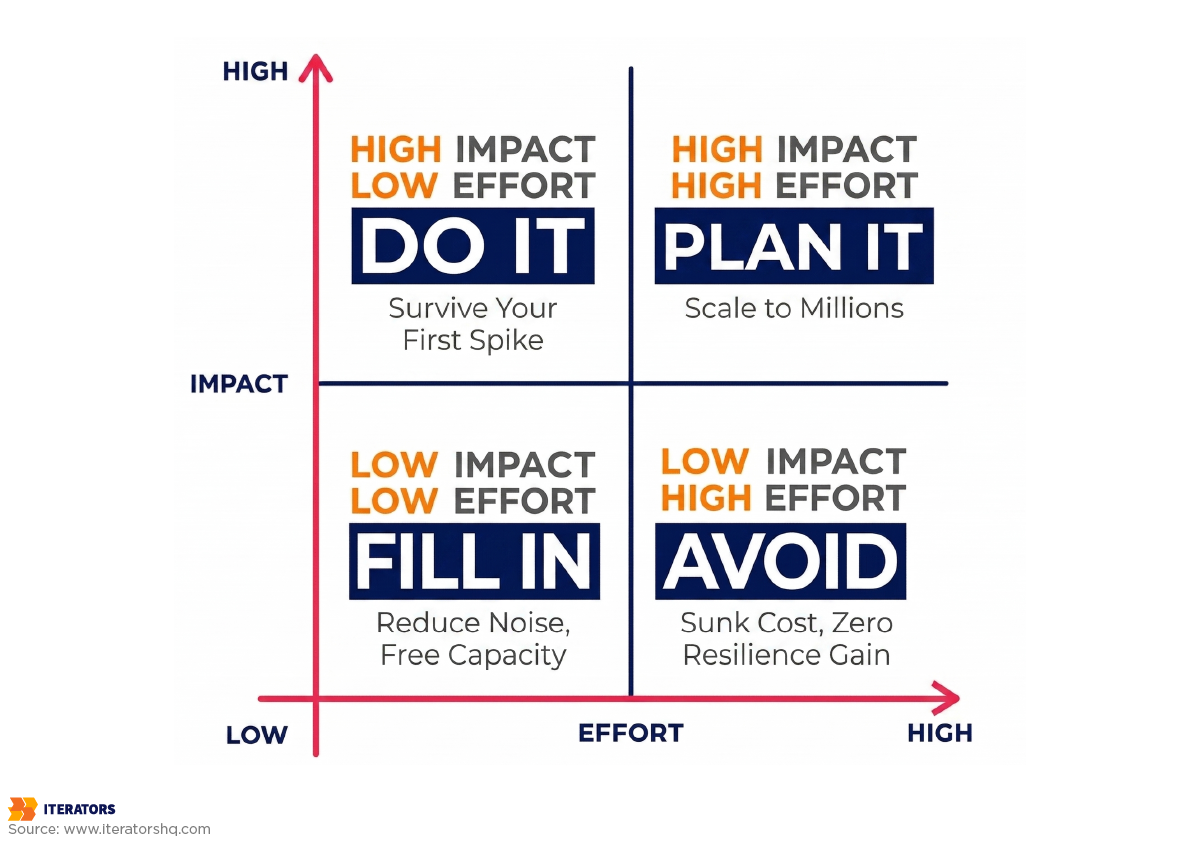
Startup CTOs face a constant trade-off between shipping features quickly and building stable architecture that maintains mobile app performance under load. This tension often results in technical debt that becomes critical exactly when your app goes viral.
When to Optimize for Speed vs Resilience
Early-stage startups often prioritize speed to validate product-market fit. This is acceptable for “Napoleon-style” MVP development—transitioning directly from vision to spec. However, once your app enters a growth phase, production-ready standards must be enforced.
The cost of fixing mobile app performance under load flaws after a crash during a viral moment is often triple the cost of building them correctly from the start. It involves emergency “firefighting,” lost market opportunity, and damaged brand reputation that’s hard to recover.
Here’s a practical framework:
Pre-Product-Market-Fit (Speed Priority):
- Basic error handling is acceptable
- Simple retry logic (with exponential backoff)
- Minimal caching
- Focus on core user flows
Post-Product-Market-Fit (Resilience Priority):
- Comprehensive error boundaries
- Circuit breakers and retry budgets
- Sophisticated caching strategies
- Graceful degradation for all features
- Load testing before major launches
The transition point is usually when you start spending meaningful money on user acquisition. If you’re paying for traffic, you need architecture that won’t waste that investment.
Technical Debt That Becomes Critical Under Load
Not all technical debt is created equal. Debt in your networking layer is particularly lethal because it amplifies under load. Shortcuts like:
- Hard-coding API endpoints instead of using a configuration service
- Ignoring idempotency in retries
- Failing to implement proper error boundaries
- Skipping request deduplication
These might work fine for 10,000 users but will cause spectacular failures at 1,000,000 users. The “vicious cycle” means poor initial decisions lead to crashes, which lead to negative reviews, which reduce discoverability, effectively killing your app just as it gains traction.
React Native Performance Considerations
In 2025, React Native remains a popular choice for startups due to its 40-60% faster time-to-market and single codebase. With the “New Architecture” (Fabric, JSI, TurboModules), React Native now offers near-native responsiveness and synchronous communication. Understanding how React Native affects mobile app performance under load is critical for making the right architectural decisions.
However, React Native still requires careful management of the JavaScript thread. Under extreme load, if your app is performing complex data processing in JS while also trying to render high-frequency animations, the UI can drop frames and feel “janky.”
For most consumer apps, React Native’s performance is excellent. But for apps with extreme performance requirements—like real-time trading, heavy media processing, or gaming—native development still offers superior raw performance and better resource management under stress.
The key is understanding your performance requirements before choosing a framework. If you need to ship quickly and your app isn’t performance-critical, React Native is excellent. If you’re building something that needs to render 60fps animations while processing real-time data streams, consider native.
Designing Mobile App Performance Under Load to Fail Gracefully Instead of Catastrophically

Resilience engineering for mobile app performance under load assumes systems will eventually fail. The question is whether they fail gracefully or catastrophically. Graceful degradation ensures that when a failure occurs, it’s localized and manageable.
Circuit Breaker Patterns for Mobile
The circuit breaker pattern prevents cascading failures before they happen. Like an electrical breaker, it “trips” and stops sending requests to a service that’s already failing.
Here’s how it works:
Closed State (Normal Operation):
- Requests flow through normally
- Monitor error rates and latency
Open State (Failure Detected):
- Stop sending requests to failing service
- Return cached data or show graceful error
- Periodically test if service has recovered
Half-Open State (Testing Recovery):
- Send limited test requests
- If they succeed, close the circuit
- If they fail, open the circuit again
Netflix’s implementation uses a 10-second rolling window to track request results. If the error rate exceeds a threshold (e.g., 50% of requests failing), the circuit opens. The app immediately serves a fallback response—cached data or a “silent failure”—without even trying to hit the network.
This allows your backend to recover quickly because it’s no longer being hammered by requests during the outage. When the service recovers, the circuit closes and normal operation resumes.
Graceful Degradation Decision Framework
Not all features are equally critical. You need to decide which features are “mission-critical” and which are “optional.”
Mission-Critical (Fail Fast):
- Bank transfers
- Payment processing
- Authentication
- Core content delivery
For these, show honest error messages and prevent the action rather than risking data corruption or security issues.
Optional (Fail Silent):
- “People You May Know” widgets
- Trending topics
- Recommended content
- Social features
For these, simply hide the component if the service fails. The rest of the app works perfectly.
Enhancement (Custom Fallback):
- Real-time data (show cached with timestamp)
- Personalization (show default recommendations)
- Search (show recent searches as fallback)
For these, provide degraded functionality rather than nothing.
Offline-First Architecture Benefits for Mobile App Performance Under Load
Apps built with an ‘offline-first’ mindset deliver superior mobile app performance under load and are inherently resilient to traffic spikes. By treating the local database (SQLite, Realm, or similar) as the source of truth and using background sync, your app’s UI is never blocked by the network.
This architecture naturally handles thundering herds because the “burst” of requests happens in a decoupled background queue rather than on the user’s critical path. Users can interact with your app immediately, even if your servers are completely down.
The implementation requires rethinking your data flow:
Traditional (Fragile):
User action → API request → Wait → Update UI
Offline-First (Resilient):
User action → Update local DB → Update UI immediately
Background: Sync local DB → API → Handle conflicts
This pattern is particularly powerful for apps like task managers, note-taking apps, or any app where users create or modify content. Instagram, for example, lets you like posts and write comments even when completely offline—they sync when connectivity returns.
UX During Partial Failures
User experience during mobile app performance under load failures is as important as the technical fix. “Skeleton screens” and clear progress indicators reduce user stress and prevent the frustrated spam-clicking that adds more load to your system.
Bad Error UX:
“Network Error”
[Retry Button]
Good Error UX:
“We’re experiencing high traffic right now.
Your request is queued and will complete shortly.
Showing cached data from 2 minutes ago.”
[Dismiss]
The good version:
- Explains what’s happening
- Sets expectations
- Provides value (cached data) rather than nothing
- Doesn’t encourage spam-clicking with a retry button
Real-World Examples of Mobile App Performance Under Load

Success at scale and consistent mobile app performance under load isn’t accidental—it’s engineered. Let’s look at how companies that survived viral growth built their mobile architectures.
Instagram’s Resource Prioritization
Instagram’s team moved to a ‘flat design’ to reduce assets and improve mobile app performance under load. By drawing shapes in code rather than loading bitmaps, they shaved 120ms off cold start times.
Their prefetching logic is a masterclass in load management. They use srcset to ensure devices only download the exact resolution needed for their screen size, preventing bandwidth waste. A 2x retina iPhone gets 750px images, while an older device gets 375px images—same visual quality, half the data.
They also implemented a sophisticated priority queue for network requests:
- Critical: User-initiated actions (like posting a photo)
- High: Visible content in current viewport
- Medium: Content just outside viewport (prefetch)
- Low: Analytics and telemetry
- Idle: Background data sync
During traffic spikes, they automatically drop low and idle priority requests to preserve capacity for critical user actions.
Uber’s Integrated Cache Strategy
Uber serves over 40 million reads per second using an “integrated cache” architecture. Their query engine automatically populates Redis from the storage layer, reducing request latencies by 75% for the p75 metric.
This prevents the database from being overwhelmed during surge pricing events when millions of users are simultaneously checking ride availability. The cache is structured to handle thundering herds through:
- Probabilistic early expiration: Cache entries expire gradually rather than all at once
- Request coalescing: Multiple concurrent requests for the same data generate only one database query
- Negative caching: Even “no drivers available” results are cached to prevent repeated expensive queries
Netflix’s Failure Injection (Chaos Engineering)
Netflix famously pioneered “Chaos Monkey,” a tool that randomly kills production instances to ensure the system can self-heal. This approach to testing mobile app performance under load through deliberate failure has become an industry standard. This culture of “expecting failure” forces their mobile teams to build robust graceful degradation paths.
During a major database failure, their use of local query caches on devices ensured video views were barely affected. The app seamlessly pivoted to cached metadata for titles, descriptions, and thumbnails while the backend recovered.
Their mobile team also implements aggressive timeout tuning. They found that during peak traffic, increasing timeouts from 2 seconds to 5 seconds actually reduced server load because fewer requests were retried. The key insight: let slow requests complete rather than killing them and retrying.
Client-Side Observability for Mobile App Performance Under Load

You can’t fix mobile app performance under load issues if you cannot measure them. Observability is the “nervous system” of a scalable app, telling you why something broke, not just when.
Metrics That Predict Mobile App Performance Under Load Problems
Focus on these ‘North Star’ metrics for mobile app performance under load and set automated alerts for deviations:
P99 Latency: The latency experienced by the unluckiest 1% of users. This is where scaling problems first appear. If your p50 latency is 200ms but your p99 is 5 seconds, you have a serious problem that will become catastrophic under load.
ANR Rate: Application Not Responding events freeze the app and are a leading indicator of UI thread congestion. Android’s Play Console will penalize apps with ANR rates above 0.47%, so this is both a performance and distribution issue.
Crash-Free Sessions (CFS): Industry baseline in 2025 is 99.95%, with elite apps reaching 99.99%. Anything below 99.8% should trigger immediate investigation.
Frame Drops / Jank: Metrics measuring if the UI is stuttering under high CPU load. Users perceive apps as “laggy” if they drop below 50fps consistently.
Network Error Rates by Carrier/Region: These help distinguish between server-side capacity issues and client-side code bottlenecks. If errors spike only on T-Mobile in Texas, that’s a network issue. If they spike globally, that’s a capacity issue.
Crash Reporting and Real-User Monitoring
Standard crash reporting (like Firebase Crashlytics) is the bare minimum for monitoring mobile app performance under load. Mature teams implement Real-User Monitoring (RUM) to track every user journey.
RUM allows you to see the correlation between a slow network call and a subsequent user exit. You might discover that users who experience >3 second load times have a 60% probability of abandoning the app within the next 30 seconds. This insight lets you prioritize performance work based on actual business impact.
Tools like Datadog RUM, New Relic Mobile, or Firebase Performance Monitoring provide:
- Session replay: Watch exactly what users experienced during failures
- Network waterfall charts: See which API calls are slow and why
- Custom traces: Track specific user flows from start to finish
- Crash attribution: Link crashes to specific code paths and user actions
The investment in observability pays for itself the first time you avoid a major outage because you caught the warning signs early.
Conclusion: An Action Plan for Viral Scaling
Achieving mobile app performance under load is a continuous process of auditing, hardening, and testing. Here’s your action plan:
Week 1: Audit Your Current Architecture
- Review all network retry logic—ensure exponential backoff with jitter
- Identify synchronous dependencies in your startup flow
- Map out which features are mission-critical vs optional
- Document your current crash-free rate and p99 latency
Week 2: Implement Quick Wins
- Add request coalescing for common API calls
- Implement stale-while-revalidate caching for feeds
- Defer non-critical SDK initialization
- Add circuit breakers for external dependencies
Week 3: Build Observability
- Implement RUM with custom traces for critical flows
- Set up alerts for ANR spikes, crash rate changes, and latency degradation
- Create dashboards showing p95 and p99 metrics by endpoint
Week 4: Test for Success
- Run load tests simulating 10x your current peak traffic
- Test app behavior when backend services return errors
- Verify graceful degradation for all major features
- Document your breaking points and remediation plans
Ongoing:
- Review observability dashboards weekly
- Conduct quarterly architecture reviews
- Load test before major launches or marketing campaigns
- Maintain a “resilience backlog” of improvements
Remember: the time to fix your mobile app performance under load architecture is before you go viral, not after. We’ve seen too many promising startups fail not because their product wasn’t good enough, but because their mobile architecture couldn’t handle success.
If you want expert guidance on improving mobile app performance under load and creating resilient client-side architecture, Iterators can help. We’ve built mobile apps for startups that scaled from thousands to millions of users without missing a beat. Our team specializes in React Native development, cross-platform architecture, and building systems that survive viral growth.
Don’t wait for your first crash during a traffic spike to discover your architecture’s weaknesses. Let’s build it right from the start.
Frequently Asked Questions
What is a “good” crash-free rate for a mobile app in 2025?
In 2025, 99.95% crash-free sessions is the industry baseline. Elite apps reach 99.99%, while anything below 99.8% is considered a significant risk to user retention and app store discoverability. Google Play Console and Apple’s App Store both use crash rates as ranking factors, so poor stability directly impacts your distribution.
How do I prevent my app from “DDoS-ing” my own backend?
The primary solution is implementing exponential backoff with jitter in your retry logic. This de-synchronizes clients and prevents the “synchronized spamming” that occurs when thousands of devices retry failed requests simultaneously. Also implement circuit breakers to stop sending requests to services that are already failing, and use retry budgets to limit total retries across your entire request chain.
Should I choose React Native or Native for a high-load app?
React Native is excellent for most consumer apps, offering 40-60% faster development cycles and near-native performance with the New Architecture. However, for apps with extreme performance requirements—like real-time trading, heavy media processing, or complex animations—native development still offers superior raw performance and better resource management under stress. The key is matching your framework choice to your actual performance requirements, not just choosing based on what’s trendy.
What is the difference between TTID and TTFD?
TTID (Time to Initial Display) is when the user first sees a frame on screen—even if it’s just a splash screen or skeleton UI. TTFD (Time to Fully Drawn) is when the app is fully interactive with all critical content loaded. Both metrics matter: TTID provides immediate feedback that the app is launching, while TTFD is when users can actually accomplish their goals. Industry benchmarks for 2025 are TTID under 2 seconds and TTFD under 5 seconds.
How does the thundering herd problem affect mobile apps?
The thundering herd occurs when a large number of clients simultaneously attempt expensive operations—like fetching fresh data after a cache expiration or waking up from a push notification. This coordinated “stampede” can overwhelm databases and cause system-wide timeouts. The solution is introducing jitter to de-synchronize client behavior, implementing request coalescing so multiple concurrent requests generate only one backend query, and using probabilistic cache expiration so cached items don’t all expire simultaneously.
What are the most important metrics to track during a traffic spike?
Focus on p99 latency (the experience of your unluckiest users), ANR rates (app freezes), network error rates by carrier and region (to distinguish client vs server issues), crash-free session rate (overall stability), and memory usage patterns (to catch memory leaks before they cause crashes). These metrics provide the visibility needed to distinguish between server-side capacity issues and client-side code bottlenecks, allowing you to prioritize fixes effectively.