
Here’s a fun fact that’ll keep you up at night: 100% of the top 100 paid Android apps have tampered versions floating around in third-party markets. Not 99%. Not “most of them.” Every. Single. One.
And before iOS developers start feeling smug—92% of the top paid iOS apps are in the same boat.
Welcome to mobile security in 2025, where your beautifully crafted app is basically a sitting duck unless you implement runtime protection mobile security. Traditional security approaches are failing, and runtime protection mobile security has become the critical defense layer that separates apps that survive from those that get compromised.
Building bulletproof mobile security isn’t just about implementing the right techniques—it’s about implementing them correctly for your specific threat model and business requirements. At Iterators, we’ve architected runtime protection mobile security for banks, healthcare providers, and high-stakes applications that can’t afford to be compromised. Schedule a free security consultation and let’s discuss how to build defense-in-depth that actually works against real-world attacks.
What We’re Covering (Because This Isn’t Your Average Security Fluff Piece)
This guide will walk you through:
- Why code obfuscation alone is like putting a screen door on a submarine
- The actual mechanics of Runtime Application Self-Protection (RASP)
- How Google Play Integrity API works (and when it doesn’t)
- Real bypass techniques attackers use—and how to defend against them
- Practical implementation patterns for React Native and native apps
- OWASP MASVS compliance without the compliance-speak headaches
Who This Is For: Mobile CTOs, security leads at fintech/healthcare companies, senior mobile developers implementing security features, and product managers who need to understand why “just add security” isn’t a thing.
Who This Isn’t For: People looking for a quick “5 security tips” listicle. We’re going deep.
The Problem: Why Static Protections Are Dead (And Why Runtime Protection Mobile Security Matters)
Let’s start with some uncomfortable truths.
The State of Mobile Security Is… Not Great
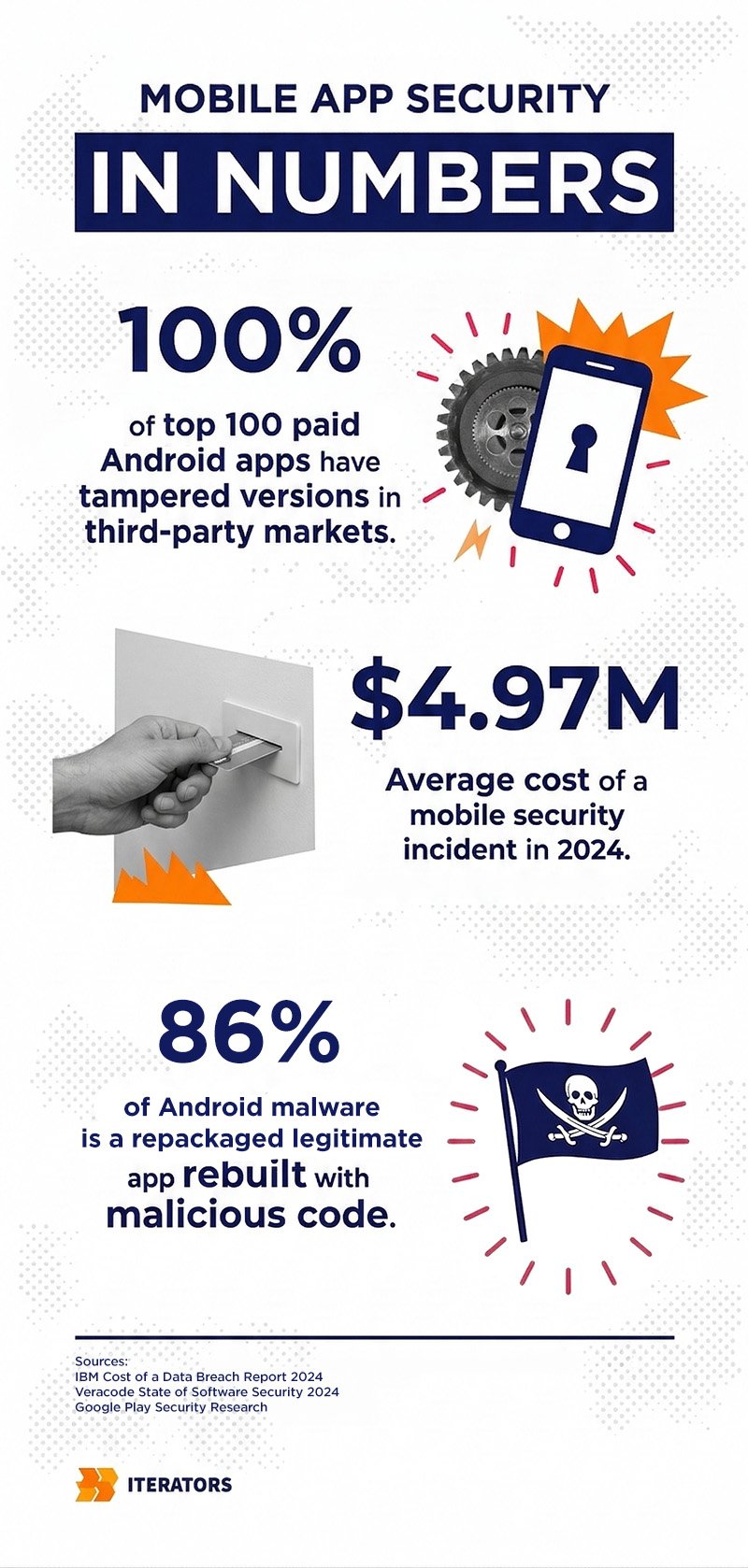
The average cost of a mobile security incident in 2024 hit $4.97 million according to IBM’s Cost of a Data Breach Report. That’s not a typo. And it’s not just happening to small shops with no security budget—67% of organizations incorrectly believe that standard OS-level protections for iOS and Android are “good enough” for high-value apps.
Spoiler: They’re not.
Here’s what’s actually happening in the wild:
- One in four mobile apps contains at least one high-risk security flaw according to Veracode’s State of Software Security.
- 50% of apps with 5-10 million downloads include a significant vulnerability
- 86% of Android malware consists of repackaged versions of legitimate apps
- 74% of organizations report that development speed pressure has compromised their mobile security
The mobile threat landscape isn’t defined by simple malware anymore. We’re dealing with sophisticated API abuse, runtime manipulation, and AI-powered social engineering that targets the execution environment itself. These threats align with the OWASP Mobile Top 10 security risks that organizations face today.
What Code Obfuscation Actually Does (Hint: Not Enough)
Code obfuscation is like renaming all your variables to single letters and scrambling your function names. It makes your code harder to read—for about 15 minutes.
Here’s what obfuscation can do:
- Make reverse engineering slightly more annoying
- Protect against casual code thieves
- Reduce your app size (sometimes)
Here’s what obfuscation cannot do:
- Stop a determined attacker with Frida or JADX
- Detect if your app is running on a rooted device
- Prevent memory manipulation at runtime
- Block hooking frameworks from intercepting your API calls
- Verify that your app hasn’t been repackaged with malware
The fundamental problem: Obfuscation is a static defense. It protects the code at rest. But your app doesn’t get attacked while it’s sitting in the app store—it gets attacked while it’s running.
That’s where runtime protection mobile security comes in.
What Runtime Protection Mobile Security Actually Means (No Buzzword Bingo)
Runtime protection mobile security is your app’s ability to defend itself while it’s executing. It’s the difference between a locked door (obfuscation) and a security guard who’s actually watching what’s happening inside the building (runtime checks).
The Core Runtime Protection Mobile Security Principle: Apps Need to Know Their Environment
Think of it this way: Your app is running on a device. That device might be:
- A legitimate, unmodified iPhone running the latest iOS
- A rooted Android phone with Magisk Hide active
- An emulator running on a security researcher’s laptop
- A jailbroken device with Frida actively hooking your functions
Your app needs to know which scenario it’s in through runtime protection mobile security. And it needs to react appropriately. Implementing intelligent runtime responses requires sophisticated software architecture—learn about our custom software development services that specialize in security-first mobile applications.
Runtime Protection Mobile Security vs. RASP vs. App Shielding (What’s What)
The terminology gets messy, so let’s clarify:
Runtime Application Self-Protection (RASP): Technology embedded in your app that monitors execution and blocks attacks in real-time. It’s like having a security guard inside your application process.
App Shielding: Broader category that includes obfuscation, anti-tampering, and runtime checks. Think of it as the full armor—RASP is one component.
Runtime protection mobile security: The umbrella term for all techniques that detect and respond to threats during execution.
Here’s the key distinction most people miss: RASP operates from inside your application’s runtime environment. It’s not sitting at the network edge like a Web Application Firewall (WAF). It has full visibility into how data moves through your code, what functions are being called, and whether those calls make sense.
| Feature | RASP | WAF | Traditional Antivirus |
| Location | Inside app process | Network perimeter | OS level |
| Detection Basis | Code execution context | HTTP pattern matching | Signature matching |
| False Positives | Low (verifies actual behavior) | High (pattern guessing) | Medium |
| Zero-Day Protection | Excellent | Limited | Poor |
| Performance Impact | 2-10% latency | Minimal | Variable |
The Five Pillars of Runtime Protection Mobile Security
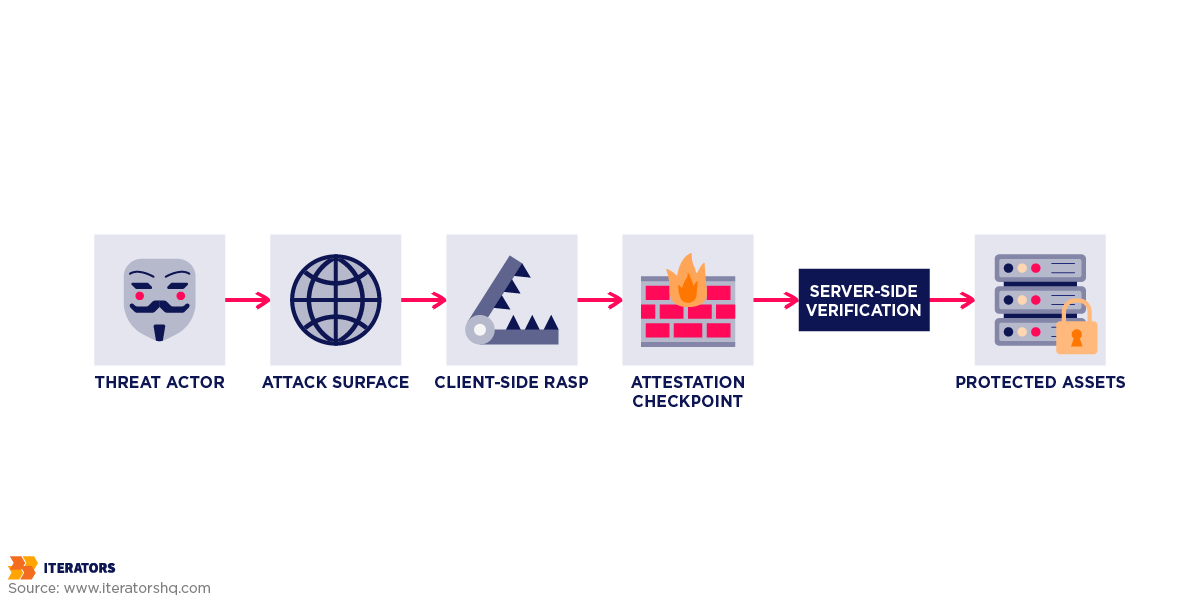
Let’s break down the actual techniques that make runtime protection mobile security work. These aren’t theoretical—they’re what you need to implement for effective runtime protection mobile security.
1. Rooting and Jailbreak Detection
What it detects: Whether the device’s OS has been modified to grant root/admin access.
Why it matters: Rooted devices bypass the OS security model. An attacker with root can:
- Read your app’s private data from disk
- Inject code into your process
- Intercept SSL/TLS traffic
- Modify your app’s memory at runtime
How detection works:
For Android:
- Check for su binary at common locations
- Test for Magisk presence
- Verify build tags (test-keys vs release-keys)
- Check for root management apps
- Attempt to execute su commands
For iOS:
- Check for Cydia.app, Sileo.app
- Test file system write access outside sandbox
- Verify dyld environment for suspicious libraries
- Check for common jailbreak files
Advanced root hiding tools like Magisk’s DenyList have a ~47% success rate against common runtime protection mobile security detection libraries. This is why you need layered runtime protection mobile security checks, not a single root detection call.
Defense strategy:
- Multiple detection methods (don’t rely on one check)
- Obfuscate your detection logic (make it hard to find and patch)
- Server-side validation (assume client checks will be bypassed)
- Graceful degradation (maybe allow read-only access on rooted devices)
2. Emulator Detection
What it detects: Whether your app is running on an emulator instead of real hardware.
Why it matters: Emulators are the attacker’s playground. They provide:
- Easy memory inspection and modification
- Screenshot/screen recording without user consent
- Network traffic interception
- Automated testing of exploits at scale
Detection fingerprints:
Android emulator tells:
- Build properties containing “generic”, “sdk”, “goldfish”
- Sensors: Missing or fake accelerometer/GPS data
- CPU architecture: x86 on “ARM” devices
- IMEI: Patterns like 000000000000000
- Network: Suspicious MAC addresses for VirtualBox
iOS simulator tells:
- Architecture: x86_64 instead of arm64
- UIDevice.current.model returns “Simulator”
- Missing hardware features: Touch ID/Face ID sensors
The bypass problem: Sophisticated emulators can fake most fingerprints. The security researcher community actively maintains emulator detection bypass tools.
Defense strategy:
- Combine multiple signals (no single check is reliable)
- Use behavioral analysis (real users don’t interact like bots)
- Server-side risk scoring (emulator detection is one input among many)
- Accept that some emulators will slip through—focus on detecting abuse patterns
3. Memory Integrity Checks
What it detects: Unauthorized modification of your app’s memory during execution.
Why it matters: Memory is where your app’s secrets live at runtime, making memory integrity a critical component of runtime protection mobile security:
- Change price values in e-commerce apps
- Bypass premium feature checks
- Extract encryption keys
- Alter game scores or in-app currency
How it works:
- Calculate checksum of critical code sections at startup
- Periodically verify checksums during runtime
- Store checksums in obfuscated locations
- Use hardware-backed storage (Keystore/Keychain) where possible
The bypass problem: Tools like Frida can hook your runtime protection mobile security integrity check functions and return fake “all clear” results. It’s a cat-and-mouse game.
Defense strategy:
- Polymorphic checks (different locations each build)
- Multiple independent verification threads
- Random timing (don’t check on a predictable schedule)
- Hardware-backed attestation (TEE/Secure Enclave)
4. Anti-Hooking Strategies
What it detects: Frameworks like Frida, Xposed, or Cydia Substrate that allow runtime code injection.
Why it matters: Hooking frameworks are the Swiss Army knife of mobile attacks, which is why anti-hooking is essential in runtime protection mobile security.:
- Intercept function calls and modify return values
- Log sensitive data passing through your code
- Bypass authentication checks
- Steal cryptographic keys
Detection methods:
Android:
- Frida: Check for frida-server process, suspicious ports (27042)
- Xposed: Look for XposedBridge.jar, specific packages
- Substrate: Check for MobileSubstrate directory
iOS:
- Substrate: Scan for MobileSubstrate/DynamicLibraries/
- Frida: Detect suspicious dyld libraries
- Check for code signing violations
The bypass problem: Attackers can hook the runtime protection mobile security anti-hooking detection itself. It’s turtles all the way down.
Defense strategy:
- Inline checks (not in separate functions that can be easily hooked)
- Check for hooking frameworks at multiple points in your code
- Use native code for critical checks (harder to hook than Java/Swift)
- Assume detection will be bypassed—use it as a signal, not a gate
5. Device Attestation (The Google Play Integrity API)
What it provides: Cryptographic proof that your app is running on a genuine, unmodified device.
Why it’s different: Unlike the client-side checks above, attestation involves a trusted third party (Google or Apple) vouching for your app’s integrity.
We’ll dive deep into Play Integrity in the next section, but here’s the key concept: Attestation moves the trust anchor off the device, providing a foundation for runtime protection mobile security. Instead of your app checking itself (which can be fooled), a remote server verifies cryptographic signatures that are extremely difficult to forge.
The User Experience Tightrope: Security vs. Usability

Here’s the uncomfortable truth: Every runtime protection mobile security measure you add makes your app slightly worse for legitimate users.
The False Positive Problem
Let’s say you implement aggressive root detection. You’ll catch rooted devices… and you’ll also flag:
- Power users who root for legitimate reasons (custom ROMs, accessibility features)
- Developers testing your app
- Users in regions where rooted devices are common
- Devices with manufacturer-installed root (yes, this happens)
Real-world example: A banking app that blocks all rooted devices will lose customers in markets where 20%+ of devices are rooted by default. That’s not a security decision—it’s a business decision.
Tuning Detection Sensitivity
The art of runtime protection mobile security is finding the right balance. Here’s a framework:
Risk-Based Response:
| Device State | Risk Level | Recommended Action | Example |
| STRONG_INTEGRITY | Low | Full access | Hardware-backed attestation passed |
| DEVICE_INTEGRITY | Medium | Standard access | Certified device, no root detected |
| BASIC_INTEGRITY | High | Limited access | Potentially rooted or emulator |
| INTEGRITY_FAILED | Critical | Block or read-only | Modified app or compromised device |
Graceful Degradation:
Instead of blocking users outright:
- Allow read-only access on risky devices
- Require step-up authentication for sensitive actions
- Show warnings instead of hard blocks
- Log for fraud analysis without immediate action
A/B Testing Security Measures
Yes, you should A/B test your security. Here’s what to measure:
- Abandonment rate: How many users leave when they hit a security check?
- Support tickets: Are users confused by security prompts?
- False positive rate: What % of blocked users were legitimate?
- True positive rate: What % of attacks did you actually catch?
Pro tip from our work at Iterators: Start with logging-only mode for your runtime protection mobile security implementation. Collect data on what would be blocked for 2-4 weeks before actually blocking. You’ll be shocked at the runtime protection mobile security false positives.
Runtime Protection Mobile Security: OWASP MASVS Compliance Without the Headache

The Mobile Application Security Verification Standard (MASVS) is the definitive framework for mobile security. But it’s also 100+ pages of dense technical requirements. Let’s cut through the noise.
The Three Levels (And When You Need Each)
MASVS-L1 (Standard Security):
- Who needs it: Every app. Period.
- What it covers: Basic data handling, platform interaction, code quality
- Example: A weather app, news reader, basic utility
MASVS-L2 (Defense-in-Depth):
- Who needs it: Apps handling sensitive data (PII, payments, health data)
- What it adds: Stronger crypto, better authentication, stricter storage
- Example: Healthcare apps, messaging apps, fitness trackers
MASVS-RESILIENCE (MASVS-R):
- Who needs it: Apps where IP protection or anti-tampering is critical
- What it adds: Runtime protection, anti-reverse-engineering, tamper detection
- Example: Banking apps, DRM-protected content, competitive gaming
Mapping Runtime Protection Mobile Security to MASVS Controls
Here’s what you actually need to implement:
- MASVS-RESILIENCE-1 (Platform Integrity):
- Root/jailbreak detection
- Emulator detection
- Device attestation (Play Integrity / App Attest)
- MASVS-RESILIENCE-2 (Anti-Tampering):
- App signature verification
- Code integrity checks
- Resource integrity validation
- MASVS-RESILIENCE-3 (Anti-Static Analysis):
- Code obfuscation
- String encryption
- Control flow obfuscation
- MASVS-RESILIENCE-4 (Runtime Protection Mobile Security Anti-Dynamic Analysis):
- Debugger detection
- Anti-hooking checks
- Memory integrity verification
The key insight: MASVS-R runtime protection mobile security controls are layered. You don’t need all of them, but you need enough that bypassing one doesn’t compromise the whole system.
Compliance for Regulated Industries
If you’re in fintech or healthcare, runtime protection isn’t optional—it’s a regulatory requirement.
- PCI DSS (Payment Card Industry):
- Requirement 6.5: Protect against common coding vulnerabilities
- Requirement 11: Regularly test security systems
- Runtime protection mobile security helps: Detect tampering that could expose card data
- HIPAA (Healthcare):
- Technical Safeguards: Implement measures to protect ePHI
- Runtime protection mobile security helps: Detect compromised devices accessing health data
- GDPR (EU Data Protection):
- Article 32: Implement appropriate technical measures
- Runtime protection mobile security helps: Demonstrate ‘security by design’
Google Play Integrity API: The Deep Dive
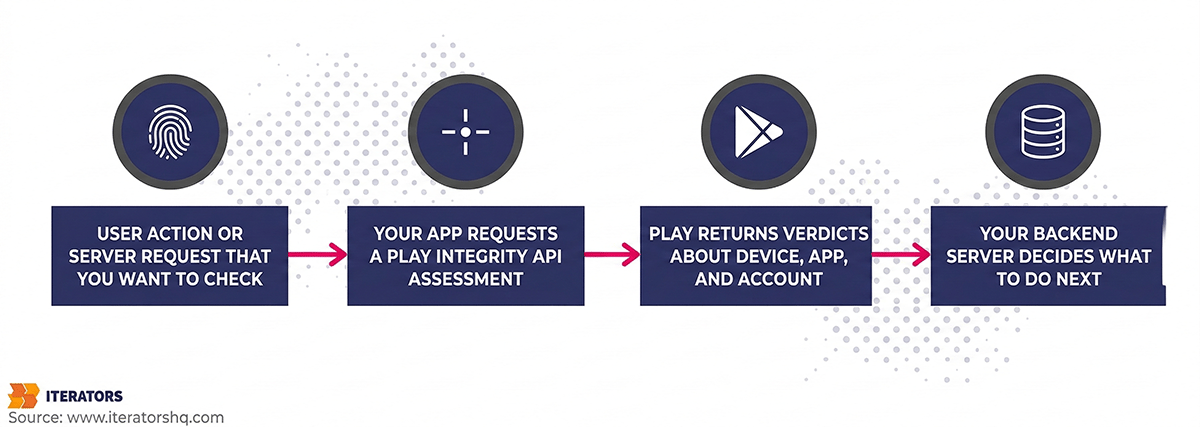
Alright, let’s get into the weeds. Google Play Integrity is your most powerful tool for Android attestation—but only if you understand how it actually works.
What Attestation Actually Does
Think of attestation like a notary public for your app. Google Play acts as a trusted third party that says: “Yes, this app is the real deal, running on a legitimate device.”
The flow:
- Your app requests an integrity token from the Play Integrity API
- Google Play Services evaluates the device, app, and environment
- Google signs a token with their private key (which you can’t forge)
- Your app sends the token to your backend server
- Your server verifies the token with Google’s servers
- You make a decision based on the verdict
Critical point: The app never trusts the token locally. All decisions happen server-side.
The Three Verdict Types (And What They Mean)
- App Integrity Verdict:
- PLAY_RECOGNIZED: App is the official version from Google Play
- UNRECOGNIZED_VERSION: App may be modified or sideloaded
- UNEVALUATED: Integrity check couldn’t complete
- Device Integrity Verdict:
- MEETS_STRONG_INTEGRITY: Hardware-backed attestation. Device is unmodified, Play Protect is on, bootloader is locked. This is the gold standard.
- MEETS_DEVICE_INTEGRITY: Device is a genuine Android device, but may not meet all strong integrity requirements
- MEETS_BASIC_INTEGRITY: Device passes basic checks but may be rooted or running on an emulator
- Account Details Verdict:
- LICENSED: User has a valid license (for paid apps)
- UNLICENSED: No valid license found
- UNEVALUATED: Couldn’t determine
Standard vs. Classic API (And When to Use Each)
- Standard API:
- Speed: < 500ms typically
- Use case: Frequent checks (every API call, game action)
- How it works: Uses cached signals, no server-generated nonce
- Limitation: Susceptible to replay attacks if not handled carefully
- Classic API:
- Speed: 1-3 seconds
- Use case: High-stakes actions (login, money transfer)
- How it works: Server generates a nonce, full attestation flow
- Benefit: Stronger anti-replay protection
Our recommendation at Iterators: Use Standard for most actions, Classic for authentication and financial transactions.
Implementation: The Right Way
Here’s the pattern we use in production:
- Warm up the provider at app launch for runtime protection mobile security (Standard API)
- Prepare a request with hash of the action being performed
- Request the token and send to your backend
Backend validation involves:
- Decode the token (it’s a JWT)
- Verify the signature using Google’s public key
- Check the package name matches your app
- Verify the requestHash matches what you expected
- Check the timestamp (reject old tokens)
Handling Edge Cases (Where Most Implementations Fail)
Delay and timeout handling:
Don’t block the UI thread. Use proper timeout handling with runtime protection mobile security fallback strategies. If integrity checks times out, allow the action but flag for review.
Caching and replay prevention:
Server-side token cache prevents replay attacks. Store used tokens with timestamps and clean up expired entries.
Offline scenarios:
Handle cases where Play Services is unavailable with runtime protection mobile security fallback strategies like limited offline functionality and queued actions for verification.
What Play Integrity Can’t Do (And Why You Still Need Runtime Protection Mobile Security)
Limitations:
- Delay: Even Standard API adds latency. You can’t check every single action.
- Availability: Play Services might not be installed (rare, but happens)
- Granularity: It tells you the device state, not what’s happening in your app’s memory
- Bypass potential: Sophisticated attackers can patch Play Services
The solution: Layer Play Integrity with client-side runtime protection mobile security checks. Use Play Integrity for runtime protection mobile security real-time threat detection.
Runtime Protection Mobile Security: Bypass Techniques and Defense-in-Depth

Let’s talk about how attackers actually beat these runtime protection mobile security protections. Because if you don’t know how your runtime protection mobile security defenses fail, you can’t build better ones.
Common Attack Vectors
1. Magisk Hide and Root Concealment
Magisk is the most popular rooting tool for Android. Its “DenyList” feature specifically hides root from apps.
How it works:
- Unmounts Magisk files when a target app launches
- Hides the Magisk Manager app
- Cleans up process names and file paths
- Resets system properties
Detection rate: ~47% of advanced root hiding attempts succeed against common runtime protection mobile security detection libraries.
Runtime protection mobile security countermeasure: Use multiple detection vectors, obfuscate detection logic, use native code for critical checks.
2. Frida Hooking
Frida is a dynamic instrumentation framework that lets attackers inject JavaScript into your app to modify behavior.
Common Frida attacks involve hooking functions and changing return values to always return “not rooted” or similar false results.
Detection: Check for Frida server, look for Frida-related files, monitor for suspicious network ports.
3. Emulator Fingerprinting Bypass
Sophisticated emulators can fake most hardware signatures, which is why runtime protection mobile security requires behavioral detection.
What emulators struggle to fake in runtime protection mobile security:
- Realistic sensor noise (accelerometer jitter)
- Touch pressure variation
- Battery drain patterns
- Thermal throttling behavior
Runtime protection mobile security behavioral detection: Analyze touch patterns, sensor data, and battery behavior using ML models trained on real device behavior.
4. Patched Play Services
Attackers can modify Google Play Services to return fake integrity verdicts.
How it works:
- Decompile Play Services APK
- Modify the integrity check logic to always return MEETS_STRONG_INTEGRITY
- Reinstall the modified APK
Mitigation: Server-side checks for anomalies like tokens from known rooted devices claiming strong integrity.
The Runtime Protection Mobile Security Defense-in-Depth Architecture
Here’s the runtime protection mobile security architecture we recommend at Iterators for high-security apps:
Client-Side (Mobile App):
- Layer 1: Code Obfuscation (Name obfuscation, Control flow flattening, String encryption)
- Layer 2: Runtime Checks (RASP) (Root/jailbreak detection, Debugger detection, Hooking framework detection, Memory integrity checks)
- Layer 3: Device Attestation (Google Play Integrity API, Apple App Attest, Custom challenge-response)
Server-Side (Your Backend):
- Layer 4: Token Verification (Verify integrity token signature, Check token freshness, Prevent replay attacks)
- Layer 5: Behavioral Analytics (Device fingerprinting, Usage pattern analysis, Velocity checks, Anomaly detection ML-based)
- Layer 6: Business Logic Validation (Server-side authorization, Transaction limits, Fraud scoring)
Key principle: Assume every client-side check will be bypassed. Use them as signals, not gates. The real decision-making happens server-side.
Runtime Protection Mobile Security Implementation Guide: React Native and Native Apps

At Iterators, we build a lot of React Native apps. Here’s how we handle runtime protection mobile security in a cross-platform world. Learn more about our approach to React Native vs native development and the security trade-offs involved.
Runtime Protection Mobile Security React Native Challenges
The problem: React Native’s JavaScript bridge means your business logic is more exposed than native code. An attacker can:
- Hook into the JavaScript context
- Modify Redux state
- Intercept API calls before they reach native code
- Bypass client-side validation
The solution: Push runtime protection mobile security-critical operations to native modules.
Building a Security Native Module
Create a React Native interface that calls down to native security checks, and implement comprehensive security checks in native code (Kotlin for Android, Swift for iOS).
Runtime Protection Mobile Security Performance Considerations
The overhead question: How much does runtime protection mobile security cost?
From our runtime protection mobile security production data at Iterators:
| Check Type | Latency Added | Battery Impact | When to Run |
| Root detection (basic) | ~5ms | Negligible | App launch |
| Root detection (comprehensive) | ~50ms | Negligible | App launch + periodic |
| Emulator detection | ~10ms | Negligible | App launch |
| Play Integrity (Standard) | 200-500ms | Low | Per action |
| Play Integrity (Classic) | 1-3s | Low | Auth/critical actions |
| Memory integrity check | ~20ms | Low | Periodic (every 30s) |
| Frida detection | ~15ms | Low | Periodic (every 60s) |
Total runtime protection mobile security impact for a typical session:
- App launch: +100ms (one-time comprehensive checks)
- Per API call: +250ms (Standard integrity check)
- Background: +35ms every 30s (periodic monitoring)
For a mobile app with 200ms average response time:
- Without protection: 200ms
- With runtime protection: 450ms
- User perception: No noticeable difference (< 500ms is “instant”)
Battery impact: In our testing, full runtime protection mobile security adds < 2% to daily battery drain.. The biggest cost is Play Integrity API calls, not the detection logic itself.
Testing Strategy
Unit testing security checks: Mock file systems and build properties to test detection logic.
Integration testing with Play Integrity: Test timeout handling and fallback scenarios.
QA checklist for runtime protection:
- Test on rooted devices (Magisk, SuperSU)
- Test on emulators (Android Studio, Genymotion, BlueStacks)
- Test with Frida attached
- Test with debugger attached
- Test on old OS versions (Android 8, iOS 12)
- Test on devices without Play Services
- Test in airplane mode (offline)
- Test with VPN enabled
- Measure battery impact over 24 hours
- Measure app launch time impact
- Check for false positives (legitimate power users)
When to Implement What: The Decision Framework
Not every app needs Fort Knox runtime protection mobile security. Here’s how to decide what you actually need.
Risk Assessment by App Category
| App Category | Risk Level | Recommended Protection |
| Fintech (Banking, Payments) | Critical | Full stack: RASP + Play Integrity + Behavioral analytics + MASVS-L2+R |
| Healthcare (PHI, Telemedicine) | Critical | Full stack: RASP + Attestation + Compliance logging + MASVS-L2+R |
| E-commerce (High-value) | High | RASP + Play Integrity + Fraud detection + MASVS-L2 |
| Gaming (Competitive, IAP) | High | Anti-cheat + Root detection + Play Integrity + MASVS-L1+R |
| Social/Messaging | Medium | Basic RASP + Attestation + MASVS-L2 |
| Enterprise (Internal tools) | Medium | MDM integration + Basic integrity + MASVS-L1 |
| Content/Media | Low | DRM + Basic obfuscation + MASVS-L1 |
| Utilities/Productivity | Low | Code obfuscation + MASVS-L1 |
Cost-Benefit Analysis
Let’s be real: Runtime protection mobile security costs money. Here’s how to think about ROI.
Costs:
- Development time: 2-4 weeks for comprehensive runtime protection mobile security RASP implementation
- Third-party tools: $5,000-$50,000/year for commercial RASP solutions
- Performance overhead: 2-5% latency, 1-2% battery
- Maintenance: Ongoing updates to bypass new attack techniques
Benefits:
- Prevented fraud: Average mobile fraud incident costs $4.97M
- Compliance: Avoid regulatory fines (GDPR: up to 4% of revenue)
- Reputation: Data breaches destroy user trust
- Revenue protection: Stop app cloning and piracy
Break-even calculation:
If your app processes $10M/year in transactions:
- 1% fraud rate = $100K in losses
- Runtime protection cost = $30K (implementation + tools)
- If runtime protection mobile security stops 50% of fraud = $50K saved
- Net benefit = $20K/year
For high-value apps, the runtime protection mobile security ROI is obvious. For low-value apps, focus on basics (obfuscation + Play Integrity).
Phased Rollout Strategy
Don’t implement everything at once. Here’s our recommended phased approach:
Phase 1: Foundation (Week 1-2)
- Code obfuscation (ProGuard/R8 for Android, built-in for iOS)
- Basic root/jailbreak detection
- Google Play Integrity integration (Standard API)
- Server-side token verification
Phase 2: Hardening (Week 3-4)
- Emulator detection
- Debugger detection
- Basic anti-hooking checks
- Memory integrity verification
Phase 3: Advanced (Month 2-3)
- Comprehensive RASP implementation
- Behavioral analytics
- Custom challenge-response protocols
- ML-based fraud detection
Phase 4: Optimization (Ongoing)
- A/B test security measures
- Tune false positive rates
- Update bypass detection
- Monitor attack patterns
Measuring Effectiveness
Key metrics:
- Attack detection rate: What % of known attacks are you catching?
- Target: >90% for common attacks (root, emulator, debugger)
- False positive rate: What % of legitimate users are flagged?
- Target: <1% for hard blocks, <5% for warnings
- Bypass rate: How often do attackers successfully bypass your protections?
- Benchmark: 47% for root hiding, 30% for emulator detection
- Time to bypass: How long does it take an attacker to defeat your protections?
- Target: >30 days for a skilled attacker
- Fraud reduction: Did fraud/abuse decrease after implementation?
- Target: 50-70% reduction in automated attacks
Iterators’ Runtime Protection Mobile Security Approach: Real-World Case Studies

Let’s talk about how we’ve actually implemented runtime protection mobile security in production. These examples represent just a few of our security implementations—explore our full case studies portfolio to see more runtime protection mobile security solutions.
Case Study 1: Fintech Mobile Banking App
Client: Mid-sized digital bank with 500K users
Challenge:
- High fraud rates from rooted devices (~$200K/year in losses)
- Regulatory pressure for stronger security (PCI DSS)
- Users complaining about clunky authentication
Our solution:
Layered runtime protection mobile security architecture:
- Client-side: Comprehensive RASP (Guardsquare DexGuard)
- Attestation: Google Play Integrity (Classic API for transactions)
- Server-side: Custom fraud scoring engine
Risk-based authentication: Calculate risk scores based on device integrity, runtime checks, behavioral signals, and historical trust, then respond accordingly.
User communication:
- Clear messaging when security checks fail
- In-app remediation for fixable issues
- Support escalation for false positives
Results:
- Fraud reduced by 68% in first 6 months
- False positive rate: 0.8% (within acceptable range)
- User satisfaction improved (fewer security friction points)
- Passed PCI DSS audit with zero findings
The comprehensive security architecture also supported SOC 2 compliance, demonstrating enterprise-grade security controls.
Case Study 2: Healthcare Telemedicine Platform
Client: HIPAA-compliant telemedicine app (React Native)
Challenge:
- Protect sensitive health data (PHI)
- Ensure video sessions aren’t recorded/intercepted
- Support older devices (Android 8+)
Our solution:
React Native security module: Native module for security checks with continuous monitoring during video calls and graceful degradation strategies.
Session security:
- Continuous monitoring during video calls
- Automatic termination if screen recording detected
- Watermarking for screenshot detection
Graceful degradation:
- On older devices without hardware attestation: Use behavioral checks
- On rooted devices: Allow view-only access (no PHI)
- On emulators: Block entirely
Results:
- Zero PHI breaches in 18 months
- HIPAA compliance maintained
- 99.2% uptime for secure sessions
- Supported devices from Android 8 to 15
Case Study 3: Gaming Anti-Cheat System
Client: Competitive mobile game with 2M DAU
Challenge:
- Rampant cheating (memory hacking, bots)
- Legitimate power users getting banned (false positives)
- Performance critical (60 FPS requirement)
Our solution:
Lightweight runtime checks: Native C++ anti-cheat with memory integrity checks, hooking detection, and periodic behavioral analysis.
Server-side validation:
- All game actions verified server-side
- Impossible actions auto-flagged (e.g., moving faster than max speed)
- Statistical analysis of player performance
Tiered enforcement:
- Soft ban: Suspected cheaters matched against each other
- Hard ban: Confirmed cheaters (after review)
- Whitelist: Trusted players with good history
Results:
- Cheating incidents reduced by 82%
- False positive rate: 2.1% (down from 15%)
- No measurable FPS impact
- Player retention improved (fair competition)
FAQ: Your Burning Questions Answered

Q: Do I really need runtime protection if I’m using HTTPS?
A: HTTPS protects data in transit. Runtime protection defends against attacks on the device. They’re complementary, not alternatives.
HTTPS doesn’t stop:
- Memory manipulation
- Rooted device access to your app’s data
- Repackaged apps with malware
- Debugger-based attacks
You need both.
Q: Can’t I just use ProGuard/R8 and call it a day?
A: ProGuard/R8 are great for obfuscation, but they’re static defenses. They make your code harder to read, but they don’t detect or respond to runtime attacks.
Think of it this way:
- ProGuard = Locking your door
- Runtime protection = Security camera + alarm system
You need both.
Q: What’s the performance impact on low-end devices?
A: From our testing on budget Android devices ($100-$150 range):
- App launch: +150ms (acceptable)
- Per-action integrity check: +400ms (noticeable but tolerable)
- Battery drain: +2-3% over 8 hours
Optimization tips:
- Cache integrity tokens (5-minute TTL)
- Use Standard API instead of Classic for frequent checks
- Run heavy checks (memory integrity) less frequently
- Offload processing to background threads
Q: How do I handle false positives without annoying users?
A: Risk-based response + clear communication.
Don’t: Block users with a generic “Security error” message.
Do: Explain what’s wrong and how to fix it.
Also: Implement a “security override” for support to manually whitelist false positives after verification.
Q: Is Play Integrity enough, or do I need third-party RASP?
A: Depends on your risk profile.
Play Integrity is enough if:
- You’re not handling high-value transactions
- Your app isn’t a target for sophisticated attackers
- You have strong server-side validation
- You’re okay with the ~47% bypass rate for advanced root hiding
You need third-party RASP if:
- You’re in fintech/healthcare/gaming
- Attackers are actively targeting your app
- You need to meet OWASP MASVS-R requirements
- You want sub-5% bypass rates
Our recommendation: Start with Play Integrity + basic client-side checks. Upgrade to commercial RASP if you see significant attack volume.
Q: How often should I update my security checks?
A: Continuously.
Minimum update cadence:
- Monthly: Review bypass techniques and update detection logic
- Quarterly: Update RASP library/SDK versions
- Per-release: Regenerate obfuscation (polymorphism)
- Real-time: Monitor attack patterns and adjust server-side rules
Why? Attackers share bypass techniques. If someone publishes a bypass for your app, it’ll spread within days. You need to be faster.
Q: Can I implement runtime protection in Flutter/Xamarin/other frameworks?
A: Yes, but with more work.
The pattern:
- Write security checks in native code (Kotlin/Swift)
- Create platform channels/plugins to call native code
- Bridge the results back to your framework
The key: Don’t try to do security checks in Dart/C#/JavaScript. Always drop down to native code.
Q: What about iOS? Is App Attest equivalent to Play Integrity?
A: Yes and no.
Similarities:
- Both provide device attestation
- Both use hardware-backed keys
- Both verify app authenticity
Differences:
- App Attest is more privacy-focused (less device info shared)
- Play Integrity has more granular verdicts
- App Attest requires iOS 14+; Play Integrity works on older Android
Implementation complexity: App Attest is more complex to implement correctly. You need to:
- Generate and store attestation keys
- Create attestation objects
- Verify attestations server-side
- Handle key invalidation and rotation
Our take: Both are solid. Use App Attest for iOS, Play Integrity for Android. Don’t try to unify them—embrace platform-specific approaches.
Conclusion: Security Is a Journey, Not a Destination
If you’ve made it this far, you understand that runtime protection isn’t a checkbox—it’s a continuous process of:
- Understanding your threat model (Who’s attacking you and why?)
- Implementing layered defenses (No single technique is bulletproof)
- Monitoring and adapting (Attackers evolve; so must your defenses)
- Balancing security and UX (Perfect security with zero users is worthless)
The Iterators Runtime Protection Mobile Security Approach
At Iterators, we’ve built mobile security into everything from fintech platforms to healthcare apps to competitive games. Our philosophy:
Security is not a feature—it’s a foundation.
We don’t bolt on runtime protection mobile security at the end. We architect it from day one:
- React Native apps with native security modules
- OWASP MASVS compliance built into our development process
- Google Play Integrity and App Attest integration as standard
- Real-world testing against actual attack tools (Frida, Magisk, etc.)
We’ve seen what runtime protection mobile security approaches work and what fails.
The mobile security market is projected to hit $2.86 billion by 2032. That’s not because security is getting easier—it’s because the stakes keep getting higher.
What You Should Do Next
If you’re just starting:
- Implement code obfuscation (ProGuard/R8)
- Add Google Play Integrity (Standard API)
- Basic root/jailbreak detection
- Server-side token verification
If you’re scaling:
- Comprehensive RASP implementation
- Behavioral analytics
- A/B test security measures
- Consider commercial RASP tools (Guardsquare, Promon)
If you’re in a regulated industry:
- Full OWASP MASVS-L2+R compliance
- Professional security audit
- Penetration testing
- Compliance documentation
If you need help:
Runtime protection mobile security is complex stuff. And if you’re building something that matters—something that handles money, health data, or corporate secrets—you don’t want to get it wrong.
At Iterators, we’ve built mobile apps for banks, healthcare providers, and enterprises that can’t afford a breach. We know how to implement runtime protection that actually works—not just in theory, but in production, under attack, at scale.
Schedule a free consultation with Iterators to discuss your mobile security needs. We’ll help you figure out what you actually need (not just what vendors want to sell you).
Further Reading: