

Building a successful B2B SaaS product is hard. Achieving enterprise readiness to serve Fortune 500 customers is harder. The moment you try to move upmarket, you hit the wall—where promising startups go to die because they can’t pass vendor security assessments.
You’ve built a killer B2B SaaS product. Your early customers love it. Revenue is climbing. Then you get that email from a Fortune 500 prospect:
“We’re very interested in your platform. Before we proceed, please complete our vendor security assessment and confirm that you support SAML SSO with our Active Directory Federation Services.”
Your stomach drops. You have no idea what half those words mean. Your authentication is email/password with a sprinkle of Google OAuth. Your “security architecture” is whatever AWS gave you by default.
Welcome to the enterprise readiness cliff where many startups fail.
Here’s the brutal truth: 52% of Fortune 500 companies that existed in 2000 are now extinct, many because they couldn’t adapt to digital transformation fast enough. But here’s the twist—plenty of startups also die because they try to move upmarket without proper enterprise readiness. They either:
- Lose deals because they can’t pass vendor security assessments
- Bleed money building custom SSO integrations that break constantly
- Suffer breaches that destroy their reputation and sometimes their entire company
Remember Code Spaces? Probably not—because they were completely destroyed in 24 hours by a cyberattack in 2014. An attacker gained access to their AWS control panel and systematically deleted everything: databases, backups, snapshots, machine images. The company shut down permanently. The root cause? Weak identity controls and no separation of duties—a complete absence of enterprise readiness.
This guide will save you from that fate.
Don’t know where to start with enterprise readiness? You’re not alone. We’ve helped dozens of B2B SaaS startups navigate this exact challenge. Schedule a free 30-minute consultation and we’ll help you assess your current security posture, identify gaps that could kill enterprise deals, and create a practical roadmap to achieve enterprise readiness on your budget.
We’re going to walk through the entire landscape of achieving enterprise readiness—from understanding what SSO actually means to choosing between Auth0 and WorkOS, from implementing SCIM provisioning to avoiding XML signature wrapping attacks. We’ll cover the technical patterns, the economic tradeoffs, and the security pitfalls that most startups don’t discover until it’s too late.
By the end, you’ll know exactly how to achieve enterprise readiness on a startup budget, pass vendor security assessments without breaking a sweat, and position your company for those massive deals that transform startups into scaleups.
Let’s get started.
Understanding Enterprise Readiness: What Enterprise Customers Actually Expect
Enterprise readiness sounds like something only massive corporations need. It conjures images of dedicated security teams, million-dollar budgets, and endless compliance meetings.
But here’s what enterprise readiness actually means for a B2B SaaS startup:
A systematic approach to managing who can access your application, what they can do once they’re in, and how you prove to auditors that you’re doing it right.
That’s it. Three components of enterprise readiness:
- Authentication (proving who someone is)
- Authorization (controlling what they can do)
- Auditability (logging everything so you can prove it later)
Sounds simple, right? So why do startups struggle so much with it?
Because what works for 100 self-service users completely breaks when you try to sell to a 10,000-person enterprise. Let me show you why.
The PLG-to-Enterprise Gap
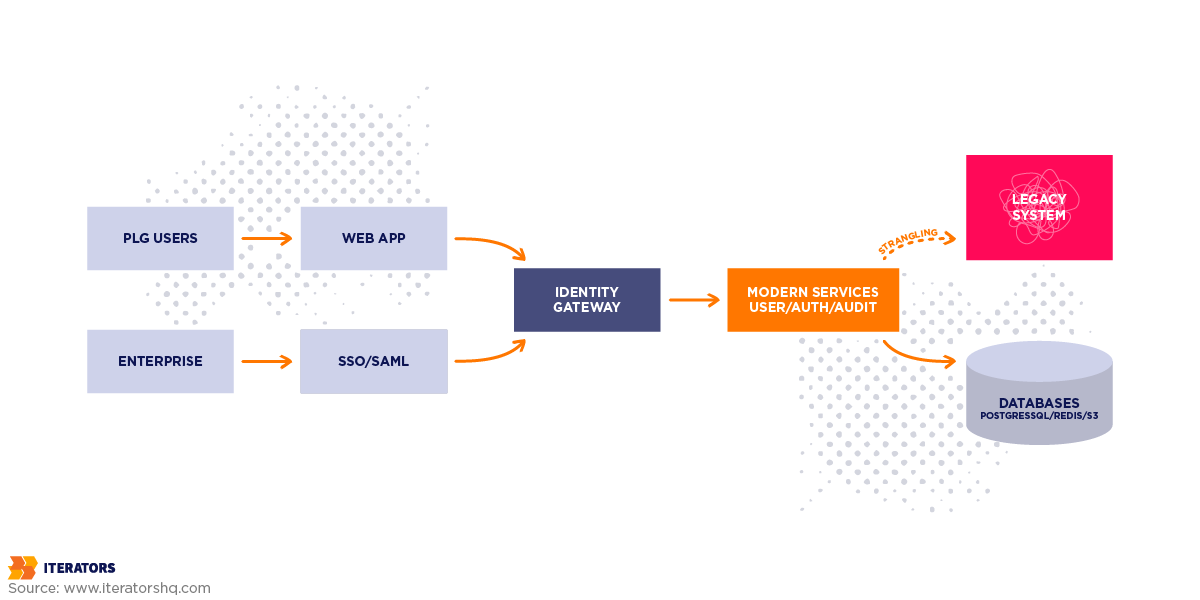
Most successful B2B SaaS companies start with a Product-Led Growth strategy. Users sign up with their email, create a password, maybe authenticate with Google or GitHub, and boom—they’re in. Frictionless. Beautiful. Converts like crazy.
Then you try to sell to IBM and discover you lack enterprise readiness.
IBM’s IT security team looks at your “email and password” authentication and laughs. Here’s what enterprise readiness actually requires:
- Federated SSO through their corporate Identity Provider (probably Microsoft Entra ID or Okta)
- Automated provisioning so when they hire someone, that person automatically gets access
- Automated deprovisioning so when they fire someone, access is revoked instantly across all 300+ SaaS tools
- Audit logs showing every action every user took, retained for at least one year
- Role-based access control that maps to their internal organizational hierarchy
- Multi-factor authentication enforced at the IdP level
- Conditional access policies (like “only allow access from corporate devices”)
Your email/password system can’t do any of this.
And here’s the kicker: IBM won’t even start a pilot until you demonstrate enterprise readiness. Their procurement process literally has a “vendor security assessment” gate that your application must pass before anyone can sign a contract. According to WorkOS’s guide for product managers, if you can’t integrate with their IdP, you don’t make it past the first meeting.
This is where startups either build enterprise readiness or watch deals evaporate.
The Three Pillars of Enterprise Readiness
Let’s break down what enterprise customers actually care about when evaluating your enterprise readiness:
Pillar 1: Identity Management and Control

In a PLG model, the user owns their account. They signed up with their personal email, they set the password, they control access.
In an enterprise readiness model, the corporation owns the account. That email address (john.doe@bigcorp.com) belongs to BigCorp, not John. When John leaves the company, BigCorp needs to instantly revoke his access to your application—and 299 other SaaS tools—with a single click in their Identity Provider.
Without SSO, this is impossible. BigCorp’s IT team would need to manually log into your admin panel and deactivate John’s account. Now multiply that by 300 applications and 50 people leaving per month. It’s not sustainable—and it fails basic standards.
Even worse: without automated deprovisioning, you get “zombie accounts”—former employees who still have active sessions and can access sensitive corporate data weeks or months after termination. This is a massive security risk and a dealbreaker for enterprise readiness.
Pillar 2: Governance and Visibility
Enterprise security teams pursuing readiness don’t just want to control access—they want to prove they’re controlling it.
When an auditor asks “Who accessed customer financial data in Q3 2024?”, the answer can’t be “uh, let me check our application logs… oh wait, we only keep those for 7 days.”
Enterprise readiness requires:
- Comprehensive audit logs of every user action (login, data access, configuration change)
- Immutable storage so logs can’t be tampered with after the fact
- Long retention (minimum 1 year, often 7 years for regulated industries)
- Export capability so logs can be ingested into their SIEM (Security Information and Event Management) system
This isn’t paranoia—it’s compliance. SOC 2 Type II audits require demonstrable controls. ISO 27001 certification requires audit trails. GDPR requires the ability to show what happened to personal data.
If your logging strategy is “we use console.log and check CloudWatch when something breaks,” you’re not demonstrating enterprise readiness.
Pillar 3: Compliance Alignment
Here’s a dirty secret about enterprise sales: the security team has veto power over every deal.
Your champion in the business unit might love your product. The economic buyer might have budget approved. But if the CISO (Chief Information Security Officer) says “this vendor doesn’t meet our enterprise readiness requirements,” the deal dies.
What are those requirements? Usually some combination of:
- SOC 2 Type II (proves you have proper security controls)
- ISO 27001 (international security standard)
- GDPR compliance (if you handle EU data)
- HIPAA compliance (if you handle healthcare data)
- PCI DSS (if you handle payment card data)
Getting these certifications is expensive (SOC 2 alone can cost $50,000-$100,000 for the audit), but not having them is more expensive—you simply can’t sell to enterprises without demonstrating enterprise readiness.
The good news? Proper identity architecture is the foundation for all of these frameworks. If you get SSO, RBAC, and audit logging right, you’re 60% of the way to SOC 2 compliance.
When Startups Actually Need Enterprise Readiness
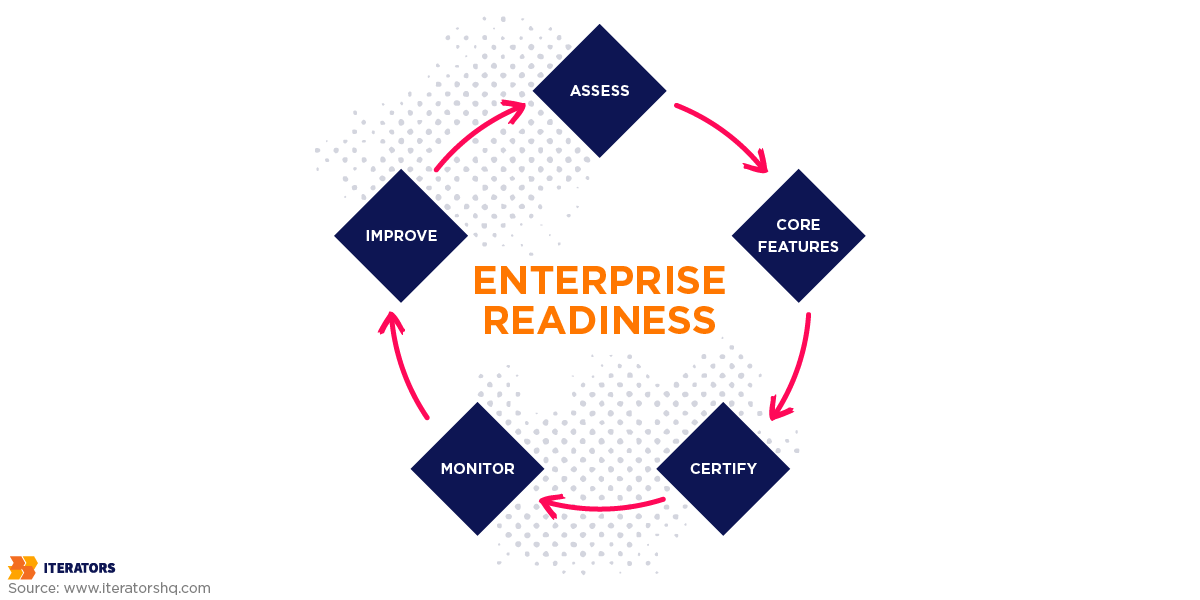
The honest answer: earlier than you think.
Most founders assume they can punt on enterprise readiness until they have their first enterprise customer. This is backwards. By the time an enterprise prospect asks for SSO, you’re already 3-6 months behind.
Here’s a better framework for achieving enterprise readiness:
Phase 1: Seed Stage (0-10 customers)
Focus: Product-market fit. Use simple email/password auth. Enterprise readiness isn’t critical yet.
Phase 2: Series A (10-100 customers)
Focus: Repeatable sales motion. Start building enterprise readiness before you need it. Why? Because:
- Implementation takes 2-3 months minimum
- You’ll need enterprise readiness for your first enterprise pilot
- Retrofitting auth into an existing app is 10x harder than building it right the first time
Phase 3: Series B+ (100+ customers)
Focus: Enterprise dominance. Full enterprise readiness is table stakes. You should also have:
- SCIM provisioning
- Advanced RBAC
- Audit log export
- SOC 2 Type II certification
- Dedicated security team
The companies that win enterprise markets don’t wait until they need enterprise readiness—they build the foundation early and use it as a competitive advantage, much like successful companies approach business process optimization.
The Real Cost of Delaying Enterprise Readiness

Let me paint a picture of what happens when you delay enterprise readiness:
You close a $500K deal with a Fortune 500 company. Congrats! They want to onboard 5,000 users. But you don’t have SCIM provisioning—you lack basic enterprise readiness. Their IT team has to manually create 5,000 accounts. This takes them 3 months and they’re furious.
Then an employee leaves. Your customer expects automatic deprovisioning (basic enterprise readiness). You don’t have it. They have to email you to manually deactivate the account. This happens 200 times in the first year. Your support team is drowning.
Then they ask for audit logs for a compliance audit—another enterprise readiness requirement. You can only provide 30 days of history. They need 12 months. The deal is now at risk.
You scramble to build these enterprise readiness features. It takes 6 months and costs $300K in engineering time. During this period, you can’t close any other enterprise deals because word has spread that you’re “not enterprise-ready.”
Total cost of delaying enterprise readiness:
- $300K in rushed engineering
- 6 months of lost sales momentum
- Damaged reputation with your biggest customer
- Probable churn when the contract comes up for renewal
Compare this to building enterprise readiness right the first time:
- $50K-$100K using a vendor like WorkOS
- 4-6 weeks of implementation time
- Every enterprise deal after that closes faster
- Your product becomes known for strong enterprise readiness
The math is brutal. Waiting costs 3-5x more than achieving enterprise readiness upfront.
SSO Protocols: SAML 2.0 vs. OpenID Connect
Alright, you’re convinced you need enterprise readiness through SSO. Great! Now comes the fun part: choosing your poison.
In the world of enterprise readiness and identity, there are two dominant protocols:
- SAML 2.0 (the old guard)
- OpenID Connect (the new hotness)
And here’s the thing: to achieve full enterprise readiness, you probably need to support both.
I know, I know. You wanted a simple answer. But enterprise readiness is where modern development practices collide with 20-year-old corporate infrastructure, and the collision is messy.
Let me explain why both protocols exist, what they’re good at, and how to decide which one to implement first for enterprise readiness.
SAML 2.0: The Legacy Protocol
SAML (Security Assertion Markup Language) was released in 2005. In tech years, that’s ancient. It’s older than the iPhone. It predates AWS. It was designed when XML was still considered “modern.”
And yet, SAML is still the dominant protocol for workforce identity in organizations.
Why? Because it’s baked into every legacy Identity Provider that corporations use:
- Microsoft Active Directory Federation Services (ADFS) – the default for Windows-centric enterprises
- Shibboleth – common in universities and government
- PingFederate – popular in financial services
- Oracle Identity Federation – if you’re selling to Oracle shops
These systems power the identity infrastructure for millions of employees at Fortune 500 companies. And they’re not going anywhere. The switching cost is too high, the risk is too great, and frankly, they work fine for what enterprises need.
So if you want to demonstrate enterprise readiness to these companies, you need to speak SAML.
How SAML Works
SAML is based on a trust relationship established through metadata exchange. Here’s the enterprise readiness flow:
Setup Phase (One-Time):
- Your app (the Service Provider) generates an XML metadata file containing your Entity ID, Assertion Consumer Service URL, and public key
- The customer’s IT team uploads this metadata to their Identity Provider
- The IdP generates its own metadata containing their Entity ID, SSO endpoint, and public key
- You download and configure the IdP metadata in your app
Login Flow (Every Time):
- User clicks “Login with SSO” in your app
- Your app redirects the user to the IdP’s SSO endpoint
- User authenticates at the IdP (username/password, MFA, etc.)
- IdP generates a signed SAML assertion (an XML document) containing user identity and group memberships
- IdP redirects user back to your app with the assertion
- Your app validates the assertion signature
- If valid, you create a session for the user
This process is core to enterprise readiness. Sounds straightforward, right? Here’s where it gets messy.
The XML Signature Wrapping Attack
SAML’s reliance on XML introduces a critical vulnerability that can compromise enterprise readiness: XML Signature Wrapping (XSW).
Here’s how it works: An attacker intercepts a valid SAML response, injects a forged assertion into the XML (claiming to be admin@victim.com), and manipulates the XML structure so your signature validation logic checks the original valid assertion while your processing logic reads the forged assertion. Your app validates the signature (passes!), processes the forged assertion (oops!), and grants admin access to the attacker—completely destroying your enterprise readiness.
This isn’t theoretical. Real-world SAML implementations have been compromised this way, as Stack Overflow’s analysis of SSO implementation problems demonstrates.
The fix for maintaining enterprise readiness? Use a battle-tested SAML library. Don’t roll your own XML parsing. Libraries like passport-saml for Node.js, python3-saml for Python, or ruby-saml for Ruby have already solved these enterprise readiness edge cases.
Or better yet, use a hosted SAML gateway that handles enterprise readiness for you (more on that later).
The Certificate Rotation Problem
SAML assertions are signed using X.509 certificates. These certificates have expiration dates—typically 1-3 years.
When a customer’s IdP certificate expires and they rotate to a new one, every SAML integration breaks unless you’ve planned for it—undermining your enterprise readiness.
Best practices for maintaining enterprise readiness:
- Support multiple active certificates simultaneously (most IdPs publish both old and new certs during rotation)
- Monitor certificate expiry dates and alert customers 90/60/30 days before expiration
- Automate metadata refresh by periodically fetching the IdP’s metadata URL (if they provide one)
Fail to do this, and you’ll get angry support tickets: “SSO stopped working and we can’t figure out why!”—not exactly the hallmark of enterprise readiness.
OpenID Connect: The Modern Alternative
OpenID Connect (OIDC) is what happens when you take OAuth 2.0 (the protocol that powers “Login with Google”) and add an identity layer on top for enterprise readiness.
It was designed for the modern web and modern enterprise readiness:
- JSON instead of XML
- RESTful APIs instead of SOAP
- Dynamic discovery instead of manual metadata exchange
- Native support for mobile apps and Single Page Applications
OIDC is the protocol that powers enterprise readiness for:
- Okta (enterprise IdP)
- Auth0 (developer-friendly IdP)
- Google Workspace (formerly G Suite)
- Microsoft Entra ID (formerly Azure AD)—supports both SAML and OIDC
If you’re building a greenfield application in 2025, OIDC should be your default choice. It’s easier to implement, more secure by default, and better suited for modern architectures.
The Authorization Code Flow
OIDC’s recommended flow for web applications achieving enterprise readiness is the Authorization Code Flow with PKCE (Proof Key for Code Exchange). Here’s how it maintains enterprise readiness:
Step 1: User clicks “Login” Your app generates a random code verifier, hashes it to create a code challenge, and redirects the user to the IdP with your client ID, redirect URI, the code challenge, and requested scopes.
Step 2: User authenticates at IdP User enters credentials, the IdP may enforce MFA (critical for enterprise readiness), and user consents to sharing their profile with your app.
Step 3: IdP redirects back with authorization code User is sent to your redirect URI with a one-time code. This code is not the access token—it’s just a temporary authorization code.
Step 4: Your backend exchanges code for tokens Your server makes a secure request to the IdP’s token endpoint, includes the code and the original code verifier, and the IdP returns an ID token (a JWT containing user identity), access token (for accessing user data), and refresh token.
Step 5: Your app validates the ID token Verify the signature using the IdP’s public keys, check the token hasn’t expired, verify the audience claim matches your client ID, and extract user identity.
Why is this better than SAML?
- The tokens never touch the browser (more secure)
- PKCE prevents authorization code interception
- Automatic key rotation (no certificate rotation headaches)
- Works great for SPAs and mobile apps
The Discovery Endpoint
One of OIDC’s killer features for achieving enterprise readiness is the /.well-known/openid-configuration endpoint.
Hit this URL on any OIDC-compliant IdP and you get a JSON document containing the authorization endpoint, token endpoint, JWKS URI (where to fetch public keys for token validation), and supported scopes.
This means you can build a “generic OIDC connector” that works with any OIDC-compliant IdP without custom configuration—a huge win for enterprise readiness. Just ask the customer for their discovery URL and you’re done.
Compare this to SAML, where you need to manually configure Entity IDs, ACS URLs, and certificate fingerprints for every customer. OIDC dramatically simplifies achieving enterprise readiness.
Which Protocol to Support

Here’s the honest answer:
Start with OIDC. Add SAML when you need it.
OIDC will cover your enterprise readiness needs for:
- Modern enterprises using Okta, Auth0, Google Workspace, or Microsoft Entra ID
- Startups and SMBs (they almost always use OIDC)
- Any customer willing to use a modern IdP
SAML becomes necessary for enterprise readiness when:
- You’re selling to large enterprises with legacy infrastructure (finance, healthcare, government)
- Your customer explicitly requires SAML (usually because their IdP is ADFS or Shibboleth)
- You’re trying to close a deal worth $500K+ and SAML support is a checkbox on their vendor assessment
The good news? If you use a vendor like WorkOS or Auth0, you get both protocols in one integration for complete enterprise readiness. You implement their SDK once, and they handle the protocol negotiation with each customer’s IdP.
Integration Patterns: Where to Put the Identity Logic
You’ve chosen your protocols for enterprise readiness. Now you need to decide where in your architecture to implement the authentication logic.
This decision has massive implications:
- Development velocity (how fast can you ship?)
- Operational complexity (how hard is it to maintain?)
- Security posture (where are the attack surfaces?)
- Scalability (what happens when you have 100 microservices?)
There are two primary patterns for achieving enterprise readiness:
- Middleware Pattern (embed auth in your application)
- Gateway Pattern (handle auth at the edge)
Let’s break down both approaches.
Pattern 1: The Middleware Approach
In the middleware pattern, you use a library (like Passport.js, Spring Security, or OmniAuth) to handle authentication inside your application code.
How it works:
Your application includes an authentication library that handles the SAML or OIDC flow directly. When a user logs in, the library intercepts the request, handles the identity provider exchange, validates the response, and extracts user information. This information is then immediately available to your application logic.
Advantages for enterprise readiness:
- Deep integration – Your app has immediate access to user attributes during the login flow
- Fine-grained control – You can implement complex authorization logic based on IdP data
- Fast initial setup – For a monolithic app, this is often the quickest way to get enterprise readiness working
Disadvantages:
- Tight coupling – Authentication logic is intertwined with business logic
- Code duplication – In a microservices architecture, every service needs to implement the same auth logic
- Upgrade hell – Patching a security vulnerability requires redeploying your entire application
- Language lock-in – If you have a polyglot stack, each language needs its own implementation
When to use middleware:
- You have a monolithic application
- You’re just getting started with enterprise readiness and need something working quickly
- You have complex authorization requirements that need deep integration with the IdP
Pattern 2: The Identity Gateway Pattern
In the gateway pattern for achieving enterprise readiness, you place an identity-aware reverse proxy in front of your application. The gateway handles all the SAML/OIDC complexity and forwards authenticated requests to your backend.
How it works:
The gateway sits between users and your application. When a user tries to access your app, the gateway intercepts the request and checks for a valid session. If no session exists, it redirects to the IdP for authentication. After successful authentication, the gateway creates a session cookie and forwards all subsequent requests to your backend with identity information injected in HTTP headers.
Popular Gateway Solutions for Enterprise Readiness:
- OAuth2 Proxy – Open source, supports OIDC and some SAML IdPs
- Pomerium – Open source, built for zero trust and enterprise readiness
- Cloudflare Access – Managed service, integrates with Cloudflare’s edge network
- Google Cloud IAP – Managed service for Google Cloud Platform
Advantages:
- Language-agnostic – Your backend can be written in any language
- Centralized policy – Enforce MFA, IP allowlisting, or device trust at a single point
- Easy to upgrade – Patch the gateway without touching application code
- Microservices-friendly – One gateway can protect dozens of services
- Zero trust ready – Easily integrate with identity-aware proxies for BeyondCorp-style security
Disadvantages:
- Backend must trust the gateway – If an attacker bypasses the gateway and sends forged headers directly to your backend, your enterprise readiness is compromised
- Network security required – You need to ensure backend services are only accessible via the gateway
- Session management complexity – The gateway maintains sessions separately from your app
When to use gateway:
- You have a microservices architecture
- You want to enforce security policies uniformly across services
- You’re building a multi-tenant B2B SaaS and need to isolate customer identity
- You’re implementing zero trust architecture
Hybrid Approach: Best of Both Worlds
In practice, many companies achieving enterprise readiness use a hybrid:
- Gateway for authentication (handles SSO, validates tokens)
- Middleware for authorization (implements RBAC, checks permissions)
This gives you optimal enterprise readiness:
- Centralized auth policy (gateway)
- Application-specific authorization logic (middleware)
- Flexibility to add services in any language
This is the pattern we recommend for most B2B SaaS startups pursuing enterprise readiness. It’s the sweet spot between flexibility and maintainability.
The Economics: Build vs. Buy

Alright, let’s talk money and achieving enterprise readiness.
You need enterprise readiness through SSO. You have three options:
- Build it yourself using open-source libraries
- Buy a commercial platform (Auth0, WorkOS, Clerk)
- Self-host an open-source IdP (Keycloak, Zitadel)
Each has wildly different cost structures, and choosing wrong can cost you hundreds of thousands of dollars.
Let me break down the real economics—not the marketing fluff, but the actual TCO (Total Cost of Ownership) you’ll face over 2-3 years achieving enterprise readiness.
Option 1: Building Enterprise Readiness Yourself
The Pitch:
“We’ll just use passport-saml and implement enterprise readiness ourselves. How hard can it be?”
The Reality:
Building robust, multi-tenant SAML and OIDC support for enterprise readiness from scratch typically costs $250,000 to $500,000 in engineering time over 12-18 months.
Here’s why achieving enterprise readiness is expensive:
Phase 1: Basic Implementation (2-3 months, $75K-$100K) Implement SAML and OIDC flows, build configuration UI for tenants to input their IdP metadata, handle certificate validation and rotation, and basic error handling.
Phase 2: Advanced Features (3-4 months, $100K-$150K) SCIM provisioning endpoints, support for multiple IdPs per tenant, audit logging for all authentication events, and support for “exotic” IdP configurations like ADFS and Shibboleth.
Phase 3: Ongoing Maintenance (ongoing, $75K-$250K/year) Security patches for XML parsing vulnerabilities, supporting new IdP versions and quirks, debugging customer-specific integration issues, and handling certificate expiry and rotation failures.
Hidden Costs of DIY Enterprise Readiness:
- Support burden – Your engineers become the first line of support for SSO issues
- Opportunity cost – That’s 6-12 months of engineering time not spent on product features
- Security liability – You own the security of the authentication flow; any vulnerability is your responsibility
When building makes sense:
- You have very specific requirements that no vendor supports
- You have strong in-house security engineering expertise
- You’re building a platform where identity is the product
When it doesn’t:
- You’re a typical B2B SaaS startup trying to achieve enterprise readiness
- You have a small engineering team (less than 10 people)
- You need enterprise readiness working in the next 3-6 months to close deals
Option 2: Commercial Identity Platforms
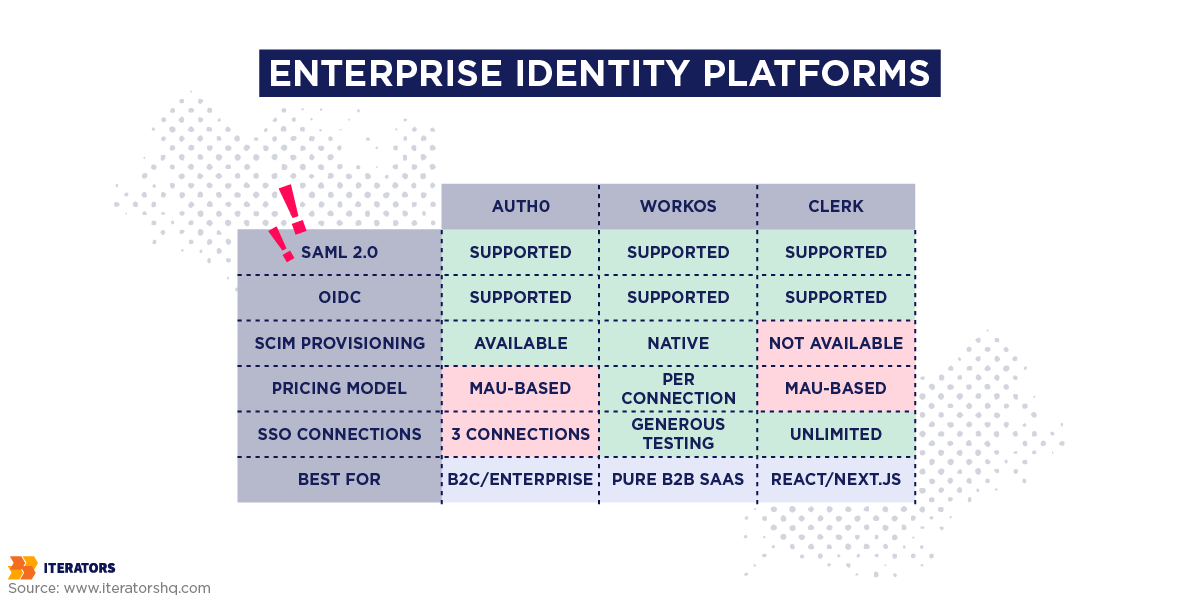
Commercial vendors abstract away the complexity of enterprise readiness but charge for it. The key is understanding their pricing models and avoiding traps, similar to how you’d evaluate strategic technology decisions.
Auth0 (Okta Customer Identity Cloud)
The Good: Excellent developer experience, comprehensive documentation, supports SAML, OIDC, social logins, passwordless, MFA, and large ecosystem of integrations for enterprise readiness.
The Pricing Trap:
Auth0 charges primarily on Monthly Active Users (MAU). For B2C, this makes sense. For B2B enterprise readiness, it’s a disaster.
Here’s why:
You’re a B2B SaaS with 10 enterprise customers, each with 1,000 employees. That’s 10,000 total users requiring enterprise readiness.
Auth0 Pricing:
- Free tier: 7,500 MAU (not enough)
- Essentials: $240/month for 10,000 MAU
- But wait—Essentials caps you at 3 enterprise SSO connections
- You need 10 connections (one per customer) for enterprise readiness
- To get unlimited SSO connections, you need the Enterprise tier
- Enterprise tier: Custom pricing, typically $20,000-$50,000/year minimum
So you go from “$240/month sounds reasonable!” to “$50K/year minimum commitment” real quick in your pursuit of enterprise readiness.
When Auth0 makes sense:
- You have a B2C product with millions of users
- You need social login and passwordless auth alongside enterprise readiness
- You’re willing to pay for the premium developer experience
When it doesn’t:
- You’re a B2B SaaS with many customers but few users per customer
- You need predictable, connection-based pricing for enterprise readiness
- You want to avoid vendor lock-in
WorkOS
The Good: Built specifically for B2B SaaS and enterprise readiness, charges per Organization Connection not MAU, unbundled architecture (you keep your existing user database), and excellent SCIM support.
The Pricing Model:
- Free tier: 1 million MAU (generous for testing enterprise readiness)
- Pay-as-you-go: $125/connection/month
- Volume discounts available
The Math:
If you charge enterprise customers $10,000+/year, the $1,500/year WorkOS cost per customer for enterprise readiness is a reasonable COGS (Cost of Goods Sold).
Example:
- You close 10 enterprise deals at $50K/year each = $500K ARR
- WorkOS cost for enterprise readiness: 10 connections × $1,500 = $15K/year
- That’s 3% COGS—totally sustainable
When WorkOS makes sense:
- You’re a B2B SaaS startup
- You want connection-based pricing that scales with revenue
- You need SCIM for enterprise readiness and don’t want to build it yourself
- You value API-first architecture
When it doesn’t:
- You need a full user database solution (WorkOS is auth-only)
- You want built-in UI components (though they now offer AuthKit for this)
Clerk
The Good: Beautiful pre-built UI components, built for React/Next.js, great developer experience, and unlimited SSO connections on Pro tier ($25/month + $0.02/MAU).
The Catch:
Clerk is very frontend-focused. If you have a complex backend architecture or need deep customization for enterprise readiness, you might outgrow it.
When Clerk makes sense:
- You’re building a React/Next.js app
- You want beautiful, pre-built auth UI
- You need enterprise readiness but don’t want to think about it
When it doesn’t:
- You have a polyglot backend (Go, Python, Rust)
- You need extensive customization for specific enterprise readiness requirements
Microsoft Entra External ID (Azure AD B2B)
The Good: First 50,000 MAU are free, excellent if you’re already in the Microsoft ecosystem, and supports both SAML and OIDC for enterprise readiness.
The Catch:
Configuration is complex. Federation with other IdPs (like Okta or Google Workspace) can be tricky. Advanced features require Premium licensing ($6-$9/user/month).
When it makes sense:
- You’re already using Azure
- Your customers are mostly Microsoft shops seeking enterprise readiness
- You have in-house Azure expertise
When it doesn’t:
- You’re on AWS or GCP
- You want simple, developer-friendly APIs
Option 3: Self-Hosted Open Source
For startups with strict data sovereignty requirements or those operating on “zero budget,” open-source IdPs offer an alternative path to enterprise readiness.
Keycloak
The Good: Industry-standard open-source IAM, feature-complete (SAML, OIDC, SCIM, MFA, everything needed for enterprise readiness), and battle-tested at scale.
The Bad:
Keycloak is a Java application that’s resource-intensive and operationally complex.
TCO Reality:
To run Keycloak in production with enterprise readiness, you need:
- High Availability cluster (3+ nodes)
- Database cluster (PostgreSQL or MySQL with replication)
- Load balancer
- Monitoring and alerting
- DevOps engineer time for patching, tuning, and incident response
Cost Breakdown:
| Item | Annual Cost |
|---|---|
| Infrastructure (AWS) | $6,000-$12,000 |
| DevOps time (20% of 1 FTE) | $15,000-$30,000 |
| Total | $21,000-$42,000 |
This often exceeds the cost of a commercial tool for early-stage companies pursuing enterprise readiness.
When Keycloak makes sense:
- You have strict data residency requirements
- You already have DevOps expertise
- You’re at scale (1M+ users) where commercial pricing becomes prohibitive
When it doesn’t:
- You’re a small startup with limited ops capacity
- You need to move fast on enterprise readiness
Zitadel
The Good: Modern, cloud-native architecture (written in Go), event-sourced (superior audit trails), lower resource footprint than Keycloak, and built-in multi-tenancy (better for B2B SaaS enterprise readiness).
The Bad:
Smaller community and ecosystem than Keycloak.
When it makes sense:
- You want open source but need better performance than Keycloak
- You’re building a B2B SaaS and need native multi-tenancy for enterprise readiness
SCIM: The Hidden Requirement That Kills Deals

SSO solves authentication for enterprise readiness. But it doesn’t solve lifecycle management.
Here’s the scenario that breaks most startups:
- Enterprise customer signs a contract for 5,000 seats
- They want to onboard all 5,000 users at once
- Without SCIM (a critical enterprise readiness feature), their IT team has to manually create 5,000 accounts in your app
- This takes weeks. They’re furious about your lack of enterprise readiness.
- An employee leaves. The customer expects automatic deprovisioning (basic enterprise readiness).
- You don’t have it. They have to email your support team to deactivate the account.
- This happens 200 times in the first quarter.
- Your support team is drowning. The customer is threatening to churn due to incomplete enterprise readiness.
SCIM (System for Cross-domain Identity Management) solves this critical enterprise readiness gap.
What SCIM Actually Does
SCIM is a standardized REST API that allows an IdP to automatically support enterprise readiness by:
- Provisioning users (create accounts when someone joins the company)
- Updating users (change email, name, group memberships)
- Deprovisioning users (deactivate accounts when someone leaves)
Think of it as “webhooks for identity”—essential for true enterprise readiness.
How SCIM Works
SCIM is essentially an agreement between your application and your customer’s Identity Provider about how to automatically manage users. Think of it as a standardized way for their HR system to tell your app:
- “Create this new employee’s account” – When someone joins the company
- “Update this person’s information” – When someone changes roles or departments
- “Remove this person’s access” – When someone leaves the company
The beauty of SCIM is that it happens automatically, in real-time. Your customer’s IT team doesn’t need to touch your application. Everything happens behind the scenes through a secure API connection.
The challenge? Different Identity Providers (Okta, Azure AD, OneLogin) send these updates in slightly different formats. It’s like having customers who speak English with different accents—you need to understand all of them to truly achieve enterprise readiness.
This is why many startups choose to use a vendor like WorkOS or Auth0 rather than building SCIM support themselves. The vendor handles all the dialect differences, and you just get clean, consistent user data.
Implementation Challenges
Challenge 1: The PATCH Nightmare
The PATCH verb is where most SCIM enterprise readiness implementations break. Different IdPs handle group updates completely differently. Okta sends full array replacements while Azure AD sends granular add/remove operations. Your implementation needs to handle both styles to maintain enterprise readiness.
Challenge 2: Idempotency
SCIM operations must be idempotent for proper enterprise readiness. If an IdP sends a request to create a user that already exists, you need to handle it gracefully—either by returning the existing user or linking the SSO identity to the existing account.
Challenge 3: Performance at Scale
During initial sync, an enterprise might push 10,000 users at once. If your user lookup queries aren’t properly indexed, they will time out and compromise your enterprise readiness. You need to ensure your database can handle the load.
SCIM vs. Webhooks
Some modern IdPs use webhooks instead of SCIM for enterprise readiness. Webhooks are simpler to implement but less standardized. SCIM remains the “lowest common denominator” for enterprise readiness with established IdPs, as explained in Frontegg’s guide to enterprise SSO.
Zero Trust Architecture
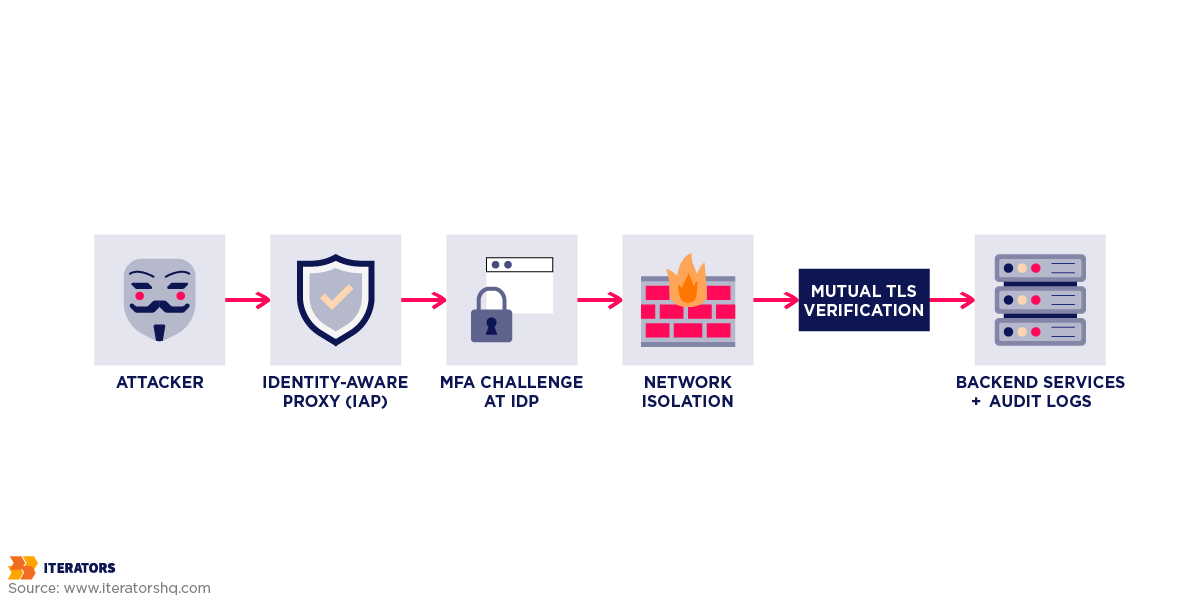
Enterprise security teams evaluating your enterprise readiness don’t just care about who can access your application—they care about how you secure your own infrastructure.
When you fill out a vendor security assessment for enterprise readiness, you’ll see questions like:
- “How do your engineers access production systems?”
- “Do you enforce MFA for administrative access?”
- “Are production systems accessible from the public internet?”
If your answer is “We SSH into EC2 instances using password authentication,” you’ve failed the enterprise readiness assessment.
Let me show you how to build a zero trust architecture that passes enterprise readiness scrutiny—using free and low-cost tools.
The VPN Problem
Traditional security relied on VPNs: put your internal tools behind a VPN, and only people with VPN access can reach them.
This model is broken and doesn’t meet modern enterprise readiness standards:
- Perimeter problem – Once an attacker breaches the VPN, they have broad network access
- Credential theft – VPN credentials can be phished or stolen
- Lateral movement – Compromised VPN access allows attackers to pivot to other systems
Zero Trust flips this model for true enterprise readiness: never trust, always verify.
Every request is authenticated and authorized based on identity, device posture, and context—regardless of network location. Google’s BeyondCorp approach pioneered this model, and Microsoft’s Zero Trust framework has made it mainstream.
Identity-Aware Proxy (IAP)
Instead of putting your admin panel on a private subnet behind a VPN, put it behind an Identity-Aware Proxy for enterprise readiness.
How it works:
When a user tries to access your admin panel, the IAP intercepts the request and checks for a valid session. If no session exists, it redirects to your IdP for authentication. The user authenticates with MFA, the IAP creates a session, and forwards the request to your admin panel. Every subsequent request is verified against the session.
Key benefit: Your admin panel never touches the public internet. It’s only accessible via the IAP.
Tools:
- Cloudflare Access – Free for up to 50 users, then $3/user/month
- Google Cloud IAP – Free for Google Workspace users
- Pomerium – Open source, self-hosted
Audit Logging for Compliance
Enterprise customers require comprehensive audit logs as part of enterprise readiness:
- Who accessed what system?
- When did they access it?
- What actions did they perform?
- Were any errors or anomalies detected?
Requirements:
- Immutable storage (logs can’t be tampered with)
- Long retention (minimum 1 year, often 7 years for regulated industries)
- Export capability (customers may want to ingest logs into their SIEM)
Tools:
- AWS CloudTrail – Logs all AWS API calls, following AWS IAM best practices
- Google Cloud Audit Logs – Logs all GCP API calls
- Datadog / Splunk – Centralized log aggregation
- Papertrail / Loggly – Affordable log management for startups
Best practice: Use AWS S3 with Object Lock (WORM – Write Once, Read Many) to ensure logs can’t be deleted, even by a compromised admin account.
Common Pitfalls to Avoid

Let’s talk about the mistakes that kill enterprise readiness implementations, drawing from insights in My1Login’s guide on SSO implementation mistakes.
These aren’t theoretical—they’re real issues we’ve seen when helping startups build enterprise readiness.
Pitfall 1: The “Happy Path” Fallacy
The Mistake:
You test SSO with Okta. It works great! You ship it and claim enterprise readiness.
Then a customer tries to integrate with ADFS (Active Directory Federation Services). Nothing works. You spend 2 weeks debugging. Your enterprise readiness reputation takes a hit.
The Reality:
Okta is developer-friendly. ADFS is… not. ADFS is extremely strict about XML formatting, case-sensitive in unexpected places, and notorious for non-standard SAML implementations.
The Fix:
Test with at least 3 different IdPs before claiming enterprise readiness:
- Okta (the easy one)
- Azure AD (common in enterprises)
- ADFS (the hard one)
If it works with all three, you’ve achieved real enterprise readiness.
Pitfall 2: Poor Error Messages
The Mistake:
User tries to log in via SSO. Something breaks. They see: “Login Failed”
That’s it. No details. No logs. No way to debug. This destroys the enterprise readiness user experience.
The Fix:
Log everything (with PII redacted) and give the user an error code they can send to support. This makes debugging 10x faster and maintains your enterprise readiness reputation.
Pitfall 3: Conflating Authentication with Authorization
The Mistake:
You implement SSO and assume you’ve achieved enterprise readiness. A user logs in. You assume they should have admin access because they’re from the customer’s IT department.
The Reality:
SSO proves who the user is (authentication). It does not define what they can do (authorization). True enterprise readiness requires both.
The Fix:
Build a separate RBAC (Role-Based Access Control) system. The IdP sends group memberships in the SAML assertion. You map those groups to internal roles. Your app checks roles before allowing actions. This approach mirrors principles in talent management for technology businesses.
Pitfall 4: Not Planning for Certificate Rotation
The Mistake:
You configure a customer’s SAML metadata. Everything works. Six months later, SSO breaks. You have no idea why. Your enterprise readiness is questioned.
The Reality:
The customer’s IdP certificate expired and they rotated to a new one.
The Fix:
Support multiple active certificates simultaneously, monitor certificate expiry and alert customers 90/60/30 days before expiration, and automate metadata refresh by periodically fetching the IdP’s metadata URL.
Pitfall 5: Trusting Frontend Headers
The Mistake:
You use the Identity Gateway pattern for enterprise readiness. The gateway injects user identity headers. Your backend trusts these headers blindly.
An attacker bypasses the gateway and sends a request directly to your backend with a forged header claiming to be admin. Boom. They’re admin. Your enterprise readiness is completely compromised.
The Fix:
Use network isolation to ensure backend services are only accessible via the gateway (use private VPCs), implement Mutual TLS requiring the gateway to present a client certificate when connecting to backends, or have the gateway sign the headers with a shared secret that backends verify.
Frequently Asked Questions About Enterprise Readiness

What’s the minimum budget needed for enterprise readiness?
For a startup with 10-50 employees achieving enterprise readiness:
- SSO Platform: $125-$500/month (WorkOS, Clerk)
- Zero Trust Access: $0-$150/month (Cloudflare Access free tier, then paid)
- Audit Logging: $50-$200/month (Papertrail, Loggly)
- Compliance Consulting: $5,000-$10,000 one-time (for SOC 2 prep)
Total: $2,000-$5,000/month or $25,000-$60,000/year for enterprise readiness.
This is a rounding error compared to the revenue from one enterprise deal ($100K-$500K/year).
Can you implement enterprise readiness without a dedicated security team?
Yes, absolutely.
Using a vendor like WorkOS or Clerk, a single full-stack engineer can implement enterprise readiness in 2-4 weeks.
The key is to not build it yourself from scratch. Use a platform that abstracts the complexity of enterprise readiness.
How long does typical integration take?
Using a vendor (WorkOS, Auth0, Clerk): 2-4 weeks
Building from scratch: 3-6 months
The difference is night and day for achieving enterprise readiness. Don’t build from scratch unless you have a very specific reason. As SSO Jet’s guide for startups explains, timing and approach matter significantly.
What are red flags when evaluating identity providers?
- Opaque pricing – If they won’t show you a price list without a sales call, run.
- MAU pricing for B2B – Avoid MAU-based pricing for B2B.
- Vendor lock-in – Can you export your user data? Can you migrate to another provider?
- Poor documentation – If their docs are bad, integration will be painful.
- No SCIM support – SCIM is non-negotiable for enterprise readiness.
When should startups consider zero trust architecture?
Immediately.
Zero trust isn’t just for enterprises. Tools like Cloudflare Access and Tailscale make it accessible to startups pursuing enterprise readiness.
Benefits include passing vendor security assessments, reducing attack surface, enabling secure remote work, and preparing for SOC 2 compliance. Following frameworks like the NIST Cybersecurity Framework can guide your implementation.
Conclusion: Build Enterprise Readiness Now
Here’s the truth about enterprise readiness:
It’s not a feature. It’s a foundation.
You can’t bolt enterprise readiness on after the fact. You can’t fake it during a sales demo. And you definitely can’t ignore it and hope enterprise customers won’t notice.
The startups that win enterprise markets build enterprise readiness early:
- They implement SSO before they need it
- They design for SCIM from day one
- They treat audit logs as a first-class feature
- They embrace zero trust architecture
- They invest in security certifications (SOC 2, ISO 27001)
And they achieve enterprise readiness without hiring a 50-person security team or spending $500K on custom auth infrastructure.
How? By making smart build-vs-buy decisions:
- Use vendors like WorkOS for SSO and SCIM
- Use Cloudflare Access or Tailscale for zero trust
- Use AWS CloudTrail and S3 Object Lock for audit logs
- Hire a consultant for SOC 2 prep (don’t do it yourself)
The total cost? $25,000-$60,000/year.
The return? The ability to close $100K-$500K enterprise deals.
The alternative? Watching those deals evaporate because you can’t demonstrate enterprise readiness.
Remember Code Spaces? They were destroyed in 24 hours because they neglected identity security. Don’t let that be you.
Build enterprise readiness now. Your future self—and your future acquirers—will thank you.
Ready to achieve enterprise readiness for your startup?
At Iterators, we’ve helped dozens of B2B SaaS companies implement enterprise readiness through SSO, SCIM, and zero trust architecture. We know the patterns that work, the pitfalls to avoid, and the vendors worth using.
Schedule a free consultation and let’s talk about your enterprise readiness roadmap.
We’ll help you:
- Choose the right SSO platform for your enterprise readiness needs
- Implement SCIM provisioning that actually works
- Design a zero trust architecture on a startup budget
- Pass vendor security assessments and close enterprise deals
Don’t let security architecture be the reason you can’t move upmarket. Let’s build your enterprise readiness right, together.