
Mobile app reverse engineering is happening to your app right now. If you’ve built a mobile app, someone can take it apart through mobile app reverse engineering techniques. The tools for mobile app reverse engineering are free, the tutorials are on YouTube, and the process can take less than a day. This guide shows you exactly how mobile app reverse engineering works from the attacker’s perspective – the tools, techniques, and mistakes they exploit.
Welcome to the world of mobile app reverse engineering.
But here’s what most security articles won’t tell you: understanding mobile app reverse engineering from the attacker’s perspective is more valuable than any security product you can buy. Because once you see what they see, you’ll never write vulnerable code the same way again.
This guide will walk you through exactly how mobile app reverse engineering works – from the attacker’s perspective. We’ll show you the tools they use, the techniques they employ, and the mistakes they exploit. By the end, you’ll understand why that API key you hardcoded “just for testing” is probably already in someone’s database. And more importantly, you’ll know what to do about it.
What Exactly Is Mobile App Reverse Engineering (And Why You Should Care)
Mobile app reverse engineering is the process of taking a compiled application and working backward to understand its internal structure, logic, and data handling. Mobile app reverse engineering techniques can expose everything from API endpoints to encryption keys. Think of it as digital archaeology – except instead of uncovering ancient ruins, attackers are uncovering your business logic, API endpoints, and that embarrassing TODO comment you left in production.
Someone downloads your APK or IPA file. Within hours, they’re reading code that looks remarkably similar to what you wrote. They can see:
- Every API endpoint you call
- How you validate premium features
- Where you store user credentials
- What encryption keys you’re using (or not using)
- The exact algorithm that makes your app special
And here’s the kicker – mobile app reverse engineering isn’t some NSA-level operation. A motivated teenager with a laptop can do this. The tools are free, well-documented, and actively maintained by communities who share techniques and discoveries.
Mobile App Reverse Engineering Statistics That Matter
The mobile app security market, driven largely by mobile app reverse engineering threats, is projected to hit $3.1 billion by 2025, growing at over 20% annually. Recent data from the OWASP Mobile Top 10 shows that:
- Over 70% of mobile applications have at least one critical vulnerability
- The average time to reverse engineer and analyze an app is under 4 hours
- Mobile app data breaches cost an average of $6.08 million in the financial sector
- The gaming industry loses billions annually to modded APKs that bypass in-app purchases
What We See When Auditing Mobile App Reverse Engineering Vulnerabilities
At Iterators, we’ve been building mobile apps for over a decade. When clients come to us for security audits, we consistently find the same patterns. Even experienced teams – teams with senior developers, code reviews, and QA processes – miss basic protections.
The most common issue? Developers underestimate how easily mobile app reverse engineering can extract secrets from compiled apps. We’ve found:
- API keys hardcoded in source files, visible in decompiled code
- OAuth tokens stored in SharedPreferences without encryption
- Backend URLs pointing to staging environments with weaker security
- Encryption keys stored as string constants
- Certificate pinning implemented incorrectly, making it trivial to bypass
Here’s a real example of mobile app reverse engineering from a dating app audit we conducted. The app stored user authentication tokens in AsyncStorage without encryption. An attacker could download the app, install it on a rooted Android device, navigate to the app’s data directory, read the AsyncStorage file as plain text, and extract valid user tokens to impersonate any user in the system. Total time: about 15 minutes.
Why This Matters More in 2026 Than Ever Before

Three forces are converging to make mobile app reverse engineering both easier and more damaging:
1. AI-Enhanced Analysis
Large language models have fundamentally changed the mobile app reverse engineering game.Tools like JADX now integrate with AI to automatically explain decompiled code. Upload your decompiled app to an LLM, and it will explain what each function does, identify security vulnerabilities, suggest ways to exploit the code, and even write working attack scripts.
2. Cross-Platform Framework Vulnerabilities
React Native, Flutter, and other cross-platform frameworks have made app development faster. But they’ve also created new attack surfaces. JavaScript bundles in React Native apps can be extracted and read almost as easily as viewing sources in a browser. Learn more about cross-platform app development frameworks and their security implications.
3. Democratized Attack Tools
The barrier to entry for reverse engineering has collapsed. Tools that required deep technical knowledge a decade ago now have point-and-click interfaces. This democratization means your app isn’t just vulnerable to elite hackers – it’s vulnerable to anyone with motivation and an internet connection.
Who’s Actually Performing Mobile App Reverse Engineering and Why
Competitors want to understand how you built that feature they’re trying to copy. We’ve seen this repeatedly in the fintech space. A client’s investment algorithm was extracted from their app and implemented by a competitor within weeks.
Hackers and Fraudsters are after money. They reverse engineer apps to bypass payment systems, extract user credentials, find API endpoints to scrape user data, and discover vulnerabilities to sell on dark web markets.
Security Researchers analyze apps to find vulnerabilities and report them responsibly. The problem? The same techniques used by white-hat researchers are available to black-hat attackers.
Modders and Pirates reverse engineer apps to create unofficial versions with enhanced features or removed restrictions, often crossing into piracy and revenue loss.
How Attackers Actually Break Mobile Apps: Common Reverse Engineering Techniques
Most successful attacks use well-known tools and documented techniques. The attacker doesn’t need to be a genius. They just need to be methodical.
Static Analysis: The Foundation of Mobile App Reverse Engineering
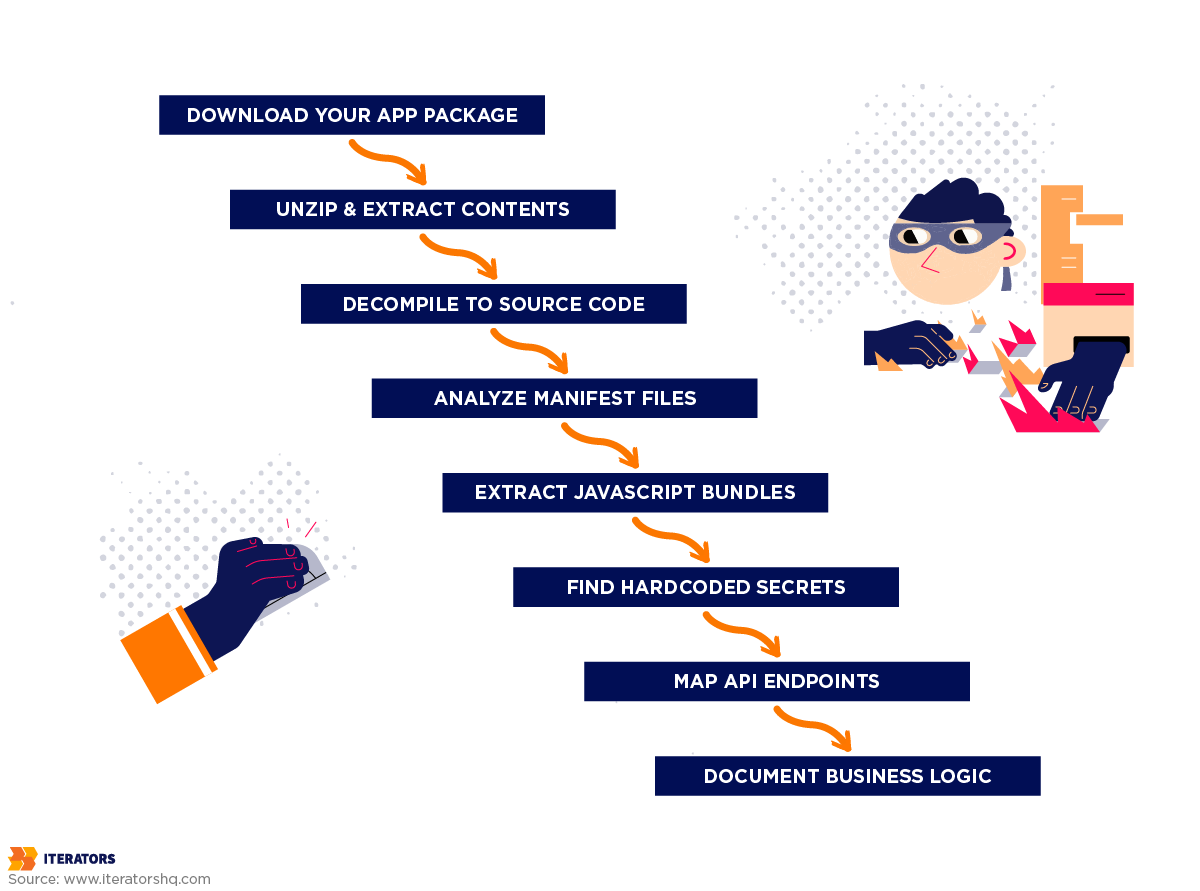
Static analysis is the foundation of mobile app reverse engineering. Attackers examine your app without running it, looking at the code, resources, and configuration files.
Step 1: Obtaining the App Package
For Android apps (APK files), attackers can download directly from Google Play using tools like APK Downloader, extract from their own device after installing, or find uploaded copies on APK mirror sites.
For iOS apps (IPA files), they can download from the App Store using Apple Configurator, extract from a jailbroken device using tools like Clutch, or find uploaded copies on IPA distribution sites.
Step 2: Unpacking the Package
Both APK and IPA files are just ZIP archives. An attacker can unzip them and immediately see all image and media assets, configuration files, compiled code, and resource files. This unpacking reveals a surprising amount even before decompiling code.
Step 3: Decompiling to Readable Code
This is where mobile app reverse engineering really happens. Tools can convert compiled bytecode back into something remarkably close to the original source code.
For Android Apps, the primary tool is JADX (Dex to Java Decompiler), which converts DEX bytecode to Java source code with near-perfect accuracy. Attackers can see API keys hardcoded as constants, debug builds that bypass validation, and the entire business logic.
For iOS Apps, while more complex because apps are compiled to native ARM machine code, tools like class-dump, Hopper Disassembler, and Ghidra can extract Objective-C class information and provide assembly code with pseudo-code generation.
For React Native Apps, the process is particularly simple: extract the APK/IPA, locate the JavaScript bundle, and if using Hermes, use hermes-dec to decompile bytecode. Attackers essentially see your source code, including all API endpoints, authentication mechanisms, and any secrets or keys.
For Flutter Apps, tools like Blutter and reFlutter can parse Flutter’s snapshot format and reconstruct class structures and logic.
Step 4: Analyzing Manifest and Configuration Files
Beyond code, attackers analyze configuration files for vulnerabilities. An Android manifest showing android:debuggable=”true” tells attackers they can attach a debugger. Setting android:allowBackup=”true” means they can extract app data via ADB. These configuration mistakes are immediately visible and exploitable.
Dynamic Mobile App Reverse Engineering: Manipulating Your App While It Runs
Dynamic analysis involves running the app in a controlled environment and manipulating it in real-time.
The Foundation: Rooted/Jailbroken Devices
Dynamic analysis typically requires a compromised device that gives attackers complete control over the operating system, allowing them to access any app’s data directory, inject code into running processes, bypass system security restrictions, and monitor all system calls and network traffic.
The Power Tool: Frida Framework
Frida has become the industry standard for dynamic analysis. It’s a dynamic instrumentation toolkit that lets attackers inject JavaScript into running processes.
With Frida, attackers can intercept any function call and modify its behavior. They can bypass root detection by hooking the detection method and forcing it to always return false. They can unlock premium features by making subscription checks always return true. They can see every API call your app makes, including endpoints, parameters, headers, and authentication tokens. They can even read and modify data in memory, including decrypted data and session tokens.
Man-in-the-Middle Attacks: Intercepting Encrypted Traffic
Even when apps use HTTPS, attackers can intercept traffic using man-in-the-middle (MITM) attacks. They install a proxy tool like Burp Suite, configure their device to route all traffic through the proxy, install the proxy’s SSL certificate as trusted, and run the app. Now all traffic flows through the proxy where they can read all requests and responses, modify data in transit, and test for injection vulnerabilities.
HTTPS encrypts traffic between client and server, but in an MITM attack there are two separate HTTPS connections (App → Proxy and Proxy → Server). The proxy decrypts traffic from the app, inspects or modifies it, then re-encrypts it for the server.
Mobile App Reverse Engineering by Platform: Android, iOS, and Cross-Platform Vulnerabilities

Not all mobile apps are created equal when it comes to mobile app reverse engineering resistance. The platform you choose fundamentally shapes your app’s attack surface.
Mobile App Reverse Engineering on Android: The Open Book
Android’s openness makes it a playground for mobile app reverse engineering. APK decompilation is remarkably easy – download APK (30 seconds), open in JADX (10 seconds), read nearly perfect Java source code (immediately).
Manifest Misconfigurations
The AndroidManifest.xml file controls app permissions and security settings. Following Android security best practices is critical. Common issues include:
- Debuggable builds in production: When android:debuggable=”true”, attackers can attach debuggers, set breakpoints, modify runtime behavior, and extract sensitive data
- Exported components: Exported activities can be launched by other apps or via ADB, allowing attackers to access restricted functionality or bypass authentication
- Backup allowance: When allowed, attackers can extract app data including databases, SharedPreferences files, and internal storage
- Clear text traffic: This allows HTTP connections, making MITM attacks trivial
ProGuard/R8 Limitations
Android’s built-in obfuscation tools have significant limitations. Code that uses reflection or extends Android framework classes can’t be fully obfuscated. String constants aren’t encrypted by default. While names are obfuscated, the logic flow remains intact and obvious to experienced reverse engineers.
iOS: Cracking the Walled Garden
iOS is generally more secure than Android, but determined adversaries can still break through despite Apple’s security architecture. Most iOS reverse engineering requires a jailbroken device, which is a significant barrier, but jailbreaks are regularly released for new iOS versions.
Apps downloaded from the App Store are encrypted with Apple’s FairPlay DRM, but tools like Clutch can decrypt apps on jailbroken devices. Once decrypted, iOS apps reveal class names and methods, string constants, API calls, and logic flow through disassembly tools.
On jailbroken devices, attackers can access the Keychain database and extract stored credentials using tools like Keychain-Dumper.
Reverse Engineering React Native Mobile Apps: The JavaScript Vulnerability
React Native apps face unique challenges because they ship with a JavaScript bundle containing your app’s logic. Understanding React Native security considerations is essential.
Extracting the bundle is trivial – unzip the APK/IPA and read the JavaScript file directly. If using Hermes, the bundle is compiled to bytecode, but tools like hermes-dec easily decompile it. Attackers see your actual source code, including all API endpoints, authentication mechanisms, keys, and business logic.
React Native’s default storage mechanism, AsyncStorage, stores data as plain text and is easily accessible on compromised devices. We’ve found AsyncStorage containing user authentication tokens, API keys, user personal information, payment data, and session identifiers. When choosing between React Native vs native development, these security considerations are crucial.
Flutter: The Dart Dilemma
Flutter compiles Dart code to native ARM code, which should provide better security than React Native’s JavaScript. But it’s not as secure as you might think.
Flutter apps include a snapshot of compiled Dart code. Tools like Blutter can parse these snapshots to extract class names, method signatures, string constants, and program flow. While Flutter provides obfuscation options, they have limitations.While not as clean as JavaScript extraction, it provides enough information to understand the app’s architecture.
Bypassing Protection Mechanisms: How Attackers Defeat Common Security Measures

Understanding how attackers use mobile app reverse engineering to bypass common protections reveals why client-side security alone is never enough.
Bypassing Root Detection in Mobile App Reverse Engineering
Root and jailbreak detection seems logical – if the device is compromised, don’t run the app. But there’s a fundamental problem: you’re asking the compromised device to honestly report that it’s compromised.
Apps typically check for root by looking for su binaries, root management apps, or trying to execute su commands. With Frida, bypassing this is trivial – attackers simply hook the detection method and force it to return false. The app now thinks it’s running on a non-rooted device.
Why Client-Side Detection Always Fails: When your app runs on a device the attacker controls, they can modify any code, hook any function, and lie about any check. No matter how sophisticated your detection becomes, it’s still running in enemy territory.
Certificate Pinning: The False Sense of Security
Certificate pinning prevents MITM attacks by ensuring your app only trusts specific SSL certificates. It’s one of the most recommended security measures. It’s also one of the most commonly bypassed.
Attackers can bypass pinning using Frida to hook the certificate validation function and make it always succeed. Tools like objections automate this process. For apps with native code pinning, attackers can locate the validation function in the binary, patch it to always return success, and repackage the app.
The community maintains ready-made SSL unpinning scripts that work against most common implementations.
Code Obfuscation: Security Through Obscurity
Code obfuscation makes your code harder to read but it’s not encryption. It just makes reverse engineering more time-consuming.
Standard obfuscation doesn’t encrypt string constants, so API keys remain visible. The logic flow is preserved even if names are obfuscated. And dynamic analysis bypasses obfuscation entirely – with Frida, attackers can see actual values at runtime regardless of obfuscation.
Commercial tools like DexGuard and iXGuard provide stronger protection with string encryption, control flow obfuscation, and class encryption, but these techniques still aren’t unbreakable.
The Fundamental Problem: Client-Side Security
All client-side protections share a fatal flaw: they run on a device the attacker controls. No matter how sophisticated your protection, attackers have unlimited time to analyze it, can modify any code, and can bypass any protection.
This doesn’t mean client-side protection is useless – it raises the cost of attack, deters casual attackers, buys time to detect and respond, and protects against automated attacks. But it’s not a complete solution.
The Real Business Impact of Mobile App Reverse Engineering
Security breaches make headlines, but the real cost of mobile app reverse engineering often flies under the radar because it doesn’t look like a traditional “hack.”
Data Leakage and Privacy Violations: The Regulatory Nightmare
When attackers extract API keys from your decompiled app, they can access your backend and download user data. The cascade typically unfolds over weeks or months, eventually requiring regulatory notifications under GDPR, CCPA, and other privacy laws.
The average cost of a data breach in the financial sector is $6.08 million, but that’s just the direct cost. Add legal fees ($500K-$2M), regulatory fines (up to 4% of global revenue under GDPR), customer notification costs ($50K-$500K), credit monitoring ($100K-$1M), and PR crisis management ($100K-$500K).
A dating app we worked with had AWS credentials extracted from their React Native bundle. An attacker downloaded user photos, database backups, and personal information for 50,000 users. The breach cost over $5 million total, including a 40% reduction in active users. The vulnerability was simple – AWS credentials hardcoded in a JavaScript file.
Intellectual Property and Business Logic Theft: Your Competitive Advantage, Gone
A fintech startup spent 2 years developing a credit risk scoring algorithm. A competitor reverse engineered their app and copied the algorithm in 3 months. The startup’s competitive advantage was gone.
Reverse engineering exposes proprietary algorithms, business logic (recommendation engines, pricing strategies), and even unreleased features through code for features not yet enabled or API endpoints for beta functionality.
Monetization Bypass and Revenue Loss: Death by a Thousand Cracks
The mobile gaming industry loses an estimated $2-3 billion annually to in-app purchase cracks. Popular games see 10-30% of users on cracked versions.
Attackers reverse engineer apps, find premium feature checks, modify them to always return true, and repackage and distribute. A meditation app we analyzed had a cracked version downloaded 100,000+ times, representing over $1 million in annual lost revenue.
API Abuse and Backend Exploitation
Reverse engineering exposes your entire backend. Your app reveals every API endpoint it calls, including admin panels and debug modes you never intended to be public. If rate limiting is client-side, attackers bypass it entirely. Authentication token formats can be analyzed and forged.
A food delivery app we analyzed used HTTPS but no certificate pinning. Through MITM analysis, we discovered the API didn’t validate that users owned the accounts making orders, promo codes were validated client-side, and delivery fees could be set to zero. Attackers could order food charged to other users’ accounts with unlimited promo codes and free delivery.
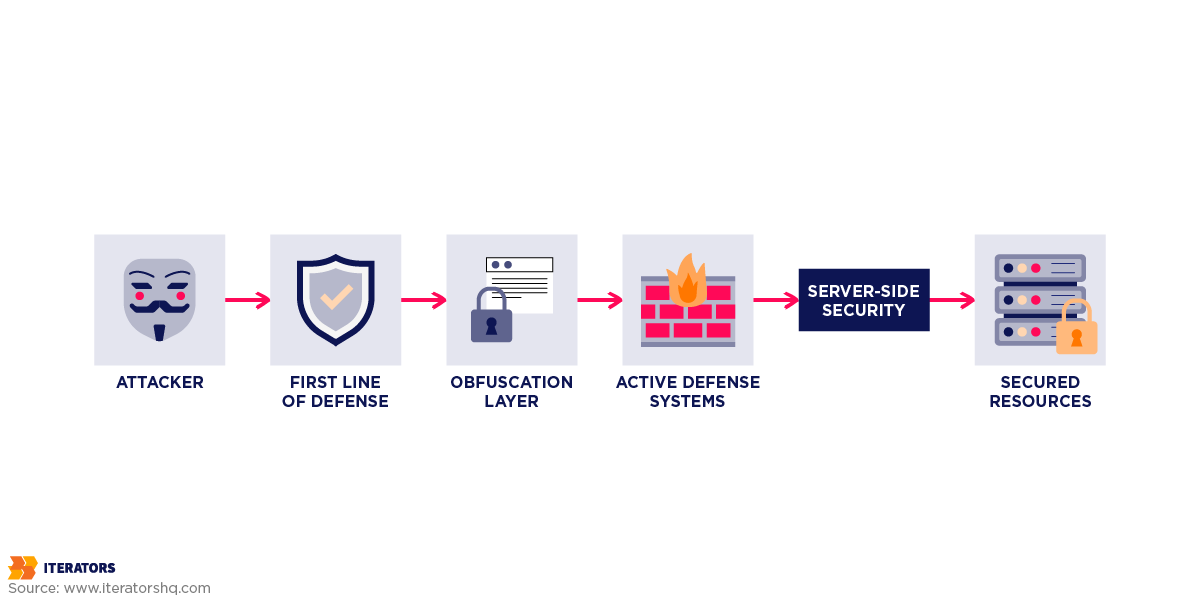
Defensive Strategies: How to Actually Protect Your Mobile App
You can’t make your app immune to mobile app reverse engineering, but you can raise the cost of attack high enough that most attackers move on to easier targets. The OWASP Mobile Security Testing Guide provides comprehensive guidance for implementing these defenses.
The Foundation: Security Starts in Development
Never Hardcode Secrets
Don’t put API keys, OAuth tokens, or encryption keys directly in your code. For sensitive operations, use your backend as a proxy rather than exposing keys in the app.
Implement Proper Secrets Management
- Android: Use Android Keystore for cryptographic keys, implement encryption for sensitive data, use NDK to hide critical logic in native code
- iOS: Use Keychain for sensitive data with appropriate accessibility settings, enable Data Protection, use Secure Enclave for cryptographic operations
- React Native: Use react-native-keychain or react-native-encrypted-storage, never use AsyncStorage for sensitive data
Server-Side Validation for Everything
Never trust the client. Validate all inputs and business logic server-side. Premium subscription status, payment amounts, and business rules should all be verified by your backend.
Use HTTPS Everywhere
Configure your app to disallow clear text traffic entirely through network security configuration.
Implement Certificate Pinning
Even though it can be bypassed, it still raises the bar. Include backup pins to handle certificate rotation.
Build-Time Hardening
Code Obfuscation
Enable R8/ProGuard for Android with aggressive settings. Use SwiftShield for iOS identifier obfuscation. Enable Hermes for React Native and consider additional JavaScript obfuscation. Use Flutter’s obfuscation flag during build.
Commercial Obfuscation Tools
For high-value apps, consider commercial solutions like DexGuard (Android) or iXGuard (iOS) that provide advanced string encryption, class encryption, asset encryption, and anti-tampering capabilities.
Native Code for Sensitive Logic
Move critical logic to C/C++ with NDK (Android) or native code (iOS), which is harder to reverse engineer than managed code.
Runtime Protection
Implement detection for rooted/jailbroken devices, hooking frameworks like Frida, attached debuggers, and emulators. Don’t just block these devices – report to your backend for behavioral analysis.
Runtime Application Self-Protection (RASP)
Commercial RASP solutions like Guardsquare (DexGuard), Promon SHIELD, or Arxan monitor app behavior and respond to threats in real-time. They detect hooking and instrumentation, monitor for suspicious API calls, validate app integrity at runtime, and report attacks to your backend.
Backend Security: The Last Line of Defense
Even if your app is completely compromised, strong backend security can limit damage:
- API Authentication: Require valid JWT tokens and validate user permissions
- Rate Limiting: Prevent abuse through server-side rate limits (not client-side)
- Input Validation: Don’t trust client-provided prices, quantities, or any business-critical data
- Anomaly Detection: Check for impossible travel, unusual API usage patterns, and known attack patterns
- Device Attestation: Use Google Play Integrity API (Android) or DeviceCheck (iOS) to validate device integrity
The Defense-in-Depth Strategy
Layer multiple defenses:
- Development: Secure coding practices, no hardcoded secrets, server-side validation
- Build-Time: Code obfuscation, string encryption, native code for sensitive logic
- Runtime: Root detection, Frida detection, code integrity checks, RASP
- Backend: Strong authentication, rate limiting, input validation, anomaly detection
- Monitoring: Crash analysis, security event tracking, pirated version detection
- Response: Incident response plan, ability to disable compromised versions
| ESSENTIAL SECURITY FEATURES (Launch Now) | NICE-TO-HAVE SECURITY FEATURES (Add Later) |
|---|---|
| No Hardcoded Secrets – Remove all API keys, tokens, and credentials from source code | Commercial Obfuscation – DexGuard, iXGuard for advanced string/class encryption |
| HTTPS Everywhere – Enforce encrypted connections for all network traffic | RASP Solutions – Runtime protection with Promon SHIELD or Arxan |
| Server-Side Validation – Validate all business logic, payments, and permissions on backend | Advanced Root Detection – Multi-layer detection with server-side reporting |
| Basic Obfuscation – Enable R8/ProGuard (Android) or build-time obfuscation (iOS/Flutter) | Native Code Migration – Move critical logic to C/C++ for harder reverse engineering |
| Secure Storage – Use Keychain (iOS) or Keystore (Android) for sensitive data | Device Attestation – Google Play Integrity API or Apple DeviceCheck validation |
| API Authentication – Require valid JWT tokens and validate user permissions | Anomaly Detection – Monitor for suspicious patterns and impossible travel |
| Input Validation – Never trust client data – validate all inputs server-side | Security Dashboard – Real-time monitoring of security events and threats |
| Rate Limiting – Implement server-side throttling to prevent API abuse | Penetration Testing – Quarterly security audits by professional ethical hackers |
Understanding security compliance frameworks like SOC 2 can also help establish appropriate security controls for your mobile applications.
Frequently Asked Questions
Can reverse engineering be completely prevented?
No. If your app runs on a device, it can be reverse engineered. The goal is to make it expensive enough that attackers move to easier targets through multiple layers of protection, server-side validation, continuous monitoring, and regular security updates.
Is obfuscation enough to protect my app?
No. Basic obfuscation makes static analysis harder but string constants remain visible, logic flow is preserved, and dynamic analysis bypasses it entirely. Obfuscation should be one layer in a defense-in-depth strategy that includes secure architecture, runtime protection, and monitoring.
Are React Native apps less secure than native apps?
React Native apps can be as secure as native apps, but it requires extra effort. JavaScript bundles are easily extracted and more readable than compiled native code, but using react-native-keychain for sensitive data, implementing native modules for critical operations, enabling Hermes with obfuscation, and validating everything server-side can provide strong security.
How long does it take to reverse engineer a mobile app?
For unprotected apps: 4-8 hours. With basic protection (ProGuard, HTTPS): 10-20 hours. With advanced protection (DexGuard, RASP, native code): 40-80 hours. Enterprise-grade protection may take weeks or months and may not be economically viable for attackers.
Should I be worried about reverse engineering if I’m just a startup?
Yes, if you handle sensitive user data, have proprietary algorithms, monetize through in-app purchases, or operate in a competitive market. Focus on architecture (server-side validation), implement basic protections (obfuscation, HTTPS), and plan to scale security as you grow.
Is iOS really more secure than Android?
iOS provides slightly better baseline protection through App Store encryption and a more restrictive platform, but both platforms can be reverse engineered by determined attackers. The platform matters less than the architecture and security practices you implement.
What tools can I use to test my own app’s security?
Test your app the same way attackers do: Use JADX to decompile Android apps, Ghidra to disassemble native code, MobSF for automated testing, Frida for runtime instrumentation, and Burp Suite to intercept network traffic. If you can find vulnerabilities, so can attackers.
When should I invest in commercial app protection solutions?
Consider commercial protection (DexGuard, iXGuard, RASP) for financial/banking apps, healthcare apps with PHI, enterprise apps with sensitive data, apps with valuable IP, subscription-based apps where piracy is a major threat, or apps requiring specific compliance standards.
Conclusion: Understanding Is the First Step to Defense
Your mobile app is not secure by default. Security requires intentional design, implementation, and ongoing maintenance.
But understanding mobile app reverse engineering from the attacker’s perspective gives you a massive advantage. Most developers don’t think about security until after a breach. By reading this article, you’re already ahead of 90% of app developers.
Security isn’t about achieving perfection – it’s about managing risk. Start with the basics: remove hardcoded secrets, implement HTTPS everywhere, enable basic obfuscation, and validate everything server-side. Then layer on additional protections based on your risk profile.
The threat landscape evolves constantly. New attack tools emerge, AI makes reverse engineering easier, and attackers share techniques. Your security needs to evolve too through regular security audits, continuous monitoring, staying current with best practices, and testing against new attack techniques.
Take Action Today
This week: Audit your app for hardcoded secrets, review your security architecture, enable basic protections.
This month: Implement comprehensive security measures, test your own app’s security, set up monitoring.
This quarter: Conduct a security audit, establish security processes, train your team.
Don’t wait for a breach to take security seriously. By then, it’s too late.
Need help securing your mobile app?
At Iterators, we specialize in building secure mobile applications across all platforms. Whether you’re starting a new project or need to harden an existing app, we can help. Our team has been developing mobile apps for over a decade, from dating apps to enterprise solutions.
Schedule a free security consultation to discuss your specific needs. We’ll review your app, identify vulnerabilities, and provide a roadmap for improving security – no sales pitch, just practical advice from developers who’ve been doing this for over a decade.