

Enterprise readiness usually surfaces when a security questionnaire arrives and no one can answer it.
A department head wants a pilot. Procurement sends the vendor assessment: Do you support SAML SSO? Can you provide audit logs? Do you have SOC 2? Can users be mapped to departments and teams? What is your incident response process? Can you prove it?
That’s when the gap becomes measurable. Enterprise readiness is not a feature sprint. It’s a maturity layer across product, infrastructure, security, process, and documentation. This post is about when you can build it internally, when that breaks, and what it costs when you get it wrong.
Build vs. Partner Calculator
The True Cost of DIY Enterprise Readiness
Building internally isn’t always cheaper. Toggle your current foundations below to calculate your true DIY timeline, opportunity cost, and risk to active deals.
Architectural Foundation
Clean tenant model & abstracted permissions existEngineering Experience
Team has built SAML, RBAC & SOC 2 beforeTime Advantage
We have 6-12 months before a deal depends on itDocumentation Discipline
Strong existing infra-as-code and sec policiesTimeline
Cost
Enterprise Deals
What Enterprise Readiness Actually Means
Enterprise readiness means your SaaS can pass the security, compliance, and operational requirements that enterprise buyers enforce before signing.
It includes:
- Security controls — access management, encryption, secret handling, production access policy
- SOC 2 compliance or a documented roadmap with evidence collection in progress
- SSO integration — SAML and OIDC, IdP testing, domain-based routing, JIT provisioning
- Role-based access control — org hierarchy, not just admin/user binary
- Audit logs — who did what, when, from where, exportable, tamper-resistant
- Monitoring systems — observability beyond uptime: workflow success, permission errors, per-tenant latency
- Data policies — retention, deletion, backup schedules, disaster recovery
- Incident response — runbooks, escalation paths, SLAs with operational evidence
- Documentation — architecture diagrams, data flows, admin guides, security posture artifacts
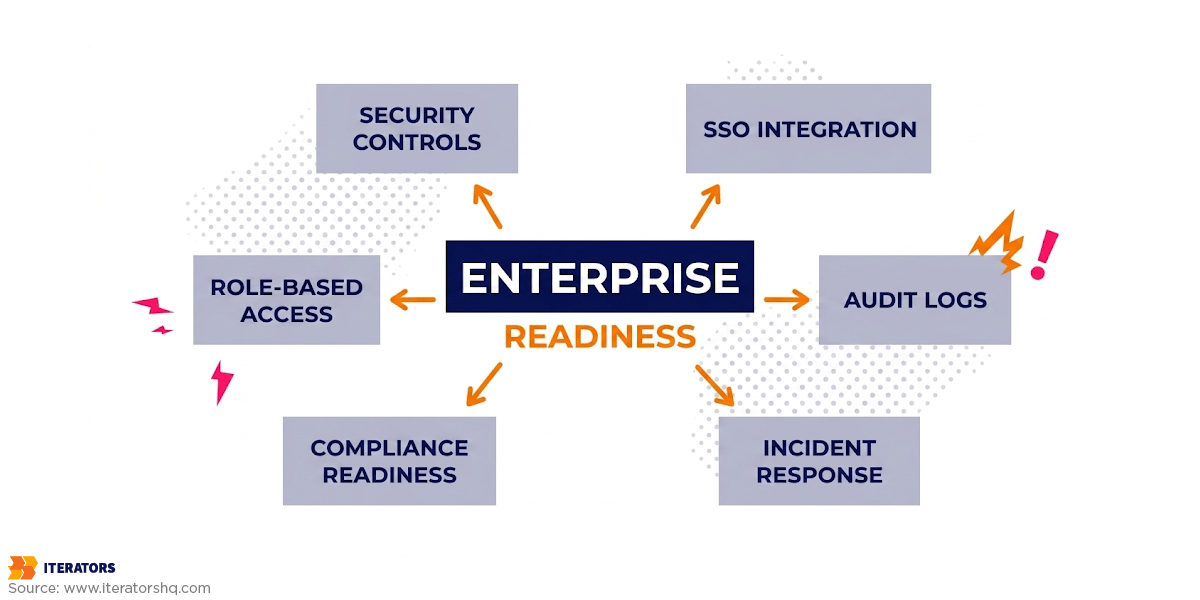
Enterprise buyers evaluate risk, not features. The question is: will your software expose our data, and can your team respond when something breaks?
For the full spectrum of enterprise-ready B2B SaaS requirements, there’s more forensic detail in the linked post.
Why Enterprise Readiness Matters Before Enterprise Sales
Enterprise customers move slowly until procurement starts. Then they expect fast answers.
You can spend six months building the relationship. The buyer endorses the product. The pilot looks clean. Then procurement begins.
Procurement doesn’t evaluate the dashboard. Procurement evaluates risk. So does security, legal, IT, and finance. Your enterprise sales strategy becomes less about closing deals and more about surviving assessment without looking structurally unprepared.
When the Gap Shows Up
You’re selling a B2B workflow tool. You have customers. Revenue is climbing. The product works.
A department head at a Fortune 500 company says: “We’re ready to move forward. Please complete our vendor security assessment.”
They ask for SOC 2 reports, SAML SSO, role-based access control, audit logs, data deletion policies, uptime history, backup verification, pen test results, and encryption details.
You have basic multi-tenancy, admin and user roles, debug logs, and general uptime monitoring. But no org hierarchy, no customer-facing audit logs, no formal SLA with operational evidence behind it, and “we plan to do SOC 2” without any controls implemented.
That’s when enterprise readiness stops being theoretical.
Why Investors Watch This
Investors know that moving upmarket is one of the biggest growth levers for B2B SaaS startups. They also know enterprise sales expose messy architecture, weak DevOps, and accumulated technical debt.
A product that can pass enterprise assessment signals your company can scale without rebuilding foundations under contract pressure.
When DIY Enterprise Readiness Works
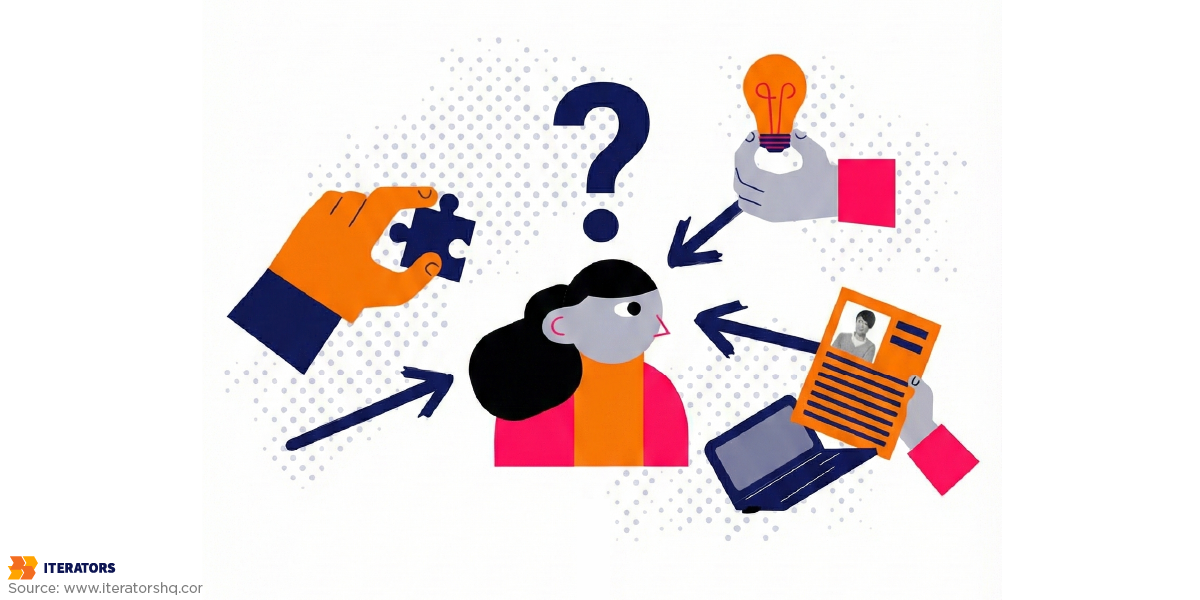
DIY isn’t always wrong. It works under specific conditions.
Your Architecture Is Already Close
DIY makes sense when your SaaS has strong foundations: clean tenant model, clear data ownership, centralized permissions abstraction, infrastructure-as-code, CI/CD, automated tests, centralized logging, and current documentation.
RBAC is straightforward when permissions are already abstracted. It’s expensive when every screen checks if user.is_admin == true in seventeen different places.
You Have Time
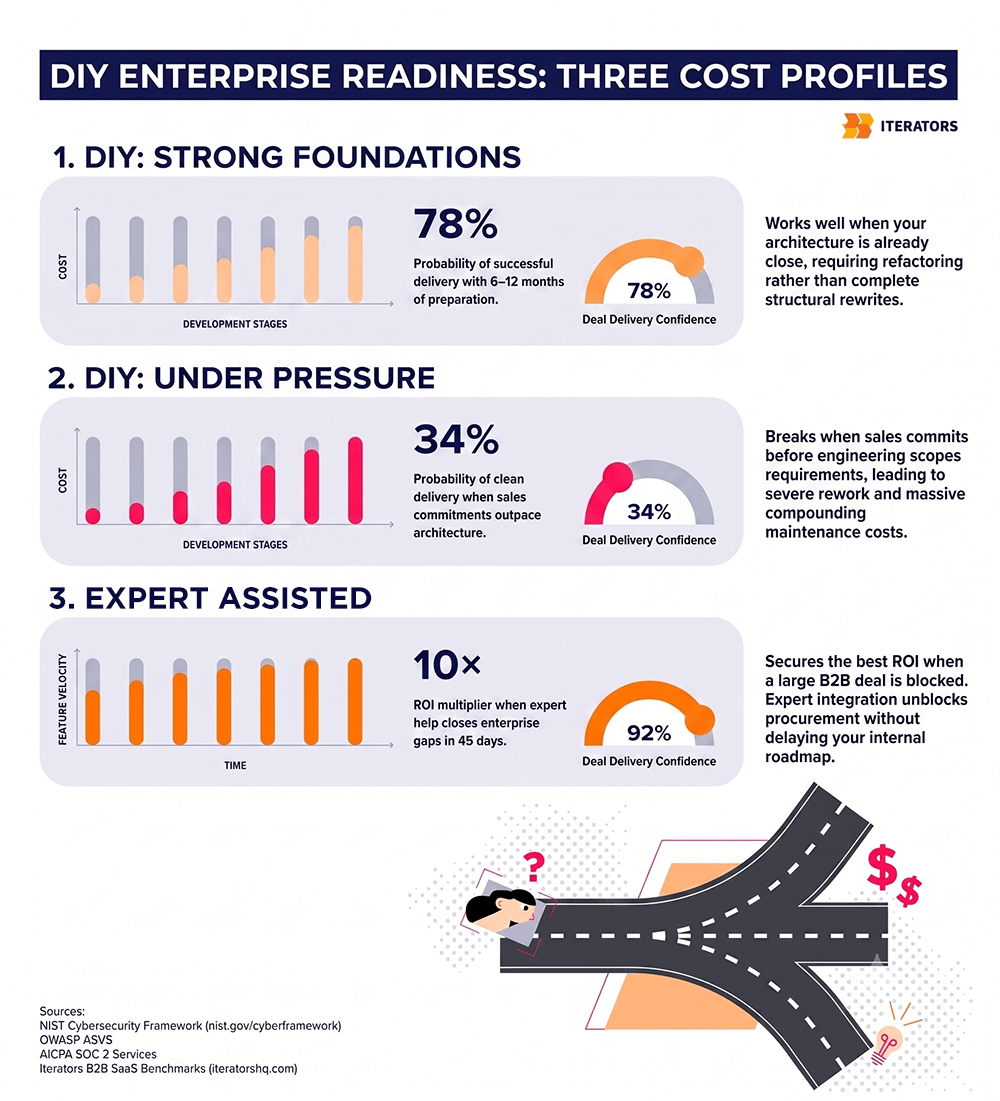
If you have 6–12 months before enterprise readiness becomes deal-critical, DIY may work. You can map requirements, prioritize gaps, refactor access control properly, and add SSO without panic architecture.
If your buyer wants answers in three weeks, different constraints apply. Technical debt accrued under sales pressure gets expensive.
Your Team Knows the Territory
Your team doesn’t need to memorize every compliance framework, but they need to know the terrain. Useful references: NIST Cybersecurity Framework, OWASP ASVS, and AICPA SOC Services.
DIY works when your team understands that SOC 2 readiness isn’t policy templates, SSO isn’t “add login with Okta,” and audit logs aren’t debug logs with a different label.
When DIY Enterprise Readiness Fails
DIY usually fails when startups mistake checklists for implementation. A checklist says: SSO yes, RBAC yes, audit logs yes. An enterprise buyer asks: Which identity providers have you tested? Can users be deprovisioned automatically? Can permissions be assigned by department? Can audit logs be exported in structured format? Who has production access? Where is the evidence?
That’s where the checklist stops being useful.
Sales Outruns Engineering
Sales hears enterprise interest and commits to SSO, custom roles, audit exports, admin dashboards, approval workflows, and SCIM. Engineering hears about it later.
This creates custom forks. One-off code paths. Customer-specific permissions. Hidden support burden. The deal may close, but the SaaS platform now has a maintenance problem that scales poorly.
Sales, product, and engineering need a shared enterprise readiness map before commitments are made.
Compliance Is Treated Like Paperwork
Bruce Schneier: “Security is not a product, but a process.”
SOC 2 compliance for SaaS isn’t a PDF. It means your real operations match your documented controls. If your security policy says production changes require approval, but your senior engineer deploys directly from a laptop at midnight, the document isn’t protective—it’s evidence of the gap.
Multi-Tenancy Is Too Simple
SMB multi-tenancy: company, users, admin, maybe teams. Enterprise org management: countries, regions, business units, departments, teams, billing admins, global admins, department admins, read-only auditors, external consultants, custom roles, permission inheritance, data segmentation.
Basic multi-tenancy gets you to SMB and mid-market. Enterprise-ready SaaS often requires organizational hierarchy in the product model.
Monitoring Stops at Uptime
“The server is up” isn’t sufficient. Enterprise readiness monitoring must answer: Are key workflows succeeding? Are background jobs failing? Are users getting permission errors? Is one tenant experiencing higher latency? Are integrations failing? Are audit events being captured?
If you monitor CPU, memory, and uptime only, you’re missing operational state. More detail in enterprise monitoring and observability.
The Real Cost of DIY Enterprise Readiness

The real cost isn’t just developer salaries. It includes engineering time, senior architecture time, DevOps effort, security tooling, infrastructure cost, QA, documentation, policy writing, evidence collection, roadmap delay, sales delay, rework, and opportunity cost.
The last one is usually the kill condition. If your best engineers spend three months retrofitting SAML SSO, RBAC, audit logs, and SOC 2 evidence collection, they’re not building differentiating features.
What Enterprise Readiness Costs
There’s no universal number. A basic readiness gap assessment: low-five-figure effort, internal or external. SSO, RBAC, and audit logging: several engineer-months if architecture isn’t prepared. SOC 2 readiness: months depending on company maturity.
Worst case: a poorly implemented DIY build costs more to unwind than building correctly the first time. This is particularly true for access control, tenant isolation, audit logging, and data retention—because these aren’t features. They’re foundations.
What Enterprise Buyers Actually Check
Enterprise buyers check security posture, compliance readiness, SSO, RBAC, audit logs, monitoring, data handling, incident response, SLAs, support process, and documentation.
They want to know: Do you enforce MFA? How do you manage secrets? Who has production access? Do you have SOC 2? Do you support SAML SSO? Can we map roles to departments? Can admins see who did what and when? Is data encrypted at rest and in transit? Can data be deleted or exported? How often do backups run? How do you detect incidents? Who responds? What response times can you operationally support?
This is why preparing your SaaS architecture for enterprise assessment matters before the questionnaire arrives.
Enterprise Readiness Features Startups Underestimate
Some enterprise features look simple until you implement them.
SSO Is Not Just a Login Button
Enterprise SSO involves SAML, OIDC, IdP metadata exchange, domain-based login, certificate rotation, just-in-time provisioning, user deprovisioning, SCIM, multiple identity providers, customer-specific configuration, admin setup UX, and error handling for misconfigured IdPs.
The login button is visible. The real work is lifecycle management. Enterprise buyers care about what happens when an employee leaves.
RBAC Is Not Just Admin and User
Basic roles work for small teams. Enterprise roles include global admin, workspace admin, department admin, team manager, billing admin, security admin, read-only auditor, external contractor, support impersonation role, and custom roles with inherited permissions.
If your permission model is too primitive, every enterprise request becomes custom logic. Custom logic becomes bugs. Permission bugs become security incidents.
Audit Logs Are Not Debug Logs
Debug logs are for developers. Audit logs are for trust. Enterprise audit logs should answer: Who did what? When? From where? What changed? Was it successful? Which tenant was affected? Can the record be exported? How long is it retained? Can it be tampered with?
A console log saying “updated user” doesn’t count.
Documentation Is Not Optional
Documentation is what everyone needs and nobody wants to write. But enterprise readiness without documentation is infrastructure with no operational map.
You need architecture diagrams, data flow diagrams, security documentation, admin guides, incident response runbooks, backup procedures, support escalation paths, deployment runbooks, compliance evidence, and internal ownership maps.
Documentation doesn’t need to be exhaustive. It needs to be accurate, current, and operationally useful. For broader SaaS architecture decisions, early planning reduces later cost.
DIY vs. Expert Partner: The Decision Framework
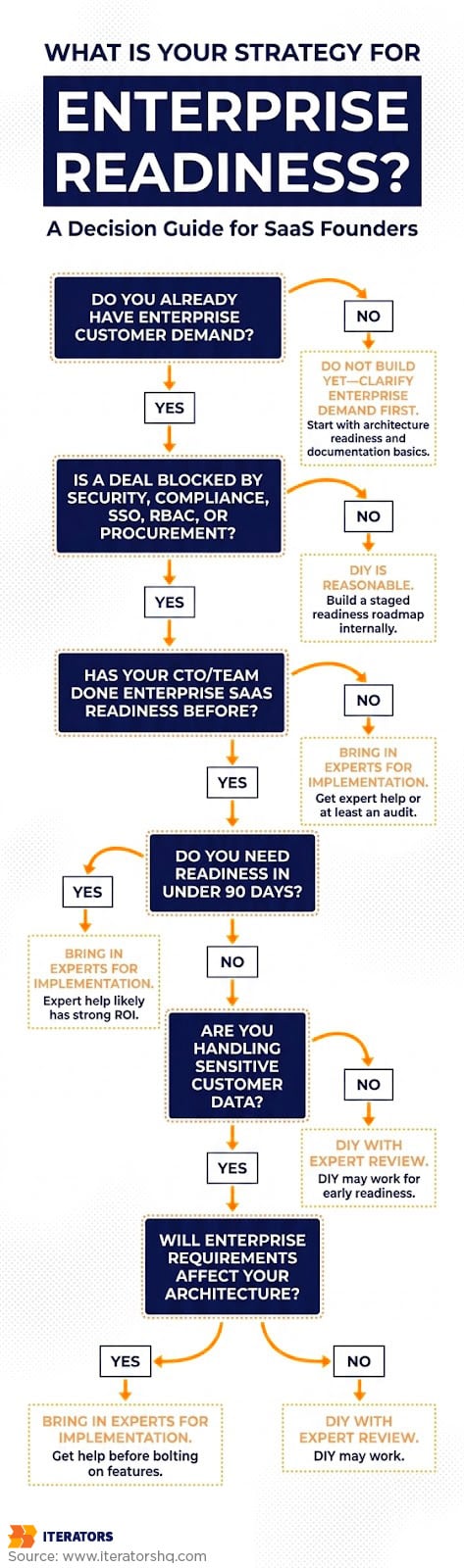
At some point, founders ask: “Couldn’t our internal team just do this?” Sometimes, yes. But the better question: “What does it cost if they do?”
Expert help has the strongest ROI when a large enterprise deal is blocked, your internal team lacks enterprise SaaS experience, security requirements are unclear, you need readiness fast, features affect core architecture, or the roadmap is already under pressure.
The value of an experienced technical partner isn’t that they “know the checklist.” It’s that they know which items are architectural, which are procedural, which are buyer-facing, and which become expensive if you build them wrong.
When Expert Help Delivers 10x ROI
If a $250K ACV enterprise deal is blocked by SSO, RBAC, audit logs, SOC 2 roadmap, security documentation, and vendor assessment answers—and your internal team needs four months while the buyer needs confidence in 45 days—the cost isn’t just engineering time. The cost is the deal, plus roadmap delay, plus team distraction, plus the risk of building it wrong under pressure.
This is where a technical partner can deliver ROI by converting enterprise requirements into scalable architecture, secure implementation, infrastructure-as-code, monitoring, QA, documentation, and buyer-facing evidence.
Iterators helps SaaS teams build the technical foundation behind enterprise readiness: scalable architecture, SSO, RBAC, audit logs, monitoring, infrastructure, QA, and documentation that support serious B2B sales.
A Practical Enterprise Readiness Roadmap
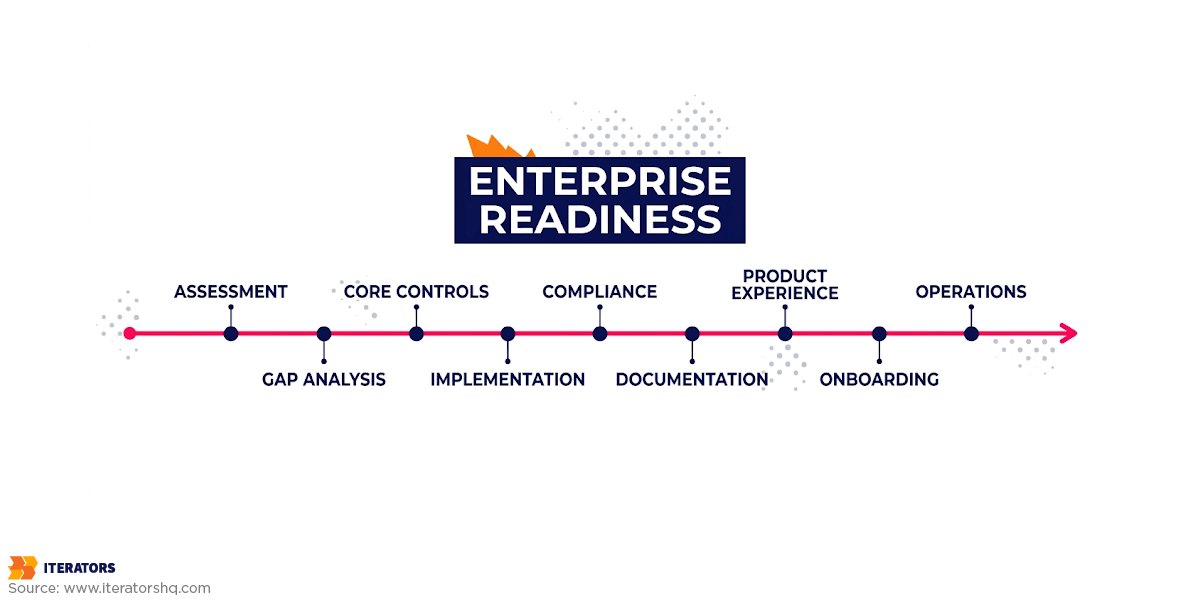
You don’t need to become “perfectly enterprise-ready” overnight. You need a staged roadmap.
Phase 1: Enterprise Readiness Assessment
Start with the gap. Assess architecture, data flows, tenant model, identity and access management, security controls, infrastructure, monitoring, documentation, compliance readiness, support process, and buyer requirements.
This phase answers: “What do we need to build, and what can wait?”
Phase 2: Core Enterprise Controls
Build the controls that unblock most enterprise conversations: SSO, RBAC, audit logs, admin controls, monitoring, backups, incident response basics, production access controls, secrets management, and basic data retention policies.
This is where architecture discipline matters. Rush access control and you’ll rebuild it. Rush audit logs and you’ll patch them three times.
Phase 3: Procurement and Compliance Support
Make your readiness visible to buyers. Build SOC 2 roadmap, security documentation, policies, evidence collection process, architecture diagrams, data flow diagrams, subprocessor list, customer-facing security materials, and vendor assessment response library.
When a buyer asks, you should have answers that pass review.
Phase 4: Enterprise-Grade Product Experience
Improve the enterprise customer experience. Add usage analytics, enterprise onboarding flows, SLAs, advanced support, custom integrations, reporting, admin dashboards, and better documentation.
This is where enterprise readiness becomes a growth engine, not just a defensive requirement. Enterprise buyers want proof of value through seat utilization, feature adoption, workflow completion, and ROI metrics.
Phase 5: Long-Term Enterprise Operations
Enterprise readiness is never finished. Long-term operations include continuous monitoring, security reviews, access reviews, compliance updates, roadmap governance, incident drills, documentation updates, enterprise customer success workflows, and audit evidence maintenance.
How to Know You’re Enterprise-Ready Enough
Enterprise-ready isn’t absolute. You don’t need every enterprise feature on day one. You need enough trust to pass the next buyer stage.
Instead of “Are we enterprise-ready?” ask: “Are we enterprise-ready enough for the next buyer we’re trying to close?”
Rate your maturity across security controls, identity and access, compliance readiness, monitoring, data protection, documentation, infrastructure scalability, support process, admin UX, and enterprise onboarding. Scores below 20 mean you’re too early for serious enterprise sales. Scores above 35 indicate readiness for enterprise conversations.
Final Take: DIY Enterprise Readiness Is Possible, But Rarely Cheap
DIY enterprise readiness can work if your team has enterprise SaaS experience, your architecture is already close, your documentation discipline is strong, and you have time before a deal depends on it.
But DIY is rarely cheap. The hidden cost is usually opportunity cost. Your best engineers get pulled from the roadmap. Compliance becomes a side project. Sales commits faster than engineering can safely build. RBAC becomes a patchwork. Audit logs become debug logs with reformatting.
Most SaaS startups don’t lose enterprise deals because their core product is weak. They lose them because enterprise requirements were treated as nice-to-haves. By the time a buyer asks for audit logs, RBAC, SSO, vendor documentation, and SOC 2 evidence, it’s often too late to retrofit cleanly.
Enterprise readiness is the ability to prove to a cautious buyer that your product, team, and processes won’t create risk for them.
The best time to address it is before procurement exposes the gaps. The second-best time is now—but with a clear understanding of what breaks when you build it wrong.
What’s Still Unresolved
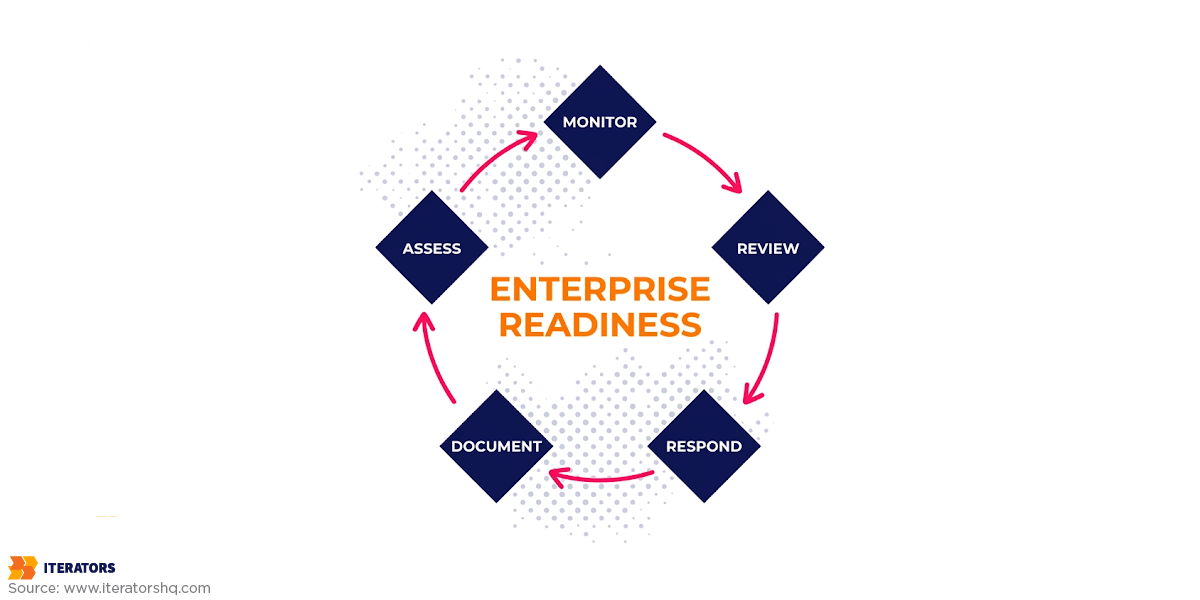
Three constraints don’t go away:
- Enterprise requirements will always outpace SMB architecture. You can’t predict every org structure, every IdP configuration, every compliance variant a buyer will require. The question is whether your architecture can absorb new requirements without structural rewrites.
- Compliance is never “done.” SOC 2 Type II is annual. Security questionnaires evolve. New regulations appear. Enterprise readiness is operational hygiene, not a launch milestone.
- The opportunity cost trade-off remains load-bearing. Every hour spent retrofitting enterprise features is an hour not spent on differentiation. The decision isn’t “DIY or not”—it’s “what’s the cheapest path to unblocking the next $500K in ARR without breaking the roadmap?”
FAQ: DIY Enterprise Readiness
What is DIY enterprise readiness?
DIY enterprise readiness means preparing your SaaS product for enterprise customers using your internal team. It includes security controls, SSO, RBAC, audit logs, compliance preparation, monitoring, documentation, and enterprise onboarding workflows.
Can a startup handle enterprise readiness internally?
Yes, if the team has enterprise SaaS experience, time, and architectural maturity. If a large deal is blocked by compliance, security, or procurement, outside help often reduces risk and speeds delivery.
What do enterprise buyers expect from SaaS vendors?
Enterprise buyers expect SSO, role-based access control, audit logs, security documentation, data protection policies, monitoring, incident response, uptime expectations, support processes, and often SOC 2 compliance or a documented roadmap.
Is SOC 2 required for enterprise SaaS sales?
Not always, but many enterprise buyers expect SOC 2 or a clear SOC 2 roadmap. Even when not mandatory, SOC 2 readiness reduces friction during vendor assessment.
How much does enterprise readiness cost?
Cost depends on product maturity, architecture, compliance needs, and buyer requirements. Costs include engineering time, infrastructure, security tooling, documentation, QA, audits, and opportunity cost from delaying the main product roadmap.
When should a SaaS startup get expert help for enterprise readiness?
Expert help is most valuable when an enterprise deal is blocked, the team lacks prior experience, requirements affect core architecture, sensitive data is involved, or procurement deadlines are tight.
What is the biggest enterprise readiness mistake SaaS founders make?
Treating enterprise requirements as add-ons. Features like SSO, RBAC, audit logs, monitoring, and compliance evidence often require architectural decisions, not last-minute patches.
How do I know if my SaaS product is enterprise-ready?
Your product is enterprise-ready enough when it can satisfy buyer security reviews, support enterprise identity and access needs, provide auditability, protect customer data, document operational processes, and scale reliably under customer-specific requirements.