
Enterprise vendor assessments are designed to find risk, not evaluate product quality. When a procurement team sends you a 400-row security questionnaire, they’re not evaluating your roadmap or your demo. They’re checking whether your enterprise ready SaaS infrastructure can answer questions your sales team may not know to ask.
Those questions look like this:
“Can you share your SOC 2 Type II report?”
“Do you support SAML SSO with SCIM provisioning?”
“Can your audit logs be exported to our SIEM with seven-year retention?”
If your answers are “it’s on the roadmap,” “we support Google login,” and “our logs live in three places” — the assessment is effectively over. That’s the enterprise readiness gap, and it doesn’t close by shipping faster.
Enterprise Infrastructure Scorecard
Are You Actually Enterprise Ready?
Procurement isn’t evaluating your product roadmap—they’re looking for risk. Toggle your current capabilities to see your readiness score and the revenue at stake.
Security & Compliance
Integrations Layer
Operations & Reliability
Architecture & Data
Score
Per Year
Annually
What You Promised vs. What Enterprise Ready SaaS Actually Requires
There’s a specific sentence that creates problems after Series A:
“We’re ready to move upmarket.”
Enterprise readiness isn’t a positioning decision. It’s the capacity to survive technical, legal, security, and compliance evaluation from buyers whose job is to treat you as a risk until you demonstrate otherwise.
The Series A Pitch Deck Fantasy
Most pitch decks make enterprise expansion look sequential:
- Win SMBs
- Move into mid-market
- Add enterprise features
- Close Fortune 500 logos
The architectural assumptions underneath:
- “We can add enterprise features later”
- “Our architecture is scalable”
- “We just need SSO”
- “SOC 2 is mostly paperwork”
- “Enterprise clients will wait while we build what they need”
These assumptions are understandable in a fundraising context. They’re wrong in ways that don’t surface until procurement.
The Technical Reality Check
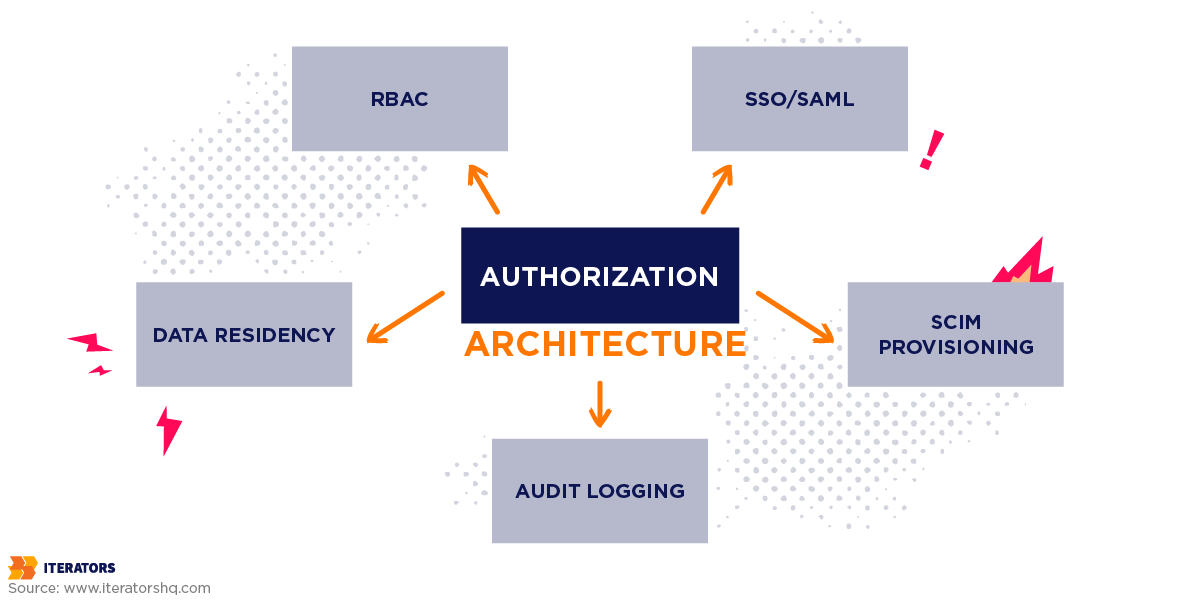
Enterprise requirements aren’t features. They’re architectural commitments.
Take role-based access control. A startup may implement RBAC as Admin and User. An enterprise deployment means:
- Global admin
- Country admin
- Division admin
- Department manager
- Team lead
- Billing admin
- Security auditor
- Read-only reviewer
- External contractor
- Temporary user
- Custom roles created by their IT team
And those permissions must propagate across every view, every API endpoint, every data export, every webhook, and every admin action.
That’s not a feature toggle. That’s architecture.
SMB buyers ask:
- Does this solve my problem?
- Can my team use it?
- Is the price reasonable?
Enterprise buyers ask:
- Can this vendor expose us to regulatory risk?
- Can this vendor survive an outage?
- Can this vendor integrate with our identity provider?
- Can we offboard 4,000 employees immediately?
- Can we audit every sensitive action?
Different evaluation criteria. Different architecture requirements.
Your product may be good. Your infrastructure may not yet be trusted. In enterprise sales, trust is the product before your product gets evaluated.
Why the Enterprise Ready SaaS Gap Is Getting Worse
Three things are compressing the gap between what founders assume and what enterprises require.
First, enterprise security teams now treat vendor risk as a structural concern, not a procurement formality. Third-party incidents have been expensive enough that security review has moved earlier in the buying cycle.
Second, enterprise software portfolios are already large. Many CIOs are consolidating vendors rather than adding another early-stage company. You’re not just competing against alternatives — you’re competing against “we don’t add vendors.”
Third, compliance standards keep rising. SOC 2, GDPR, SAML, SCIM, audit logs, and data residency requirements aren’t “enterprise extras.” They’re procurement filters. The difference between a buyer who asks for your SOC 2 report and one who doesn’t is usually the difference between a regulated and an unregulated industry — and you’re increasingly selling into regulated ones.
The architecture you built for SMB doesn’t fail loudly. It fails quietly, in a vendor assessment spreadsheet.
What Enterprise Vendor Assessments Actually Evaluate

Enterprise vendor assessments aren’t designed to appreciate your hustle. They’re designed to find risk.
A typical assessment covers security policies, access control, authentication, encryption, data residency, incident response, business continuity, disaster recovery, and compliance certifications. Completing one thoroughly takes significant engineering and legal time. Multiply that across several active enterprise prospects and vendor assessment responses start consuming senior engineering cycles.
Here are the 12 requirements that appear consistently.
Security: The Table Stakes
1. SOC 2 Compliance
SOC 2 evaluates controls related to security, availability, processing integrity, confidentiality, and privacy based on AICPA Trust Services Criteria.
The distinction that matters:
- SOC 2 Type I evaluates whether controls are designed properly at a point in time
- SOC 2 Type II evaluates whether controls operate effectively over 6–12 months
That observation period matters. You can’t buy your way around time. “We’ll get SOC 2 next month” usually means the speaker doesn’t understand SOC 2.
First-year certification typically costs tens of thousands to six figures depending on scope. More detail in our guide on what SOC 2 actually requires.
2. Role-Based Access Control
Enterprise RBAC isn’t “admin/user.” It’s permission architecture. Enterprise customers need to mirror their organizational structure inside your product.
A functional RBAC system has to answer:
- Who can invite users?
- Who can export data?
- Who can edit billing?
- Who can see departmental reports?
- Who can access sensitive user fields?
RBAC touches everything: frontend views, backend authorization, API endpoints, admin panels, exports, reports, audit logs, and webhooks.
If permissions are scattered across conditionals in the codebase, retrofitting RBAC is expensive surgery.
3. Audit Logging
Enterprise customers want to know who did what, when, from where, and what changed. Audit logging typically captures:
- Login attempts and failures
- MFA changes
- Role changes
- User invitations and removals
- Data exports
- Admin actions
- Integration changes
- API key creation and revocation
These logs must be immutable, timestamped, searchable, exportable, and retained for years.
This is where many startups get exposed. They have application logs that help developers debug. That’s not the same as audit logs that help enterprises prove accountability. Enterprise security teams know the difference.
4. Data Residency and Data Sovereignty
Data residency means customer data must remain in a specific geographic region. This matters for GDPR, sector regulations, government contracts, and internal enterprise policies.
That requires:
- Multi-region infrastructure
- Regional databases
- Region-aware storage
- Regional backups
- Data processing boundaries
If your product runs in one AWS region because that’s where it started, data residency isn’t a configuration setting. It’s an infrastructure redesign.
Integration: The Hidden Complexity
Enterprise ready SaaS must fit into an existing ecosystem. If your product adds another isolated login and disconnected data silo, IT will object before users ever touch it.
5. SSO Integration
Single Sign-On is typically the first request. Enterprise customers expect support for:
- SAML 2.0
- OpenID Connect
- Okta
- Microsoft Entra ID / Azure AD
- Google Workspace
- OneLogin
SSO sounds contained until you realize it touches your entire authentication model. You need identity provider configuration, metadata exchange, tenant-level settings, domain verification, just-in-time provisioning, account linking, and error handling.
“We have Google login” doesn’t count.
6. SCIM Provisioning
SSO handles authentication. SCIM handles lifecycle management — provisioning users from a directory and deprovisioning them when they leave.
When an employee exits a 10,000-person company, their access needs to disappear from every vendor automatically. Manual offboarding doesn’t scale.
Required:
- Automatic user provisioning
- Automatic deprovisioning
- Group syncing
- Role mapping
- Directory integration
7. API and Webhook Infrastructure
Enterprise customers want your SaaS to connect with the rest of their stack. Your API can’t be an undocumented side door.
Required:
- RESTful or GraphQL APIs
- Authentication and authorization
- Rate limiting
- Versioning
- Pagination
- Developer documentation
- Sandbox environments
- Webhook retries
- Webhook signing
If your webhook fires twice, their downstream system may duplicate records. If it doesn’t fire, their automation fails silently.
8. Data Import and Export
Enterprise onboarding often starts with bulk import. Enterprise renewal often depends on reporting.
Required:
- Bulk imports with validation
- Scheduled exports
- CSV, JSON, and BI-friendly formats
- Customer-controlled exports
- Data deletion workflows
Data portability reduces vendor lock-in anxiety. Enterprise buyers commit more easily to a vendor they can leave cleanly.
Operations: The Scalability Test
Enterprise customers don’t just buy software. They buy continuity.
9. Service Level Agreements
An SLA is a promise with consequences. Enterprise SLA requirements typically include:
- 99.9% uptime or higher
- Defined support response times
- Incident escalation paths
- Maintenance window policies
- Financial penalties
- Root cause analysis after incidents
The dangerous part isn’t signing the SLA. It’s signing one your infrastructure can’t actually support.
If you promise 99.9% uptime, you need:
- Redundant infrastructure
- Automated monitoring
- Alerting
- Incident response procedures
- On-call coverage
- Failover mechanisms
- Tested backups
The SLA should reflect operational capability, not sales optimism. More in our SLA guide.
10. Disaster Recovery
“We have backups” isn’t a disaster recovery plan. The gap between having backups and knowing the restore time, who executes it, and when it was last verified — that gap is exactly what procurement is looking for.
Enterprise customers will ask:
- What’s your Recovery Time Objective?
- What’s your Recovery Point Objective?
- When was your last restore test?
- How often do you run disaster recovery drills?
Recovery procedures need to be documented and tested. Not planned. Tested.
11. Performance and Scalability
Your product working for 100 users doesn’t demonstrate it will work for 10,000. Enterprise load is different in kind, not just quantity.
You may need to handle:
- Large datasets
- Bulk operations
- Concurrent users
- Complex permission checks
- Heavy reporting queries
- API bursts
Multi-tenant architecture creates an additional constraint: you need to prevent one tenant from degrading performance for another. The OWASP Multi-Tenant Security guide covers the security considerations.
Enterprise scalability isn’t “can the server handle it.” It’s whether the database, permissions, reports, exports, support, onboarding, and cost structure handle it together.
12. Monitoring and Analytics
Enterprise customers want two kinds of visibility.
Operational reliability:
- Uptime monitoring
- Error tracking
- Latency tracking
- Log aggregation
- Performance dashboards
Business value visibility:
- Seat utilization
- Feature adoption
- Department-level usage
- Exportable reports
Enterprise buyers need to justify renewal at budget review. If your champion can’t demonstrate adoption, the deal is at risk regardless of product quality.
Enterprise Ready SaaS Matrix: Expectations vs. Reality
| Requirement | What Founders Think | What Enterprises Require |
|---|---|---|
| SOC 2 compliance | “We’ll do it later” | Type II report with observation period |
| RBAC | Admin and user roles | Custom roles, org hierarchy, delegated admin |
| Audit logging | Application logs | Immutable user/action logs with retention |
| Data residency | Cloud provider handles it | Region-aware architecture and storage |
| SSO | Google login | SAML/OIDC with Okta, Azure AD |
| SCIM | Manual user invites | Automated provisioning/deprovisioning |
| APIs | Some endpoints | Versioned, documented, rate-limited APIs |
| SLAs | “We’re reliable” | Contractual uptime with penalties |
| Disaster recovery | Backups exist | Tested RTO/RPO and recovery drills |
This is where founders often realize they didn’t build bad software. They built software for a different buyer.
Why “We’ll Build It Later” Destroys Deals
The Timeline Reality
Some enterprise requirements can be built in parallel. Others are sequential.
SOC 2 Type II requires operating history. You need evidence collected over months. You can’t compress six months of evidence into six weeks.
RBAC depends on your authorization architecture. Audit logging depends on identifying which actions are sensitive. SSO depends on tenant-aware authentication. Data residency depends on infrastructure architecture.
So when a prospect asks whether you can have this ready before procurement closes next month, the honest answer is often: not unless we started six months ago.
The Financial Impact
The costs of delayed enterprise readiness:
- Lost deals
- Longer sales cycles
- Emergency engineering work
- Roadmap disruption
- Sales team frustration
- Investor confidence erosion
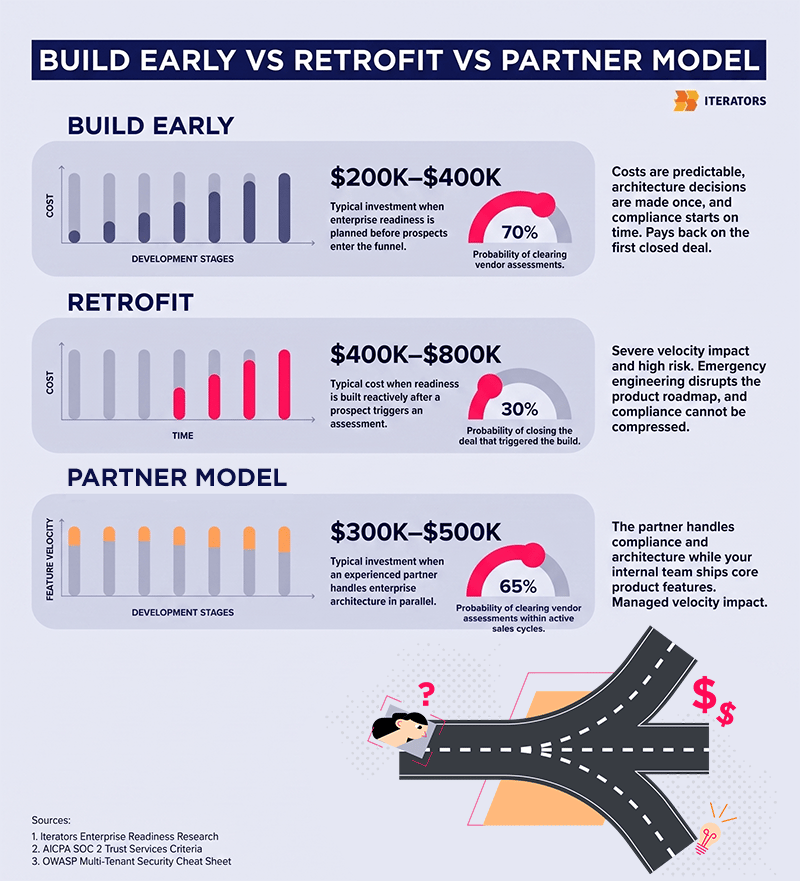
One enterprise deal can represent $250K, $500K, or $1M+ in annual contract value. A focused enterprise readiness effort typically costs $250K–$400K. The investment can pay back on a single deal. The problem is timing — if you invest before a prospect appears, it feels expensive; if you invest after, it may be too late for that deal.
The Architectural Rework Problem
Enterprise features cost significantly more to retrofit when the original architecture assumed:
- Small teams
- Simple roles
- Single region
- Manual onboarding
- Basic auth
- No tenant isolation
This produces the rewrite vs. refactor dilemma. Neither path is cheap. This is why enterprise readiness needs to be part of your architecture strategy before the first serious enterprise sales push.
The Competitive Problem
Your competitor may not have a better product. They may simply have better enterprise readiness.
They have the SOC 2 report. They have SSO. They have audit logs. They have answers for data residency. They have security documentation ready.
So procurement picks them. Not because users preferred them. Because they cleared the security review without complications.
Enterprise sales isn’t always a product contest. Sometimes it’s airport security. The winner is the vendor that gets through without setting off alarms.
Enterprise Ready SaaS Assessment: Score Your Current State
This scorecard reflects the requirements that appear consistently in enterprise vendor assessments. Score yourself honestly — an inflated score costs nothing today and costs a deal later.
Security and Compliance: 25 Points
- SOC 2 Type II certified: 10 points
- Comprehensive audit logging: 5 points
- RBAC with custom roles: 5 points
- Encryption at rest and in transit: 3 points
- Documented security policies: 2 points
Integration Capabilities: 20 Points
- SSO with multiple providers: 8 points
- RESTful API with documentation: 6 points
- Webhook infrastructure: 3 points
- Bulk import/export: 3 points
Operational Infrastructure: 25 Points
- 99.9% uptime SLA capability: 10 points
- Tested disaster recovery plan: 8 points
- Load tested for enterprise scale: 4 points
- Multi-region deployment capability: 3 points
User Management: 20 Points
- Bulk user provisioning: 6 points
- Advanced permission management: 6 points
- Self-service admin capabilities: 4 points
- Usage analytics dashboard: 4 points
Documentation and Support: 10 Points
- Technical documentation: 4 points
- Admin training materials: 3 points
- Support SLA capability: 3 points
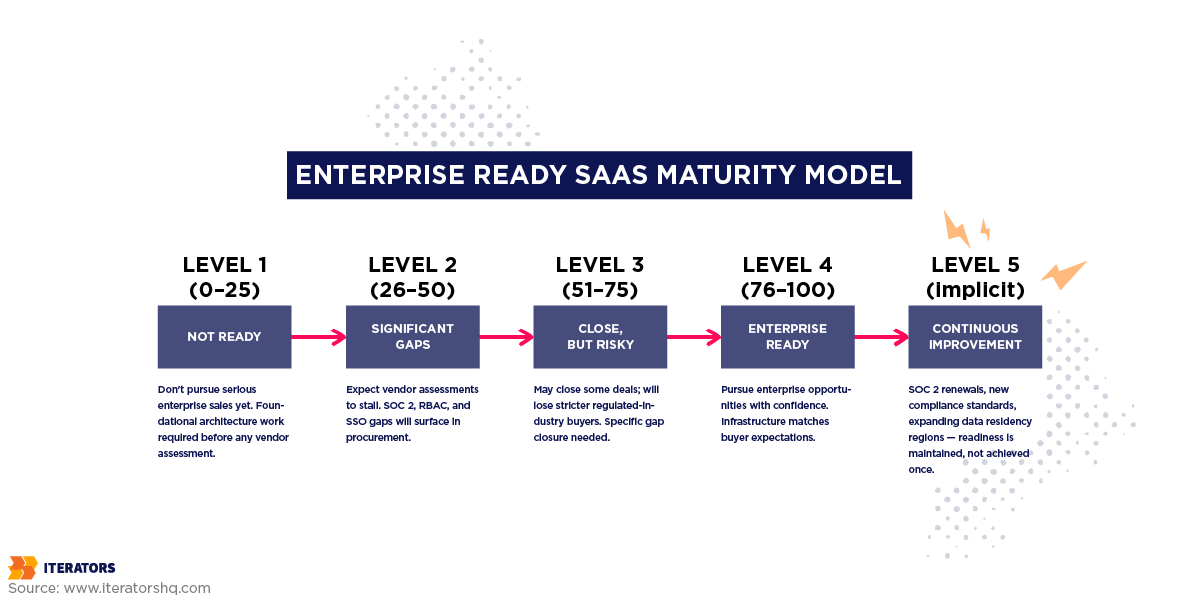
How to Interpret Your Score
| Score | Status | Meaning |
|---|---|---|
| 0–25 | Not ready | Don’t pursue serious enterprise sales yet |
| 26–50 | Significant gaps | Expect vendor assessments to stall |
| 51–75 | Close, but risky | You may close some deals, lose stricter buyers |
| 76–100 | Enterprise ready SaaS | Pursue enterprise opportunities with confidence |
A weak score doesn’t mean the product is bad. It means the infrastructure was built for a different stage. That’s fixable — but only if you stop treating it as a future problem.
The Enterprise Readiness Sprint: Building Enterprise Ready SaaS Without Killing Velocity
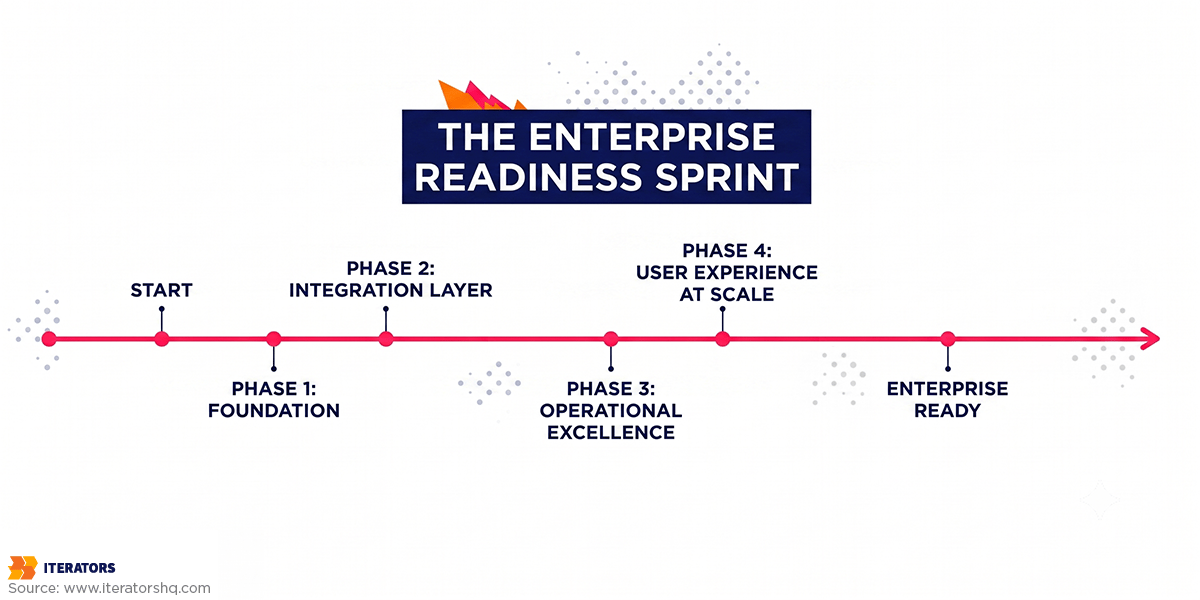
Throwing enterprise readiness tickets into the product backlog is not a plan. That’s a queue that will lose to feature work every sprint.
The better approach: focused workstreams that move in parallel where dependencies allow.
Phase 1: Foundation (Weeks 1–4)
Goal: Establish security and compliance baseline.
Critical work:
- SOC 2 gap analysis
- Security policy review
- Access control audit
- Audit logging architecture
- RBAC architecture
- Data classification
Why this comes first: SOC 2 has the longest lead time of anything in the list. Logging and RBAC affect everything downstream. Security architecture must precede integrations.
Phase 2: Integration Layer (Weeks 5–8)
Goal: Build integration capabilities enterprises expect.
Critical work:
- SAML/OIDC SSO
- SCIM provisioning
- API documentation
- API versioning
- Webhook infrastructure
- Bulk imports/exports
Why this comes second: SSO depends on the auth architecture from Phase 1. SCIM depends on user models. These capabilities unblock sales engineering on active deals.
Phase 3: Operational Excellence (Weeks 9–12)
Goal: Make infrastructure SLA-capable.
Critical work:
- Load testing
- Performance tuning
- Monitoring and alerting
- Backup strategy
- Restore testing
- Disaster recovery runbooks
- Multi-region planning
Why this comes third: You need a stable foundation before load testing reveals anything useful. SLA commitments must match operational capability before they go into a contract.
Phase 4: User Experience at Scale (Weeks 13–16)
Goal: Make enterprise administration usable.
Critical work:
- Advanced user management
- Bulk provisioning UX
- Group management
- Usage analytics
- Adoption dashboards
- Admin documentation
- Training materials
Why this comes last: It depends on RBAC, SCIM, and analytics foundations from the prior phases. It directly affects what you can demonstrate in enterprise demos and what admins can do on day one.
Enterprise Ready SaaS Timeline Comparison
| Approach | Timeline | Cost Range | Risk | Velocity Impact |
|---|---|---|---|---|
| Build early | 3–6 months | $200K–$400K | Medium | Controlled |
| Retrofit after prospect appears | 12–18 months | $400K–$800K | High | Severe |
| Partner model | 4–8 months | $300K–$500K | Medium-low | Managed |
| Ignore and hope | Unknown | Very expensive | Extremely high | Chaotic |
Hope isn’t a strategy. It’s just technical debt wearing sunglasses.
Real-World Examples from Iterators
Imperative — HR Tech Platform
Imperative is an HR tech platform built around purpose-oriented peer coaching. Enterprise HR tech carries demanding requirements: complex organizational structures, secure user management, employee data protection, and compliance coverage.
Iterators provided full tech ownership including:
- Scala and Play framework development
- SOC 2 Trust Services Criteria embedded into the platform
- Custom controls aligned with Imperative’s operational needs
The platform supported enterprise customers and helped Imperative generate revenue exceeding $7 million. Full engagement details here.
Nexus — Fintech Platform
Nexus was building a compliant, auditable platform bridging traditional banking and crypto. Iterators delivered:
- Real-time matching engine
- KYC/KYB integration
- Banking integrations
- Staging-ready infrastructure
- Documentation and coordination
Fintech is enterprise readiness on hard mode. Regulation is architecture. Security is the product. Auditability is non-negotiable from day one.
When to Build In-House vs. Bring in Experts
Build In-House If:
- You have engineers with enterprise architecture experience
- Your team has built SOC 2-ready systems before
- You can absorb a 12–18 month timeline
- Your product roadmap can tolerate the parallel load
Hidden costs: learning curve, architectural decisions that need to be unwound, compliance delays, lost product velocity while senior engineers context-switch.
Partner with Experts If:
- You need enterprise readiness in 3–6 months
- Your team hasn’t built for enterprise compliance before
- You can’t slow core product development
- You’re already in enterprise sales conversations
The advantage is speed, focus, and not paying for the learning curve.
The Hybrid Model
For many teams, the best path: the partner handles architecture assessment, SOC 2 readiness, audit logging, RBAC, SSO/SCIM, and infrastructure hardening; the internal team handles core product features and customer-specific workflows.
This preserves product velocity while upgrading technical maturity. The knowledge transfer from the partner engagement ends up in your team, not just your codebase.
Common Enterprise Ready SaaS Mistakes That Cost Deals
Mistake 1: Underestimating SOC 2 Timeline
By the time customers ask, you’re already late. SOC 2 Type II requires operational evidence over time.
The fix: Start SOC 2 readiness before the first serious enterprise sales push.
Mistake 2: Bolting Enterprise Features onto SMB Architecture
SSO touches authentication. RBAC touches authorization. Audit logs touch every sensitive action. None of this sits cleanly in an “enterprise features” module.
The fix: Run an architecture review before implementing enterprise features.
Mistake 3: Ignoring Data Residency
Your cloud provider gives you tools. You’re responsible for how you use them. Data residency requires architectural decisions about storage, processing, backups, and logs — not a checkbox.
The fix: Design for regional isolation early if enterprise or regulated markets are on your roadmap.
Mistake 4: Treating Disaster Recovery as Backups
The question isn’t whether backups exist. It’s: can you restore them, how long does it take, who executes it, and when was it last verified?
The fix: Define RTO and RPO. Test restores. Document procedures. Run drills.
Mistake 5: Weak Documentation
Enterprise buyers don’t want tribal knowledge locked in your lead engineer’s head. You need security documentation, admin guides, API docs, architecture diagrams, DR runbooks, and incident response plans.
The fix: Document as you build. Imperfect documentation that exists beats perfect documentation that doesn’t.
The ROI of Enterprise Ready SaaS
Enterprise readiness is expensive. Not having it is also expensive.
Deals closed vs. lost. If enterprise readiness closes one $500K annual contract that would otherwise fail procurement, the investment pays for itself on that deal.
Sales cycle compression. Vendor assessment time dropping from six months to six weeks changes cash flow and forecast accuracy.
Higher contract value. Enterprise buyers pay more for security, compliance, integrations, admin control, and reliability. These aren’t cost centers — they’re pricing inputs.
Reduced engineering chaos. Without readiness, every enterprise prospect generates emergency tickets. With readiness, sales can reuse existing documentation and implementation patterns. That frees senior engineering time for product work.
Investor confidence. Your Series A pitch deck promised enterprise clients. Enterprise readiness demonstrates the technical execution can match the business narrative.
From Promises to Infrastructure
There are three positions you can be in when a serious enterprise prospect enters the funnel:
- Your infrastructure already answers the vendor assessment questions — the deal moves at the buyer’s pace
- Your infrastructure has gaps you can close in parallel with the sales process — the deal moves more slowly and may stall at procurement
- Your infrastructure requires foundational work before the deal can close — you’re answering “it’s on the roadmap” to questions that have hard deadlines
The third position isn’t necessarily fatal, but it usually means the deal closes on the next cycle, not this one.
At Iterators, we work through this as an integrated workstream — engineering, DevOps, UX, QA, and enterprise architecture in one focused effort, not a separate track waiting on the product team.
What doesn’t go away: SOC 2 Type II requires an observation period. RBAC retrofitted onto the wrong authorization model costs more to fix than it would have to build correctly. Data residency designed in after the fact is infrastructure surgery under load. Each of these has a timeline floor that no amount of engineering capacity can compress. The earlier you start the clock, the more options you have when the procurement deadline appears.
Frequently Asked Questions
How long does it take to become enterprise ready SaaS?
In-house, enterprise readiness typically takes 12–18 months starting from MVP architecture. With an experienced partner, meaningful progress compresses to 3–6 months. SOC 2 Type II still requires an observation period that can’t be shortened regardless of resources assigned.
What’s the minimum investment required?
A focused enterprise readiness effort with an expert partner typically falls in the $200K–$400K range. Building fully in-house tends toward $400K–$800K or more, including senior engineering time, tooling, infrastructure, and audits. The relevant comparison is cost against what you lose if the first major enterprise deal fails procurement.
Can we add enterprise features when customers ask?
Sometimes, for simple surface-level requests. Core requirements — SSO, SCIM, RBAC, audit logging, data residency — affect architecture. Retrofitting them is slower, riskier, and more expensive than building the right foundation first.
Do we need SOC 2 before pursuing enterprise deals?
For many enterprise buyers, especially in regulated industries, SOC 2 Type II is expected rather than negotiable. You can begin conversations while the certification is in progress, but you need a credible timeline with an actual target date — not a roadmap item.
What happens if we fail a vendor assessment?
Best case, the deal stalls while you close the gaps. Worst case, the buyer moves to a competitor and the security team at that organization remembers the outcome. Failed assessments extend sales cycles and affect how that account responds when you come back.
How do we maintain product velocity while building enterprise readiness?
Parallel tracks. Enterprise readiness work shouldn’t share a backlog with product features. Dedicated resources handle security, infrastructure, and compliance while the product team serves existing customers. The failure mode is treating enterprise readiness as a series of tickets rather than a separate workstream with its own staffing.
Should we build in-house or partner with experts?
Build in-house if you have enterprise architecture experience on staff, runway for a longer timeline, and capacity to absorb the parallel load without disrupting product work. Partner if you need speed and proven patterns. A hybrid — partner on foundation and architecture, in-house on product features — works well when knowledge transfer is explicit.
What’s the first step?
Score your current state using the assessment above. Identify the critical-path items — SOC 2 readiness, audit logging, RBAC architecture, SSO/SCIM, and disaster recovery — and determine which your current architecture can support cleanly versus which will require structural work. That answer determines whether you’re looking at a sprint or a rework.