

Mobile performance observability is broken for most engineering teams—and the irony is they have more data than ever to prove it. You’ve got dashboards. Lots of them. You’re tracking metrics. Mountains of them. Your monitoring tools are sophisticated, expensive, and generate alerts 24/7. Yet when your mobile app starts hemorrhaging users, you’re still playing detective with incomplete clues, chasing symptoms instead of causes, and watching your engineering team drown in noise while critical issues slip through unnoticed.
Welcome to the mobile performance observability crisis of 2025—where more data creates less clarity, and most teams are collecting tons of telemetry but can’t turn it into engineering decisions.
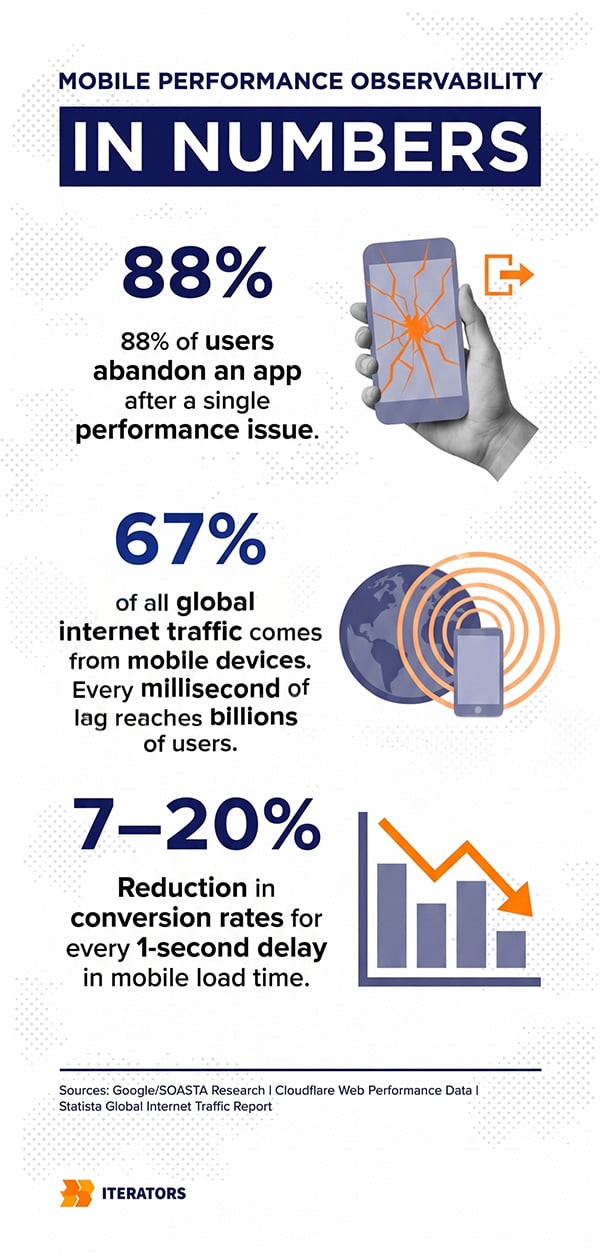
The brutal truth? 88% of users will abandon your app after encountering performance issues. And with mobile traffic accounting for nearly 67% of all global internet activity, that’s not just a technical problem—it’s an existential business threat.
But here’s what’s different about this guide: We’re not going to tell you to “monitor your app performance” or recommend another dashboard tool. Instead, we’ll show you how to build observability systems that surface real issues, guide engineering prioritization, and turn your telemetry into a strategic advantage.
Free Consultation
Turn Your Telemetry Into
Decisions, Not More Dashboards
Our engineers will audit your mobile observability setup, identify the signals that actually correlate with user retention and revenue, and build you a system that surfaces real issues — before your users find them first.
Audit My Observability Stack →Why Most Mobile Performance Observability Dashboards Fail
Your mobile performance observability problem isn’t that you don’t have enough metrics—it’s that you have too many of the wrong ones.
Most mobile teams are drowning in what we call “vanity metrics”—numbers that look impressive in executive presentations but provide zero guidance for engineering decisions. Total app opens, daily active users, average session length—these metrics tell you that something is happening, but they can’t tell you why it’s happening or what you should do about it.
The fundamental issue is that traditional monitoring was designed for a world that no longer exists. Legacy monitoring systems answer the question “Is my mobile performance observability working?” with a simple yes or no based on predefined thresholds. But modern mobile applications don’t fail because of simple bugs—they fail because organizations lack the visibility to understand why failures occur in the first place.
The Monitoring vs. Observability Distinction
Let’s be precise about what we mean by mobile performance observability versus monitoring, because the confusion between these terms is costing engineering teams millions in productivity.
Monitoring is reactive. It tells you when something breaks based on rules you defined yesterday. It’s like having a smoke detector in your house—useful for known problems, but useless for anything you didn’t anticipate.
Observability is proactive. It lets you ask arbitrary questions about your system’s behavior without having to predict those questions in advance. It’s like having thermal imaging that shows you exactly where the heat is coming from, even if you’ve never seen that particular fire pattern before.
Here’s the critical distinction that most teams miss:
| Feature | Monitoring | Observability |
|---|---|---|
| Primary Goal | Symptom detection and health reporting | Root cause analysis and behavioral understanding |
| Operational Mode | Reactive: identifies issues after they occur | Proactive: addresses issues before user impact |
| Scope of Inquiry | Individual components and siloed metrics | Distributed systems and interrelated health |
| Complexity Focus | Static, well-understood networks | Dynamic, cloud-native deployments |
| Telemetry Use | Threshold-based alerting and logs | Correlation of traces, metrics, events, and logs |
| Decision Logic | Human-defined rules and patterns | AI-driven insights and machine learning |
When you monitor, you’re checking if your known failure modes are occurring. When you observe, you’re investigating why your system is behaving a certain way—including behaviors you never anticipated.
For mobile performance observability in highly distributed and unpredictable environments—device diversity, fluctuating network conditions, varied OS scheduling behaviors—this distinction isn’t academic.It’s the difference between understanding that your Android users in India are experiencing 8-second startup times while iOS users in the US see 2 seconds, and having no idea why your overall “average startup time” metric looks fine.
The Mobile Performance Observability Dashboard Paradox
Here’s the paradox: The more sophisticated your dashboards become, the less useful they often are.
We’ve seen engineering teams with dozens of Grafana dashboards, hundreds of tracked metrics, and thousands of log lines per second—yet when a critical production issue hits, they’re still manually SSH-ing into servers, grep-ing through logs, and piecing together a narrative from fragments.
Why? Because dashboards show you what you expected to measure, not what you need to know.
The best mobile performance observability systems don’t start with dashboards—they start with questions:
- Why did our ANR rate spike 300% for users on Android 13?
- Which specific API endpoint is causing these startup delays?
- Why are users in Brazil seeing 5x more network failures than users in Germany?
- What changed between our last release and this one that’s causing frame drops on the checkout screen?
If your mobile performance observability system can’t answer these questions without you spending hours correlating data across multiple tools, you don’t have observability—you have expensive data collection.
What Signals Actually Matter for Mobile Performance Observability
Not all metrics are created equal. In fact, most metrics that mobile teams track religiously are actively harmful because they create the illusion of visibility while obscuring real problems.
Let’s cut through the noise and focus on the signals that actually correlate with user retention, conversion rates, and revenue—the metrics that matter for business outcomes, not just engineering vanity.
Startup Time: The First Impression Metric
Your app’s startup time is the single most important mobile performance observability metric you can track. Period.
Why? Because it’s the first experience every user has with your app, every single time they open it. And humans are ruthless judges of first impressions.
Research shows that a delay of just one second in page load time results in a 7% to 20% reduction in conversion rates. For mobile apps, this effect is even more pronounced because users expect mobile experiences to be faster than desktop, not slower.
Yet the data shows mobile pages average 8.6 seconds to load—70.9% longer than the 2.5-second average for desktop pages. This performance gap directly contradicts user behavior, as mobile use now accounts for over 66% of online traffic.
What should you measure for startup time?
Cold Start Time: The time from app launch to first interactive frame when the app isn’t in memory. This is your worst-case scenario and the experience most users encounter.
Warm Start Time: The time when your app is already in memory but needs to recreate the activity. This should be significantly faster than cold start.
Hot Start Time: The time when your app is already running in the background. This should be nearly instantaneous.
The critical mistake teams make is tracking average startup time. Averages hide the pain. You need to track percentiles—specifically p50, p90, p95, and p99. Because if your p99 startup time is 12 seconds, that means 1% of your users are waiting 12 seconds every time they open your app. And those users? They’re gone.
Pro Tip: At Iterators, when we work on React Native development, we establish performance budgets during the design phase that influence architecture and dependency selection. If a library adds 500ms to your cold start time, you don’t use that library—no matter how cool its features are.
ANRs: The Silent User Killer
Application Not Responding (ANR) events are a critical mobile performance observability concern—silent, invisible in most analytics, and absolutely devastating to user retention.
An ANR occurs when your app’s main thread is blocked for more than 5 seconds on Android, as defined in Google’s official ANR documentation (or when your app becomes unresponsive on iOS, though the terminology differs). To the user, it looks like your app has frozen. The OS shows them a dialog: “App isn’t responding. Do you want to close it?”
That dialog is a conversion killer. Users who see it rarely come back.
Yet most mobile teams aren’t tracking ANRs systematically. They’re buried in crash reports, dismissed as “edge cases,” or blamed on “bad devices.” This is engineering malpractice.
What causes ANRs?
- Main thread blocking: Network calls, database operations, or complex computations on the UI thread
- Deadlocks: Two threads waiting on each other indefinitely
- Slow broadcast receivers: Android-specific issue where background operations take too long
- Memory pressure: Device running out of RAM and thrashing
The fix isn’t just “don’t block the main thread”—it’s building observability that shows you exactly which operations are blocking, which screens are affected, and which user cohorts are experiencing the problem.
Frame Drops: When Smooth Becomes Janky
Frame drops are the mobile performance observability challenge that users feel but can’t articulate. Your app might be functionally correct, but if scrolling feels janky or animations stutter, users perceive your entire app as low-quality.
The human eye can detect frame drops at 60 frames per second (fps). If your app consistently renders at 30fps, users will notice—and they’ll assume your app is broken, even if everything technically works.
What should you measure?
Jank percentage: The percentage of frames that take longer than 16.67ms to render (the threshold for 60fps)
Slow frames: Frames that take longer than 16.67ms but less than 700ms
Frozen frames: Frames that take longer than 700ms (these are catastrophic)
The tricky part with frame drops is that they’re highly context-dependent. A complex animation might legitimately take longer to render, while a simple scroll should be butter-smooth. You need to track frame performance per screen and per interaction type, not just as an app-wide average.
Real-world example: We worked with a client whose checkout screen was dropping 30% of frames during the payment flow. The average frame time looked fine (18ms), but the p95 was 45ms—meaning 5% of frames were dropping. Users were abandoning checkout because the payment button felt “unresponsive,” even though it was technically working. The fix? Moving image processing off the main thread. Conversion rate increased 12%.
Network Failures and Retry Storms
Network failures are inevitable in mobile development. Users will open your app in elevators, subway tunnels, and rural areas with spotty coverage. The question isn’t whether network failures will happen—it’s whether your app handles them gracefully or catastrophically.
Without proper mobile performance observability, the catastrophic pattern is the “retry storm”: Your app makes a network request, it times out, so it retries. We cover this in detail in our guide on designing mobile apps that survive traffic spikes. The retry times out, so it retries again. Soon you have dozens of concurrent requests hammering your backend, each one timing out and spawning more retries. Your backend falls over, your app becomes unusable, and users delete it.
What should you track?
Network error rate by type: Distinguish between timeouts, connection failures, and HTTP errors
Retry patterns: Are you seeing exponential backoff or linear retries?
Request latency distribution: p50, p90, p95, p99—because averages hide the pain
Backend correlation: Which API endpoints are causing the most failures?
The key insight here is that network performance isn’t just a client problem—it’s a distributed systems problem. You need to correlate mobile client telemetry with backend performance data to understand whether the issue is network conditions, client-side bugs, or backend capacity problems.
Background Task Latency and Battery Drain
Background tasks are the invisible mobile performance observability challenge that most teams miss entirely. Users don’t see them, but they feel their effects through battery drain, data usage, and mysterious slowdowns.
The worst part? Most mobile teams have no visibility into background task behavior because these operations happen when the app isn’t in the foreground.
What should you track?
Background CPU usage: How much processor time are your background tasks consuming?
Wake lock duration: How long are you keeping the device awake?
Network usage in background: Are you downloading data when the user isn’t actively using your app?
Battery attribution: Which of your background tasks are showing up in the OS battery usage screen?
The critical mistake is assuming background tasks are “free” because users can’t see them. They’re not free—they’re a tax on user trust. If your app shows up as a top battery drainer, users will uninstall it, regardless of how useful your features are.
Mobile Performance Observability: Signals That Matter vs. Vanity Metrics
Let’s make this concrete with a comparison table that shows the difference between actionable signals and vanity metrics:
| Vanity Metric | Why It’s Useless | Actionable Signal | Why It Matters |
|---|---|---|---|
| Total app opens | Doesn’t show user intent or satisfaction | Cold start time p95 | Directly impacts user frustration and abandonment |
| Daily active users (DAU) | Doesn’t distinguish between engaged and frustrated users | ANR rate per screen | Shows where users are experiencing freezes |
| Average session length | Can be inflated by users stuck on loading screens | Frame drop percentage per interaction | Reveals perceived quality issues |
| Total downloads | Vanity metric that ignores retention | Network error rate by endpoint | Identifies backend integration problems |
| App store rating | Lagging indicator, doesn’t guide engineering | Background battery usage | Prevents silent user churn |
The pattern here is clear: Vanity metrics tell you what happened. Actionable signals tell you why it happened and what to do about it.
How to Design Observability Pipelines That Surface Systemic Issues

Now that you know what to measure, let’s talk about how to build systems that turn those measurements into engineering decisions.
The goal of mobile performance observability isn’t to collect more data—it’s to build pipelines that automatically surface systemic issues and filter out noise. This requires a fundamentally different architecture than traditional monitoring systems.
Mobile Performance Observability Instrumentation Without Overhead
The first challenge in mobile performance observability is that capturing and shipping telemetry has real costs: battery drain, network usage, storage bloat, and CPU overhead.
You can’t just “log everything” on mobile like you might on a server. Every byte of telemetry you collect is a byte of battery life you’re stealing from your user.
The solution is selective instrumentation with smart sampling:
Critical paths: Always capture 100% of data for critical user flows—login, checkout, payment processing. These are your revenue-generating paths, and you need complete visibility.
High-volume, low-value events: Sample aggressively. Do you really need to track every scroll event? Sample at 1-5% and you’ll still have statistically significant data without killing battery life.
Error conditions: Always capture 100% of crashes, ANRs, and network failures. These are your highest-priority engineering issues.
Performance metrics: Use adaptive sampling that captures more data when performance degrades. If your p95 startup time suddenly spikes, increase your sampling rate to 100% until you’ve identified the cause.
The key is to think of sampling as a dial you can turn up or down based on what your app is experiencing. During normal operation, sample conservatively to protect battery life. During degraded performance or error conditions, sample aggressively to capture every detail you need to diagnose the problem.
Pro Tip: Firebase Analytics optimizes for battery life by batching data for approximately 60 minutes before upload. Tools like PostHog or Amplitude prioritize freshness with shorter upload intervals of 15-30 seconds. Choose your tradeoff based on your use case—but always prioritize battery life over data freshness for non-critical events.
Smart Sampling Strategies
Smart sampling is a core principle of mobile performance observability—it’s about preserving the shape of your data distribution while reducing noise.
The naive approach is uniform random sampling: capture 10% of all events. This works for high-volume events, but it completely breaks for rare but critical issues. If you have a bug that affects 0.1% of users, and you’re sampling at 10%, you’ll only capture it 0.01% of the time—essentially never.
The better approach is stratified sampling:
Sample by user cohort: Capture 100% of data for your VIP users or beta testers, and 1% for free users.
Sample by device type: Capture 100% for devices with known issues (e.g., Android 13 on Samsung Galaxy S21), and 10% for everything else.
Sample by session: Once you start sampling a user session, continue sampling that entire session. This preserves the ability to reconstruct user journeys.
Sample by error rate: If a user is experiencing errors, capture 100% of their data until the session ends.
This stratified approach gives you complete visibility into your most important users and your most problematic scenarios, while still reducing overall data volume by 90%+.
Building Signal vs. Noise Filters
The hardest part of mobile performance observability isn’t collecting data—it’s filtering out the noise so engineers can focus on signals that matter.
Here’s the brutal reality: Most alerts in most organizations are noise. They fire constantly, engineers learn to ignore them, and when a real issue occurs, nobody notices because they’re drowning in false positives.
The solution is context-aware alerting that understands the difference between “this is unusual” and “this is impacting users”:
User-impact-based alerting: Only alert when a performance degradation is affecting real users. If your p95 startup time increases by 500ms but only for 0.01% of users on a deprecated Android version, don’t alert—log it for investigation later.
Correlation-based alerting: Don’t alert on individual metrics in isolation. Alert when multiple signals correlate to indicate a systemic issue. For example: ANR rate up 50% + crash rate up 30% + network error rate up 20% = alert. Any one of those in isolation might be noise.
Release-aware alerting: Compare current performance against the previous release, not against a static baseline. If your new release increases startup time by 200ms, that’s a regression worth alerting on—even if your absolute startup time is still “acceptable.”
Time-of-day normalization: Don’t alert on metrics that naturally vary by time of day. If your backend latency is always higher during peak hours, normalize for that before alerting.
When you combine all four of these approaches together, you create a context-aware alerting system that thinks before it fires. It asks three questions simultaneously: is this a genuine regression compared to the previous release, is it affecting enough real users to matter, and are multiple signals correlated to confirm this is a systemic issue rather than random noise? Only when all three answers are yes does it trigger an alert.
This approach dramatically reduces alert fatigue while ensuring that real issues get immediate attention.
Correlating Mobile Client Telemetry with Backend Performance
One of the biggest blind spots in mobile performance observability is the failure to correlate client-side issues with backend problems.
Users don’t care whether their checkout failure was caused by a client bug, a backend timeout, or a database lock. They just know your app is broken. But as an engineer, you need to know exactly where the failure occurred to fix it.
Distributed Tracing Across the Stack
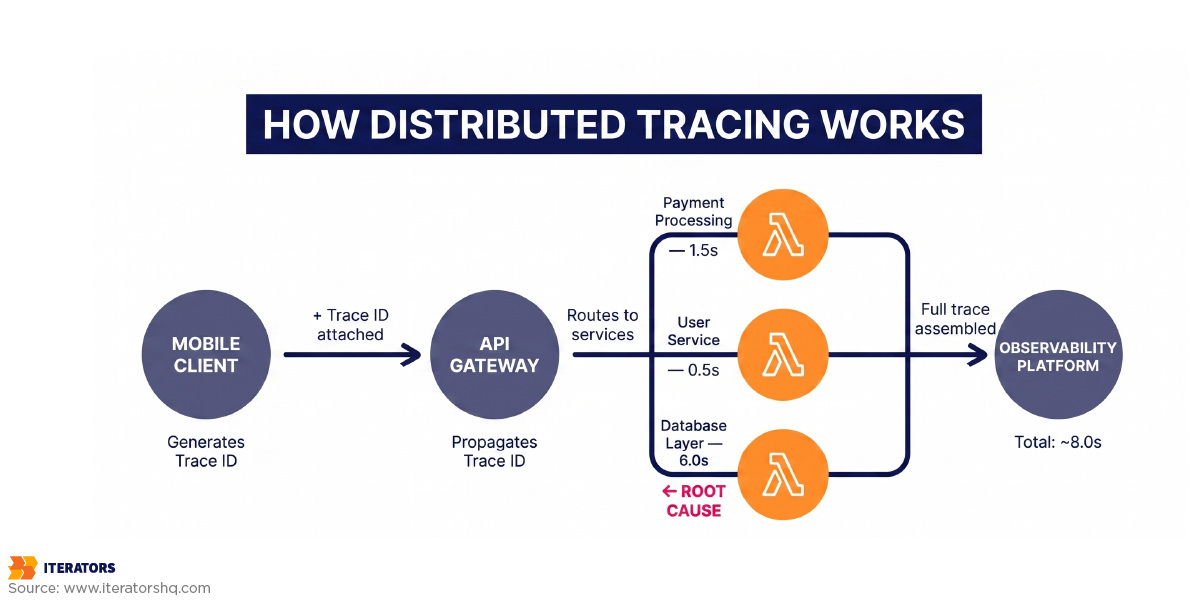
Distributed tracing is a foundational mobile performance observability practice of tracking a single request as it flows through multiple services, from the mobile client to the backend API to the database and back.
The key technology here is OpenTelemetry (OTel), which provides a vendor-agnostic standard for instrumenting your entire stack. By adopting OTel, you can avoid vendor lock-in and migrate between observability platforms as your needs evolve.
Here’s how distributed tracing works in practice:
- Mobile client initiates a request and generates a unique trace ID
- Trace ID propagates through every service the request touches
- Each service logs its portion of the request with the same trace ID
- Observability platform reconstructs the entire request path and shows you exactly where time was spent
This gives you the ability to answer questions like:
- “Why did this checkout request take 8 seconds?”
- Answer: 6 seconds in database query, 1.5 seconds in payment processing, 0.5 seconds in network latency
- “Why are users in Brazil seeing more errors than users in Germany?”
- Answer: Brazil traffic routes through a backend instance with 3x higher latency
Without distributed tracing, you’re blind to these cross-service dependencies. With it, you can pinpoint the exact bottleneck and route your engineering efforts accordingly.
When Mobile Performance Observability Reveals Backend Problems
Here’s a pattern mobile performance observability reveals constantly: A mobile team spends weeks optimizing their client-side code, reducing render times, caching aggressively—and users still complain about slow performance.
Why? Because the bottleneck isn’t the client—it’s the backend.
Real-world example: We worked with a fintech client whose mobile app was experiencing frequent ANRs during payment processing. The mobile team assumed it was a client-side threading issue and spent weeks refactoring their payment flow.
The actual problem? Their payment API was occasionally taking 15+ seconds to respond due to a database lock. The mobile client was correctly waiting for the response, but the backend was the bottleneck. By correlating mobile ANR events with backend API latency, we identified the real issue in 2 hours instead of 2 weeks.
The lesson: Always correlate mobile client errors with backend performance before assuming the problem is client-side.
Alerting Strategies That Detect Real User-Impacting Issues

Let’s talk about alert fatigue—one of the biggest enemies of effective mobile performance observability and engineering productivity.
The Mobile Performance Observability Alert Fatigue Problem
Here’s the pattern we see in almost every organization:
- Team sets up monitoring and creates alerts for everything that might go wrong
- Alerts fire constantly because thresholds are too sensitive
- Engineers learn to ignore alerts because 95% are false positives
- Real incident occurs, alert fires, nobody notices because they’re ignoring all alerts
- Users complain, leadership escalates, everyone panics
Sound familiar?
The problem isn’t that you have too many alerts—it’s that you have too many meaningless alerts. Alerts that fire when nothing is wrong, alerts that fire for transient issues that self-resolve, alerts that fire for problems that don’t impact users.
The solution is SLO-based alerting.
SLO-Based Alerting for Mobile
Service Level Objectives (SLOs) are the key to sane mobile performance observability alerting. Instead of alerting on individual metrics crossing arbitrary thresholds, you alert when your user experience degrades below acceptable levels.
Here’s how to implement SLO-based alerting for mobile:
Define your SLOs: What promises are you making to users about performance?
- Example: “95% of app launches will complete in under 3 seconds”
- Example: “99.9% of payment transactions will succeed”
- Example: “99% of users will experience zero ANRs per session”
Measure your SLIs (Service Level Indicators): The actual metrics that tell you whether you’re meeting your SLOs
- Example: p95 cold start time
- Example: payment success rate
- Example: ANR rate per session
Set error budgets: How much can you violate your SLO before you alert?
- Example: If your SLO is 95% of launches under 3 seconds, and you’re currently at 94%, you’ve consumed 20% of your error budget
- Example: Alert when you’ve consumed 50% of your error budget in a 24-hour period
This approach has several massive advantages:
Alerts are meaningful: Every alert represents actual user impact, not hypothetical problems
Alerts are actionable: You know exactly what user experience is degraded and by how much
Alerts are rare: Because you’re only alerting on SLO violations, not individual metric spikes
Alerts guide prioritization: Issues that burn through error budget faster are automatically higher priority.
In practice, an SLO-based alert for mobile app startup performance would define a single objective—for example, 95% of app launches completing in under 3 seconds—and then track how quickly your error budget is being consumed against that target. When 50% of your 24-hour error budget is gone, the alert fires. Not because a single metric crossed a threshold, but because real user experience is genuinely degrading against a promise you made.
Pro Tip: At Iterators, when we implement mobile app development projects, we build SLO tracking into the CI/CD pipeline. Every release is automatically tested against SLOs, and releases that violate SLOs are blocked from production. This prevents performance regressions from ever reaching users.
Using Mobile Performance Observability Data to Prioritize Engineering Work
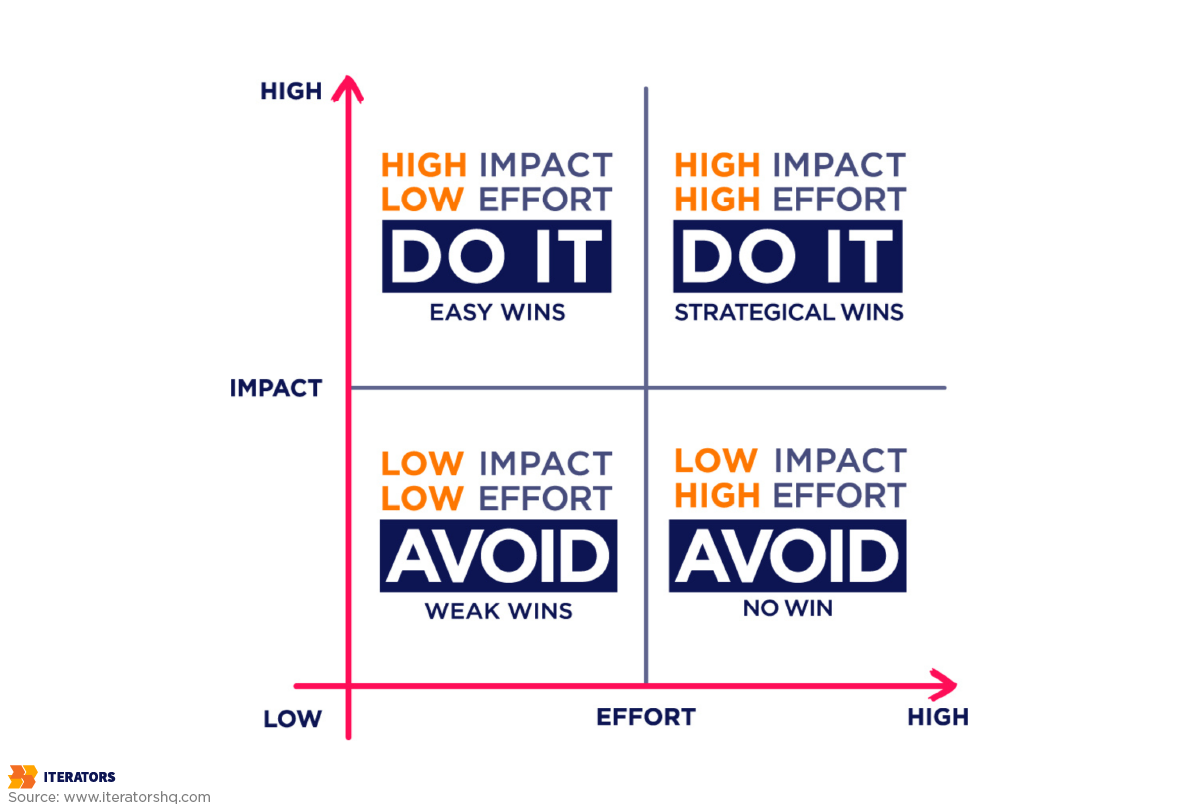
Collecting mobile performance observability data is pointless if you can’t use it to make engineering decisions. Yet most teams struggle with prioritization because they’re drowning in issues with no clear framework for deciding what to fix first.
The Performance Impact Matrix
The solution is a simple 2×2 matrix that plots every performance issue based on two dimensions:
User Impact: How many users are affected? How severely?
Engineering Effort: How hard is this to fix?
This gives you four quadrants:
| Low Engineering Effort | High Engineering Effort | |
|---|---|---|
| High User Impact | Quick Wins (Fix immediately) | Strategic Projects (Plan carefully) |
| Low User Impact | Nice to Haves (Fix when convenient) | Don’t Bother (Defer indefinitely) |
Let’s make this concrete with real examples:
Quick Wins (High Impact, Low Effort):
- Fixing a 2-second delay in checkout caused by a synchronous network call (move to background thread: 2 hours of work, affects 100% of purchase flow)
- Removing an unused analytics library that adds 500ms to startup time (delete 3 lines of code: 10 minutes of work, affects 100% of users)
Strategic Projects (High Impact, High Effort):
- Migrating from REST to GraphQL to reduce over-fetching (6 weeks of work, reduces data usage by 40% for 100% of users)
- Implementing code splitting and lazy loading for large screens (4 weeks of work, reduces initial bundle size by 60%)
Nice to Haves (Low Impact, Low Effort):
- Optimizing an animation on a rarely-used settings screen (1 day of work, affects 2% of users)
- Caching profile images (2 days of work, reduces network calls by 10% for 50% of users)
Don’t Bother (Low Impact, High Effort):
- Rewriting your entire networking layer to use a new library (8 weeks of work, marginal performance improvement)
- Supporting a deprecated Android version used by 0.1% of users (ongoing maintenance burden, negligible user impact)
The key is to be ruthless about measuring both dimensions accurately. Don’t guess at user impact—measure it with your observability data. Don’t guess at engineering effort—break down the work and estimate honestly.
Calculating ROI of Performance Improvements
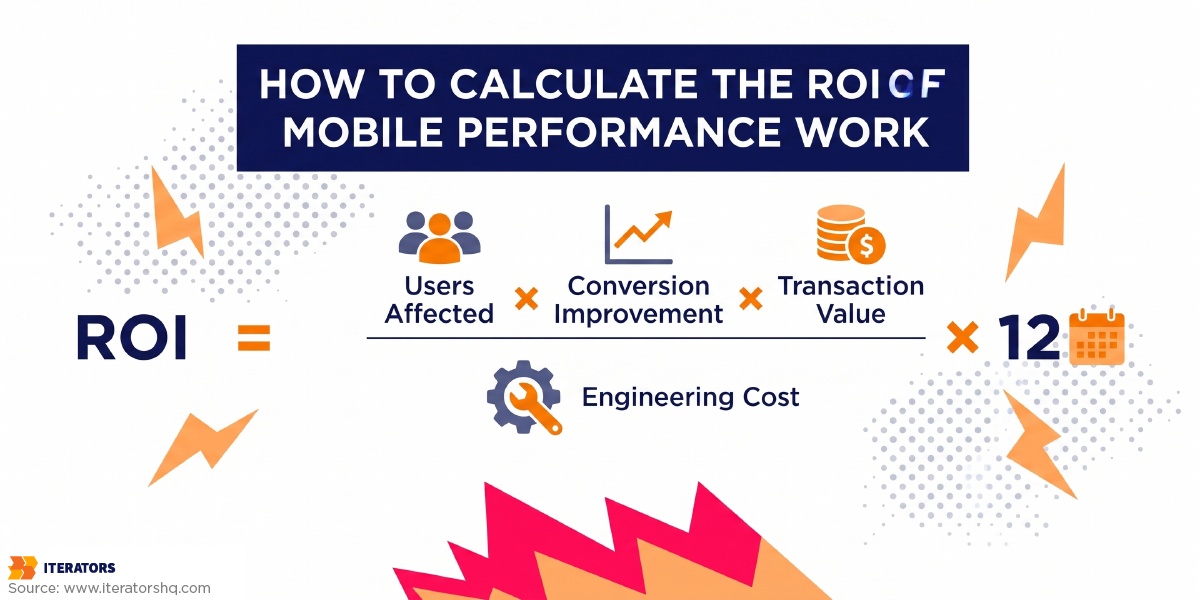
Here’s the mobile performance observability framework we use at Iterators to calculate the business value of performance work:
Step 1: Quantify current user impact
- How many users are affected by this issue?
- What’s the conversion rate for affected users vs. unaffected users?
- What’s the retention rate for affected users vs. unaffected users?
Step 2: Estimate improvement
- If we fix this issue, what’s the expected improvement in conversion/retention?
- Use A/B test data or industry benchmarks (e.g., “100ms improvement = 1% conversion increase”)
Step 3: Calculate revenue impact
- Revenue impact = (users affected) × (conversion improvement) × (average transaction value)
- Retention impact = (users affected) × (retention improvement) × (lifetime value)
Step 4: Compare to engineering cost
- Engineering cost = (hours of work) × (fully-loaded engineer cost) + (opportunity cost of not working on other features)
Step 5: Calculate ROI
- ROI = (Revenue impact + Retention impact) / Engineering cost
Real-world example:
A client’s mobile app had a checkout flow with a p95 completion time of 12 seconds. Industry benchmarks suggest that reducing this to 6 seconds would improve conversion by 15%.
- Users affected: 50,000 monthly checkout attempts
- Current conversion rate: 60%
- Expected conversion rate after fix: 69% (60% × 1.15)
- Average transaction value: $75
- Current monthly revenue: 50,000 × 0.60 × $75 = $2.25M
- Expected monthly revenue: 50,000 × 0.69 × $75 = $2.59M
- Monthly revenue increase: $340,000
- Engineering effort: 2 weeks (2 engineers × 80 hours × $100/hour = $16,000)
- Annual ROI: ($340,000 × 12) / $16,000 = 255x
This is how you sell performance work to leadership. Not “we should make the app faster” but “we can increase annual revenue by $4M with a 2-week engineering investment.”
Choosing the Right Mobile Observability Tools

The mobile performance observability market is crowded with tools, each claiming to be the “complete solution.”The reality is that no single tool does everything well, and the right choice depends on your specific needs, team size, and technical stack.
Observability for React Native Apps
If you’re building with React Native, you need mobile performance observability tools that understand the unique challenges of cross-platform development.
Key requirements for React Native observability:
JavaScript bridge monitoring: Track communication between JS and native threads Bundle size tracking: Monitor your JavaScript bundle size across releases Platform-specific metrics: Separate iOS and Android performance data Source map support: Translate minified JavaScript errors back to readable code Hot reload impact: Measure performance in development vs. production builds
Top tools for React Native:
Datadog Mobile RUM: Best for complex microservice environments where you need end-to-end tracing from mobile client to backend infrastructure. Expensive but comprehensive.
Sentry: Excellent for crash reporting and error tracking. Strong React Native support with automatic source map handling. Good free tier for startups.
Firebase Performance: Lightweight and easy to integrate. Best for early-stage MVPs and startups. Limited advanced features but zero configuration overhead.
Embrace: Session-level precision with OpenTelemetry support. Great for understanding specific user journeys and debugging complex issues.
New Relic: Enterprise-scale monitoring with strong AI/ML capabilities for anomaly detection. Best for large organizations with complex observability needs.
Mobile Performance Observability Tool Selection Framework
Here’s how to choose the right observability stack for your organization:
For early-stage startups (< 10 engineers, < 100k users):
- Primary tool: Firebase Performance (free, easy setup)
- Crash reporting: Sentry (generous free tier)
- User analytics: PostHog or Amplitude (free tiers available)
- Backend monitoring: Basic CloudWatch or Datadog free tier
For growth-stage companies (10-50 engineers, 100k-1M users):
- Primary tool: Datadog Mobile RUM or New Relic
- Crash reporting: Sentry or Bugsnag
- User analytics: Amplitude or Mixpanel
- Backend monitoring: Datadog or New Relic
- Distributed tracing: Jaeger or Tempo
For enterprise (50+ engineers, 1M+ users):
- Primary tool: Datadog or New Relic (full platform)
- Crash reporting: Sentry or Bugsnag (enterprise tier)
- User analytics: Amplitude or Mixpanel (enterprise tier)
- Custom observability: OpenTelemetry + Prometheus + Grafana
- Distributed tracing: Jaeger or Tempo
- AIOps: Moogsoft or BigPanda
Pro Tip: Use OpenTelemetry as your instrumentation layer regardless of which backend platform you choose. This gives you vendor portability and future-proofs your observability investment. You can switch from Datadog to New Relic to a custom Prometheus setup without rewriting your instrumentation code.
FAQ: Mobile Performance Observability
What’s the difference between mobile monitoring and mobile performance observability?
Monitoring tells you if something is broken (reactive). Mobile performance observability lets you understand why it’s broken and how to fix it (proactive). Monitoring is “your app crashed 50 times today.” Observability is “your app crashed 50 times today, all on Android 13 devices with less than 2GB RAM, specifically during the checkout flow when users have slow network connections, because you’re trying to load a 5MB image synchronously on the main thread.”
What performance metrics should I track for my mobile app?
Focus on metrics that correlate with user retention and revenue:
- Cold start time (p95, not average)
- ANR rate per screen
- Frame drop percentage per interaction
- Network error rate by endpoint
- Background battery usage
Ignore vanity metrics like total app opens, DAU, and average session length—they don’t guide engineering decisions.
How do I reduce alert fatigue in mobile performance monitoring?
Implement SLO-based alerting instead of threshold-based alerting. Only alert when user experience degrades below acceptable levels, not when individual metrics spike. Use error budgets to determine when to alert, and correlate multiple signals to reduce false positives. Most importantly: every alert should be actionable—if receiving an alert doesn’t change your engineering priorities, delete that alert.
What’s the best mobile observability tool for React Native?
It depends on your stage and budget:
- Startups: Firebase Performance + Sentry (free tiers)
- Growth companies: Datadog Mobile RUM or New Relic
- Enterprise: Full Datadog or New Relic platform with OpenTelemetry
The most important factor isn’t the tool—it’s your instrumentation strategy. Use OpenTelemetry to avoid vendor lock-in.
How do I correlate mobile app crashes with backend issues?
Implement distributed tracing with unique trace IDs that propagate from mobile client through all backend services. When a crash occurs, use the trace ID to reconstruct the entire request path and identify whether the failure originated in the client, backend API, database, or external service. Tools like Datadog, New Relic, and Jaeger provide this correlation out of the box.
What’s the minimum viable mobile observability stack for early-stage startups?
Start with three free tools:
- Firebase Performance for basic performance monitoring
- Sentry for crash reporting
- PostHog or Amplitude for user analytics
This gives you 80% of the value with zero cost and minimal engineering overhead. As you grow, upgrade to paid tiers and add distributed tracing.
How do I measure the ROI of mobile performance improvements?
Use this formula:
ROI = (Users Affected × Conversion Improvement × Transaction Value) / Engineering Cost
For example: Reducing checkout time from 12s to 6s affects 50,000 users, improves conversion by 15%, with $75 average transaction value:
ROI = (50,000 × 0.15 × 0.60 × $75) / $16,000 = 255x annual return
Use industry benchmarks (e.g., “100ms delay = 1% conversion drop”) to estimate impact before building.
What’s the difference between logs, metrics, traces, and events?
- Logs: Timestamped records of discrete actions (debugging tool)
- Metrics: Numerical measurements over time (trend analysis)
- Traces: End-to-end request paths across services (dependency mapping)
- Events: User actions and state changes (product analytics)
You need all four (MELT: Metrics, Events, Logs, Traces) for complete observability.
Conclusion: Observability as a Strategic Advantage
Mobile performance observability isn’t just a technical problem—it’s a business imperative. The data is unambiguous:
- 88% of users abandon apps after encountering performance issues
- 53% of users abandon mobile sites that take longer than 3 seconds to load
- A 100ms delay in load time reduces conversion rates by 7-20%
- Poor mobile performance costs businesses up to $2.49 million annually in lost revenue
Yet most mobile teams are still treating observability as an afterthought—something to “add later” after shipping features. This is backwards. Observability should be baked into your architecture from day one, not bolted on after users start complaining.
The teams that win in 2025 are those that treat mobile performance observability as a strategic advantage:
- They ship code faster because they can see its impact in real-time
- They fix issues before users complain because they detect regressions automatically
- They prioritize engineering work based on business impact, not gut feeling
- They turn performance into a competitive moat that competitors can’t match
If you’re ready to transform your mobile performance from a constant firefight into a predictable, manageable system, we can help.
At Iterators, we’ve spent over a decade building mobile applications for startups and enterprises—from React Native apps to cross-platform solutions. We know that mobile performance observability isn’t about buying tools—it’s about building systems that surface real issues and guide engineering decisions.
Whether you need help implementing mobile app development with observability baked in, or you want to audit your existing monitoring setup and turn it into true observability, we’ve been there and solved it before.
Schedule a free consultation with Iterators today. We’d be happy to review your mobile performance challenges and show you exactly how to turn your telemetry into engineering decisions.
Because in 2025, mobile performance isn’t just a technical metric—it’s your competitive advantage.