

Mobile performance optimization becomes critical when your app breaks spectacularly—stakeholders calling, support tickets flooding in, and chaos erupting on Slack. Your product launch went live two hours ago, traffic spiked, and now everything is on fire.
You open your monitoring dashboard. CPU looks… fine? Memory seems okay. Average latency is 200 milliseconds. And yet your users are reporting startup freezes, random crashes, and screens that simply refuse to load.
Welcome to the gap between what your metrics say and what your users are actually experiencing. This is where most mobile performance optimization efforts fail—not because engineers aren’t smart, but because they’re looking at the wrong signals during the worst possible moment.
This guide is a battle-tested framework for mobile performance optimization triage. Not the kind you’d find in a conference talk about “best practices for building performant apps”—that ship has sailed. This is for right now, when everything is breaking and you need to find the real root cause fast.
Whether you’re running React Native, native iOS, native Android, or some combination of all three, the diagnostic methodology is the same: isolate the failure domain before you touch a single line of code.
Free Consultation
Turn Complex Challenges Into
Your Competitive Advantage
Iterators has navigated mobile performance emergencies for companies ranging from early-stage startups to enterprise platforms. If your app is actively failing and you need specialized help NOW, get expert support immediately.
Schedule Strategic Consultation →Why Your Surface Metrics Are Lying to You
Before you can implement effective mobile performance optimization, you need to understand why your current observability setup is actively misleading you during a crisis.
The Averages Trap
Most APM dashboards default to displaying p50 (median) metrics. During a traffic spike, your p50 latency might sit at a perfectly healthy 200 milliseconds. Your on-call engineer looks at the dashboard, sees green, and starts hunting for code-level bugs.
Meanwhile, your p99 latency has spiked to 8,000 milliseconds.
That means 1% of your users—during a massive traffic event, potentially tens of thousands of people—are waiting eight full seconds for a response. They’re not waiting. They’re leaving. And your dashboard is telling you everything is fine.
Averages are mathematically designed to smooth out the extreme values that define a production crisis. The tail latencies—p95, p99, p99.9—are where the actual emergency lives. If you’re not looking at percentile distributions, you’re not looking at your crisis.
The Multi-Layer Problem
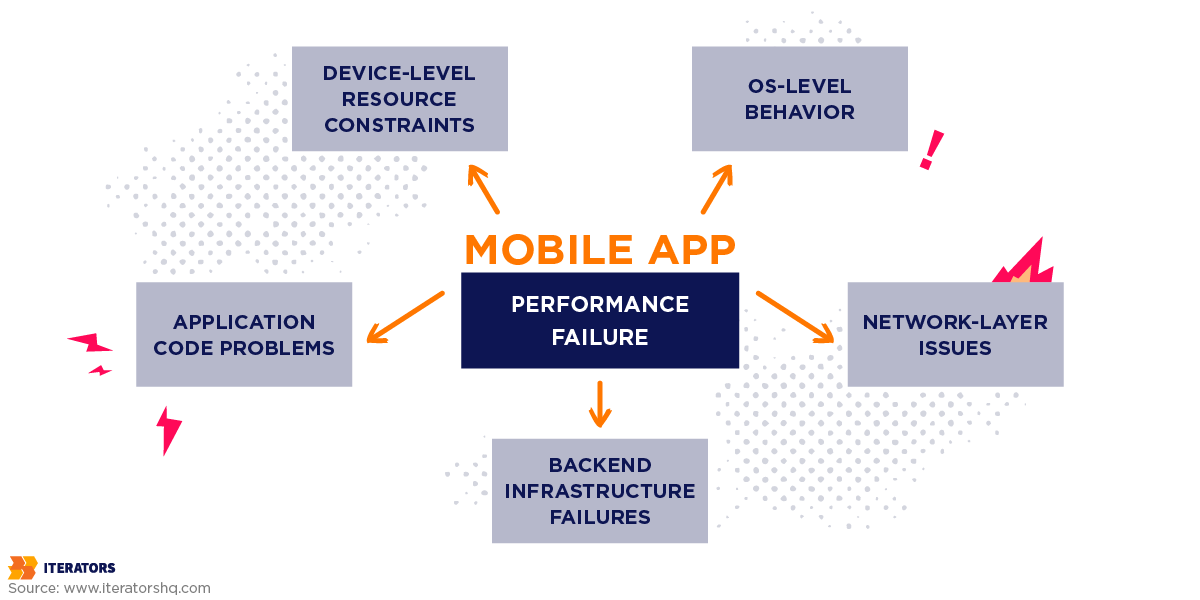
Mobile performance optimization failures are almost never caused by a single thing. When your app is breaking at scale, you’re typically dealing with a combination of:
- Device-level resource constraints (RAM, CPU, battery state)
- OS-level behavior (background process killing, memory pressure warnings)
- Network-layer issues (cellular radio wake-up times, connection pooling limits)
- Backend infrastructure failures (overloaded databases, cascading microservice timeouts)
- Application code problems (main thread blocking, memory leaks, excessive re-renders)
The reason triage is hard is that these layers interact. A backend that’s slightly slower than usual (say, 400ms instead of 150ms) might be completely invisible on a Wi-Fi connection with a modern device. On a 3G connection with an older Android phone, that same backend degradation might push total response time past the client’s timeout threshold, triggering what looks like a client-side crash.
Your monitoring tool captures the crash. Your engineer investigates the client. The actual problem is on the backend. Hours wasted.
Real-User Data vs. Synthetic Benchmarks
Here’s the uncomfortable truth about your QA environment: it doesn’t exist in the real world.
Error rates are rising as users take apps “into the wild”—people launch apps while juggling tasks, dealing with unstable networks, or using a wide range of devices. These everyday scenarios introduce issues that never surfaced in QA. Your test lab has stable Wi-Fi, charged batteries, and devices running the exact OS version you tested against.
Your users have spotty LTE in a subway tunnel, a phone at 8% battery triggering aggressive power-saving modes, and a manufacturer-customized Android build that handles memory management differently than stock.
Global digital session data shows error-driven session exits have surged 254% year-over-year. The apps haven’t gotten worse. The environments they’re being used in have gotten more complex and unpredictable.
Synthetic benchmarks tell you how your app performs under ideal conditions. Real-user monitoring tells you how your app performs when it matters.
The Mobile Performance Optimization Triage Framework
When everything is failing simultaneously, the worst thing you can do is start randomly optimizing. The second worst thing is to assume the problem is in the last place you touched.
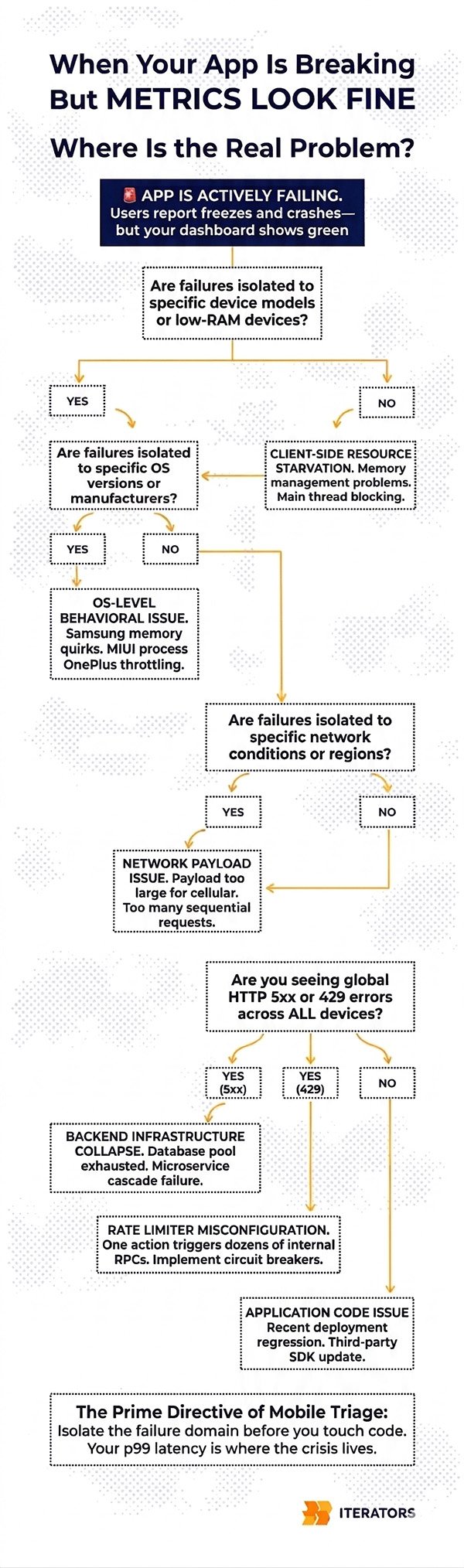
Effective mobile performance optimization follows a strict diagnostic hierarchy that moves from the outside in—from the user’s device toward your infrastructure—eliminating failure domains systematically before touching code.
The Decision Tree
Step 1: Is the failure isolated to specific devices?
Pull your crash reports and performance degradation data and segment immediately by device model and available RAM. Are you seeing failures concentrated on older Android devices with less than 2GB of RAM? Or is this hitting flagship iPhones and high-end Android devices equally?
- Isolated to low-end devices → Client-side resource starvation. Focus on memory management, main thread blocking, and view complexity.
- Hitting all device tiers equally → Proceed to Step 2.
Step 2: Is the failure isolated to specific OS versions or manufacturers?
Android fragmentation is genuinely brutal. Samsung’s memory management behaves differently from stock Android. MIUI (Xiaomi’s Android fork) has aggressive background process killing that can terminate your app’s background workers unexpectedly. OnePlus devices throttle CPU under certain thermal conditions.
- Isolated to specific OS versions or manufacturers → OS-level behavioral issue. Check manufacturer-specific memory management quirks and background process handling.
- Occurring across all OS versions and manufacturers → Proceed to Step 3.
Step 3: Is the failure isolated to specific network conditions?
Filter your telemetry by connection type (5G, 4G LTE, 3G, Wi-Fi) and geographic region. Are timeouts only occurring on cellular connections? Are users in specific regions experiencing worse performance?
- Isolated to high-latency cellular connections → Network payload or connection architecture issue. Check payload sizes, request count per screen, and connection pooling configuration.
- Occurring across all connection types globally → Proceed to Step 4.
Step 4: Are you seeing global HTTP 5xx errors or 429s?
If failures are hitting all device types, all OS versions, all network conditions, and all geographic regions simultaneously, stop looking at the mobile codebase. This is almost certainly a backend infrastructure failure.
- Global 5xx spike → Backend infrastructure collapse. Check your database connections, microservice health, and load balancer logs.
- Global 429 spike → Rate limiter misconfiguration or backend fan-out (more on this below).
- No backend errors, but widespread client failures → Application code issue affecting all environments. Check for recent deployments, third-party SDK updates, or configuration changes.
This framework sounds simple. In practice, during a crisis when your Slack is exploding and your CEO is asking for updates every ten minutes, maintaining this discipline is genuinely difficult. That’s why you need to internalize it before the emergency happens.
Common Mobile Performance Optimization Failure Patterns During Traffic Spikes
Traffic spikes break systems in predictable ways. Once you’ve isolated the failure domain using the decision tree above, you need to match your telemetry signatures to known failure patterns in your mobile performance optimization strategy.
Here are the five most common ones, in order of frequency during production emergencies.
Pattern 1: Startup Freezes and Initialization Bottlenecks
What it looks like: Users report that the app “hangs” on the splash screen or takes five to ten seconds to become interactive. Session abandonment spikes immediately after install or first launch. Your Time to Interactive (TTI) metrics are showing values well above the industry benchmark of 2 seconds.
What’s actually happening: The initialization phase—the transition from cold start to an interactive UI—is the most vulnerable period for any mobile application. During a cold boot, the app must load the binary into memory, initialize the runtime, and execute the primary activity. If developers have placed synchronous operations on the main UI thread during this phase, the OS cannot render the interface while those operations are running.
The most common culprits are:
- Synchronous database queries on startup. Querying a large SQLite database for user preferences, cached data, or session tokens on the main thread before the first frame is drawn.
- Sequential SDK initialization. Modern apps routinely initialize five to fifteen third-party SDKs at startup—analytics, crash reporting, advertising networks, A/B testing frameworks, push notification services. When these are initialized sequentially on the main thread, the cumulative startup cost can easily exceed three seconds.
- Large asset loading. Decoding high-resolution images or loading large JSON configuration files synchronously before the first render.
Diagnostic signatures to look for:
Your APM tool will show an extended TTID (Time to Initial Display) and TTI, often in the five-to-eight-second range. CPU utilization will show a massive spike on the main thread immediately upon launch, followed by a sharp drop-off if the user abandons. If you’re using Firebase Performance Monitoring, look at the app_start trace—specifically the time_to_initial_display and time_to_full_display metrics.
Emergency mitigation:
Defer non-critical SDK initialization to after the First Contentful Paint. This alone can reduce startup time by 40-60% in apps with heavy SDK dependencies. Implement a skeleton UI that renders immediately, giving users visual feedback while data loads asynchronously in the background. Any database reads required for initial render should be moved to a background thread with results posted back to the UI thread when complete.
Pattern 2: ANRs (Application Not Responding)
What it looks like: Android-specific. Users see a system dialog asking if they want to “Wait” or “Close App.” Your Play Console ANR rate is spiking. In your crash reporting tool, you’re seeing ANR events rather than traditional crashes.
What’s actually happening: An ANR occurs when the Android main thread remains blocked for longer than five seconds. Unlike crashes, which have clean stack traces pointing to a specific exception, ANRs are fundamentally threading problems—and they’re significantly harder to diagnose.
The main thread in Android handles all UI rendering, user input processing, and application lifecycle callbacks. If anything blocks this thread for five seconds, the OS intervenes.
Common ANR triggers during traffic spikes:
- Network timeouts on the main thread. This is more common than it should be. If a network call is made synchronously on the main thread (a practice that’s been discouraged for years but still appears in legacy systems), and the backend suddenly starts taking longer to respond due to traffic load, the main thread blocks waiting for a response that may never come.
- Binder thread exhaustion. Android’s inter-process communication relies on a pool of Binder threads. Under high system load, this pool can become exhausted, leaving the main thread waiting indefinitely for IPC calls to complete.
- Database lock contention. If multiple threads are competing for SQLite write locks and the main thread is one of them, a traffic spike that increases concurrent write operations can cause main thread starvation.
- Broadcast receiver abuse. Broadcast receivers that execute long-running logic on the main thread will rapidly trigger ANR states during sudden bursts of system events.
Diagnostic signatures to look for:
ANR reports provide a snapshot of the thread state at the exact moment the OS intervened. The key question when reading an ANR trace is: what was the main thread actually doing when the snapshot was taken?
If the main thread shows it was idling in the MessageQueue (waiting for work), this suggests the blockage had already cleared by the time the snapshot was captured—indicating a transient delay rather than a permanent deadlock. This is actually harder to fix because the timing is non-deterministic.
If the main thread was actively blocked attempting to acquire a lock or waiting on a network socket, you have a concrete, reproducible problem to fix.
Emergency mitigation:
Wrap the specific offending operation in a background coroutine or worker thread. If the ANR is caused by network timeouts, implement a strict timeout on all network calls (250-500ms is a reasonable starting point for emergency mitigation) and handle the timeout gracefully rather than blocking.
Pattern 3: Memory Pressure and OOM Terminations
What it looks like: App crashes that don’t produce traditional crash reports (because OOM terminations are often silent). Users report the app “closing by itself” without an error message. Your crash-free session rate is declining but your crash reporting tool isn’t showing corresponding crash reports. Day-30 retention is dropping.
What’s actually happening: When an application consumes more RAM than the OS permits, it’s terminated via an Out-Of-Memory exception. Unlike crashes, these terminations don’t always generate stack traces, making them notoriously difficult to diagnose without proper memory profiling.
The most common causes during traffic spikes and viral growth:
- Inefficient image handling. Loading high-resolution assets without downsampling to match the target view dimensions forces the app to allocate massive bitmaps to the heap. A 4K image displayed in a 100×100 thumbnail is still occupying 4K worth of memory if not properly resized.
- List virtualization failures. In infinite scroll feeds, failing to recycle views or implement proper virtualization means every scrolling action instantiates new memory objects. With a traffic spike bringing in new users who are aggressively exploring the app, this can exhaust available heap space rapidly.
- Memory leaks. Failing to unmount event listeners, maintaining global references to detached UI components, or running background polling tasks that prevent garbage collection. Memory leaks are particularly insidious because they compound over time—the app might run fine for five minutes but crash after fifteen.
Diagnostic signatures to look for:
Memory profiling reveals distinct patterns. A healthy memory graph shows a sawtooth pattern: memory allocates as the user interacts, then drops sharply when the garbage collector runs. This is normal and expected.
A memory leak shows a “staircase” pattern: baseline memory usage continually climbs over the duration of the session without ever releasing. Each garbage collection cycle recovers some memory but not enough to return to baseline. Eventually, the app hits the ceiling and is terminated.
An excessive allocation problem (different from a leak) shows rapid, high-amplitude spikes that may recover but are triggering aggressive garbage collection, which itself consumes CPU and causes frame drops.
Emergency mitigation:
Reduce image payload sizes at the CDN level immediately—force WebP format with aggressive compression as an emergency measure. Configure your image loading library’s cache limits to aggressively evict older assets under memory pressure. If you’re using Glide on Android or Kingfisher on iOS, these libraries have built-in memory pressure callbacks you can leverage.
Pattern 4: Network Saturation
What it looks like: Users on cellular connections report slow loading or timeouts, while users on Wi-Fi seem mostly unaffected. Your client-side timeout error rate is high, but your backend logs show requests eventually completing (just slowly). Time to First Byte (TTFB) metrics are elevated.
What’s actually happening: Cellular networks have a complex relationship with mobile applications that most developers don’t fully appreciate. Transitioning from an idle radio state to active data transmission involves a handshake process—radio wake-up, DNS resolution, TCP connection establishment, TLS negotiation. On a fast Wi-Fi connection, this overhead is negligible. On a congested 4G network, these fixed costs can add 200-400 milliseconds to every request.
If your application architecture makes multiple sequential API calls to render a single screen (a pattern sometimes called “chatty” APIs), the cumulative latency of these round-trips dominates the performance profile. Five sequential API calls, each taking 150ms under normal conditions, becomes five sequential calls each taking 400ms under network stress—two full seconds of blocking network time before the screen can render.
During a traffic spike, if backend response times degrade slightly, this degradation is multiplied across every sequential call. The mobile client’s connection pool saturates, and requests start timing out on the client side before the server has even finished processing them.
Diagnostic signatures to look for:
The key diagnostic signature here is the discrepancy between client-side errors and backend logs. If your backend logs show requests completing successfully (even if slowly), but your mobile APM shows those same requests timing out on the client, the problem is the gap between your client timeout configuration and actual backend response times under load.
Segment your network telemetry by connection type. If timeout rates are dramatically higher on cellular versus Wi-Fi, you have a network architecture problem rather than a backend capacity problem.
Emergency mitigation:
Immediately halt all non-essential background network calls—telemetry pings, pre-fetching, analytics events—to prioritize critical transactional requests. Increase client-side timeout thresholds as a temporary measure to stop false timeout errors while the backend stabilizes. Longer-term structural fixes involve aggregating endpoints using GraphQL or a Backend-for-Frontend (BFF) architecture to reduce the number of round-trips required per screen.
Pattern 5: Backend Fan-Out (The Hidden Cascade)
What it looks like: Global, instantaneous spike in client-side timeouts and HTTP 5xx errors across all device types and network conditions simultaneously. Your CDN is serving static assets fine, but all dynamic data fetching is failing. You might see HTTP 429 errors appearing unexpectedly, which look like rate limiting but aren’t caused by any single client sending too many requests.
What’s actually happening: This is the most important failure pattern to understand in mobile performance optimization because it’s the one that most frequently causes teams to waste hours looking in the wrong place.
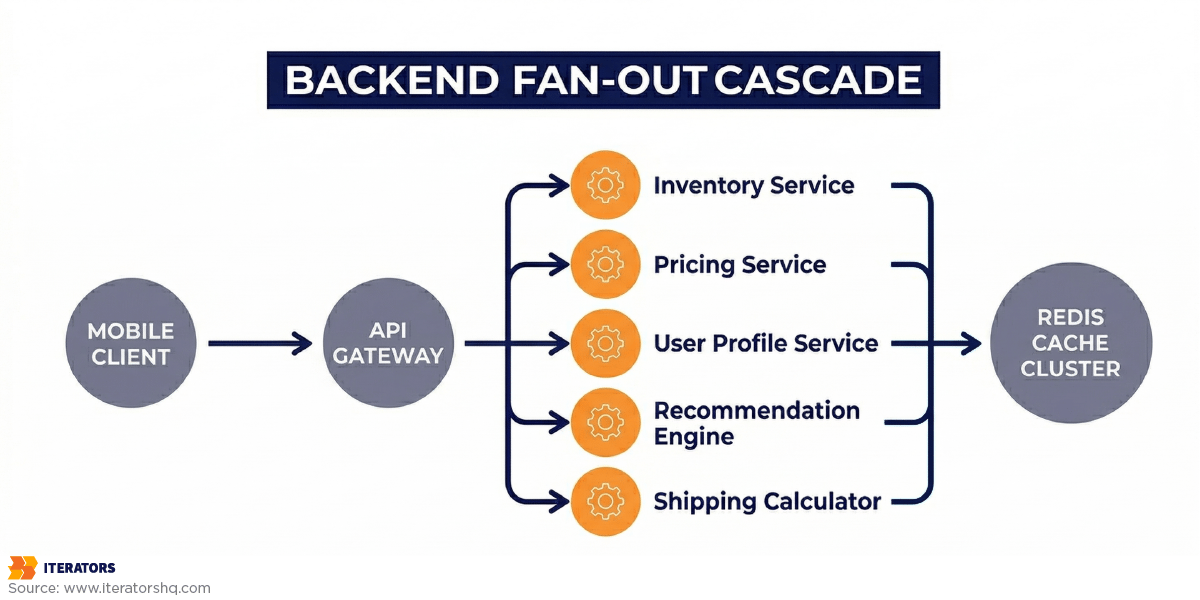
Modern mobile backends are rarely simple. A single user action on the mobile client—loading a product catalog, refreshing a social feed, checking order status—hits an API gateway. That gateway then “fans out,” generating multiple internal remote procedure calls (RPCs) to various microservices: inventory service, pricing service, user profile service, recommendation engine, shipping calculator.
Those microservices, in turn, query shared datastores—databases, Redis caches, Elasticsearch clusters. Under normal traffic, this works beautifully. Each request fans out, the microservices respond quickly, the gateway aggregates the results, and the mobile client receives a single clean response.
Under a traffic spike, one shared dependency becomes a bottleneck. Let’s say the Redis cache cluster is struggling under load. The microservices that depend on Redis start stalling, waiting for cache responses that are taking longer than usual. The API gateway stalls waiting for those microservices. The mobile clients timeout waiting for the gateway.
The multiplication effect is what makes this so dangerous. If ten microservices each make three Redis calls per request, a single mobile user action generates thirty Redis operations. Under a 10x traffic spike, that’s 300 Redis operations per second for every concurrent user. A cache cluster that was fine at normal traffic becomes completely overwhelmed.
The HTTP 429 responses you might see aren’t caused by any individual client being rate-limited. They’re caused by the rate limiter protecting a downstream service that’s struggling—and the rate limiter itself may be misconfigured or experiencing synchronization issues under load.
Diagnostic signatures to look for:
The definitive signature of backend fan-out is simultaneous, global failure across all client segments. If users on 5G in New York and users on 3G in rural areas are both experiencing identical failure rates, the problem is not on the client or the network—it’s in the backend infrastructure.
Look at your backend distributed traces. If you have proper tracing implemented, you’ll see the exact microservice call that’s stalling. If you don’t have distributed tracing, look for the service that’s showing degraded health metrics across the board.
Emergency mitigation:
The mobile team cannot fix a backend fan-out through client-side mobile performance optimization. However, there’s one critical client-side action: implement aggressive circuit breakers immediately. Stop all outgoing requests to failing endpoints for a designated period using exponential backoff. This is not just about improving user experience—it’s about preventing the mobile clients from accidentally launching a retry storm that further cripples the struggling backend.
If 100,000 mobile clients each retry failed requests every 30 seconds, that’s 3,300 additional requests per second hitting an already-overwhelmed backend. Circuit breakers with exponential backoff prevent this from happening.
Separating Device, OS, Network, and Backend Issues in Mobile Performance Optimization

The failure patterns above assume you’ve already isolated the failure domain. Here’s how to actually do that when you’re staring at a wall of alerts.
Device-Level Diagnostics
Device-level issues manifest in specific, identifiable ways. The key question is: are failures correlated with hardware capabilities?
Segment your crash and performance data by:
- Available RAM (below 2GB vs. above 4GB)
- CPU tier (budget vs. flagship)
- Battery state (charging vs. discharging, battery level)
- Storage availability (low storage often triggers OS-level memory pressure)
If failures are concentrated in low-RAM devices, you’re dealing with memory pressure or excessive main thread load. If failures are correlated with battery state, you’re likely hitting aggressive power-saving modes that throttle CPU performance. For more on handling device constraints, check our guide on app design process.
OS-Level Diagnostics
Android’s fragmentation is a genuine diagnostic challenge. Different manufacturers implement memory management, background process handling, and CPU throttling differently. Samsung’s Game Booster mode can dramatically alter performance characteristics. MIUI’s aggressive background process killing can terminate your app’s workers unexpectedly. Huawei devices have specific power management behaviors that differ from stock Android.
Filter your telemetry by manufacturer and OS version separately. A bug that only appears on Samsung devices running Android 13 is almost certainly a manufacturer-specific behavior, not a code bug.
iOS is significantly more consistent, but major iOS version upgrades sometimes introduce behavioral changes that affect specific API usage patterns. If failures are correlated with a recent iOS update, check Apple’s performance documentation for changes to the APIs you’re using.
Network Layer Analysis
The key diagnostic tool for network-layer isolation is connection type segmentation. Most mobile APM tools allow you to filter by WiFi vs. cellular, and some will break down cellular by generation (4G vs. 5G vs. 3G).
If your failure rate on cellular is significantly higher than on Wi-Fi, and the failures manifest as timeouts rather than server errors, you have a network architecture problem. The fix is structural—reducing round-trips per screen, implementing better caching, or adopting a BFF pattern.
If failure rates are similar across connection types but your TTFB is elevated, the problem is backend response time, not network architecture.
Backend Performance Isolation
The cleanest way to isolate backend issues is to look at your backend health metrics independently of your mobile telemetry. If your backend services are showing elevated error rates, increased response times, or database connection pool exhaustion, and this correlates temporally with your mobile performance degradation, the backend is the problem.
The interaction effect that complicates diagnosis: backend degradation can cause client-side symptoms that look like client-side bugs. A backend that’s 3x slower than usual might cause your mobile app’s connection pool to saturate, which then causes a cascade of client-side errors that look like network or code issues.
Always check backend health first if the decision tree points you there. Don’t let your mobile engineers spend four hours optimizing JavaScript rendering when the database is locked.
Using Real-User Data for Emergency Mobile Performance Optimization

The foundational premise of effective triage is a shift away from synthetic testing and backend-centric tracing toward Mobile Real-User Monitoring (RUM).
Why Traditional Distributed Tracing Falls Short
In backend microservice architecture, a distributed trace follows a single request as it hops between services. This is enormously useful for backend debugging. For mobile performance optimization diagnosis, it’s fundamentally insufficient.
In the mobile context, the entire device—with its shared CPU, restricted memory, fluctuating battery, and unpredictable network—acts as a single constrained environment. A mobile performance trace must encapsulate the entire device-side activity for a specific user action and treat backend network requests as child spans within that larger context.
The Slack engineering team articulated this perfectly when they built their custom client tracing system: “We were tired of letting our users down by not being able to diagnose their issues. Distributed tracing was built for measuring latency across systems. All we had to do was plumb the trace identifiers through our HTTP request header so that we could have client and server logs together in the same trace.”
By tracking highly granular phases of each transaction—database wait time vs. execute time, API queue time vs. HTTP request time vs. JSON parse time—they could instantly identify whether a latency spike was caused by network congestion or by older Android devices struggling to deserialize large payloads.
This level of instrumentation is what separates teams that can triage in minutes from teams that spend days investigating.
Essential Metrics to Track During a Crisis
When you’re in the middle of a production emergency, you need to know exactly which metrics to look at and in what order for effective mobile performance optimization.
Crash-Free Session Rate: Your baseline stability metric. The industry median for competitive applications is 99.95%. If you’re below 99.7%, you’re likely seeing App Store rating degradation. During a crisis, watch this metric in real-time.
Frame Rate (JS and UI): Both React Native and native apps expose frame rate metrics. The target is 60fps (or 120fps on ProMotion displays). Drops below 45fps are perceptible to users. Sustained drops below 30fps cause the app to feel “broken” rather than merely slow.
Time to Interactive (TTI): The time from app launch to when the user can meaningfully interact. Industry benchmark: under 2 seconds. Above 3 seconds, 53% of sessions are abandoned.
Network Request Success Rate by Endpoint: Segment this by endpoint, not just overall. A 95% overall success rate sounds fine until you realize that 100% of failures are hitting your checkout endpoint.
p95 and p99 Latency: Not averages. Never averages during a crisis. The tail is where the emergency lives.
Memory Usage Trend: Look for the staircase pattern indicating a leak, or the spike pattern indicating excessive allocation.
Practical APM Queries for Emergency Diagnosis
Datadog Mobile Vitals automatically aggregates Slow Renders, CPU ticks per second, and Frozen Frames. During triage, pivot directly from your error rate spike to the Mobile Vitals dashboard to confirm whether the backend outage is causing client-side UI freezes.
New Relic NRQL allows for SQL-like querying of telemetry. Here’s how you would query to see the percentage of users affected by catastrophic latency over 3 seconds, broken down by device model:
Query structure: Select unique count of mobile requests where response time exceeds 3000 milliseconds, divide by unique session count, multiply by 100 for percentage, then segment results by device model over the past 30 minutes.
This tells you exactly what percentage of users are experiencing catastrophic latency (over 3 seconds), broken down by device model—immediately helping you determine if this is a device-level issue or universal.
Firebase Performance Monitoring provides automatic traces for network requests and app startup. During a crisis, the custom traces you’ve instrumented (you have instrumented custom traces, right?) are invaluable for understanding exactly where time is being spent within complex user flows.
For more on implementing effective monitoring, see New Relic’s mobile app performance monitoring best practices.
Building Your Mobile Performance Optimization Fix List Under Pressure
You’ve run through the decision tree. You’ve matched your symptoms to a failure pattern. You have a hypothesis about root cause. Now you need to prioritize fixes when you have limited engineering bandwidth and a stakeholder demanding answers every fifteen minutes.
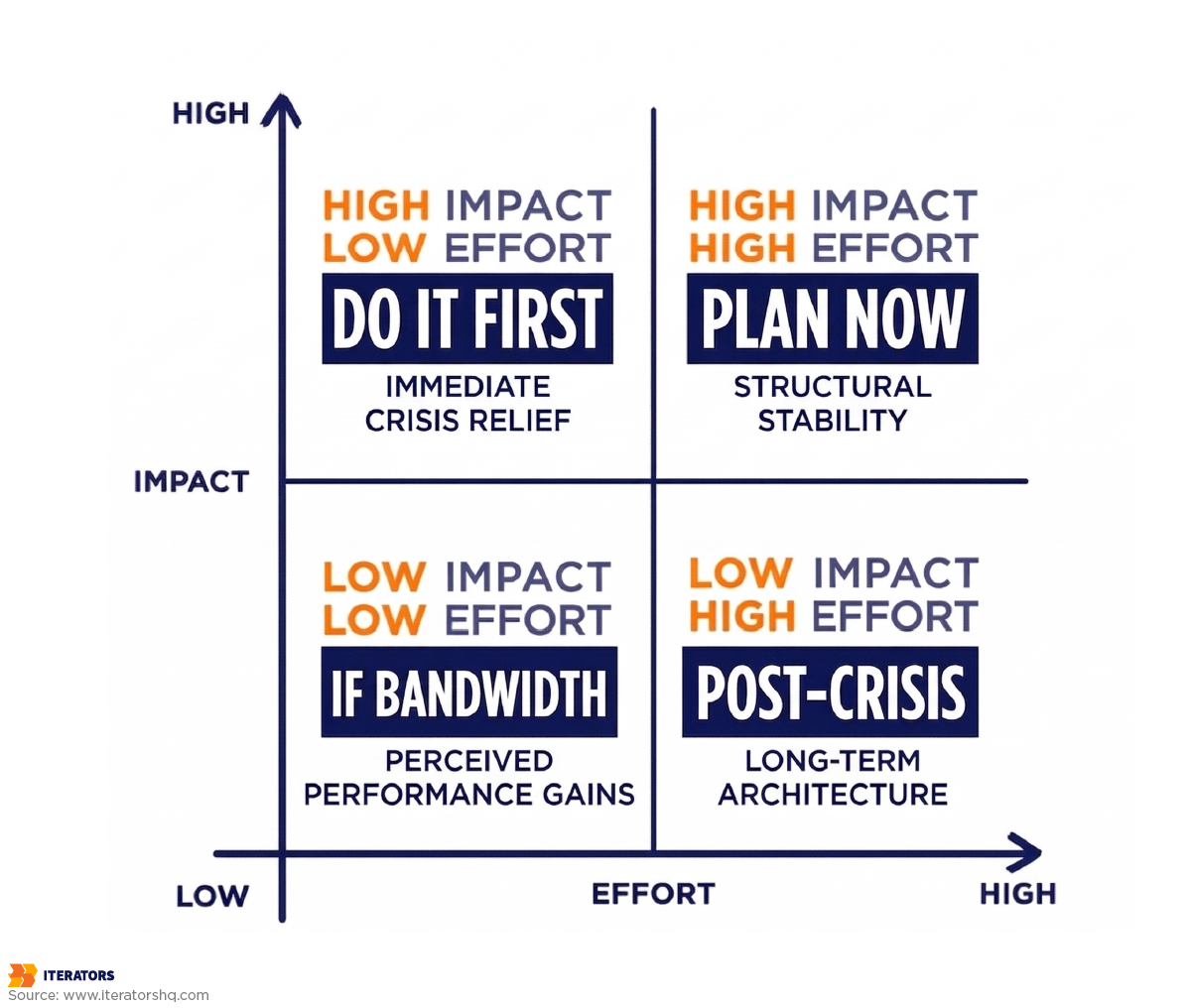
The Impact vs. Speed Matrix
Not all fixes are created equal. During an emergency, you need to think in two dimensions: how much impact will this fix have, and how quickly can you implement it?
High Impact, Fast Implementation (Do These First):
- Deferring non-critical SDK initialization to post-FCP
- Reducing image payload sizes at the CDN level
- Implementing circuit breakers for failing backend endpoints
- Increasing client timeout thresholds to stop false timeout errors
- Disabling non-essential background network calls
High Impact, Slower Implementation (Plan These Now, Start Immediately):
- Migrating synchronous operations to background threads
- Implementing proper list virtualization
- Restructuring chatty API calls into aggregated endpoints
- Adding connection pooling configuration
Lower Impact, Fast Implementation (Do These If You Have Bandwidth):
- Adding loading states and skeleton UIs for better perceived performance
- Implementing exponential backoff on failed requests
- Reducing console.log calls in production builds
Lower Impact, Slower Implementation (Schedule These for Post-Crisis):
- Architectural refactoring (BFF pattern, GraphQL adoption)
- Comprehensive memory leak audit
- Full performance profiling and render optimization
For more on managing technical improvements systematically, see our guide on business process optimization.
Communicating With Stakeholders During Triage
This part is often overlooked in technical guides, but it’s critically important during a production crisis.
Your CEO doesn’t need to know about Binder thread exhaustion. They need to know:
- What is broken (user-facing description)
- How many users are affected (percentage and absolute number)
- What you’re doing about it right now
- When you expect resolution
Give them a brief, confident update every 30 minutes. “We’ve identified the root cause as a backend cache issue causing mobile timeouts. We’ve implemented a circuit breaker to prevent retry storms and are working with the infrastructure team to restore cache cluster health. We expect resolution within 90 minutes.”
This is better than a technically accurate but incomprehensible update about Redis cluster saturation causing fan-out failures in the recommendation microservice.
React Native-Specific Mobile Performance Optimization Considerations
React Native applications have unique performance characteristics that become critical during high-load scenarios. These aren’t bugs in React Native—they’re architectural patterns that work fine at normal scale but expose their limitations under pressure.
The JavaScript Thread: Your Biggest Bottleneck
React Native runs all JavaScript—business logic, API orchestration, state management, and UI reconciliation—on a single JavaScript thread. This thread has a budget of approximately 16.67 milliseconds per frame to complete all its work before the next frame needs to render (at 60fps).
During a traffic spike, if your app is receiving large amounts of data, updating complex state trees, and re-rendering multiple components simultaneously, this thread can become completely saturated. When the JS thread is blocked, touch events—including onPress handlers—are ignored. Users tap buttons and nothing happens. They tap again. Still nothing. They close the app.
Diagnostic signature: JS Frame Rate drops below 60fps in your React Native performance profiler while the UI Frame Rate (native rendering) remains healthy. This confirms the bottleneck is in JavaScript execution, not native rendering.
Emergency triage: Strip all console.log calls from your production bundle immediately. In development mode, console.log passes through the bridge, but in production, excessive logging can still create serialization overhead. More importantly, audit for unnecessary re-renders. If your global state is updating on every network response and causing your entire component tree to reconcile, you’re wasting enormous amounts of JS thread time.
The Bridge (Legacy) and JSI (New Architecture)
The legacy React Native bridge serializes all communication between JavaScript and native code as JSON. Every native module call—accessing the camera, reading from storage, making a network request—requires serializing JavaScript objects to JSON, passing them across the bridge, deserializing them on the native side, and then serializing the response to pass back.
Under high load, this serialization overhead becomes significant. “Chatty” native modules that make frequent small calls—continuous GPS polling, real-time sensor data, frequent analytics events—can saturate the bridge with thousands of tiny payloads.
React Native’s New Architecture (JSI) eliminates this overhead by allowing JavaScript to directly reference native objects without serialization. If you haven’t migrated to the New Architecture yet, high-load scenarios are an excellent argument for prioritizing this migration. As we discussed in our React Native vs. Native comparison, the New Architecture has fundamentally changed mobile performance optimization possibilities for React Native applications.
List Virtualization: FlatList vs. FlashList
FlatList, React Native’s built-in list component, has a well-known performance limitation: it doesn’t pre-calculate item layouts by default. As users scroll, FlatList measures each view as it enters the viewport, forcing the JS thread to perform layout calculations in real-time.
Under high load, when your app is simultaneously handling network responses, updating state, and rendering new content, this dynamic measurement can cause severe jank—the choppy, stuttering scrolling experience that makes apps feel broken.
Emergency mitigation: Implement getItemLayout on your FlatLists immediately. This pre-calculates item dimensions and eliminates the real-time measurement overhead. If your items have variable heights (making getItemLayout impractical), consider migrating to @shopify/flash-list, which uses a fundamentally different recycling approach that dramatically reduces layout calculation overhead.
Animations: The Silent Frame Rate Killer
React Native animations that run through the JavaScript thread require continuous cross-bridge communication to update native views. During a traffic spike, when the JS thread is already under load from data processing and state updates, animations that depend on JS thread availability will stutter or freeze completely.
The fix: migrate animations to use useNativeDriver: true with the Animated API, or adopt react-native-reanimated, which executes animation logic on the UI thread via worklets. This completely decouples animation performance from JavaScript thread load, ensuring smooth animations even when your app is processing heavy data updates.
For a deeper dive into cross-platform mobile performance optimization characteristics and framework selection, our cross-platform app development guide covers the architectural tradeoffs in detail.
When to Call in External Experts for Mobile Performance Optimization

There’s a moment in every production crisis when the internal team has to make an honest assessment: do we have the expertise to resolve this quickly, or are we going to spend three days investigating something that a specialist could diagnose in three hours?
Signs You Need Specialized Help
You’ve been in triage mode for more than four hours without a clear root cause. At this point, the cost of continued internal investigation—in engineering time, user churn, and stakeholder confidence—likely exceeds the cost of bringing in specialists.
The failure pattern doesn’t match anything your team has seen before. Backend fan-out cascades, Binder thread pool exhaustion, and React Native bridge saturation are not common knowledge. If your team is encountering these patterns for the first time during a production emergency, you’re learning on the job at the worst possible time.
Your monitoring is insufficient to diagnose the problem. If you don’t have RUM, percentile-level latency data, or device-segmented telemetry, you cannot effectively implement mobile performance optimization without first instrumenting your app—which takes time you don’t have.
The fix requires architectural changes your team isn’t confident making under pressure. Implementing circuit breakers, restructuring API calls, or migrating to the New Architecture are not changes you want to make for the first time during an active incident.
What External Experts Bring
Experienced mobile performance engineers have pattern-matched against dozens of production incidents. They’ve seen backend fan-out before. They know what Binder thread exhaustion looks like in an ANR trace. They’ve debugged React Native bridge saturation in production.
More importantly, they bring fresh eyes. When your team has been staring at the same codebase and the same dashboards for eight hours, cognitive bias sets in. You start seeing problems where you expect them to be rather than where they actually are.
At Iterators, our approach to mobile performance optimization emergencies follows the same triage framework outlined in this article—systematic isolation of failure domains, real-user data over synthetic benchmarks, and a clear prioritization of fixes by impact and implementation speed. We’ve built and maintained mobile applications at scale, from the GamingLive.TV streaming platform that achieved better latencies than Twitch in 2015 to complex React Native applications serving enterprise clients globally.
If your app is actively failing and you need specialized mobile performance optimization expertise immediately, our emergency IT support team is structured exactly for this scenario.
Conclusion: Triage First, Optimize Later
Mobile performance optimization is a long-term discipline. Mobile performance triage is a crisis skill.
The difference matters because the instincts that make you a good optimizer—thoughtful analysis, comprehensive testing, careful refactoring—can actively hurt you during a production emergency. When everything is failing and stakeholders are demanding answers, the temptation to start optimizing code is almost irresistible.
Resist it.
Your first thirty minutes should be spent entirely on isolation: is this a device issue, an OS issue, a network issue, or a backend issue? The decision tree exists precisely to prevent you from spending four hours optimizing JavaScript rendering when your database is locked.
Once you’ve isolated the failure domain and matched it to a known failure pattern, your fix list almost writes itself. The patterns are predictable. The solutions are well-understood. The only variable is how quickly you can execute them under pressure.
A few final principles to carry into your next crisis:
Percentiles over averages. Always. Your p99 latency is where your crisis lives.
Real-user data over synthetic benchmarks. Your QA lab doesn’t have spotty 3G and a phone at 8% battery.
Isolate before you optimize. The failure domain tells you where to look. Don’t skip this step.
Circuit breakers before retry storms. When backend infrastructure is struggling, your mobile clients can make it significantly worse. Implement backoff immediately.
Call for help sooner than feels comfortable. The cost of pride during a production crisis is measured in user churn and lost revenue.
The mobile performance optimization landscape is genuinely complex—more complex than it was five years ago, and it will be more complex five years from now. The apps that survive production crises aren’t the ones with perfect code. They’re the ones with teams that can diagnose and respond faster than the crisis can compound.
For a deeper look at how we approach UI testing as part of ongoing performance management, see our guide on UI testing tips and cases. And if you want to understand how to build the metrics infrastructure that makes triage possible in the first place, our article on tracking metrics for business profitability covers the foundational observability setup.
Ready to transform your mobile performance optimization strategy? Schedule a free consultation with us to discuss how Iterators can help you build resilient, high-performance mobile applications.
FAQ: Mobile Performance Optimization Emergency Scenarios
Q: My app is crashing but my crash reporting tool isn’t showing any crashes. What’s happening?
You’re almost certainly dealing with Out-Of-Memory (OOM) terminations. When the OS kills an app due to memory pressure, it doesn’t always generate a traditional crash report. Check your APM tool’s session termination data—look for sessions that end abruptly without a user-initiated close or a reported exception. Memory profiling will show the staircase pattern indicating a leak, or high-amplitude allocation spikes indicating excessive memory usage.
Q: How do I know if a performance problem is React Native-specific or would affect a native app equally?
The clearest diagnostic signal is the JS Frame Rate vs. UI Frame Rate split. If your UI Frame Rate (native rendering) is healthy at 60fps but your JS Frame Rate is dropping, the bottleneck is in JavaScript execution—this is React Native-specific. If both frame rates are dropping simultaneously, the issue is likely in native rendering or resource constraints that would affect any app. For more details, check Android’s performance documentation.
Q: Our backend team says their services are healthy, but mobile users are experiencing timeouts. Who’s right?
Both can be correct simultaneously. Backend services can be “healthy” by their own metrics (low error rate, normal CPU) while being slow enough to push mobile client response times past the client’s timeout threshold. Check the discrepancy between backend response times (as measured by backend logs) and client-side TTFB (as measured by mobile APM). If backend response times are elevated even slightly under load, and your client timeout is configured aggressively, you’ll see client-side timeouts for requests the backend eventually completes.
Q: We’re seeing HTTP 429 errors during our traffic spike. Is someone DDoSing us?
Probably not. HTTP 429 errors during traffic spikes are almost always caused by backend fan-out triggering rate limiters on downstream services. A single mobile user’s action can generate dozens of internal microservice calls, each of which may hit rate-limited downstream services. The 429s you’re seeing are the rate limiter protecting a struggling dependency, not a volumetric attack. Implement circuit breakers on the client side immediately to prevent retry storms from making this worse.
Q: How do I explain a backend fan-out failure to non-technical stakeholders?
Use this analogy: “Imagine our app is a restaurant. When a customer places one order, the kitchen has to call five different suppliers simultaneously to get the ingredients. Normally this works fine. But today, one supplier’s phone line is overwhelmed, so the kitchen is waiting on hold. Every new order makes the hold queue longer. Eventually, customers give up waiting and leave—but the restaurant’s front door is still open and the menu is still readable. The problem isn’t the restaurant. It’s the overwhelmed supplier.”
Q: When should we invest in better observability vs. fixing the immediate problem?
Both, simultaneously. During the crisis, use whatever observability you have to triage as effectively as possible. Assign one engineer to begin instrumenting better telemetry in parallel with the triage effort. You cannot afford to go through another crisis with insufficient visibility. The observability debt you’re paying right now—in engineering hours spent investigating blindly—is the exact cost of not investing in RUM and percentile-level telemetry earlier.
Q: Our React Native app performs fine in development but degrades significantly in production. Why?
Several reasons, in order of likelihood: First, development builds include significant overhead (Metro bundler, development mode React warnings, bridge logging) that production builds don’t—but production builds also strip optimizations that development mode provides. Second, production users are on real devices with real network conditions, not your development machine on office Wi-Fi. Third, production traffic volumes expose concurrency issues that single-user testing never reveals. Enable the React Native performance profiler in production mode (not development mode) to get accurate measurements, and ensure your monitoring captures real-user device and network segmentation.
Iterators is a software development consultancy with over 10 years of experience building and maintaining mobile applications for startups and enterprise clients. Our mobile development team specializes in React Native, native iOS, and native Android development, with deep expertise in production performance engineering. If you’re facing a mobile performance crisis, schedule a free consultation with us to get immediate expert help.