

You submit an expense report. Nothing happens for four days. You ask around and someone tells you, “Oh, you have to CC Mark or it sits in the queue forever.” Nobody wrote that rule down anywhere. It’s not in the handbook. It’s just something everyone who’s been there longer than six months knows, the way you know which office chair has a wheel missing. That is what most shared services automation mistakes look like at the source: not a missing tool, but a process nobody fully understands being handed to software anyway.
That’s not a broken system. That’s a normal Tuesday in a shared services center.
Now imagine your company decides to fix this. Leadership says the words “digital transformation,” someone buys a workflow tool, and six months later you’re submitting the exact same expense report into a much nicer-looking form. It still sits for four days. Except now there’s a progress bar, so it feels like something is happening.
This is the trap. Not a lack of technology. A lack of understanding what you’re actually feeding into the technology. Or, put the way it tends to stick in people’s heads:
Digitizing a broken process creates a digitally broken process.
Bill Gates said something decades ago that still holds up better than most tech advice from that era:
“The first rule of any technology used in a business is that automation applied to an efficient operation will magnify the efficiency. The second is that automation applied to an inefficient operation will magnify the inefficiency.” — Bill Gates
Nobody in a shared services planning meeting disagrees with this sentence. And then almost everyone goes and automates the inefficient operation anyway.
Here’s the shape of the mistake before we get into specifics:
Digitizing a broken process
- Broken manual process
- Digitization without improvement
- Digitally broken process
- More tickets · More exceptions · More dashboards · Same pain
What Are Shared Services Automation Mistakes?
Shared services automation mistakes are planning, process, data, and governance errors that cause an automation project to digitize existing bottlenecks instead of removing them. The common ones are automating before mapping the process, ignoring exceptions, treating a low-code tool as a strategy, automating on top of dirty data, and measuring activity instead of outcomes. The result is a workflow that runs faster but works no better.
It helps to be strict about three words people use interchangeably. Digitization means moving a manual process into a digital tool. Automation means letting software trigger the steps. Optimization means redesigning the process so it produces a better outcome. Putting a paper approval on a web form is digitization. It is not transformation, no matter what the project is called. And the uncomfortable part is that the old email chaos does not disappear when you do this. It just becomes new platform chaos with better fonts. The bottleneck moves from an inbox nobody was managing to a queue nobody is managing, and now it has a dashboard.
The “Everyone Just Knows” Problem: How a Broken Process Becomes a Digitally Broken One
Here’s what actually happens inside most shared services centers, whether it’s finance, HR, or procurement. The official process — the one in the SOP document, the one the consultants mapped two years ago — is not the process people actually follow. The real process lives partly in a document, partly in an inbox, and partly in the head of one specific person who’s been doing this job since before the current CFO started.
If the invoice has a PO number, it goes one way. If it doesn’t, someone quietly forwards it to a manager who eyeballs it and approves it based on a rule that used to be written down somewhere but got lost in a re-org three systems ago. If the vendor is one of “the regular ones,” a different person handles it because they know that vendor’s quirks. None of this is written anywhere except in the muscle memory of three or four people.
This isn’t dysfunction, by the way. It’s what happens to every process that’s been alive long enough to meet reality. Reality is messy, and humans are very good at quietly patching messiness with judgment calls nobody bothers to document because, well, it works. Sort of. Most of the time.
The mistake starts the moment someone decides to automate this without first figuring out what “this” actually is. And when they do, the breakage is predictable, because you can only automate the version of the process you can see:
- A broken invoice approval flow becomes a broken digital invoice approval flow, running at the same speed with a nicer status page.
- A messy HR ticketing process becomes a messy portal, where the ticket still bounces between three teams, just with a reference number now.
- A procurement workflow with unclear ownership becomes automated confusion, where nobody knows who owns the exception, but the routing engine confidently sends it somewhere anyway.
- Excel-based reporting becomes dashboard theater, where the numbers are wrong at a much higher refresh rate.
Here’s the line worth remembering: if your process depends on heroic employees remembering hidden rules, automation will not fix it. It will just hide the heroics behind buttons.
Digitization, Automation, and Process Improvement Before Automation Are Not the Same Thing
People use “digital transformation,” “automation,” and “process improvement” like they’re basically the same idea wearing different hats. They’re not, and mixing them up is where the trouble starts.
| Concept | What it actually does | Common shared services example | What can go wrong |
|---|---|---|---|
| Digitization | Takes something on paper or in email and puts it in a digital form | Replacing an email approval chain with an online form | Same bottleneck, just in a browser tab instead of an inbox |
| Automation | Lets software trigger the next step without a human clicking it | Auto-routing an invoice to the “right” approver | If the routing rule is wrong, it’s now wrong at scale, instantly |
| Optimization | Actually redesigns the process to remove unnecessary steps | Skipping approval entirely for pre-matched, policy-compliant invoices | Requires someone with authority to say “we don’t need this step anymore” |
| Process intelligence | Measures the process continuously so you can keep improving it | SLA tracking, cycle-time dashboards, exception analytics | Only as good as the data feeding it |
The thing people skip is the third and fourth rows. Digitization and automation are both, in a sense, faster horses. Optimization is the part where you ask whether you need a horse at all, or whether three of your five approval steps exist because someone left the company and nobody ever removed their sign-off requirement. Process intelligence is how you keep the redesigned process honest afterward, and it lives or dies on whether your data is any good.
It’s less about whether your process is “on paper or in software” and more about whether the process makes sense in the first place. A form that takes four days because of an undocumented rule takes four days whether it’s a paper form, an email chain, or a beautifully designed workflow app with a progress bar. The medium changed. The math didn’t. This is exactly why process improvement before automation is the whole game, and why most digital transformation myths start by blurring these words together.
Common Shared Services Automation Mistakes That Lead to SSC Failure
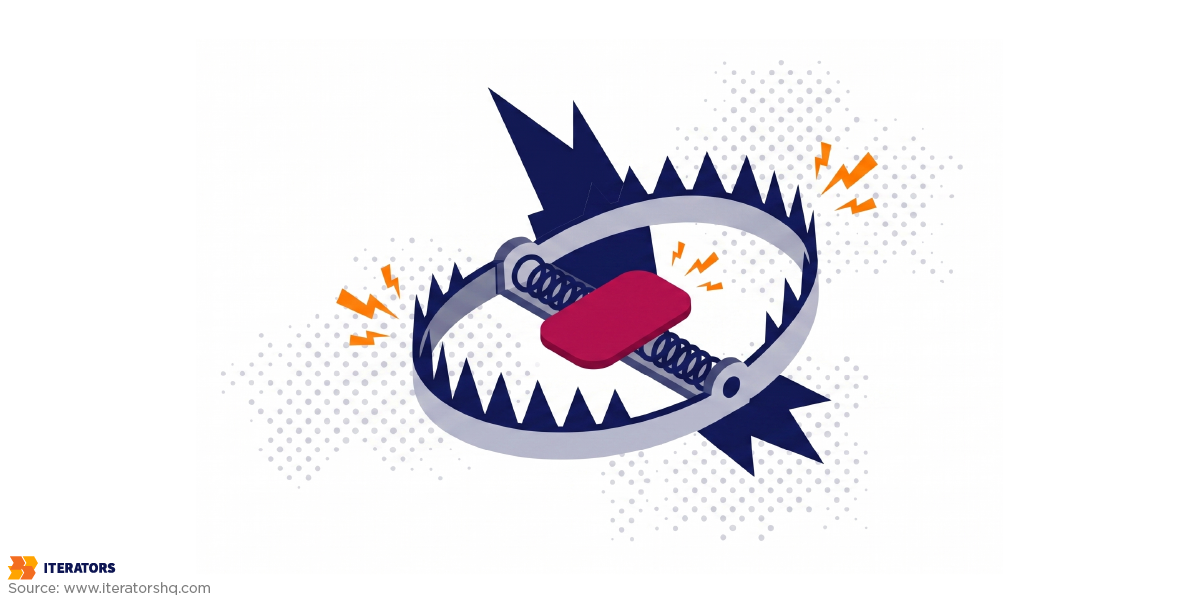
Mistake #1: Automating Before You Map the Process
Most automation projects start with someone who has never done the job writing down what they think the process is, based on an org chart and maybe one interview. Then a vendor builds software against that document.
The problem is that the actual process — the one involving Marek, the CC rule, and the vendor whose invoices always need a second look — never got written down anywhere real. So the software gets built against a fictional version of the workflow, and the first time a real invoice with a real exception hits the system, it breaks or gets stuck, and someone has to manually intervene anyway. Except now that manual intervention happens inside a system that wasn’t designed to expect it.
Before you automate anything, you map the real thing: the inputs, the owners, the exceptions, the decision points, the systems involved, the SLA expectations, the handoffs, and the failure modes. Not the version on the org chart — the version that happens on a Tuesday. This is why actually watching the work — not interviewing a manager about the work, but sitting with the people who do it — matters more than any software demo. You can’t automate a rule you don’t know exists. (Strategic process mapping is the unglamorous version of this, and it’s the step that gets cut first under deadline pressure.)
Mistake #2: Treating Low-Code Tools as Strategy
Low-code and no-code platforms are genuinely useful for small, contained things. A team wants to track requests internally, nothing fancy, twenty people using it. Great tool for that.
The trap is when a shared services center — which might be processing tens of thousands of transactions a month, across multiple countries, with different tax rules, different approval hierarchies, different everything — tries to run its core operating workflow on a tool built for simple, linear use cases. It works fine in the demo. It works fine for the first two months. Then someone needs a permission structure the tool wasn’t built for, or a country-specific exception, or an integration with a system the vendor never heard of, and suddenly you’re either living with a workaround or ripping the whole thing out and starting over with something that can actually hold the weight.
Complex shared services operations need real data models, permissions, integrations, logging, and governance. Low-code is good for the simple stuff and tends to break exactly at the edge cases, which — as we’re about to see — is where the actual cost lives. The tool isn’t the strategy. The tool is what you build once you know what you’re building.
Mistake #3: Ignoring the Exceptions
This is probably the single biggest reason shared services automation quietly fails without anyone officially calling it a failure.
Most transactions in most processes are boring and predictable. The invoice matches the PO, the amount is normal, the vendor is known. Software handles this beautifully. It’s the other slice — the invoice with no PO, the missing tax data, the duplicate vendor entry, the employee transfer that spans two countries with different tax treaties, the urgent legal review, the procurement request outside policy — where the actual cost lives.
Here’s the part nobody budgets for: those exceptions aren’t rare edge cases you can shrug off. In a lot of finance shared services operations, roughly a fifth to a third of transactions fall outside the “happy path.” If your automated system has no real plan for that slice besides “stop and wait for a human,” you haven’t removed the manual work. You’ve just relocated it and made it harder to see, because now it’s stuck inside a digital queue instead of an inbox someone was at least glancing at daily. The normal path is easy to automate. The exceptions are where shared services automation projects go to die.
Where the exceptions go
Exception check
The same 10,000 transactions a month, automated two ways. Drag to set how many are exceptions.
transactions a month stuck in a queue nobody owns
This is the typical range. Here, automation projects quietly stall.
Book a workflow audit →Mistake #4: Measuring Activity Instead of Outcomes
“We deployed forty bots.” “We digitized two hundred forms.” “Ticket volume is up.” These are activity metrics. They tell you something happened. They don’t tell you whether anything got better.
A bot that moves a broken transaction from Queue A to Queue B faster than a human used to isn’t progress. It’s the same error arriving sooner. What actually matters is cycle time, error rate, rework rate, cost per transaction, first-time-right rate, SLA compliance, and whether the people using the thing can stand it. If nobody was tracking those numbers before automation, nobody can honestly claim automation improved anything — they can only claim it looks busier. (Tracking the right metrics is the difference between knowing you improved and hoping you did.)
Mistake #5: Automating on Top of Bad Data
Software does exactly what you tell it, at whatever speed you give it. If your vendor master file has three slightly different entries for the same supplier — “Acme Corp,” “ACME Corporation,” “Acme Corp.” with a trailing space — a human doing manual entry might catch that and merge the payment. A rules-based system will happily process all three as separate vendors, at scale, forever, until someone notices the accounting doesn’t reconcile.
Master-data problems, duplicate vendors, inconsistent naming, bad ERP fields, missing approval rules, unstructured documents, unclear ownership — automating on top of any of that doesn’t clean it up. It multiplies it and adds a layer of confidence that makes it harder to notice, because now it’s coming out of a “system,” and systems feel authoritative even when they’re just repeating garbage faster. Cleaning the data first is boring and it is not optional.
Mistake #6: Forgetting the People Who Actually Use It
If the new digital process is more annoying than the old workaround, people will use the old workaround. This isn’t a training problem. It’s a design problem, and it’s incredibly common because the people scoping the automation project are rarely the same people who will sit in front of it forty times a day.
Shared services automation touches requesters, approvers, SSC agents, managers, auditors, vendors, and employees — and any one of those groups can quietly kill it by routing around it. The result is a parallel economy of shadow spreadsheets, side-channel emails, and unofficial workarounds running alongside the official system, which technically exists, technically has a dashboard, and technically nobody actually trusts. You end up maintaining two processes instead of one — the real one, hidden, and the official one, mostly empty. If the people using the process hate the new tool, your automation project becomes another workaround factory. (A little user research up front is cheap compared to that.)
The Failure Loop That Feeds Itself
Once a few of these mistakes stack on top of each other, they tend to reinforce each other in a fairly predictable way:
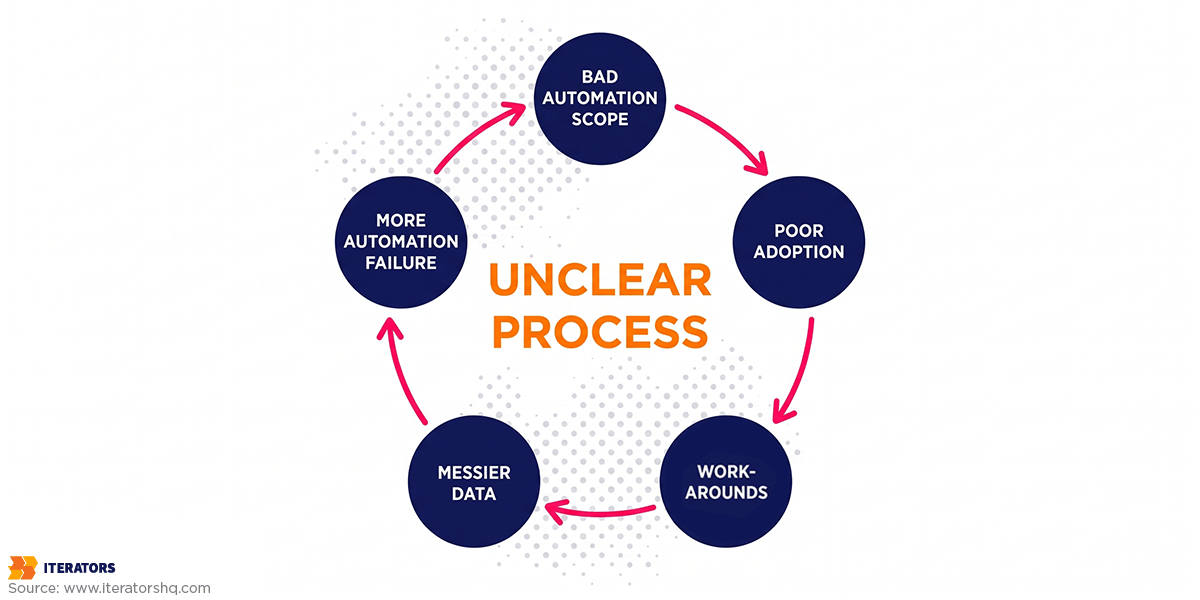
The process wasn’t clearly mapped, so the automation scope was wrong. Because the scope was wrong, people avoid using parts of it. Because people avoid it, they build workarounds. The workarounds generate data that never enters the “official” system, so that data stays messy. Because the data stays messy, any further automation attempt inherits the same mess, plus whatever new mess the workarounds created.
Nobody planned this. It just accumulates, the same way clutter accumulates in a garage — not from one bad decision, but from a hundred small ones that each seemed reasonable at the time.
Process Improvement Before Automation: The Better Playbook
The sequence that avoids all of this is genuinely not complicated, even though almost nobody follows it under deadline pressure. Ten steps, in order:
- Map the current process as it’s actually performed, not as it’s officially documented. Talk to the people doing the work, not just their managers, and specifically ask about the exceptions — that’s where the undocumented rules live.
- Identify the bottlenecks and the hidden workarounds. The workaround is usually pointing at the real problem.
- Remove the steps that don’t need to exist. Redundant approvals, duplicate data entry, sign-offs that survive only because of a person who left two reorgs ago. Business process optimization is genuinely just this: removing waste before you speed anything up, because speeding up waste just gives you waste faster.
- Standardize the inputs and outputs so the process isn’t re-inventing itself on every transaction.
- Define ownership and escalation. One person accountable for the end-to-end flow, and a clear path for the exceptions instead of a dead end.
- Clean the underlying data before it enters any automated pipeline. Duplicate vendors, inconsistent naming, missing fields — none of that gets better by being processed faster.
- Decide what actually should be automated — and, just as importantly, what shouldn’t.
- Instrument the metrics before you build, so you have a baseline. Cycle time, error rate, cost per transaction, first-time-right rate. Not “number of things digitized.”
- Start with a pilot. Run a stripped-down, simplified version of the process by hand first, even briefly. If it still doesn’t work when humans run it on paper, no amount of workflow automation is going to save it. It’ll just fail at a different speed.
- Improve continuously. The first version is never the last version, and operational excellence is a habit, not a project.
The whole point is sequence. It’s cheaper to fix a process on a whiteboard than to fix it after it’s been encoded into software that three departments now depend on.
When RPA Helps Shared Services — And When It Makes Failure Worse

RPA — robotic process automation — basically means software bots that copy repetitive human clicks across systems that don’t talk to each other. Used in the right place, it’s great.
RPA works well for repetitive, rule-based tasks on stable legacy systems: structured data movement, invoice matching, report generation, form filling, scraping a system that has no usable API. If the screen never changes and the rules never bend, a bot will do it faster than a person, forever, without getting bored.
Its weakness is that it’s brittle. Change one dropdown menu in the source system and the bot breaks, and someone has to fix it. RPA also struggles the moment the work involves ambiguous decisions, messy inputs, undocumented exceptions, frequently changing workflows, or unclear business rules — which, if you read the last few sections, is exactly what a typical shared services process is made of. This is a known, widely reported problem: a large share of RPA programs stall out after a handful of bots because the maintenance burden eventually eats whatever time savings the bots produced. RPA on top of an unmapped, exception-heavy process doesn’t reduce failure. It automates it and then bills you to maintain it.
Where AI Fits in Shared Services Automation
AI is powerful here, but it is not magic, and treating it as magic is its own category of shared services automation mistake.
The newer document-understanding kind of AI is genuinely strong at the messy stuff RPA chokes on: document classification, invoice analysis, email routing by intent, knowledge retrieval, exception detection, predictive workload planning, SLA-risk alerts, and natural-language support. These are the parts of shared services that never fit a rigid rule, and that’s exactly where AI earns its keep.
What AI needs to be trusted is the same list that makes any automation work: clean data, clear process rules, governance, monitoring, human-in-the-loop review for the edge cases, and auditability. Without those, an AI model is just a faster, more confident way to be wrong, and now the mistake is harder to trace. If you’re going to put a model in the loop, the NIST AI Risk Management Framework is a sober place to start on the governance side.
You can see this in Iterators’ work on SCHWARTZ.AI, an AI invoice-analysis prototype built for a global consulting firm to optimize how it booked cost and purchase invoices. The value wasn’t “AI for AI’s sake.” It came from combining a real understanding of the workflow, UX testing with the people who’d actually use it, the AI modeling itself, and a usable web platform to put it all in. The model was maybe a third of the work. The rest was understanding the process well enough that the model had something clean to reason about.
Which Tool for Which Mess: RPA vs AI vs Low-Code vs Custom Software
Once the process itself is in reasonable shape, the choice of technology stops being a religious debate and starts being a fairly mechanical decision based on what kind of mess you’re actually dealing with.
| Situation | RPA | AI / document intelligence | Low-code | Custom software |
|---|---|---|---|---|
| Stable, repetitive task, same screen every time | Good fit | Overkill | Fine for simple cases | Overkill |
| Messy, unstructured documents (contracts, invoices, emails) | Struggles badly | Good fit | Struggles | Good fit, usually paired with AI |
| Complex approval logic with real exceptions | Breaks often | Helps with classification, not decisions | Struggles at scale | Good fit |
| Multi-country workflow with different rules per region | Fragile | Needs strong governance | Struggles | Good fit |
| Heavy compliance and audit requirements | Weak audit trail | Needs explicit governance layer | Weak compliance story | Strongest fit |
| Predictive workload / capacity planning | Not designed for it | Good fit | Not designed for it | Good fit, paired with AI |
Custom software is the heavier lift, and it’s not the right answer for a simple, contained internal tool. But when you’re dealing with genuinely complex approval logic, multiple countries, real compliance requirements, and processes that need to scale without falling over, it tends to be the only option that doesn’t eventually get replaced anyway. The mistake isn’t picking the wrong tool. It’s picking any tool before you’ve done the mapping that tells you which mess you actually have.
Shared Services Automation Mistakes by Function
The pattern is the same everywhere, but the exceptions that break automation are function-specific. A few concrete places it goes wrong:
Finance shared services. AP invoice routing that assumes every invoice has a clean PO. Expense approvals with an undocumented “CC this person or it stalls” rule. Reconciliations that quietly depend on one analyst’s spreadsheet. Month-end reporting where the numbers are only right because someone manually fixes them before the deck goes out.
HR shared services. Onboarding that works until the new hire is in a country payroll wasn’t set up for. Employee data changes that ripple into five systems, three of which nobody remembered. Benefits questions and internal training tickets that get “routed” straight into a queue no one owns. Employee support tickets that bounce between HR and payroll because the handoff was never defined.
Procurement shared services. Vendor onboarding with three spellings of the same vendor. PO approvals that route to a manager who left. Contract routing where the “policy exception” path is really just an email to whoever knows the rule. Requests outside policy that the automation confidently approves because nobody encoded the policy.
Customer and back-office operations. Ticket triage that mislabels anything non-standard. SLA management that tracks the easy tickets and hides the hard ones. Document collection that stalls on the one missing form. Reporting workflows that look automated but are held together by a weekly manual export.
In every one of these, the automation isn’t the problem. The undocumented exception is the problem, and the automation just made it move faster.
How to Diagnose Whether Your Shared Services Process Is Ready for Automation
Before anyone greenlights a budget, run the process through a readiness scorecard. Score one point for each “yes”:
Is your process ready for automation?
Readiness scorecard
Pick one shared services process. Tick every statement that’s true for it today, not after the project.
Do not automate yet.
You’d be encoding chaos. Spend the next few weeks mapping and cleaning.
Start with: map the real process, not the SOP; write down the decision rules.
Talk through your score →If you want the five-sentence version of this scorecard, ask yourself: Can someone explain the whole process, including the exceptions, in under five sentences? Do you know, without pulling a report, what it costs to process one transaction today? Is there one person accountable for the end-to-end flow, not just their piece? Are the exceptions categorized somewhere, even roughly? Has anyone tested the redesigned process by hand before building software around it? If most of those are "no," that's not a reason to give up on automating. It's a reason to spend a few unglamorous weeks on mapping and cleaning before the first line of workflow logic gets written.
How Iterators Helps You Avoid Shared Services Automation Mistakes
We don't just put broken workflows into software. The whole argument of this article is that doing so makes things worse, and we'd rather tell you that before the invoice than after it.
What that looks like in practice is process analysis and workflow mapping first, real user research with the people who touch the process, then custom software development, AI automation where it earns its place, dashboards and metrics so you can see whether anything actually improved, shared services platforms that connect the teams and tools and approvals, enterprise integrations, scalable infrastructure, and long-term support so the thing doesn't rot the moment the launch team moves on.
We tend to work at whatever level the process is ready for:
- Process Analysis + Basic Workflow Automation. Map and clean the workflow before building anything. This is where most projects should start, and where the readiness scorecard usually lands people.
- Integrated Shared Services Platform. Connect the teams, tools, approvals, and reporting into one system instead of five that don't talk.
- AI-Powered Process Optimization. Add intelligent routing, document understanding, analytics, and automation on top of a process that's actually ready for it.
- Predictive Process Intelligence. Dashboards, forecasting, and AI-assisted decision support for continuous improvement, once the fundamentals are solid.
We do not just put broken workflows into software. We help you understand the work, improve the process, and then build the system that can actually scale.
Thinking about automating a shared services process? Start with the part that saves you the most money later: understanding what you actually have. Talk to Iterators about a workflow audit before you buy the tool.

FAQ: Shared Services Automation Mistakes
What are the most common shared services automation mistakes? Automating before mapping the real process, ignoring the exceptions, treating a low-code tool as a strategy, automating on top of dirty data, measuring activity instead of outcomes, and forgetting the people who actually have to use the thing. Almost all of them come down to automating a process nobody fully understood first.
Why does shared services automation fail? Because automation multiplies whatever you feed it. If the underlying process is efficient, automation multiplies efficiency. If it's broken, undocumented, or exception-heavy, automation multiplies the dysfunction — faster, at greater cost, and harder to unwind.
Should you improve a process before automating it? Yes. Process improvement before automation is the single highest-leverage step. Removing unnecessary steps, cleaning the data, and defining ownership on a whiteboard is far cheaper than fixing those problems after they've been encoded into software three departments depend on.
What is the difference between digitization and automation? Digitization moves a manual process into a digital tool (a paper form becomes a web form). Automation lets software trigger the steps without a human (the form auto-routes to an approver). Neither one improves the process — that's optimization, a separate step most projects skip.
Can RPA fix broken shared services processes? No. RPA is excellent for stable, repetitive, rule-based tasks, but it's brittle and breaks on ambiguity, messy inputs, and undocumented exceptions — which is what most shared services processes are full of. RPA on a broken process just automates the breakage and adds a maintenance bill.
When should shared services use AI? When the work involves messy, unstructured inputs — classifying documents, reading non-standard invoices, routing by intent, detecting exceptions — and when you have the clean data, clear rules, governance, monitoring, and human-in-the-loop review to keep it trustworthy. AI without those is just a faster way to be confidently wrong.
How do you measure shared services automation success? With outcome metrics, not activity metrics. Cycle time, error rate, rework rate, cost per transaction, first-time-right rate, SLA compliance, and user satisfaction — measured against a baseline captured before automation. "Number of bots deployed" tells you nothing about whether anything got better.
What is a digitally broken process? A broken manual process that's been moved into software without being improved first. It runs faster and looks more modern, but the original bottleneck, unclear ownership, and hidden exceptions are all still there — now harder to see, because they're buried inside a system that feels authoritative. Digitizing a broken process creates a digitally broken process.