

It starts with a notification. Then three more. Then Slack goes quiet for five seconds before someone types: “Is production down for everyone?” That five seconds of silence is where system outage recovery actually begins — not with a clean runbook, but with uncertainty, adrenaline, and a development team trying to work out whether the business is on fire or someone fat-fingered a dashboard.
Production is down. That’s the small problem.
Drag the waterline down to see what the first 48 hours uncover.
Production is down
the part everyone sees
Communication
T+0 starts when the pager goes off
Diagnosis
T+2h the first hypothesis is usually wrong
Decision
T+6h a partial picture, a running clock
Data integrity
T+24h+ a duplicate charge, three days later
1/5
problems visible
T+0
when it surfaces
The fix is rarely the hard part.
Stuck below the waterline?
Get emergency IT support →System outage recovery is usually described as one event: the system breaks, someone fixes it, service resumes. That description is wrong in a specific way, not because outages don’t eventually get fixed, but because the fix is rarely the hard part. Underneath the outage you can see, there are four or five overlapping problems: a technical failure, a diagnostic failure, a decision made under incomplete information, a data-integrity problem nobody has noticed yet, and a communication problem that started the second the pager went off. Most incident-response writing collapses these into a single timeline and calls it “resolved.” I want to pull them apart, because each one fails differently, gets fixed differently, and — this is the part that matters for anyone running a small engineering team — gets prevented differently.
Production down, unstable, or one deploy away from chaos? Iterators can help you stabilize, recover, and build a safer production support process. Talk to us about emergency IT response and production support.
Here’s the shape of the next two days before we walk through them:
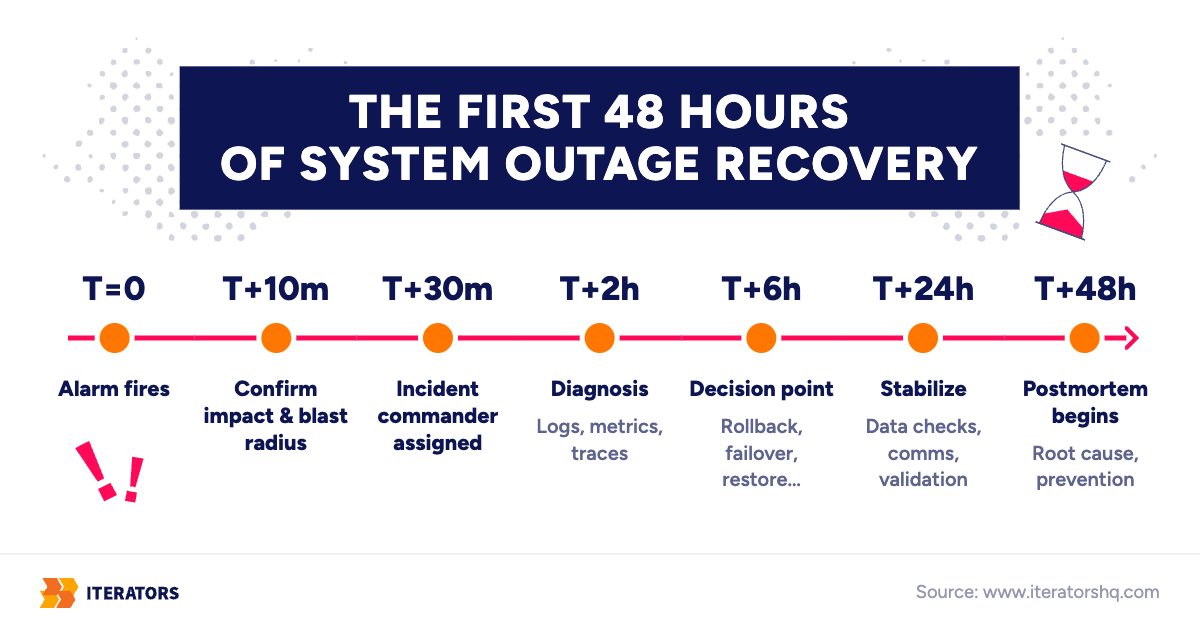
What System Outage Recovery Actually Means
System outage recovery is the process of detecting, diagnosing, containing, and restoring a failed production system while protecting user data, revenue, and the trust of whoever is depending on you at that moment. It is not “restart the server.” It is not “revert the last commit.” Those are two of several tools inside a much larger decision process, and picking the wrong one under pressure is how a 20-minute outage becomes a 20-hour one.
There are three distinct failure states worth naming separately, because teams routinely treat them as the same thing and respond wrong as a result:
- Degradation — the system is up, but slow, error-prone, or partially correct. Latency spikes, a subset of requests fail, one region is affected. Users notice, but the system is not down.
- Outage — a core function is unavailable for a meaningful population of users. Login fails, checkout fails, the API returns 5xx server errors at scale. This is what most people mean by “production is down.”
- Disaster — data is lost, corrupted, or exposed, and the fix is not “bring the service back” but “figure out what’s actually true in the database anymore.” Disasters usually start as outages and get discovered an hour or two later, during diagnosis, which is why the first response to any outage has to include the possibility that it’s actually a disaster.
The distinction matters because the correct first move is different for each. A degradation tolerates investigation. An outage tolerates a fast, imperfect decision. A disaster punishes fast decisions: a hasty rollback against corrupted data can make things permanently worse. Nobody knows which of the three they’re in at minute zero. That uncertainty is the actual starting condition of every incident, and it’s worth saying plainly instead of pretending the runbook removes it.
And recovery is never only technical. A restart that brings the API back but leaves customers who spent an hour staring at a spinner with no word from you has fixed the smaller half of the problem. This is also why startups experience outages differently than enterprises — a point worth its own section later, but the short version is that the same downtime costs a startup far more trust per hour. If you’re reading this because you suspect your team isn’t ready to run this process, that instinct is worth acting on; it’s exactly the gap emergency IT support services exist to close.
T+0: The Alarm and the First Production Downtime Response
At the moment of detection — a pager alert, a spike in error rate, a customer email, a status-page check firing red — almost everything about the incident is unknown. What actually failed, why, how far the blast radius extends, and whether it’s getting worse are all frozen facts you don’t have yet. What is not frozen, and what you control completely in the first ten minutes, is much smaller than people think, but it’s the part that determines whether the next six hours are orderly or chaotic.
The first ten minutes are not for fixing. They’re for confirming and containing. Confirm the outage is real and not a monitoring false positive. Then find the blast radius, because “production is down” means five different responses depending on the answer: Is everyone affected, or one region? One customer, or all of them? One feature, one integration, or the whole platform? You cannot scope a response to a problem you haven’t sized.
You control whether there is one source of truth or five parallel Slack threads. You control whether deploys are frozen while the team investigates, or whether three engineers each ship a guess at a fix in the next twenty minutes. You control who is allowed to talk to customers and who is allowed to touch production. None of that requires knowing the root cause. All of it requires deciding, immediately, before the diagnosis even starts.
Assign an Incident Commander Before Everyone Starts Debugging
The single highest-impact move in the first ten minutes is naming an incident commander — a role, borrowed from emergency-response structures and formalized for engineering teams by PagerDuty’s incident response framework and Google’s SRE incident-management practice, whose job is coordination, not debugging.
| Role | Job during the incident | What they must not do |
|---|---|---|
| Incident Commander | Directs tempo, assigns tasks, decides when to escalate or call outside help | Debug code, query logs, or touch infrastructure directly |
| Technical Lead | Runs the actual diagnosis and proposes fix paths | Talk to customers or make external commitments |
| Scribe | Keeps a real-time, timestamped log of what was tried and what happened | Get pulled into debating the fix |
| Customer Liaison | Publishes factual, non-speculative updates | Promise a resolution time before there’s a diagnosis |
| Executive Sponsor | Absorbs organizational pressure, authorizes spend or outside help | Override the incident commander’s tactical calls |
The reason this table looks bureaucratic for a five-person startup is that most five-person startups don’t need all five roles as separate people. What they need is the separation of concerns, even if one person holds two roles temporarily. The failure mode isn’t “we don’t have enough people.” It’s “the person debugging the database is also the person telling the CEO it’ll be fixed in twenty minutes,” and now every update to leadership is contaminated by whatever the engineer is hoping is true, not what they actually know.
Production Downtime Response Mistakes in the First 30 Minutes
The mistakes that cost the most time in this window are rarely technical. They’re coordination failures. The clean version of the first half hour looks like this:
Do:
- Confirm the impact is real before mobilizing everyone.
- Create one source of truth — a single channel, a single running timeline.
- Freeze risky changes and stop speculative fixes.
- Preserve logs and current state before you change anything.
- Note the timeline as you go, not from memory afterward.
Don’t:
- Let five engineers each deploy five different fixes at once.
- Restart random services without recording what state they were in first.
- Tell customers “almost fixed” before there’s an actual diagnosis.
- Blame the last developer who deployed — you don’t yet know it was the deploy.
The single most common one, the one that shows up in nearly every postmortem I’ve read, including some of ours: nobody writes down what was tried, so the same dead end gets rediscovered forty minutes later by someone who wasn’t in the first conversation.
T+2 Hours: System Outage Recovery Moves From Symptoms to Diagnosis
By the two-hour mark, the incident has usually moved from “something is obviously broken” to “we don’t yet know why,” and this is where system outage recovery either stays procedural or turns into guesswork. The team’s first hypothesis is almost always wrong, not because engineers are bad at their jobs, but because the signal that triggered the alert (a 500 rate, a latency spike) is a symptom several layers downstream of the actual cause.
The real cause is usually one of a familiar handful: a recent deploy, a config change, an expired certificate, a cloud-provider incident, a database lock, or a third-party API that started timing out and cascaded into your product. The trap is anchoring on the first one you think of and spending ninety minutes proving a theory you should have discarded in ten.
When Logs, Metrics, and Traces Disagree
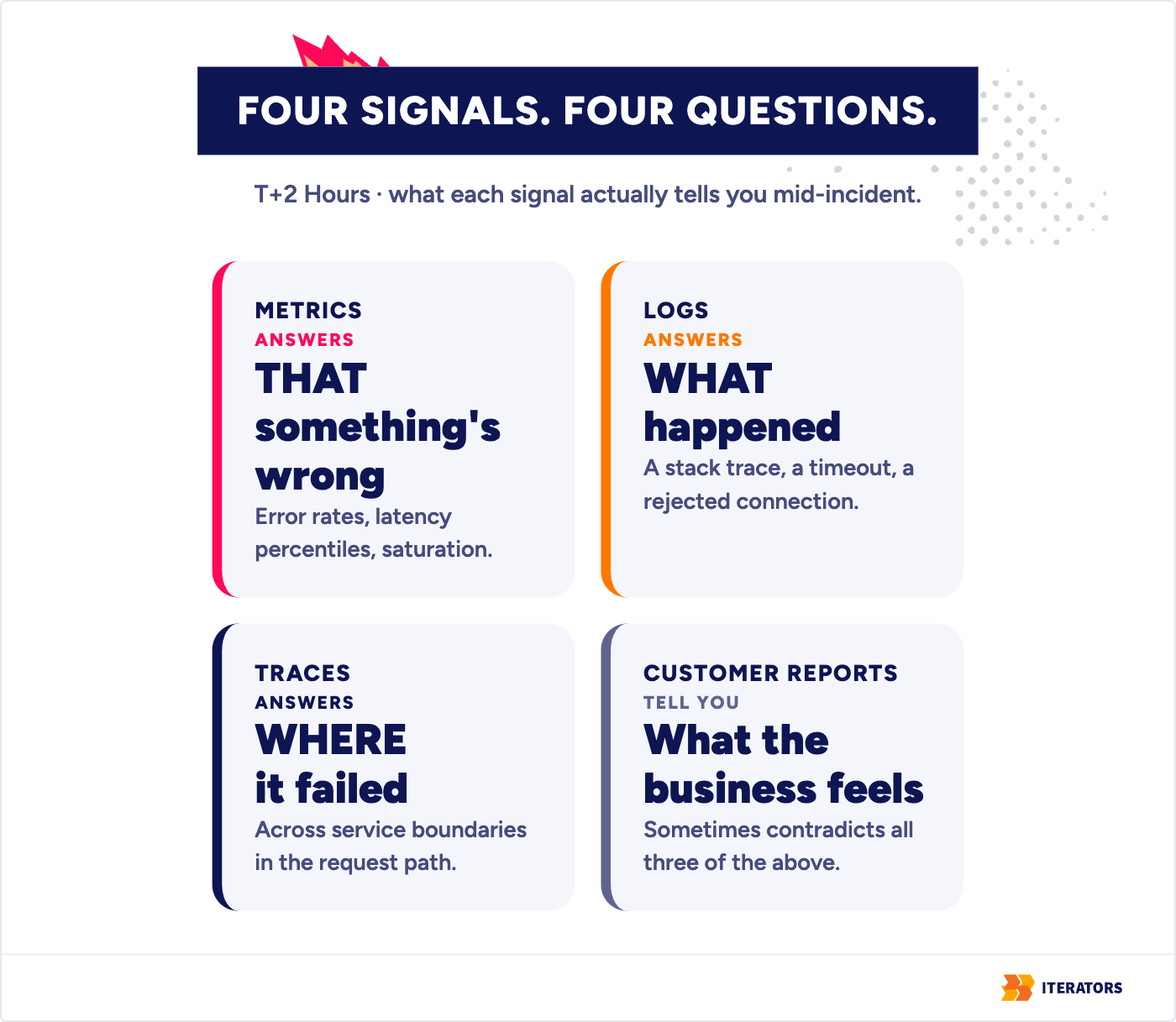
A working diagnostic process pulls from three different kinds of signal, and they answer three different questions:
- Metrics tell you that something is wrong — error rates, latency percentiles, saturation.
- Logs tell you what the system thinks happened at the point of failure — a stack trace, a timeout, a rejected connection.
- Traces tell you where in the request path things actually slowed down or failed across service boundaries.
- Customer reports tell you what the business is actually experiencing, which sometimes contradicts all three of the above.
The uncomfortable case — and the one that eats the most time — is when these disagree, or when one of them simply doesn’t exist. A team with no distributed tracing can see the error rate climbing and have no way to tell whether the failure originates in their own database, a downstream microservice, or a third-party API they don’t control. At that point, diagnosis stops being engineering and starts being detective work performed under a deadline, using whatever fragments of software documentation happen to still be accurate.
This is also where undocumented technical debt stops being an abstract line item and becomes the actual reason the outage is taking six hours instead of forty minutes. A migration script nobody wrote down. A cron job that quietly depends on a table that got renamed eight months ago. A certificate that was supposed to auto-renew and didn’t, because the renewal hook pointed at infrastructure that was decommissioned in a refactor nobody flagged as load-bearing. None of these show up in a metrics dashboard. They show up as the engineer on call spending ninety minutes reconstructing, from memory and grep, something that should have taken five minutes to look up.
If You Have No Observability, You Are Debugging by Flashlight
The worst version of this diagnostic phase is the team that has no observability at all and discovers it live, mid-incident. Finding out you have no application monitoring while production is down is functionally the same as discovering, mid-flight, that the plane has no instruments. You’re not debugging anymore. You’re guessing with more confidence than the situation warrants.
The tooling here is genuinely commoditized — Datadog, Sumo Logic, CloudWatch, Grafana, Honeycomb for telemetry, PagerDuty for alerting and on-call. Which logo you pick matters far less than whether the signal exists at all and whether someone practiced reading it before the fire. The worst time to discover you have no observability is when your production system is already down, and no purchase order clears fast enough to fix that at T+2 hours.
T+6 Hours: The System Outage Recovery Decision Point
Eventually — sometimes at hour two, sometimes at hour six — the team has enough of a diagnosis to make a call. This is the actual center of gravity of system outage recovery: not the alert, not the diagnosis, but the decision about which remediation path to take, made with a partial picture and a clock running.
There are more levers than people remember under pressure — you can roll back, patch forward, fail over, restore from backup, disable the offending feature, throttle traffic, put up a maintenance page, accept degraded service temporarily, or call in outside help. The four heavy ones trade off against each other in predictable ways:
Rollback, Hotfix, Failover, or Restore?
| Option | When it actually works | Main risk | What you must verify first |
|---|---|---|---|
| Rollback | The failure correlates with a recent deploy; the database schema hasn’t changed underneath it | Old code may not be compatible with a schema that already migrated forward | Schema backward-compatibility, staging dry-run |
| Hotfix (patch forward) | Root cause is clearly identified and isolated; rollback is too costly or impossible | Skipping full test coverage under time pressure introduces a second bug | Peer review from a second senior engineer, targeted test run |
| Failover | Underlying infrastructure or a whole region is down, not the application logic | Replication lag means the failover target is missing recent writes | Replica sync state, DNS and routing configuration |
| Restore from backup | Data is corrupted or destroyed, not just unavailable | Data written since the last backup is gone — the data-loss cost implied by your recovery point objective | Backup checksum integrity, restore-target capacity |
The table looks clean. The decision doesn’t feel clean, because you’re choosing under exactly the kind of incomplete information this entire process runs on. What kills teams here isn’t picking the wrong option in the abstract — it’s picking an option and skipping the verification column because the pressure to “just fix it” overrides the five minutes it takes to check.
When to Call an Emergency IT Response Team
There’s a specific kind of wall that shows up at this stage, and it’s worth naming precisely because it’s different from “we haven’t found the bug yet.” It’s the wall where the team cannot execute any of the four options, regardless of diagnosis quality — because nobody currently on staff has the access, the institutional memory, or the operational bandwidth to act on what they know.
That’s a different category of problem than a hard bug. A hard bug is solved with more time and the right engineer. A missing-access wall or a missing-knowledge wall isn’t solved by throwing more hours at the people already in the room — it’s solved by bringing in someone who has done this specific kind of recovery before and isn’t discovering the infrastructure for the first time under fire. This is exactly the gap firefighting tech teams are built to close, and it’s also the specific service boundary of emergency IT support — parallel diagnosis and calm operational execution running alongside a team that’s already stretched thin keeping the business functioning around the outage.
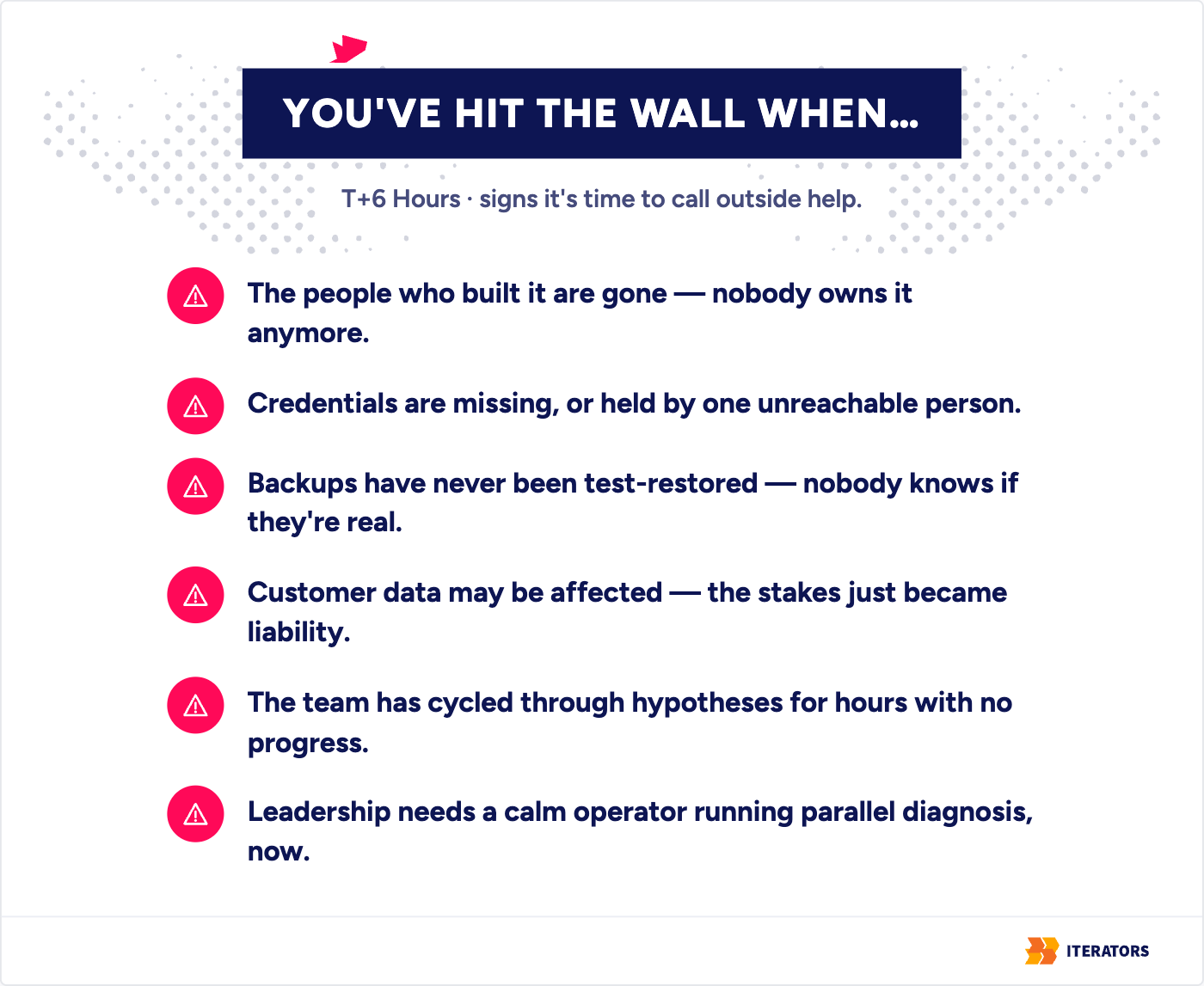
The concrete signals that you’ve hit this wall, rather than an ordinary hard bug, are usually one or more of these:
- The developers who originally built the system have left, and nobody owns it anymore.
- The internal team can’t actually get into the infrastructure — credentials are missing or held by one unreachable person.
- The backups have never been test-restored, so nobody knows if “restore from backup” is even real.
- Customer data may be affected, and the stakes just moved from downtime to liability.
- The team has been cycling through hypotheses for hours without narrowing the search space.
- Leadership needs a calm technical operator, and you need parallel diagnosis while the internal team keeps the business running.
That last signal is the most diagnostic — a team converging on an answer looks different, procedurally, from a team spinning.
T+24 Hours: Stabilization Is Not the Same as Recovery
A green health check is not the end of system outage recovery. It’s the start of a second, quieter phase that most teams underestimate, because “the site is up” feels like resolution and it isn’t.
Bringing a system back online after an outage reintroduces load in a way the system usually wasn’t designed to absorb gracefully. A message queue that backed up for six hours starts draining all at once. A backlog of webhook retries fires simultaneously. Caches have been cleared or expired, so the database takes the full weight of every request until they warm back up. If none of this was rate-limited or staged, the recovery itself can trigger a second outage — a genuinely humiliating way to extend an incident that was already resolved once.
Validate Data Before Declaring Victory
Before declaring the incident closed, the honest version of system outage recovery includes checking things that have nothing to do with whether the homepage loads. System outage recovery isn’t finished when the site responds; it’s finished when the data is provably correct:
- Did any transactions get processed twice, because a retry fired against a request that actually succeeded the first time?
- Are there orphaned records — foreign keys pointing at rows that no longer exist, or exist twice?
- Did missed webhooks need replaying, and did that replay itself stay idempotent?
- Did notification or billing events queue up, about to fire in a burst that looks like spam or double-charging to a customer?
- Is the cache serving stale data that predates the fix?
- Do the audit logs actually reflect what happened, for the postmortem and for anyone who asks later?
None of these show up as “system down.” They show up three days later as a support ticket about a duplicate charge, and by then nobody connects it to the outage.
Customer Communication During Production Downtime Response
The instinct during an outage is to go quiet until there’s good news. That’s backwards. A factual, honestly incomplete update protects trust better than silence followed by a triumphant “all clear,” because silence reads as either incompetence or indifference to whoever is depending on your uptime for their own business. Tell users what you know, don’t overpromise, separate technical detail from customer impact, and always give the next update time — then actually hit it. This matters more, not less, the tighter your service level agreements are with enterprise customers, since an SLA-breach conversation goes very differently when the customer already trusts your process than when they find out you went silent for six hours.
You don’t need to compose this from scratch at 3 a.m. A reusable template does most of the work:
Outage status updates: three messages to copy
Fill in the [brackets], post on schedule.
-
Status: Investigating
14:20 UTC
We’re aware that [feature/service] is currently [unavailable / degraded] for [some / all] users. We’ve identified the affected system and are actively investigating. No action is needed on your side.
Next update by 14:50 UTC.
-
Status: Identified
14:50 UTC
We’ve found the cause and are applying a fix. [Feature] may remain [slow / unavailable] until it completes.
Next update by 15:20 UTC.
-
Status: Resolved
15:35 UTC
[Feature] is fully restored as of 15:30 UTC. We’ll follow up with a summary of what happened and what we’re changing to prevent it.
T+48 Hours: System Outage Recovery Ends — or the Real Work Starts
The technical fire is out well before the 48-hour mark, usually. What’s still open at that point is the question of whether the same failure happens again in three months, and that question doesn’t get answered by the people who fixed the outage going back to their regular work relieved.
Richard Cook’s line from How Complex Systems Fail is the correct frame for this stage, and it’s worth quoting directly rather than paraphrasing, because paraphrase loses the specific claim being made:
“Complex systems are intrinsically hazardous systems.” — Richard I. Cook, MD
The claim isn’t that your engineers made a mistake. It’s that a system with enough interconnected parts will always contain latent weaknesses, and a bad outage is usually several small weaknesses lining up at once — a missing alert threshold, a certificate nobody owned, a runbook that was accurate a year ago and hasn’t been touched since. Blaming the engineer who happened to trigger the alignment doesn’t fix the alignment. It just makes the next engineer more careful about that specific mistake, while the structural gap that let it cause damage stays exactly where it was.
Blameless Root Cause Analysis Without Excuses
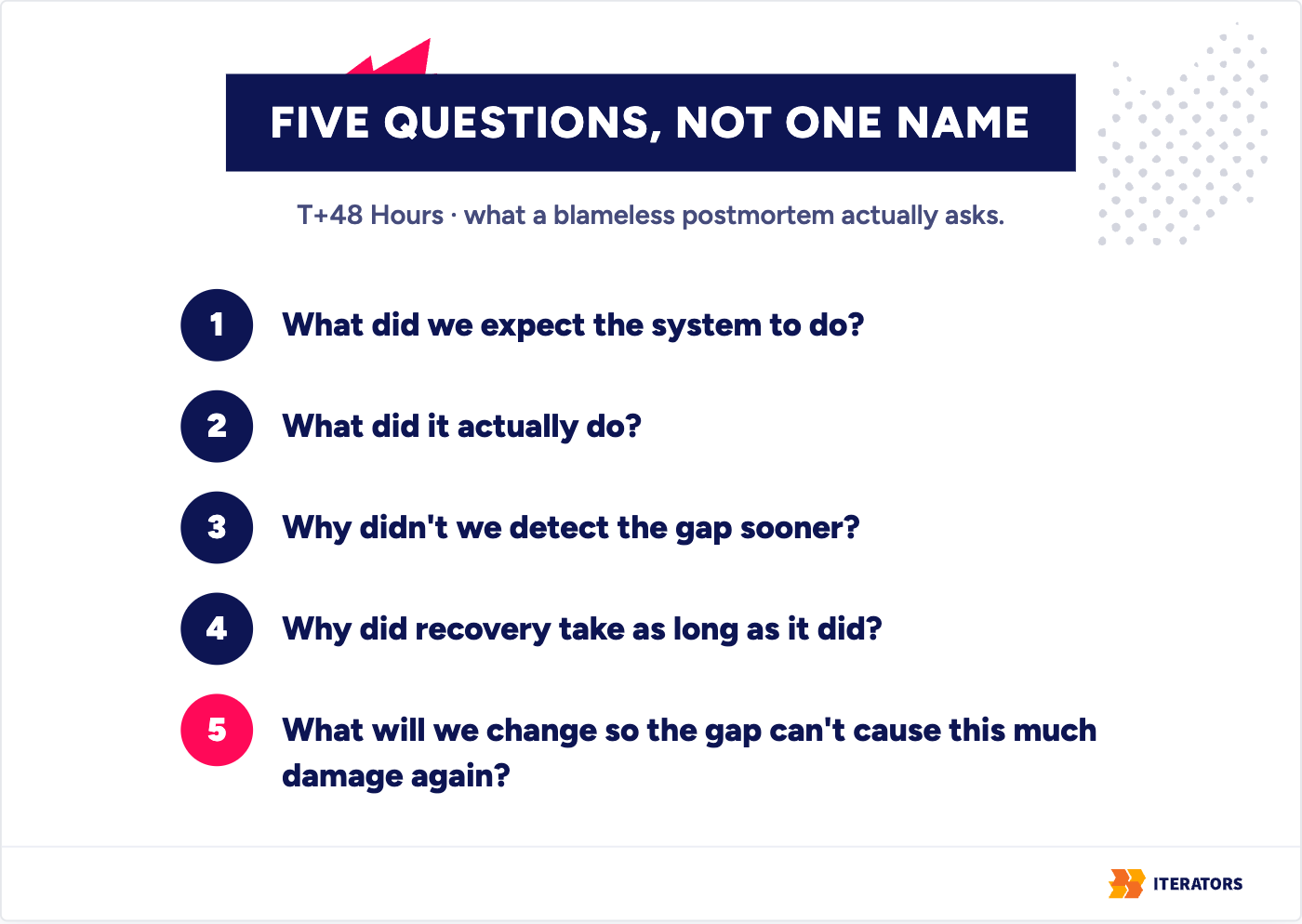
A blameless postmortem is not an exercise in avoiding accountability. Human error is almost always a symptom, not a root cause: the real question is why the system allowed a single mistake to cause this much damage. It redirects the conversation from “who did this” to five more useful questions:
- What did we expect the system to do?
- What did it actually do?
- Why didn’t we detect the gap sooner?
- Why did recovery take as long as it did?
- What will we change so the gap can’t cause this much damage again?
The output has to be concrete — a monitoring threshold added, a runbook rewritten, a piece of access control that closes a hole, with an owner and a date attached — not a vague commitment to “be more careful.”
System Outage Recovery Metrics: MTTA, MTTR, RTO, and RPO
| Metric | What it measures | Why it matters to someone who isn’t debugging |
|---|---|---|
| MTTA — mean time to acknowledge | Time from alert firing to a human confirming they’re on it | Tells you if your on-call rotation and alerting actually work |
| MTTR — mean time to recover | Time from failure start to verified restoration | The number that maps most directly to business cost |
| RTO — recovery time objective | The maximum downtime your business can tolerate for a given system | A target you set before the incident, not during it |
| RPO — recovery point objective | The maximum data loss you can tolerate, measured in time since the last valid backup | Defines how often backups actually need to run |
These numbers only mean something if they’re tracked across incidents, not calculated once after a bad one. A single data point tells you nothing about whether your process is improving. A trend across six incidents tells you whether the postmortems are actually changing anything or just producing documents nobody reopens. Executives don’t need to run the queries, but they should know these four terms, because MTTR is a business cost and RPO is a promise you’re implicitly making to customers about how much of their data you’re willing to lose.
The whole thing is a loop, and the point of the loop is that each turn makes the next outage shorter:
Outage recovery: the incident loop
Every incident should leave you better prepared for the next one.
The incident loop. Respond: Incident, then Recovery, then Root cause analysis, then Action items. Prevent: Action items feed Monitoring, then Runbook, then Simulation, and Simulation leads back to the next Incident.
It’s also worth saying, because it doesn’t require a failure to be true: embedding the discipline that makes these metrics good — access control, audit logging, documented recovery paths — doesn’t have to wait for an outage to force it. One of the platforms we’ve maintained for close to a decade had SOC 2’s security, availability, and confidentiality criteria built into the architecture from the start, not bolted on before an audit. That’s the same discipline as a good postmortem, applied before there’s anything to postmortem about.
Why System Outage Recovery Is Different for Startups
Everything above assumes a team large enough to split roles. Most startups don’t have that luxury, and system outage recovery on a small team fails in a specific, nameable way.
The Bus Factor Problem
The bus factor is the risk concentrated in the fact that one person holds the access, the credentials, or the mental model that nobody else has. When that person is unreachable during an outage — asleep, on a plane, no longer with the company — recovery doesn’t slow down. It stops. Nobody else has the production database password. Nobody else knows that the payment webhook depends on a small serverless function that was never documented because the person who wrote it “just remembered it.” This isn’t a hypothetical; it’s the most common structural cause of organizational knowledge loss turning an ordinary incident into a multi-day one.
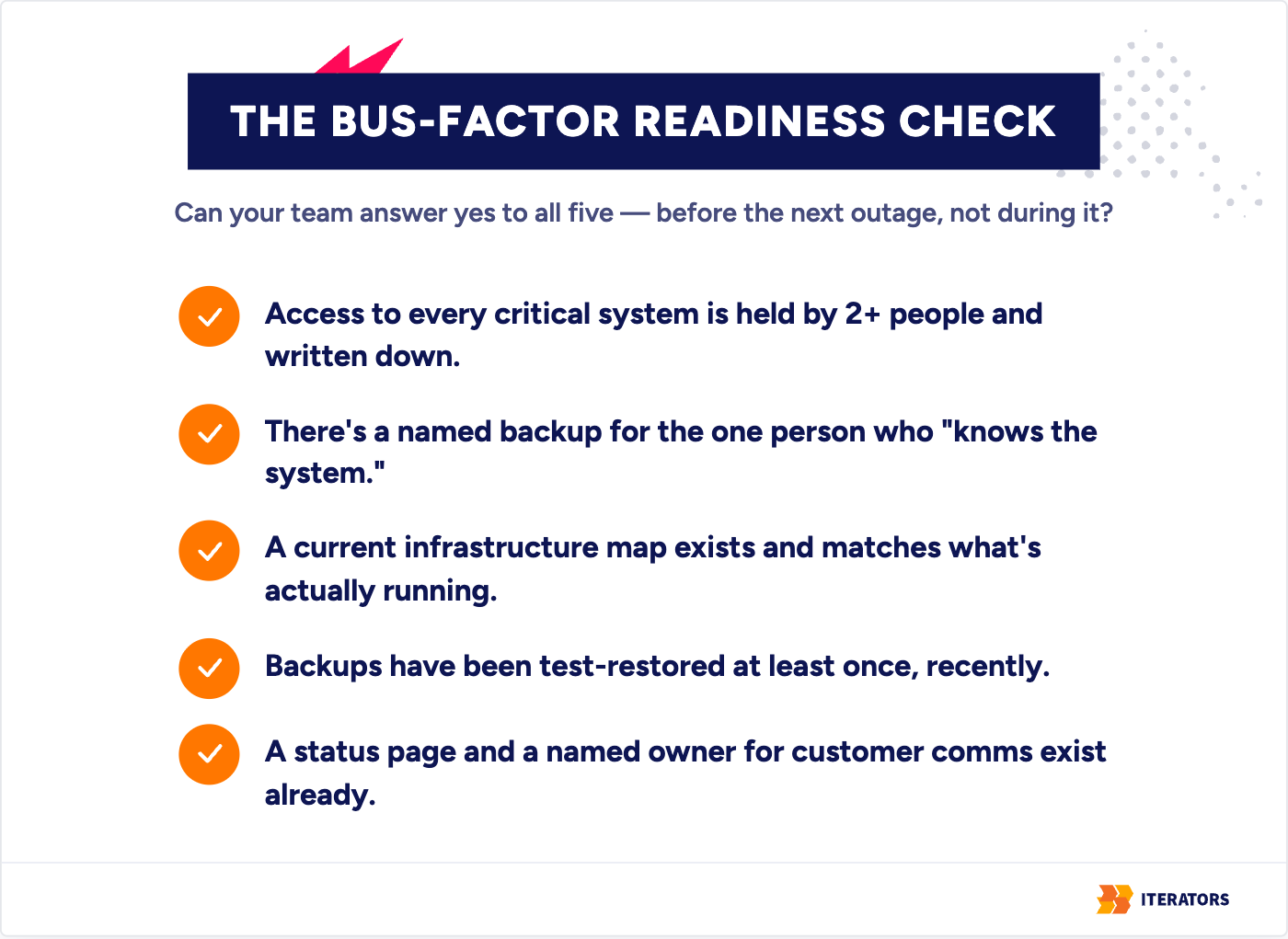
The fix isn’t hiring more people immediately. It’s treating access, documentation, and runbooks as business-continuity assets, not engineering niceties. At minimum, a small team should be able to answer yes to all of these before the next outage, not during it:
- Access to every critical system (domain registrar, cloud console, database, payment gateway) is held by at least two people and written down.
- There’s a named backup for the one person who “knows the system.”
- A current infrastructure map exists and matches what’s actually running.
- Backups have been test-restored at least once — recently.
- A status page and a named owner for customer communication exist before they’re needed.
Startups also carry a second, less technical vulnerability: a bad outage costs more trust per hour than the same outage costs an established enterprise. An enterprise SaaS platform absorbs a rough afternoon. A startup mid-pilot with an enterprise prospect can lose the deal outright, because the prospect’s security review just found its answer.
Your System Outage Recovery Checklist Before the Next Crisis
None of this is useful if it only gets read after the next outage. Good system outage recovery is mostly work you do before the crisis, not during it. The version worth keeping somewhere your team will actually see it again:
- Define incident severity levels and what triggers each one, before you need them.
- Name at least two people who can act as incident commander — not one.
- Create escalation paths, so it’s clear who gets woken up and when.
- Document production access and store it somewhere that survives someone quitting.
- Test-restore backups on a schedule, not “whenever someone remembers.”
- Set up monitoring and alerting that fires before customers notice, not after.
- Track MTTA and MTTR after every incident, even small ones.
- Keep rollback and hotfix paths tested, not theoretical.
- Maintain an architecture diagram that matches what’s actually running, not what was true a year ago.
- Document your third-party dependencies and what each one failing would do to you.
- Draft customer-communication templates before you need to write one under pressure.
- Run at least one simulated incident a year, so the first real one isn’t also the first rehearsal.
- Review your SLAs so the promises you’ve made match what you can actually deliver.
- Protect digital assets and credentials — the recovery is worthless if you can’t get into the systems that run it.
- Schedule postmortem reviews so action items get closed, not just filed.
The point of the list isn’t the list. It’s that every item on it is cheap to do in a calm week and expensive to be missing in a bad hour.
The firefighting tech team doesn’t wait for the fire to start; it makes sure the hoses are ready, the alarms are tested, and the emergency exits are marked.
How Iterators Helps Teams Recover and Prepare
I’ll keep this short, because the point of everything above wasn’t to set up a pitch — it was to describe a system outage recovery process I’ve watched teams run well and badly, from the inside. Where Iterators tends to help is in two moments: the bad hour, and the calm week that should have come before it.
In the bad hour, we act as a firefighting tech team — calm emergency response, parallel diagnosis, and operational execution running alongside your internal team so the business keeps functioning while the outage gets solved. In the calm week, we do the unglamorous work that makes the next bad hour shorter: documentation review, infrastructure and observability setup, SLA and maintenance processes, and — when internal ownership is genuinely broken — a full tech takeover of a system nobody left behind knows how to run. We try to act like a tech partner, not a ticket vendor.
That work maps to roughly four levels of engagement, and most teams start lower than they think they need to:
- Reactive emergency response — you’re down now, and you need experienced hands on the problem today.
- Proactive monitoring and response — observability, alerting, and an on-call process so the next incident is caught before a customer reports it.
- Comprehensive incident management — runbooks, severity levels, postmortem discipline, and the metrics that tell you whether any of it is working.
- Predictive, AI-assisted prevention — using the signal you’re now collecting to catch the failure patterns before they become outages.