

You know that feeling when you’ve just joined a company, your laptop hasn’t arrived, and you’re not entirely sure who to ask? So you email IT. They say it’s actually HR. HR says it’s procurement. Procurement says check with your manager. Your manager says they already submitted the request. Somewhere in that chain, the request is sitting in a shared inbox that three people technically own and nobody actually monitors. Multiply that by every new hire and every office, and you’ve got the exact problem a shared services center is built to solve.
This is a process problem, and more specifically a technology problem dressed up as an org chart problem.
A shared services center is the organizational answer to exactly this kind of mess. But building one doesn’t automatically fix anything. It just changes who owns the chaos. Whether the chaos actually goes away depends almost entirely on the software layer underneath.
If you’re trying to understand what a shared services center is, whether it fits your situation, and what actually makes one work, this is the article. And if you’re already past the “what is it” stage and into the “how do we build the technology layer” stage, Iterators builds shared services center solutions — the software, not just the org chart.
What Is a Shared Services Center?
A shared services center (SSC) is a dedicated internal team that handles common back-office work — finance, HR, IT, procurement, legal — for multiple departments, regions, or subsidiaries, using standardized processes, shared tools, and agreed-upon service levels.
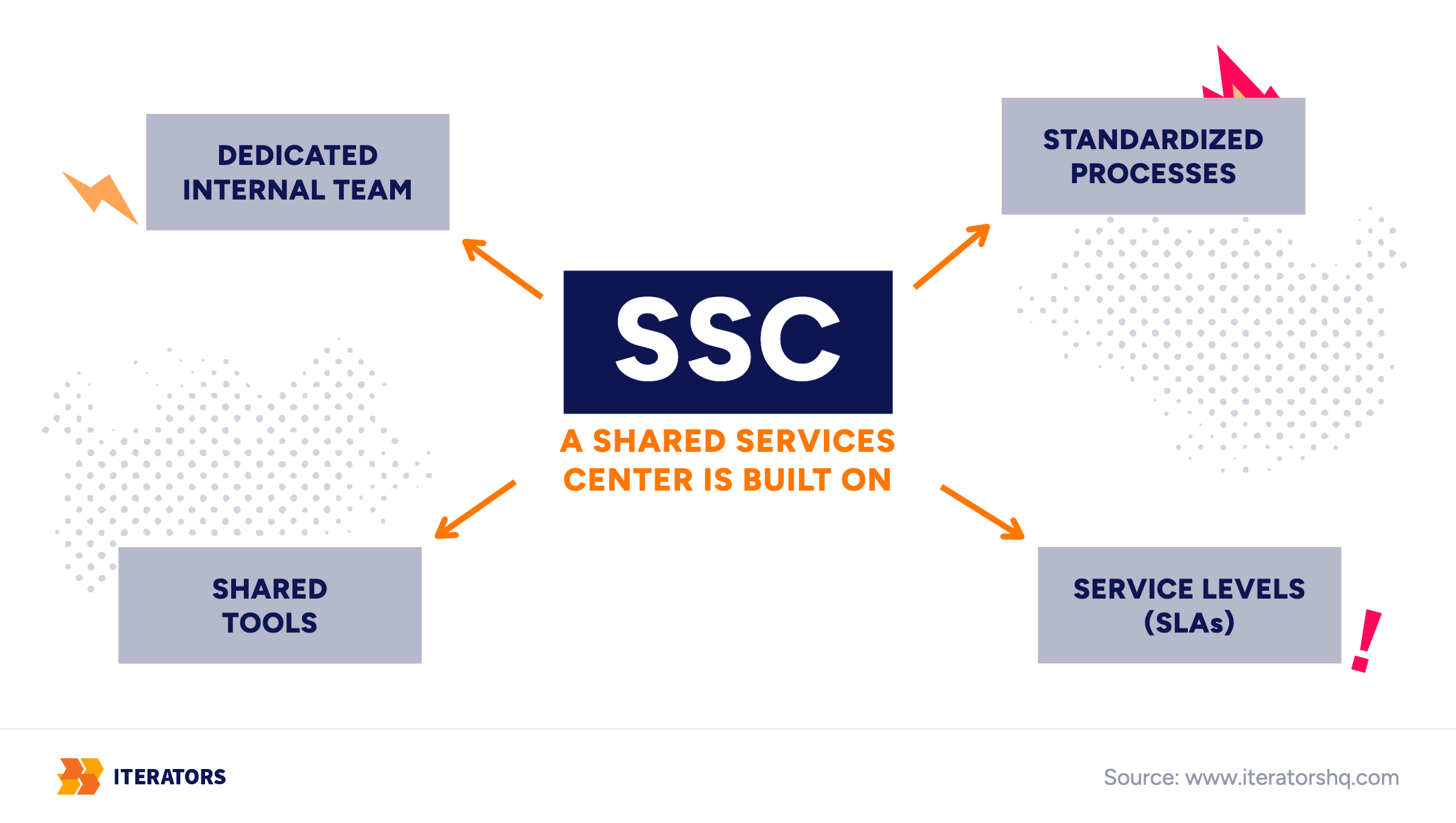
That last part is important. “Service levels” means a formal commitment — usually called a service-level agreement, or SLA — that defines how fast requests get handled, what quality looks like, and who’s accountable when something slips. Without SLAs, an SSC is just a department with a fancier name.
The concept goes back to the mid-1980s, when large corporations like Ford and General Electric started consolidating their back-office work into shared service centers, beginning with finance. For decades, it was mostly about cutting costs by centralizing labor. Move the work to one team, reduce headcount everywhere else, capture the savings.
That model still exists, but the industry has moved on. Deloitte recently renamed its long-running Global Shared Services and Outsourcing Survey to the Global Business Services Survey. The new name reflects a real shift. The leading organizations aren’t running isolated transaction centers anymore. They’re running Global Business Services (GBS) operations: multi-function, multi-country hubs that handle complex processes end-to-end, not just the routine stuff.
The Hackett Group, which benchmarks these operations, describes the leading GBS organizations as having moved beyond cost reduction to delivering value and support at the strategic level.
The difference between a shared services center and GBS is roughly the difference between a mailroom, which processes what comes in, and a logistics operation, which manages the whole flow.
How It Works: Follow One Request
The easiest way to understand how a shared services center works is to follow a single request through it. Take onboarding a new employee — something that touches HR, IT, Finance, and sometimes Procurement, all at once.
Here’s what it looks like when the center is working well.
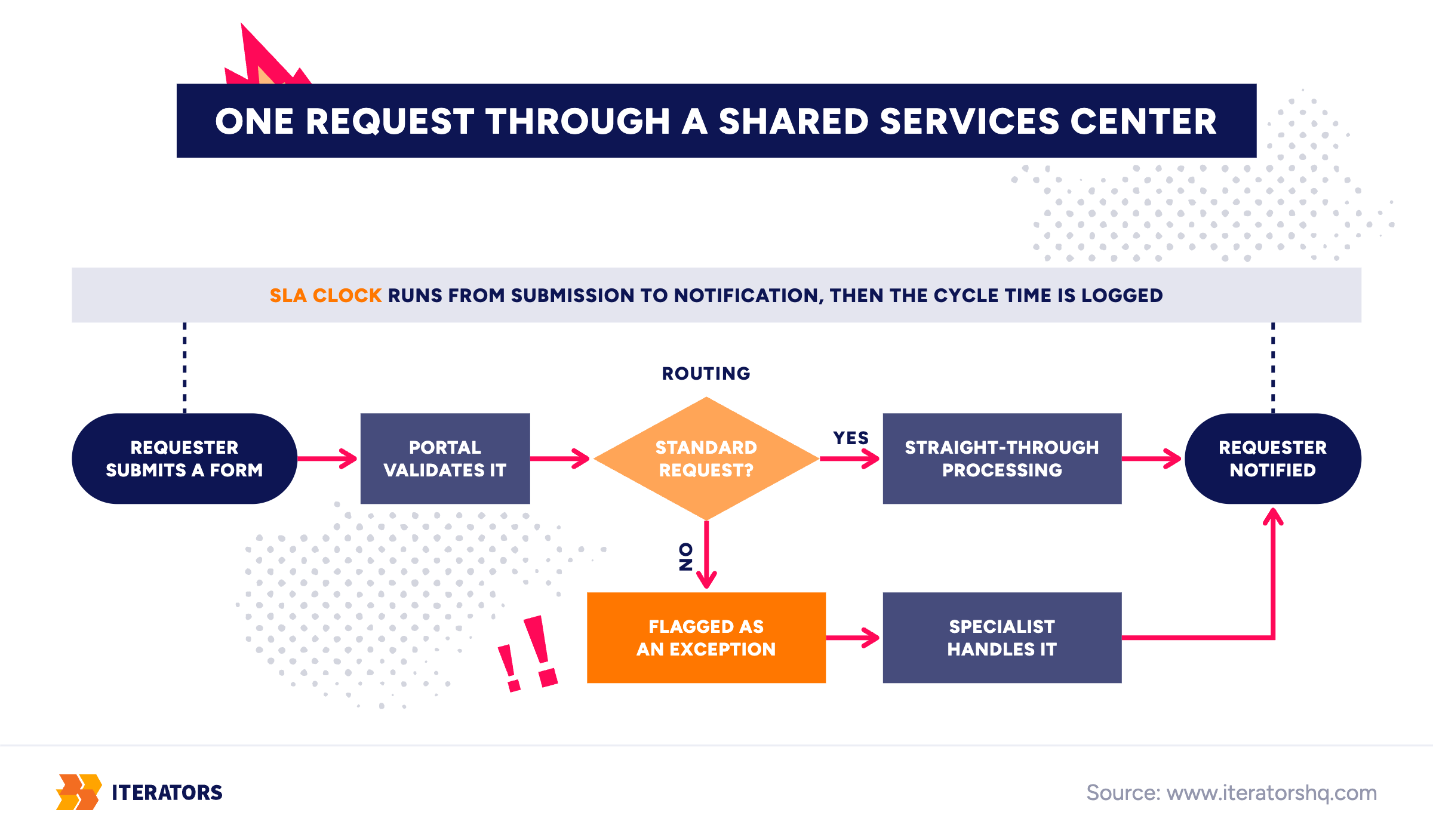
The hiring manager submits a request through a self-service portal. The form is specific: cost center, start date, hardware profile, access requirements. The system validates the inputs before the ticket is even created — no missing fields, no ambiguous entries. Once submitted, the portal creates a master ticket and automatically splits it into child tasks: HR creates the employee record, IT orders the laptop and provisions access, Finance sets up the expense account.
The SLA clock starts at submission. Standard requests move through straight-through processing — the system updates the HRIS (the HR system of record, like Workday or SuccessFactors) and reserves hardware via APIs — basically the digital connectors that let different software systems exchange data automatically — without anyone manually typing the same data into three different systems. Non-standard cases — say, a request for software that isn’t on the approved list — get flagged and routed to a specialist. Once all tasks are complete, the requester gets a notification. The cycle time is logged automatically.
The manager never sends a follow-up email asking “any update?” because the portal shows them exactly where things stand.
Now here’s what it looks like when the center exists but the technology doesn’t fit.
The request goes into a shared inbox. Someone picks it up — eventually. They email IT. IT emails back with a question. The question sits unanswered for two days because the original person is out. The laptop arrives a week after the employee does. The expense account gets set up in week three. Nobody knows how long any of this took because there’s no record.
The organizational structure is the same in both versions. What differs is workflow management.
Typical work in an SSC, by function:
| Function | What the center handles |
|---|---|
| Finance | Invoice processing, expense management, reconciliation, reporting |
| HR | Onboarding, payroll support, benefits questions, employment verifications |
| IT | Access requests, helpdesk, device setup, software licensing |
| Procurement | Purchase requests, vendor onboarding, catalog management |
| Legal / Compliance | Document review, approvals, audit prep, contract generation |
Shared Services Center vs Decentralized Teams vs Outsourcing
These three models come up together constantly, and the distinctions matter.
Decentralized teams mean each business unit, region, or department handles its own back-office work with its own staff. The work is close to the people who need it, processes are flexible, and local knowledge is preserved. The downside: the same invoice gets processed five different ways in five offices, nobody can see across the whole operation, and every location is rebuilding the same capabilities from scratch.
A shared services center centralizes that work into one internal team. The organization retains full control — the data, the processes, the institutional knowledge. The work is done by your employees, under your governance, using your systems. This is the key distinction from outsourcing: the SSC is your own team, while outsourcing hands the work to someone else’s.
Outsourcing (or BPO — business process outsourcing) transfers the work to an external vendor. You get cost reduction and variable scaling without building internal capability. What you give up is control: the vendor owns the process, the data flows through their systems, and changing anything requires renegotiating a contract.
| Decentralized | Shared Services Center | Outsourcing | |
|---|---|---|---|
| Who delivers the work | Local staff in each unit | Internal dedicated team | External vendor |
| Best for | Early-stage companies, high-autonomy environments | Growing companies scaling across regions | Large enterprises cutting transactional costs fast |
| Main risk | Duplication, inconsistency, zero visibility | Centralizing broken processes | Data exposure, loss of control, rigid change fees |
| Technology needed | Spreadsheets, email, local tools | Ticketing, ERP, HRIS, integration layer | Vendor platforms, external portals, audit logging |
There’s also a fourth model worth naming: the Global Capability Center (GCC), which is an owned offshore or nearshore subsidiary — your team, but in a different country, often with a broader mandate than pure back-office support. GCCs are common in hubs like India, Mexico, and Poland, but they’re a different conversation.
Why Companies Build One
The honest answer is: usually because they’re doing the same work in too many places, with too little visibility, at too high a cost.
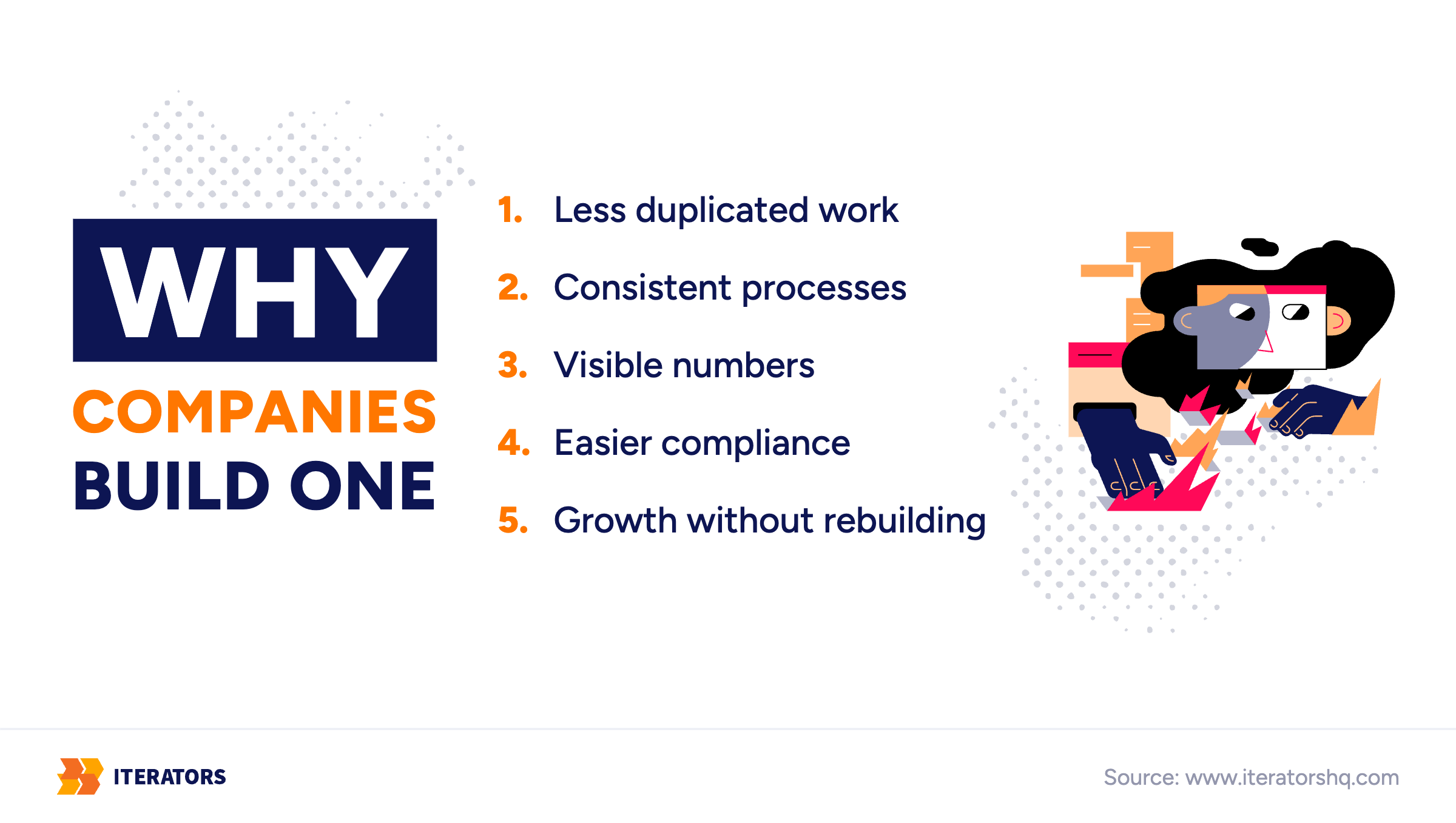
The benefits that actually materialize when a center is built well:
Less duplicated work. When the same process runs in 12 regional offices, you’re paying for 12 versions of it. Centralizing it means one version, maintained once, improved once.
Consistent processes. A supplier invoice processed in Germany shouldn’t follow different rules than one processed in Brazil. Shared services creates the conditions for consistency — though it doesn’t guarantee it.
Visible numbers. Decentralized operations are opaque. Nobody can tell you how long it takes to process an invoice, how many requests are pending, or where the backlog is. The center, with the right tools, makes all of that measurable.
Easier compliance. When processes are standardized and documented in one place, audits become tractable. When they’re scattered across 15 offices, they’re a nightmare.
Growth without rebuilding. Opening a new office or entering a new market doesn’t require standing up a full support operation from scratch. The center absorbs the additional load.
Now the nuance: none of this is automatic. Deloitte’s 2025 Global Business Services Survey found that about 55% of organizations with a global GBS leader role have achieved over 20% average savings. That’s barely half, even among organizations with dedicated global leadership. The ones that fall short have often moved people into a shared structure without changing how the work actually flows.
Why the Technology Decision Matters Most
Here’s the argument in one sentence: the org chart decides who owns the work, and the technology decides whether the work actually flows.
Think about those three people from the onboarding example.
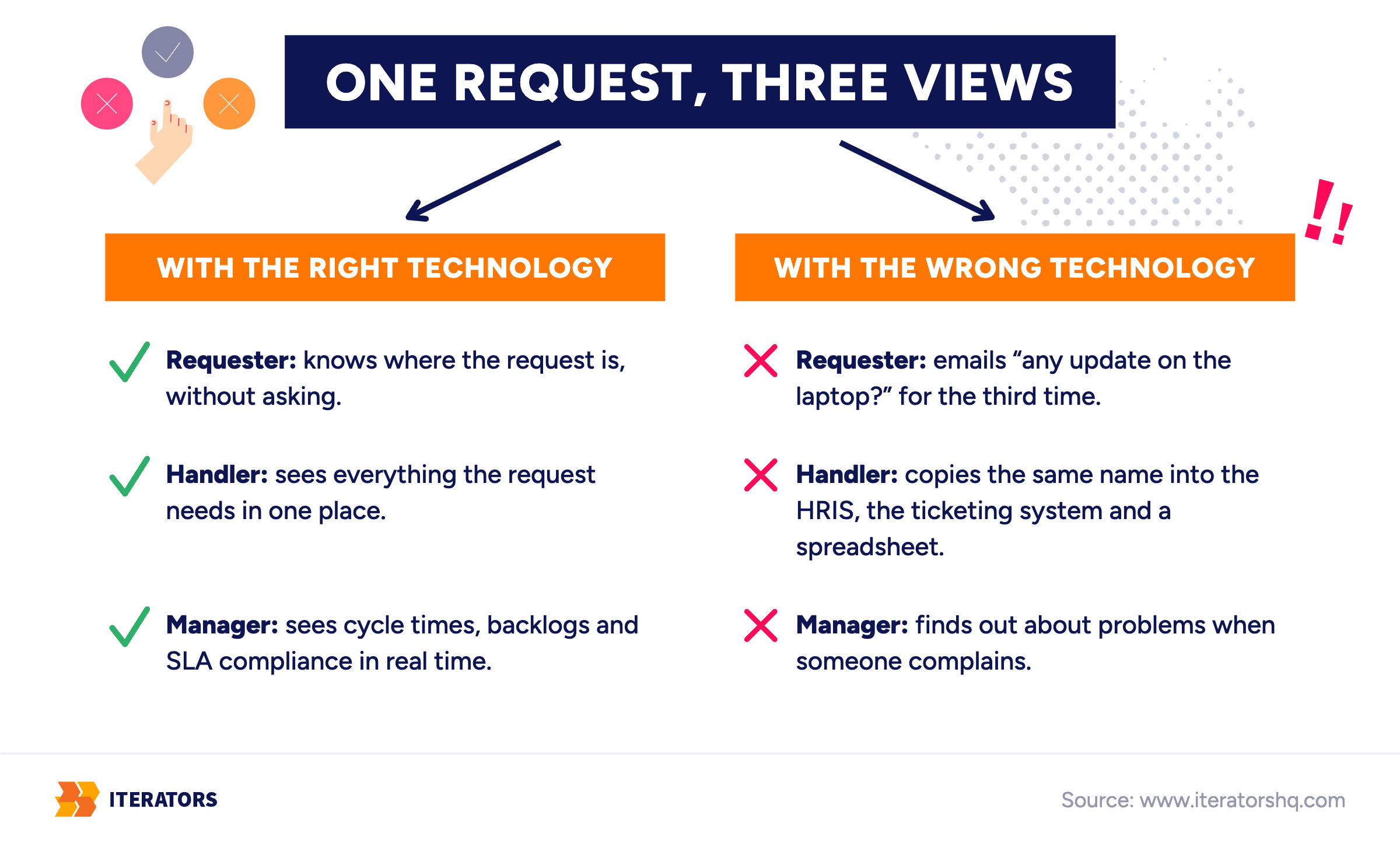
The person asking (the hiring manager, the new employee’s future colleague) — do they know where their request is, or are they emailing “any update on the laptop?” for the third time this week? If they’re sending follow-up emails, it’s the technology that’s failing them, not the people.
The person handling it (the shared services specialist) — do they see everything they need in one place, or are they copying the employee’s name from an email into the HRIS, then into the ticketing system, then into a spreadsheet that someone else maintains? If they’re acting as a human bridge between five disconnected tools, the technology is failing them too.
The manager — can they see cycle times, backlogs, and SLA compliance in real time, or do they find out about problems when someone complains? If their operational visibility depends on what people remember to report, they’re working from impressions.
Peter Drucker put it cleanly: “There is nothing so useless as doing efficiently that which should not be done at all.” In shared services, this plays out when organizations automate a process that was broken to begin with. Automating it only makes it generate errors at higher volume. This is one of the most common failure modes, and it’s covered in detail in shared services automation mistakes.
The other common failure modes:
The low-code trap. A team builds out their shared services workflows using a visual no-code tool. It works fine for simple cases. Then an exception hits — a vendor invoice with unusual payment terms, an employee request that crosses two legal entities — and the tool has no way to handle it. The workaround is email. The email doesn’t get tracked. The exception becomes a permanent manual process running parallel to the “automated” one.
The spreadsheet at enterprise scale. The center gets stood up, but nobody buys ticketing software, so requests are tracked in a shared spreadsheet. Two people edit it at the same time. Rows disappear. Nobody knows which version is current. Sensitive payroll data sits in a file with 40 people’s access permissions.
Application fragmentation. The organization buys one tool for document signing, another for ticketing, another for time tracking, and a fourth for approvals. None of them talk to each other. The shared services team becomes the integration — manually copying data between systems all day. This is workflow automation in reverse.
What Software Does a Shared Services Center Run On?
Not one thing. A functioning SSC runs on a stack of connected tools, each doing a specific job.
| Kind of tool | Examples | What it does | What happens without it |
|---|---|---|---|
| Ticketing / service management | Jira Service Management, ServiceNow, Zendesk | Turns requests into tracked tickets with owners, SLA timers, and status visibility | Requests disappear into shared inboxes |
| ERP (core finance and operations) | SAP, Oracle, Microsoft Dynamics, NetSuite | Holds invoices, purchasing records, financial transactions | The same data gets typed in twice, in two systems, by two people |
| HRIS (HR system of record) | Workday, SuccessFactors, BambooHR | Holds employee data, org structure, payroll, HR workflows | HR questions get answered from memory, or not at all |
| Self-service portal | Often custom-built | Lets people answer simple questions themselves, submit structured requests | Every question becomes a ticket |
| Reporting dashboards | Power BI, Tableau, Looker | Shows cycle times, backlogs, SLA compliance, error rates | Nobody can prove the center is working — or diagnose why it isn’t |
| Integrations | APIs, connectors, middleware — basically the pipes that let software systems exchange data | Lets the systems talk to each other automatically | People become the integration |
That last row is the one most organizations underestimate. System integrations — the connective tissue between the ticketing tool and the ERP and the HRIS — are what make straight-through processing possible. Without them, every transaction that crosses a system boundary requires a human to carry the data across manually.
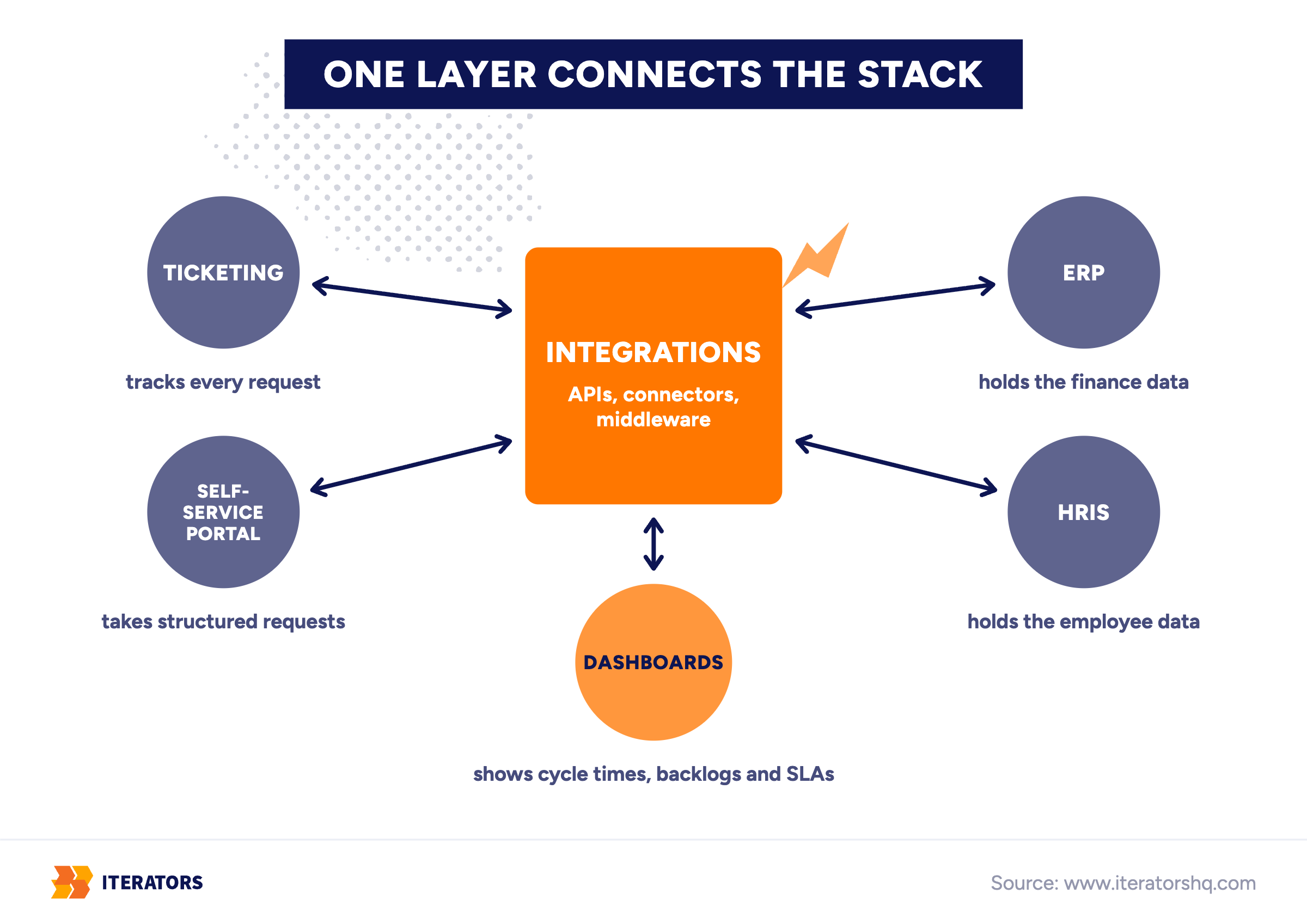
A note on AI. Deloitte’s survey found that about 58% of respondents have already begun or are planning to begin using generative AI, and Finance and IT are the top functions where use cases have been implemented. Invoice management and analytics are among those use cases. This is real, and it works when the underlying data is clean and structured. Iterators built an AI invoice analysis system that speeds up the booking of cost and purchase invoices. The full story is in the AI invoice analysis case study. The caveat: AI needs clean input and human review for edge cases. It’s not a substitute for fixing the data pipeline first.
Off-the-shelf or custom? Standard commercial software works well when your processes are standard. Signs it won’t fit: you have many exceptions, several legacy systems that need connecting, or operations across multiple countries with different regulatory requirements. Most organizations end up with a mix — core ERP and HRIS from established vendors, custom workflow and portal layers built around how the work actually runs. The full build vs buy comparison is its own topic, but the short version is: the software has to fit the process, not the other way around.
Questions to Answer Before You Choose the Technology
Not a checklist. More like the questions that, if you skip them, you’ll be answering six months later under worse conditions.
Do you know how the process actually runs — not how the documentation says it runs? Process documentation is often aspirational. The real process has informal approvals, offline spreadsheets, and regional workarounds that nobody wrote down. Process mapping surfaces those gaps before the software is chosen, not after it’s deployed.
Which exceptions eat most of the time? In most high-volume back-office operations, the routine cases are genuinely routine — they follow predictable paths and can be automated. A small number of edge cases consume a disproportionate share of specialist time. Understanding which exceptions those are shapes the entire software architecture.
Who will use this every day, and have you asked them? The people who will live inside the system — the shared services specialists, the front-line handlers — know where the current process breaks. Their input is not optional. Systems that don’t fit how people actually work get worked around immediately.
Which systems does it have to talk to? Every system the SSC needs to exchange data with is an integration point. Some of those systems will have modern APIs. Some will require custom connectors. Some will require scheduled batch transfers that introduce latency. Knowing every integration point before selecting software is basic due diligence.
How will you know it’s working? Name the metrics before launch: end-to-end cycle time, cost per transaction, SLA compliance rate, requester satisfaction score. Without pre-defined KPIs, “is it working?” becomes a question people answer based on how they feel about it. Business process optimization requires measurement, and measurement requires agreement on what to measure.
Which one workflow do you start with? Trying to centralize all back-office operations at once is how shared services projects stall. Pick one high-volume, well-understood workflow — accounts payable invoice processing is a common starting point — and get it working before expanding scope.
A Center Is Only as Good as the Way Work Flows Through It
Go back to the laptop request from the beginning. The new hire is starting Monday. The hiring manager submitted the request two weeks ago. The laptop hasn’t arrived. Nobody knows where it is.
Now run the same scenario with the right infrastructure. The manager submits the request through a portal on day one of the hiring process. The system creates a ticket, splits it into tasks for IT and HR, starts the SLA clock, and sends a confirmation with an expected delivery date. IT gets a task in their queue. The laptop ships. The access is provisioned. The manager gets a notification on Friday: everything is ready for Monday.
The organizational structure is identical in both scenarios, and the work flows in one and stalls in the other.
Same org chart. Different week.
One laptop request for a new hire who starts in two weeks. Drag through the days.
Iterators built KliX — an enterprise-ready time tracking and business process platform — for a multinational professional services firm with 5,500+ employees in over 50 countries. The platform has been running since 2016. A decade in production shows what it looks like when the software layer is built to fit the actual operational complexity, not a simplified version of it.
The shared services center concept is straightforward, and the organizational rationale is clear. The savings are real when the governance is right and the technology fits. Where most implementations go wrong is treating the software as a detail to sort out after the org chart is drawn.