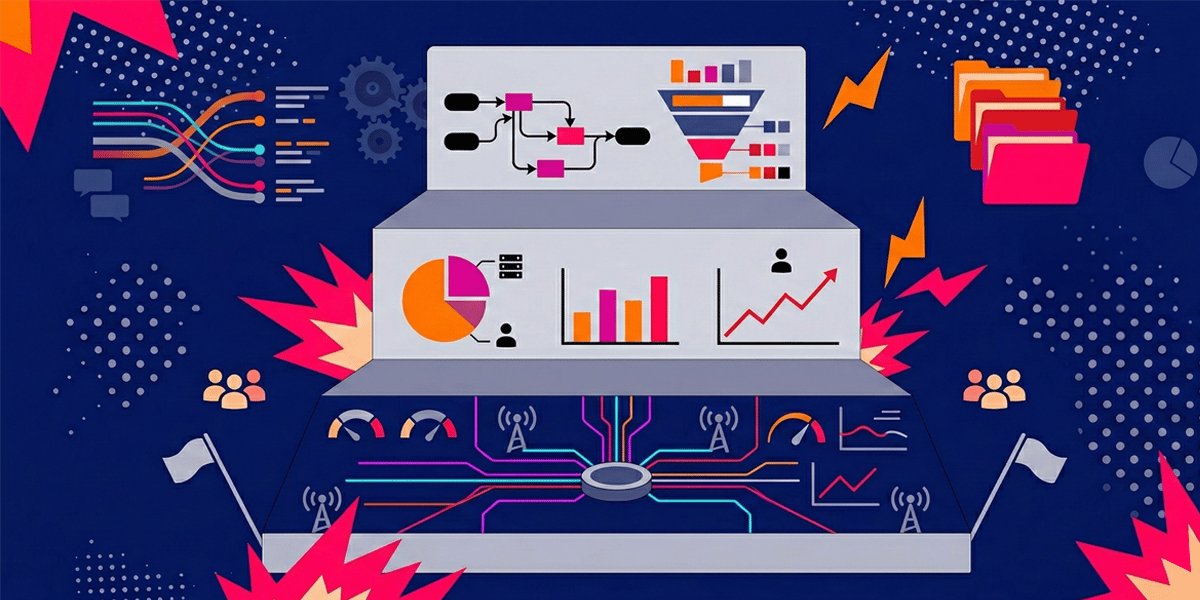

You’ve built a killer SaaS product. Your early customers love it. Your NPS scores are through the roof. Then you land your first enterprise prospect—a Fortune 500 company that could 10x your revenue overnight. During the technical evaluation, they ask about your enterprise readiness monitoring capabilities—and suddenly you realize your current observability stack wasn’t built for this level of scrutiny.
And then the vendor assessment questionnaire arrives.
261 questions. Security. Compliance. Enterprise readiness monitoring. Logging. Audit trails. SLA guarantees. Incident response protocols. Multi-tenant isolation. Real-time performance metrics. Customer adoption dashboards.
Your engineering team stares at the spreadsheet in horror. You have some monitoring. You can see when servers are down. You have Google Analytics. But enterprise-grade observability? The kind that proves you can handle their 50,000 employees across 47 countries without breaking a sweat?
You’re not even close.
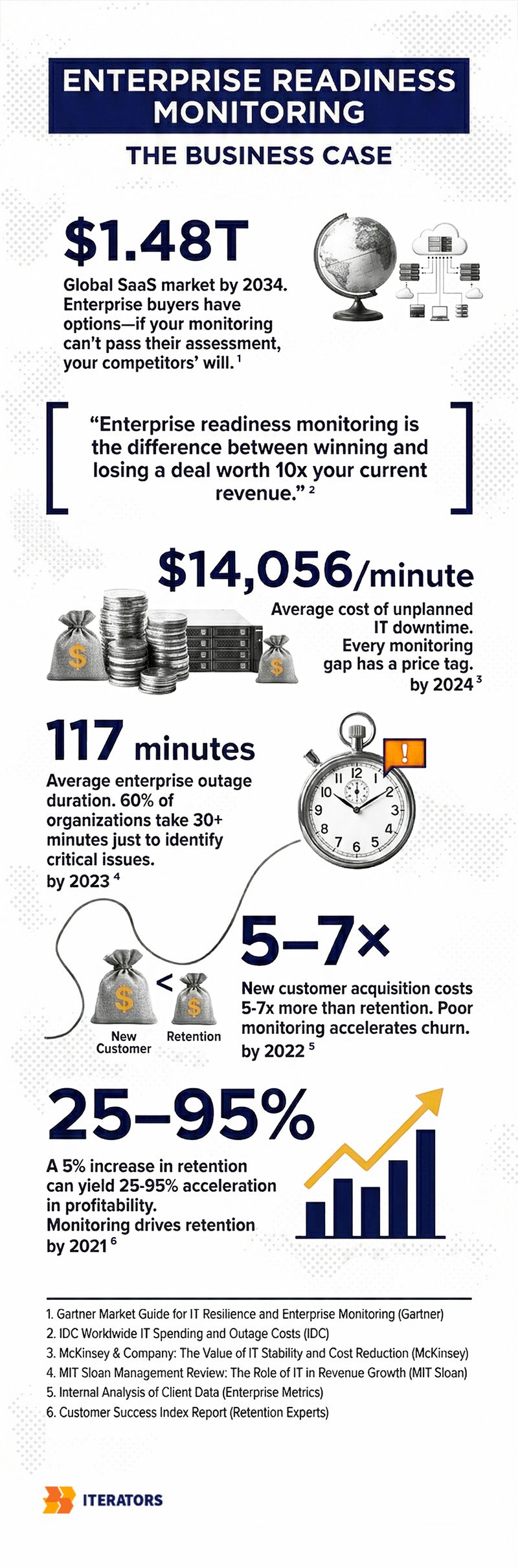
Welcome to the enterprise readiness gap—where startups learn that “works on my machine” doesn’t cut it when Fortune 500 procurement teams come knocking. The global SaaS market is projected to hit $1.48 trillion by 2034, growing at 18.7% annually. That kind of competitive density means you can’t afford to retrofit enterprise readiness monitoring after you land the big deal. By then, it’s too late.
Ready to build monitoring infrastructure that wins enterprise deals? Schedule a consultation with Iterators to assess your current observability gaps and create a roadmap to enterprise readiness.
This guide will show you exactly how to build enterprise readiness monitoring infrastructure from the ground up—the kind that satisfies vendor risk assessments, passes SOC2 audits, and proves measurable business value to the people who actually write the checks.
Let’s get into it.
What Enterprise Customers Actually Expect From Your Monitoring (And Why Your Current Setup Falls Short)
For decades, SaaS reliability was measured by one simple metric: uptime. If your servers responded to pings 99.9% of the time, you were golden. Contract signed. Invoice paid. Everyone happy.
Then the world got complicated.
Microservices. Third-party APIs. Browser-based apps. Mobile clients. Distributed databases. CDNs. Load balancers. Auto-scaling clusters. The modern SaaS architecture is a Jenga tower of dependencies, and “technically available” no longer means “actually usable.”
Your application can be “up” while being completely unusable. Extreme latency? Up. Error rates through the roof? Still up. Critical features broken? Yep, still technically up.
Enterprise buyers figured this out the hard way. Now they demand what industry leaders call “Experience SLAs”—contractual guarantees that encompass the entire user journey, not just server availability.
The Five Core Metric Categories That Actually Matter
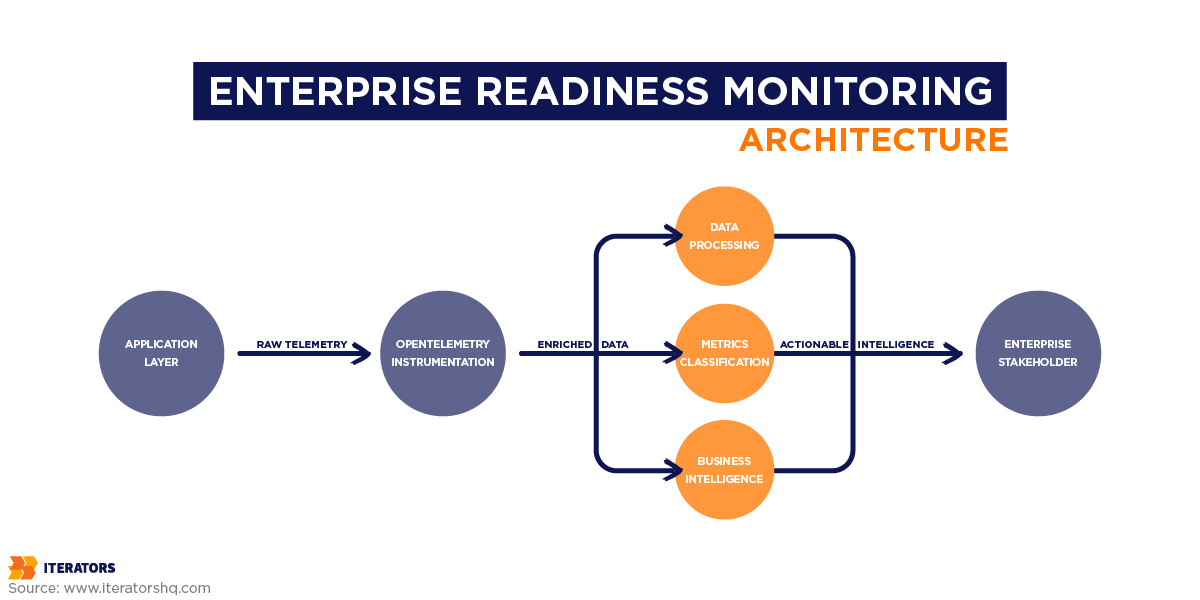
When enterprise procurement teams evaluate your enterprise readiness monitoring infrastructure, they’re looking for comprehensive visibility across five critical dimensions:
1. Uptime and Availability Guarantees
This is table stakes, but it’s more nuanced than you think. Enterprise SLAs don’t just measure binary uptime—they track:
- Graceful failure rates: How does your system behave when components fail?
- Localized outage isolation: Can one tenant’s issues affect others?
- Multi-region redundancy: What happens when AWS us-east-1 catches fire?
Tier 1 mission-critical SLAs demand 99.99% uptime, which allows for exactly 52.6 minutes of annual downtime. Not per month. Per year. That leaves zero margin for monitoring delays or slow incident response.
2. Latency and Performance Metrics
Here’s where things get expensive. According to Gartner research, unplanned IT downtime costs enterprises an average of $14,056 per minute—rising to $23,750 per minute for large corporations. But chronic latency? That’s the silent killer.
Research shows that a 100-millisecond delay in response time results in a 1% reduction in revenue for high-volume platforms. In B2B SaaS, application sluggishness erodes user productivity, tanks adoption rates, and accelerates churn.
Enterprise SLAs now heavily feature performance percentiles—p95 and p99 response times—rather than averages. Why? Because an application loading in one second converts users at three times the rate of an application loading in five seconds.
3. Quality and Error Rates
Enterprise customers don’t care about your 5xx error counts. They care about:
- Task completion rates: Can users actually finish what they came to do?
- Data freshness guarantees: Is the dashboard showing real-time data or stale cache?
- System response accuracy: If you’re selling features, what’s the error rate?
4. Capacity and Throughput
Multi-tenant SaaS creates unique monitoring challenges. Enterprise buyers want proof that:
- Tenant-specific rate limiting prevents one customer from degrading service for others
- API quota adherence is monitored and enforced in real-time
- Streaming aggregation can handle sudden traffic spikes without throttling
5. Adoption and Behavior Analytics
This is where most startups completely drop the ball. Technical uptime is necessary but not sufficient. Enterprise buyers want proof that their employees are actually using the software they paid for.
They expect self-service dashboards showing:
- Feature adoption rates by department
- Time-to-value metrics for new users
- Product Engagement Scores across organizational hierarchies
- Churn risk indicators based on usage patterns
Here’s the brutal truth: 60% of organizations require more than 30 minutes to resolve critical issues, with the average outage lasting 117 minutes. If you can’t detect, diagnose, and remediate faster than that, your enterprise readiness monitoring isn’t ready.
Why “Works on My Machine” Doesn’t Cut It
Traditional monitoring answers one question: “Is the system working correctly?”
Enterprise readiness monitoring answers a completely different question: “Can we prove to auditors, customers, and executives that the system is working correctly—and show them exactly what’s happening when it’s not?”
That’s the gap. And it’s massive.
| Traditional Monitoring Focus | Modern Enterprise Expectation |
|---|---|
| Binary uptime (99.9% ping success) | Graceful failure rates, localized outage isolation, multi-region redundancy |
| Average page load time | p95 and p99 percentile latency, API throughput under load |
| Total 5xx server errors | Task completion rates, data freshness guarantees, accuracy metrics |
| Server CPU/Memory utilization | Tenant-specific rate limiting, API quota adherence, streaming aggregation |
| Monthly logins | Deep feature adoption, Time-to-Value (TTV), Product Engagement Score (PES) |
Let’s talk about how to actually build this infrastructure.
Building Enterprise Readiness Monitoring: Observability Infrastructure That Scales
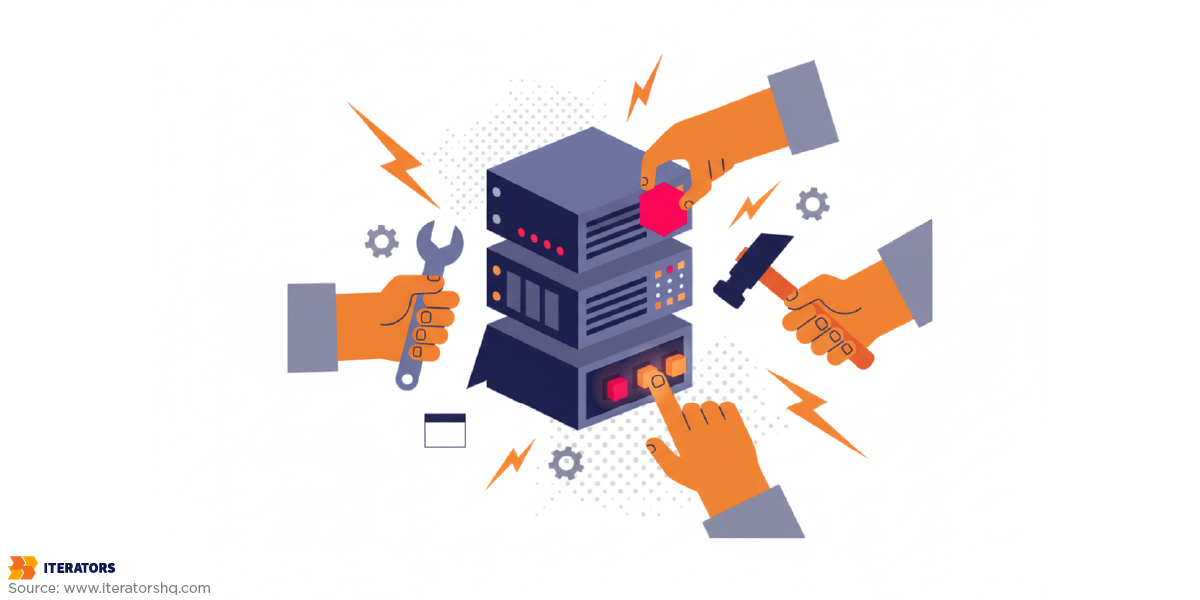
If monitoring is defensive—tracking known failure modes—then observability is offensive. It’s the ability to ask arbitrary, novel questions about your system without deploying new code.
Industry expert Charity Majors puts it perfectly: “Monitoring is about known unknowns… Observability is about unknown unknowns. We don’t know where the issues are because we’ve never been able to look deeply enough to find them.”
The Critical Distinction: Monitoring vs. Observability
Monitoring is fundamentally reactive. You set up dashboards and alerts for predefined failure scenarios. When a threshold is crossed, you get paged. It answers: “Is this specific thing broken?”
Observability is fundamentally proactive. You instrument your system to emit rich, high-quality telemetry that allows you to explore and understand why failures occur—even failures you’ve never seen before. It answers: “What’s actually happening inside this distributed mess?”
Both are essential for enterprise readiness monitoring. Neither is sufficient alone.
Instrumentation Strategy: What to Measure and Where
The OpenTelemetry framework—the vendor-agnostic standard that’s eating the observability world—organizes telemetry into four correlatable data types:
1. Distributed Traces
Traces record the complete lifecycle of a single request as it propagates across network boundaries and through various microservices. This is absolutely vital for debugging latency in distributed architectures.
When a user reports “the dashboard is slow,” a trace shows you exactly which service in the chain is the bottleneck. Was it the authentication service? The database query? The third-party analytics API? The frontend rendering?
2. Spans
A trace is constructed from individual spans—each representing a single logical operation within the broader request. Spans are enriched with attributes: highly dimensional metadata key-value pairs that provide deep contextual clues.
These attributes are the secret sauce of enterprise readiness monitoring. They provide the deep contextual clues that transform raw telemetry into actionable intelligence.
3. Logs
Logs are timestamped records of discrete events. In an observable system, logs aren’t isolated text files—they’re automatically correlated with active trace and span IDs, injecting immediate contextual relevance into error messages.
When your on-call engineer gets paged at 3 AM, they don’t want to grep through gigabytes of unstructured logs. They want to click on the alert, see the exact trace that failed, and immediately understand the full context of what went wrong.
4. Metrics
Aggregated numerical data over time, primarily used for establishing Service Level Indicators and tracking progress against Service Level Objectives.
The Two Pillars of Monitoring Data
Effective enterprise readiness monitoring categorizes data into two primary streams, as outlined by Datadog’s seminal “Monitoring 101” framework:
Work Metrics reflect the top-level health of the system by measuring its useful output:
- Throughput: Absolute work performed per unit of time (requests/second, jobs/minute)
- Success: Percentage of correct executions (successful transactions, completed workflows)
- Error: Rate of failed operations (4xx/5xx responses, exceptions thrown)
- Performance: Latency or execution duration (response time, query duration)
Work metrics are the most reliable triggers for high-urgency alerts because they directly map to user experience. If throughput drops or error rates spike, users are affected right now.
Resource Metrics track the underlying infrastructure components that facilitate the work:
- Utilization: Capacity in use (CPU percentage, memory consumption, disk space)
- Saturation: Queued or backlogged work (connection pool exhaustion, disk I/O wait)
- Errors: Internal hardware/software faults (disk failures, kernel panics)
- Availability: Resource responsiveness (database connection success rate)
Resource metrics are primarily utilized for medium-urgency notifications or recorded silently for downstream diagnostics. High CPU alone doesn’t necessarily mean users are impacted—but it might predict future problems.
The Golden Rule of Alerting: Page on symptoms (Work Metrics), not causes (Resource Metrics).
Users don’t care about high server load if the application remains fast. Paging on causes leads to engineer resentment and alert fatigue.
Application-Level Metrics
Application Performance Monitoring tracks:
- Request rates and response times per endpoint
- Database query performance and connection pool health
- External API call latency and failure rates
- Background job queue depth and processing times
- Memory leaks and garbage collection pressure
Infrastructure Metrics
For containers, Kubernetes clusters, and cloud resources:
- Pod/container CPU and memory usage
- Node availability and health checks
- Auto-scaling events and resource requests
- Network throughput and packet loss
- Storage IOPS and latency
Business Metrics
This is where enterprise readiness monitoring transcends engineering and becomes a product and revenue driver:
- Feature usage frequency by customer cohort
- Workflow completion rates (e.g., “checkout funnel conversion”)
- Time-to-first-value for new users
- Seat utilization by organizational unit
- API consumption against quota limits
By injecting business-context attributes into standard telemetry events, product and finance teams can leverage the same observability datastore to analyze cohort behaviors, track feature adoption, and monitor operational bottlenecks.
Logging Architecture for Multi-Tenant SaaS

Security logging failures consistently rank in the OWASP Top 10 application security risks. Inadequate log retention severely hampers forensic investigations and extends the duration of data breaches.
In multi-tenant SaaS, logging must satisfy strict isolation requirements. Enterprise IT administrators require assurance that you capture comprehensive, tenant-isolated audit logs. When a breach is suspected, clients expect self-service access to immutable logs detailing every authentication attempt, data export, and permission modification within their specific organizational tenant.
Structured Logging Requirements
Enterprise readiness monitoring demands structured logging with consistent schemas. Every log entry should include:
- Timestamp and severity level
- Service identifier
- Trace and span identifiers for correlation
- Tenant and user identifiers
- Event type and reason
- IP address and user agent
- Any relevant business context
Log Aggregation and Centralization
You cannot—I repeat, cannot—expect enterprise customers to SSH into your servers to grep log files. Logs must be:
- Centrally aggregated into a unified datastore
- Indexed for fast querying across billions of events
- Accessible via filtered dashboards so customers only see their tenant’s data
Per-Customer Log Isolation
Multi-tenant isolation isn’t optional for enterprise readiness monitoring. Telemetry pipelines must automatically append tenant identifiers to every span and log line at the ingress point. This allows security layers to securely filter dashboard views so enterprise clients only see their proprietary data.
Without this, you’ll never pass a vendor security questionnaire. The CAIQ v4 (Consensus Assessments Initiative Questionnaire) explicitly asks: “How do you ensure logs from different tenants are isolated?”
If your answer is “uh, we don’t,” the deal is dead.
Retention Policies That Balance Cost and Compliance
Highly regulated sectors (finance, healthcare) often mandate log retention periods extending from one to seven years to comply with HIPAA, GDPR, and CCPA. But storing high-volume, highly dimensional telemetry data in hot storage for extended periods is financially unviable.
The solution? Intelligent log lifecycle management and storage tiering.
| Storage Tier | Retention Period | Data Profile & Access Speed | Primary Use Case |
|---|---|---|---|
| Hot Storage | 0 – 30 Days | Highly indexed storage. Millisecond query response. | Active incident response, real-time alerting, application debugging |
| Warm Storage | 1 – 6 Months | Object storage with federated query engines. Seconds to minutes. | Trend analysis, capacity planning, quarterly business reviews |
| Cold Archive | 1 – 7+ Years | Deep archive storage. Retrieval takes hours to days. | Regulatory compliance, SOC 2 audit trails, legal holds, forensic investigations |
Automating this lifecycle via infrastructure-as-code ensures data is reliably purged at the end of its legal utility, minimizing cloud expenditures while neutralizing “inadequate logging” audit failures.
From Raw Data to Business Intelligence: Per-Customer Dashboards

Enterprise readiness monitoring transcends technical stability. It requires translating raw telemetry into actionable business intelligence.
Large corporations operate with complex organizational structures—spanning countries, regional offices, departments, and localized teams. They expect SaaS vendors to mirror this hierarchy within reporting dashboards.
Organizational Hierarchy Mapping
For a SaaS platform to demonstrate enterprise readiness monitoring, it must aggregate user data according to intricate organizational charts:
- Global administrators require macro-level views of license utilization and system performance across the entire multinational footprint
- Regional managers need security-restricted views limited strictly to their localized teams
- Department heads want feature adoption metrics for their specific business units
- Billing managers need seat utilization reports to optimize license allocation
This isn’t just nice-to-have. It’s a procurement requirement. Enterprise buyers want self-service dashboards that allow IT and procurement departments to continuously validate ROI without relying on manual reporting from your customer success team.
Self-Service Analytics
Providing these dashboards requires:
- Hierarchical data models that map organizational structures.
- Security-filtered queries that enforce data isolation:
- A department head in “Engineering” should only see metrics for their department
- A regional admin in “EMEA” should only see data for European sites
- Global admins see everything
- Customizable reporting templates that allow customers to:
- Export usage data to their internal BI tools
- Schedule automated reports for executive reviews
- Create custom dashboards for specific use cases
Global BI Insights for Your Internal Teams
The same enterprise readiness monitoring infrastructure that powers customer-facing dashboards also drives internal business intelligence:
Usage trend analysis across the entire customer base:
- Which features are most/least adopted?
- Which customer segments show highest engagement?
- What’s the correlation between feature usage and churn?
Cohort analysis and segmentation:
- How do enterprise customers behave differently from SMBs?
- Which onboarding flows lead to higher activation rates?
- What’s the median time-to-value by customer size?
Feature adoption tracking:
- What percentage of customers use advanced features?
- How long does it take for new features to gain traction?
- Which features correlate with expansion revenue?
Adoption Reporting That Drives Customer Success

A technically flawless application that fails to deliver business value will face subscription cancellation. In B2B SaaS, economic success relies heavily on expansion revenue and compound growth from the existing customer base.
Customer retention is the primary determinant of long-term SaaS profitability. Acquiring a new customer costs five to seven times more than retaining an existing one. The probability of selling to an existing customer is 60-70%, compared to just 5-20% for new prospects. A 5% increase in customer retention can yield 25-95% acceleration in profitability.
The Metrics That Actually Predict Churn
Net Revenue Retention calculates retained and expanded revenue from existing customers, accounting for cross-sells, upsells, downgrades, and churn. NRR is the ultimate proxy for product stickiness.
Top-quartile SaaS companies consistently achieve NRR rates exceeding 115-120%, meaning the business grows organically even if no new logos are acquired. Median NRR sits around 101-106%.
Gross Revenue Retention measures revenue retained from existing customers without factoring in expansion revenue. Top-tier enterprise SaaS firms maintain GRR above 95%, while the industry median hovers at 90%.
But these are lagging indicators. By the time NRR drops, churn has already happened. You need leading indicators that predict churn before it occurs.
Leading Indicators of Churn
Customer churn is rarely abrupt—it’s the culmination of sustained disengagement. A 2024 Bain & Company study found that while 80% of CEOs believe their company delivers superior customer experience, only 8% of their customers agree.
To bridge this gap, enterprise readiness monitoring must implement rigorous adoption reporting using product analytics to measure breadth, depth, and frequency of user interaction.
Superficial metrics like login frequency are deceptive and can mask high-risk behavior. Instead, track:
1. Time to Value and Activation Rate
The velocity at which a newly onboarded user completes a predefined sequence of core tasks that demonstrate the product’s primary utility.
Forrester notes that an enterprise customer’s decision to renew is largely crystallized within the first 90 days of deployment. Customers who fail to achieve meaningful results in this window are highly prone to cancellation, regardless of budget availability.
2. Feature Adoption Rate
The percentage of the user base engaging with specific, high-value modules. B2B data suggests that customers engaging with more than 70% of a platform’s core features are twice as likely to renew contracts compared to low-adoption cohorts.
3. Active User Cadence
The ratio of Daily Active Users to Monthly Active Users indicates the habitual nature of the software. For enterprise workflow tools, a high ratio confirms the application has become deeply embedded in the client’s daily operations.
4. Product Engagement Score
A composite metric that aggregates three dimensions:
- Adoption: Average number of core events utilized
- Stickiness: Daily-to-monthly active user ratio
- Growth: Net user expansion within an account
By correlating granular adoption telemetry with customer success outreach, SaaS providers shift from reactive triage to proactive intervention. If application usage drops below defined thresholds, automated triggers can dispatch Customer Success Managers or deploy targeted in-app guidance to re-engage users, safeguarding recurring revenue streams.
| Adoption Metric | High-Risk Threshold | Action Trigger |
|---|---|---|
| Time to First Value | >30 days | CSM outreach + in-app onboarding prompts |
| Feature Adoption Rate | <30% of core features | Feature education campaign + webinar invitation |
| Active User Ratio | <20% | Re-engagement email series + usage incentives |
| Product Engagement Score | <40/100 | Executive business review + success plan creation |
How Enterprise Readiness Monitoring Wins Deals: Supporting Vendor Assessments
Even with robust uptime and high product adoption, SaaS providers selling to enterprise accounts must navigate exhaustive Vendor Risk Assessments. Corporate procurement departments utilize standardized security questionnaires to evaluate third-party risk across complex digital supply chains.
The Vendor Assessment Questionnaire Reality
The industry relies on several established frameworks:
CAIQ (Consensus Assessments Initiative Questionnaire): Developed by the Cloud Security Alliance, CAIQ v4 comprises 261 specific questions mapping to 17 domains of the Cloud Controls Matrix. It heavily scrutinizes logging, monitoring, and audit capabilities.
VSAQ (Vendor Security Alliance Questionnaire): A modular framework focusing on data protection, proactive/reactive security policies, and supply chain compliance.
SIG (Standardized Information Gathering): A comprehensive library of questions for deep third-party risk management and regulatory alignment.
A recurring theme across all VRA frameworks is the demand for rigorous enterprise readiness monitoring. These questionnaires explicitly ask:
- How do you monitor administrative privileges?
- How do automated tools detect malicious software deployments?
- Is reliable time synchronization utilized across all log records?
- Can you provide evidence of continuous security monitoring?
- What’s your mean time to detect security incidents?
A mature enterprise readiness monitoring pipeline provides the exact evidentiary documentation required to confidently answer these questions, accelerating the procurement cycle and preventing deals from stalling in security review.
Common Monitoring Questions
Here’s what you’ll actually be asked:
Security Monitoring:
- “Describe your security incident detection and response capabilities.”
- “How do you detect unauthorized access attempts?”
- “What automated tools do you use to identify malicious activity?”
Audit Logging:
- “Do you maintain comprehensive audit logs of administrative actions?”
- “Can customers access logs specific to their tenant?”
- “How long do you retain audit logs?”
Performance Monitoring:
- “What SLAs do you guarantee for uptime and performance?”
- “How do you monitor and report on SLA compliance?”
- “What’s your mean time to detect and resolve critical incidents?”
Data Protection:
- “How do you ensure logs from different tenants are isolated?”
- “Are logs encrypted at rest and in transit?”
- “Who has access to customer log data?”
Proof Points Procurement Teams Demand
Saying “yes, we do that” isn’t enough. You need evidence:
- Public status pages showing historical uptime data
- Incident post-mortems demonstrating transparent communication
- SOC 2 Type II reports validating operational effectiveness of controls
- Sample dashboards showing the level of visibility you provide
- Documented incident response procedures with defined SLAs
- Automated compliance reports generated from your observability platform
| DO | DON’T |
|---|---|
| Maintain a centralized repository of compliance artifacts | Wait until you receive the questionnaire to gather evidence |
| Automate compliance reporting from your observability platform | Manually compile reports for each vendor assessment |
| Provide self-service access to customer-specific logs and metrics | Make customers file support tickets to access their own data |
| Document incident response procedures with defined SLAs | Wing it when incidents occur and scramble to explain later |
| Publish transparent status pages and incident post-mortems | Hide outages and hope customers don’t notice |
Running Enterprise Readiness Monitoring in Production

Having the infrastructure is one thing. Operating it effectively is another.
Alerting Strategies That Don’t Cause Burnout
The fundamental rule: Page on symptoms, not causes.
Symptom-based alerts surface real, user-facing problems:
- “API error rate exceeded 5% for the last 5 minutes”
- “Response time exceeded 1000ms for the last 10 minutes”
- “Checkout conversion rate dropped 50% compared to baseline”
Cause-based alerts trigger on internal metrics that may or may not affect users:
- “Database CPU usage exceeded 80%”
- “Memory utilization reached 90%”
- “Disk I/O wait time increased”
Here’s the thing: users don’t care about high server load if the application remains fast. Paging on causes leads to alert fatigue—where responders ignore critical pages due to a high volume of false positives.
Alert Routing and Escalation
Not all alerts are created equal. Implement severity-based routing:
P0 – Critical: Complete service outage affecting all customers
- Response: Page on-call engineer immediately
- SLA: Acknowledge within 5 minutes, mitigate within 30 minutes
P1 – High: Significant degradation affecting multiple customers
- Response: Page on-call engineer, escalate to team lead after 15 minutes
- SLA: Acknowledge within 15 minutes, resolve within 2 hours
P2 – Medium: Isolated issues or performance degradation
- Response: Create ticket, notify during business hours
- SLA: Acknowledge within 4 hours, resolve within 24 hours
P3 – Low: Minor issues or resource warnings
- Response: Log silently, review during weekly ops meeting
- SLA: Best effort
Incident Tracking and Continuous Improvement
When incidents occur, the learning matters more than the fix.
Incident severity classification should be standardized:
- P0: Complete service outage, all customers affected
- P1: Significant degradation, multiple customers affected
- P2: Isolated customer issues or performance problems
- P3: Minor issues with workarounds available
Post-incident review process (blameless post-mortems):
- Timeline reconstruction: What happened, when, and why?
- Root cause analysis: What systemic factors contributed?
- Action items: What specific changes will prevent recurrence?
- Follow-up: Were action items actually implemented?
Feedback loops into development:
- Incidents reveal gaps in observability coverage → add instrumentation
- Repeated incidents in the same area → prioritize architectural improvements
- Customer-reported issues → improve symptom-based alerting
Using Metrics for Product Decisions
Enterprise readiness monitoring data isn’t just for debugging—it drives product strategy:
Feature usage data informing roadmap:
- Which features are heavily used? Invest more.
- Which features are ignored? Deprecate or redesign.
- What workflows are users trying to accomplish? Build better tools.
Performance bottleneck identification:
- Which API endpoints are slowest?
- Which database queries consume the most resources?
- Where should optimization efforts focus?
Capacity planning:
- What’s the growth trajectory for each customer segment?
- When will current infrastructure hit limits?
- What’s the cost per tenant at scale?
Aligning Enterprise Readiness Monitoring with SOC 2 Trust Services Criteria
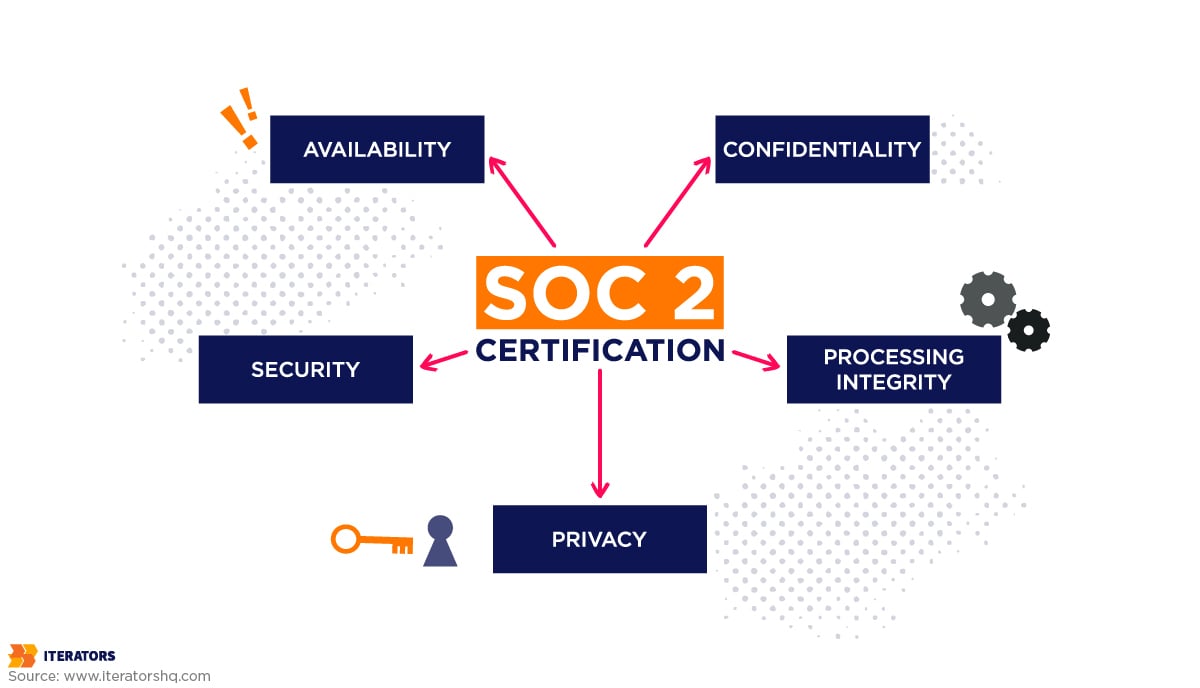
Proof of regulatory compliance—most notably SOC 2—has transitioned from competitive differentiator to mandatory prerequisite for B2B procurement.
Developed by the American Institute of Certified Public Accountants, SOC 2 is an independent auditing standard that assesses a service organization’s capacity to protect client data.
Unlike prescriptive checklists, SOC 2 evaluates the operational effectiveness of controls mapped against five Trust Services Criteria. Enterprise readiness monitoring forms the evidentiary backbone for satisfying these criteria.
Security (Common Criteria)
The foundational and sole mandatory criterion. Organizations must leverage observability platforms to:
- Establish behavioral baselines and scan continuously for anomalous system activity
- Monitor unauthorized configuration changes via infrastructure drift detection
- Track authentication failures and access patterns to detect potential breaches
- Alert on privilege escalation attempts or unusual administrative actions
Example control: “Automated alerting on anomalous access patterns, MFA utilization metrics, configuration change logs.”
Availability
Mandates that the system is accessible for operation. Satisfied through:
- Continuous uptime monitoring with SLA tracking
- Capacity utilization alerts to prevent resource exhaustion
- MTTR tracking for incident response effectiveness
- Disaster recovery drill logs proving business continuity readiness
Example control: “Continuous uptime monitoring, capacity utilization alerts, MTTR tracking, disaster recovery drill logs.”
Processing Integrity
Ensures that system operations are complete and accurate. Satisfied via:
- System error rate monitoring to detect data processing failures
- Data pipeline validation checks ensuring data quality
- Transaction trace analysis verifying end-to-end workflow completion
Example control: “System error rate monitoring, data pipeline validation checks, transaction trace analysis.”
Confidentiality
Demands the protection of restricted data. Satisfied through:
- Access logs showing who accessed what data and when
- Data encryption verification metrics (at rest and in transit)
- Tenant isolation monitoring ensuring multi-tenant data segregation
Example control: “Access logs, data encryption verification metrics.”
Privacy
Governs the collection and retention of PII. Satisfied through:
- Data usage monitoring tracking PII access and processing
- Privacy impact assessments documenting data handling procedures
- Retention policy enforcement via automated lifecycle management
Example control: “Automated data retention policy enforcement, PII access audit logs.”
Type I vs. Type II Reports
Type I evaluates the design of security controls at a single point in time. It answers: “Are the controls properly designed?”
Type II verifies the operational effectiveness of controls over a sustained evaluation period (typically 6-12 months). It answers: “Do the controls actually work as designed over time?”
Real-time log streaming and automated compliance dashboards synthesize raw telemetry into legible compliance artifacts, drastically reducing the manual engineering overhead associated with audit preparation.
Enterprise Readiness Monitoring Anti-Patterns: Common Mistakes to Avoid

Even well-intentioned teams fall into predictable traps when building observability infrastructure.
Mistake #1: Treating Monitoring as an Afterthought
The trap: Building the entire application first, then trying to “add monitoring” at the end.
Why it fails: Enterprise readiness monitoring requires architectural decisions from day one—instrumentation points, trace propagation, attribute injection, tenant isolation. Retrofitting this into a mature codebase is expensive and incomplete.
The fix: Instrument from the MVP stage. Make OpenTelemetry SDK integration part of your initial scaffolding.
Mistake #2: Over-Relying on Default Tool Configurations
The trap: Installing Datadog/New Relic/Honeycomb and assuming the default dashboards are sufficient.
Why it fails: Default configurations are generic. They don’t understand your business logic, your critical user journeys, or your specific failure modes.
The fix: Customize dashboards and alerts based on your actual user workflows and business metrics.
Mistake #3: Ignoring the Gap Between Dev and Production
The trap: Monitoring works great in staging, but production is a black box.
Why it fails: Staging environments don’t reflect real traffic patterns, multi-tenant complexity, or third-party API failures.
The fix: Implement production observability with the same rigor as staging. Use feature flags to test instrumentation changes safely in production.
Mistake #4: Failing to Test Alerting Workflows
The trap: Setting up alerts but never actually triggering them to verify they work.
Why it fails: When a real incident occurs, you discover alerts aren’t routing correctly, on-call engineers aren’t configured in PagerDuty, or runbooks are outdated.
The fix: Run quarterly incident response drills. Deliberately trigger alerts and validate the entire escalation chain.
Mistake #5: Not Documenting Incident Response Procedures
The trap: Relying on tribal knowledge and “we’ll figure it out when it happens.”
Why it fails: During high-stress incidents, engineers make mistakes. Without documented procedures, response is chaotic and slow.
The fix: Maintain runbooks for common failure scenarios. Document escalation paths, communication templates, and recovery procedures.
Mistake #6: Collecting Metrics Without Context
The trap: Tracking raw numbers (request count, error count) without business context.
Why it fails: You can’t answer questions like “which customers are affected?” or “is this a paid tier issue?”
The fix: Inject high-cardinality attributes (tenant_id, user_role, billing_plan, feature_flag) into all telemetry.
Mistake #7: Alert Fatigue from Noisy Thresholds
The trap: Setting alert thresholds too aggressively, resulting in constant false positives.
Why it fails: Engineers start ignoring alerts. When a real incident occurs, it’s lost in the noise.
The fix: Tune alert thresholds based on historical data. Use anomaly detection instead of static thresholds. Page only on symptoms that directly affect users.
Your Path to Enterprise Readiness Monitoring: Implementation Roadmap
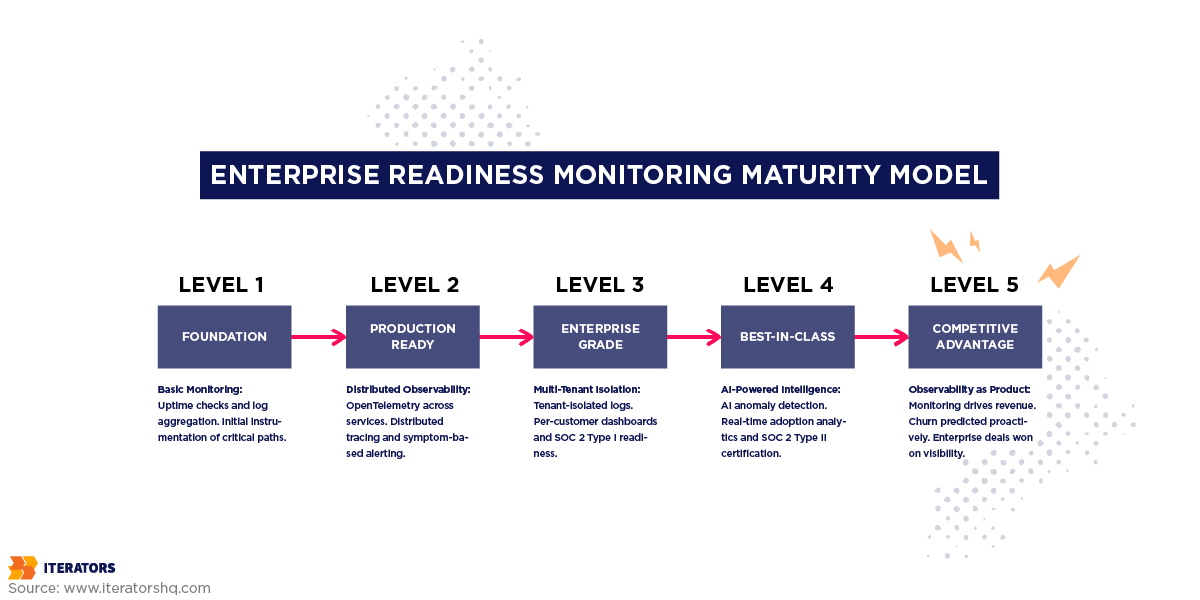
Building enterprise-grade observability is iterative. Organizations progress through defined maturity phases.
Phase 1: Foundation (Weeks 1-4)
Goal: Establish basic monitoring and logging infrastructure.
Key Deliverables:
- Basic uptime monitoring (synthetic checks, health endpoints)
- Centralized log aggregation
- Initial instrumentation of critical paths
- Simple dashboards for engineering team
Duration: 2-4 weeks
Team Size: 1-2 engineers
Phase 2: Production-Ready (Weeks 5-12)
Goal: Implement comprehensive observability for core workflows.
Key Deliverables:
- OpenTelemetry SDK integration across services
- Distributed tracing for critical user journeys
- Symptom-based alerting with PagerDuty integration
- Customer-facing status page
- Basic incident response procedures
Duration: 6-8 weeks
Team Size: 2-3 engineers + 1 SRE
Phase 3: Enterprise-Grade (Months 4-7)
Goal: Meet vendor assessment and SOC 2 requirements.
Key Deliverables:
- Multi-tenant log isolation with security controls
- Per-customer dashboards with organizational hierarchy
- Automated compliance reporting
- Advanced alerting with anomaly detection
- Documented incident response playbooks
- SOC 2 Type I audit readiness
Duration: 3-4 months
Team Size: 3-4 engineers + 1 SRE + 1 compliance specialist
Phase 4: Best-in-Class (Months 8+)
Goal: Leverage observability for competitive advantage.
Key Deliverables:
- AI-powered anomaly detection and predictive alerting
- Real-time adoption analytics driving customer success
- Automated capacity planning and cost optimization
- Advanced business intelligence dashboards
- Continuous compliance monitoring
- SOC 2 Type II certification
Duration: 6+ months
Team Size: Full platform team with dedicated observability focus
Conclusion: Observability as Product, Not Infrastructure
Here’s the uncomfortable truth most SaaS founders don’t want to hear:
Your application’s features don’t matter if enterprise buyers can’t trust your infrastructure.
You can have the best UX in the world. The most innovative features. The slickest onboarding flow. But if you can’t answer “How do you monitor multi-tenant data isolation?” or “What’s your MTTD for security incidents?” during a vendor assessment, the deal dies.
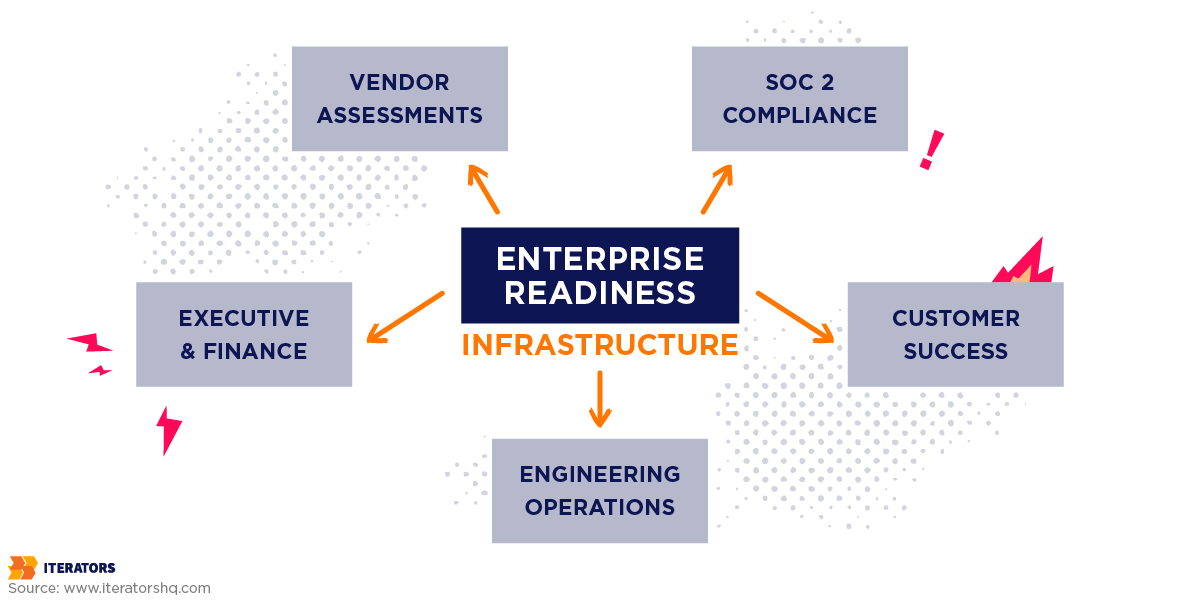
Enterprise readiness monitoring isn’t just about keeping servers online. It’s about:
- Proving to auditors that your controls work
- Showing customers that their employees are actually using your software
- Demonstrating to procurement that you can scale without breaking
- Providing executives with the ROI data they need to justify renewal
The companies winning enterprise deals in 2025 aren’t necessarily building better products. They’re building better visibility into their products.
They’re treating observability as a first-class product feature—not an operational afterthought.
They’re instrumenting from day one, not retrofitting after the first big customer complains.
They’re using the same telemetry data to power both engineering debugging and customer success dashboards.
They’re passing SOC 2 audits because their enterprise readiness monitoring infrastructure generates compliance evidence automatically.
The question isn’t whether you need enterprise-ready monitoring. The question is: how much revenue are you leaving on the table by not having it?
Because every vendor assessment you fail, every deal that stalls in security review, every customer that churns due to poor visibility—that’s money you’ll never get back.
Start building your observability foundation today. Your future enterprise customers are already asking for it.
Ready to transform your monitoring infrastructure into an enterprise revenue driver? Schedule a consultation with Iterators to build enterprise readiness monitoring that closes deals, not just tracks uptime.
Frequently Asked Questions
What’s the difference between monitoring and observability?
Monitoring is reactive—it tracks known failure modes using predefined metrics and alerts. You set thresholds for things like CPU usage or error rates, and get paged when they’re exceeded.
Observability is proactive—it’s the ability to ask arbitrary questions about your system’s behavior without deploying new code. It relies on high-quality telemetry (traces, logs, metrics) enriched with contextual attributes that let you explore and understand why failures occur, even failures you’ve never seen before.
Think of it this way: monitoring tells you that something broke. Observability tells you why it broke and how to fix it. Both are essential for enterprise readiness monitoring.
How much does enterprise-grade monitoring cost?
It depends on scale, but here are rough benchmarks:
Tooling costs (SaaS observability platforms):
- Small startup (<10 engineers, <100 customers): $500-2,000/month
- Growth stage (10-50 engineers, 100-1,000 customers): $2,000-10,000/month
- Enterprise-ready (50+ engineers, 1,000+ customers): $10,000-50,000+/month
Engineering costs:
- Initial implementation: 2-4 engineers for 3-6 months
- Ongoing maintenance: 1-2 dedicated SRE/platform engineers
Total first-year investment: $150,000-500,000 depending on team size and tooling choices.
But compare that to the cost of not having it: a single failed enterprise deal can be worth $100,000-1,000,000+ in ARR. One major outage can cost $14,000+ per minute. Customer churn from poor visibility compounds annually.
Which metrics matter most for vendor assessments?
Procurement teams focus on:
- Uptime guarantees: 99.9% minimum, 99.99% preferred
- Incident response times: MTTD, MTTA, MTTR
- Security monitoring: Anomaly detection, access logging, threat detection
- Audit capabilities: Comprehensive logs, tenant isolation, retention policies
- Compliance certifications: SOC 2 Type II, ISO 27001, GDPR compliance
The specific metrics vary by industry, but the underlying question is always: “Can you prove your system is secure, reliable, and compliant?”
How long should we retain logs for SOC 2 compliance?
Minimum requirements:
- Audit logs: 1 year minimum (SOC 2 evaluation period is typically 6-12 months)
- Security logs: 90 days minimum for incident investigation
Industry best practices:
- Hot storage (instant query): 30 days
- Warm storage (federated query): 6 months
- Cold archive (compliance/legal): 1-7 years depending on regulatory requirements
HIPAA requires 6 years. GDPR allows retention only “as long as necessary” for the stated purpose. Financial services often require 7 years.
The key is automating lifecycle management so data automatically transitions between storage tiers and is purged when no longer legally required.
What tools do enterprise SaaS companies actually use?
Popular observability platforms:
- Datadog: Comprehensive APM, infrastructure monitoring, log management
- New Relic: Application performance monitoring with strong analytics
- Honeycomb: High-cardinality observability focused on distributed tracing
- Grafana: Open-source visualization with Prometheus, Loki, Tempo
- Splunk: Enterprise-grade log management and SIEM
Specialized tools:
- PagerDuty: Incident management and on-call scheduling
- Sentry: Error tracking and crash reporting
- Lightstep: Distributed tracing for microservices
- AWS CloudWatch: Native AWS monitoring and logging
Most companies use a combination: Datadog for infrastructure + Sentry for errors + PagerDuty for alerting, for example. The key is ensuring all tools integrate and correlate data for true enterprise readiness monitoring.
How do you monitor multi-tenant applications without violating customer privacy?
Three critical practices:
- Automatic tenant ID injection: Every log line and span must include tenant_id as an attribute, injected at the ingress point before any business logic executes.
- Security-filtered dashboards: Customers access dashboards through an authentication layer that filters queries to only their tenant’s data. They literally cannot see other tenants’ metrics or logs.
- Encryption and access controls: Log data must be encrypted at rest and in transit. Access to raw logs should be restricted to authorized personnel only, with all access logged for audit purposes.
What to avoid: Never log PII (passwords, credit cards, SSNs) in plain text. Use tokenization or hashing for sensitive data that must be logged. Learn more about multi-tenant SaaS best practices.
Can you retrofit monitoring into an existing product, or must it be built from the start?
You can retrofit enterprise readiness monitoring, but it’s expensive and incomplete.
Challenges of retrofitting:
- Existing architecture may not support trace propagation across services
- Adding instrumentation requires touching every critical code path
- Multi-tenant isolation is hard to add if the data model wasn’t designed for it
- Testing instrumentation changes in production is risky
Best approach if retrofitting:
- Start with infrastructure monitoring (servers, databases, load balancers)
- Add application-level instrumentation incrementally, starting with critical user journeys
- Implement distributed tracing for new features going forward
- Gradually backfill instrumentation for legacy code paths
Why building from the start is better:
- Instrumentation becomes part of standard development practices
- Trace context propagation is built into service communication patterns
- Tenant isolation is designed into the data model from day one
- Testing and debugging are easier throughout development
The best time to implement enterprise readiness monitoring was at the MVP stage. The second-best time is right now.