

Everyone who’s built something with Cursor or Claude Code agrees on one thing: the first weekend is genuinely magic. You describe what you want in plain English, and the app appears. The login screen works, and the dashboard has charts that actually update when you click things. You show it to a friend, or an investor, or your mom. For a few days you feel like you skipped three years of learning to code. That weekend is the easy half of getting from vibe coding to production.
Then, usually somewhere around week three, something breaks in a way you can’t quite explain. You ask the AI to fix it. It fixes it — technically — by breaking two other things you hadn’t touched. So you ask it to fix those. The file you’re editing now contradicts logic in a file you forgot existed. The AI wrote both, twenty sessions apart, with two different ideas of how the app should work. Nobody warned you about this part. The move from vibe coding to production is one of the hardest transitions happening in software right now. It’s hard precisely because the first part goes so well that you don’t see the second part coming.
I want to be upfront about something before I get into the mechanics of why this happens. I’m not here to tell you vibe coding was a mistake, or that you wasted your time. And I’m not here to make you feel embarrassed about the state of your codebase. You built something. That’s not nothing. Most people with an idea never get past the idea. What I want to talk about is the moment when the thing that got you this far stops getting you further. That moment looks less like a bug and more like a wall.
What Vibe Coding to Production Actually Means
Here’s the short version, the one I’d put on a slide if anyone made me make slides. Vibe coding to production means taking a prototype built through conversational AI coding tools and turning it into something secure, stable, and maintainable. It has to be solid enough that real users, a real team, and eventually a real enterprise buyer can depend on it.
That sounds obvious written down, and stops being obvious the moment you live through it.
What surprised me most when I started looking into this is that the code itself is rarely the problem anymore. Jacek Głodek, our founder and managing partner, puts it more bluntly than I would: “Writing code is largely a solved problem now. Engineering isn’t. Every AI session makes architectural decisions — where data lives, how failures are handled, where one module ends and the next begins — and nobody is making them consciously. So between sessions, the system drifts.”
I keep coming back to that last part. In a vibe-coded app, those decisions still get made. Just by accident, one prompt at a time.
Felt Speed vs. Measured Speed
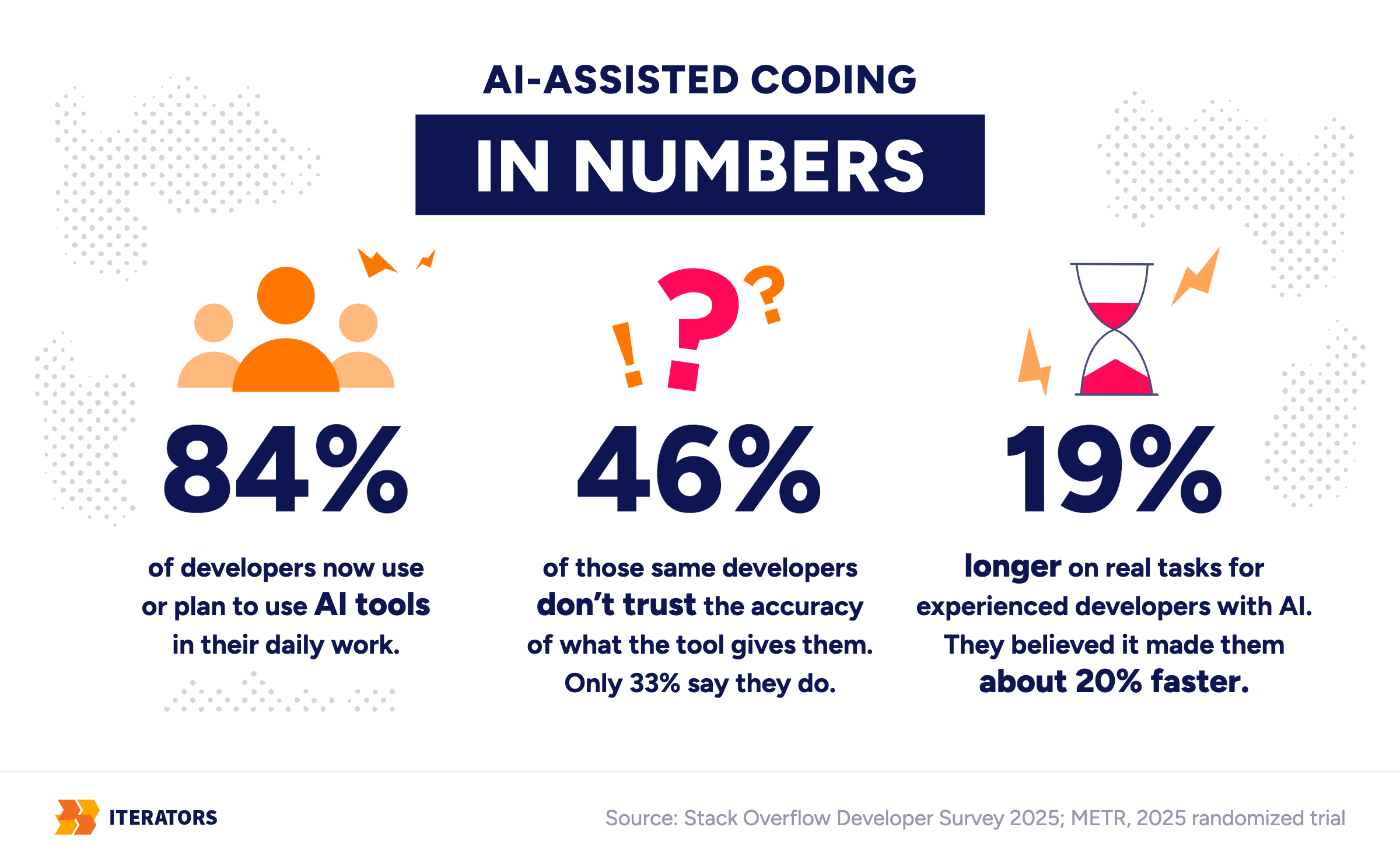
I don’t think this is a controversial starting point, by the way. According to the 2025 Stack Overflow Developer Survey, 84% of developers now use or plan to use AI tools in their daily work. What’s more interesting is that 46% of those same developers don’t trust the accuracy of what the tool gives them. By contrast, only 33% say they do. That’s not a small gap. That’s close to half the industry building with something it doesn’t fully believe. It’s a strange place to be standing when you’re also betting your product on it.
And the speed is real, at least some of the time. GitHub’s own research on Copilot found developers completing a defined task up to 55% faster with it. But that study measured something narrow — writing an HTTP server, a known task, inside a controlled setup. It didn’t measure what happens when the task is “build my product” and nobody’s written down what done even looks like.
A stranger and, I think, more honest study gets closer to what’s actually going on. METR ran a randomized trial in 2025 with experienced open-source developers working in their own large, real repositories — not toy problems. The ones using AI tools took 19% longer to finish their tasks than the ones working without it. Here’s the part I can’t stop thinking about: those same developers believed the AI had made them about 20% faster. They were slower, in minutes on a clock, while feeling faster in their heads. That gap between felt speed and measured speed is, I’d argue, the entire story. It’s why a prototype can look finished to the person who built it. To the person who has to maintain it next, however, it looks like something else entirely.
A Prototype Should Answer a Question
None of this is an argument against the tools. It’s an argument against confusing “it works on my laptop” with “it can run a business.” Those are different claims, and a vibe-coded prototype only ever makes the first one.
There’s another reason for that, too. A prototype exists to answer a question. Done properly, prototyping starts with a hypothesis: what are we actually trying to find out, and what would prove us wrong? A lot of vibe-coded apps skip that step entirely. Someone had an idea, described it to an AI, and got a fully functional version of the idea. Yet nobody ever decided what the idea was supposed to prove. What you end up with shows that something can be built. It rarely tells you whether it should have been built that way, or whether anyone actually needs it. I keep running into the same gap whenever I look at an MVP that got built before anyone validated the problem underneath it.
The Architecture Wall: Why Vibe Coding to Production Isn’t a Straight Line
I keep coming back to the same image when I try to explain this to founders. A prototype is a sketch of a building. It shows you where the rooms go, what the front door looks like, roughly how big the kitchen should be. A sketch is genuinely useful — you can hand it to someone and they’ll understand the idea immediately. What a sketch cannot do is hold up a roof. For that you need plumbing nobody draws, wiring nobody photographs, and a fire exit nobody puts in the brochure.
The architecture wall is the point where your app still works beautifully in a demo. But the moment it meets real usage, it becomes expensive, fragile, or actively unsafe. It’s not one bug, and it’s usually not bad code. It’s a pile of engineering decisions nobody made on purpose: how data is stored, who can do what, what happens when something fails. They were all skipped for speed, and they all come due on the same bill.
AI Optimizes for the Next Prompt, Not the Whole System
Large language models work inside a context window — essentially the AI’s short-term memory for your specific request. It solves the problem directly in front of it, often very well. But it has zero visibility into the five other decisions that request should have touched.
So the decisions still get made — where data lives, how errors are handled, which library talks to the database. They just get made as a side effect of answering a prompt, not because anyone weighed the options. Ask for a login screen and you’ve also, without noticing, picked an approach to authentication.
Every Session Starts From Scratch
Then the session ends. The next one starts with the code the last one left behind, but none of the reasoning. On Monday the AI handles errors one way. On Thursday, in a fresh session, it picks another way, equally reasonable and incompatible with Monday’s. Neither is wrong on its own. Together, they’re a system slowly drifting away from whatever design it once had. (Nobody notices drift while it’s happening. That’s what makes it drift.)
There’s a dataset I find genuinely startling here. GitClear looked at 211 million lines of changed code written between 2020 and 2024, the years AI assistants went mainstream. Copy/pasted lines rose from 8.3% to 12.3% of all changed code between 2021 and 2024. Meanwhile, over the same period, the share of changed lines that counted as refactoring collapsed from 25% to under 10%. Refactoring here means cleaning up and reusing existing logic instead of writing something new next to it.
Translate that into plain terms. Instead of improving the thing that already does almost what you need, the AI writes a new version right next to it. Five times, in five different files. Each one works on its own. None of them know the others exist. When a business rule changes — a tax rate, a discount, a permission check — someone has to go find all five copies by hand. By the time anyone notices, they won’t all agree with each other anymore.
Vibe coding to production: same screen, different system
Drag through 40 AI sessions. Watch what changes, and what doesn’t.
The Codebase Grows Without a Map
Ask for a feature, get a feature. Ask for another, get another. Nobody stops to ask where it should live relative to everything else. After all, the tool answering you has no concept of "everything else", only of the next prompt. A second developer joining the project has nowhere to start, because there's no map. Just a pile of rooms, built on different days, by something with no memory of the rooms before.
This is technical debt in its purest form. Martin Fowler, who popularized the term, describes it as borrowing against the future. It's the extra work you'll owe later because of a shortcut taken now. Vibe coding doesn't invent this problem. It just lets you borrow an enormous amount of principal in a single weekend, at a rate that would make a payday lender blush.
The Data Model Nobody Designed
Tables get created the moment the AI needs somewhere to put something. There are no planned migrations (the safe steps for changing a database structure). No indexing (the database's way of finding the right records quickly). No audit trail (a record of who changed what and when). Often there's also no real separation between one customer's data and another's. It works fine with twelve users and twelve rows. It gets considerably more interesting with twelve thousand.
The Happy Path Is the Only Path
This is the part I notice first, because it's my actual job to notice it. Vibe-coded interfaces are often gorgeous. Component libraries are good now, and AI tools lean on them hard. So the login screen looks finished, the dashboard looks finished, the onboarding flow looks finished. What's missing is everything that happens when the user doesn't do exactly what the demo assumed.
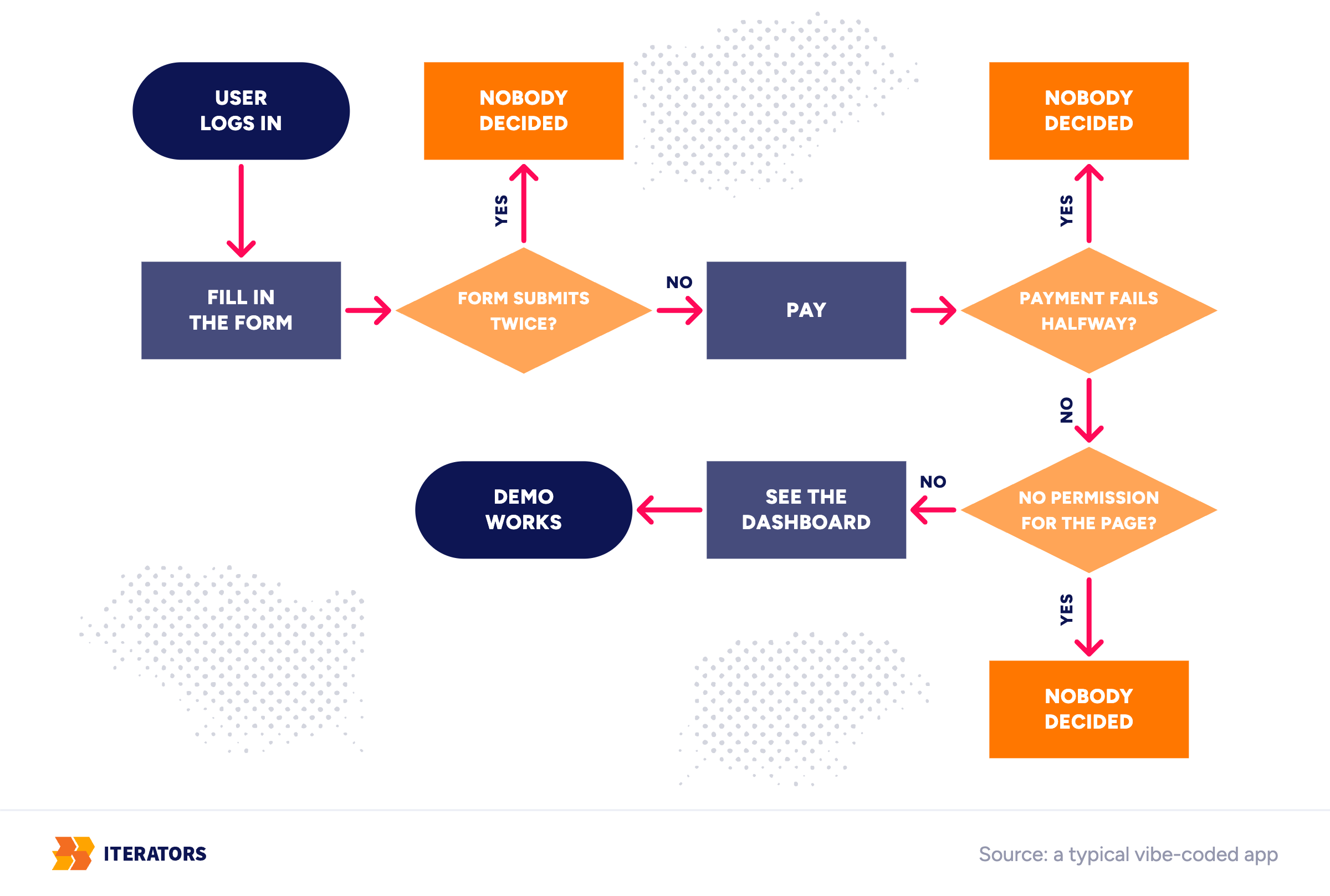
What happens when a form submits twice because someone double-clicked? And if a payment fails halfway through? What does someone see when they don't have permission to view a page — a blank screen, a crash, a polite message? Nine times out of ten, in a vibe-coded app, the honest answer is: nobody decided. The AI generated the happy path because the happy path is what you described. It's like telling someone about a trip without mentioning what happens if the flight gets cancelled. But a real product isn't mostly the happy path. It's mostly the other paths, handled well enough that the user never has to think about them. That's also where most of the error handling work in any serious product actually lives.
Vibe Coding to Production: Signs You've Hit the Ceiling
I'd rather give you a way to check this yourself than ask you to trust me. Here's the list I actually use when someone asks me whether their vibe-coded app is in trouble:
- Every new feature breaks two old ones
- The AI keeps editing files it shouldn't touch
- Nobody can say why the app does something the way it does, except that the AI did it that way
- Nobody on the team can fully describe how data moves through the app, start to finish
- Login works, but permissions are inconsistent or missing entirely
- The same piece of logic exists in three or four different files
- Changing the database feels like defusing something
- There are no automated tests that would actually catch a regression (an old feature breaking after a new change)
- Deployment only works if one specific person does it, by hand, in a specific order
- A basic security question from a potential customer is hard to answer with a straight face
- You wouldn't feel comfortable handing this codebase to a new developer and walking away
If you recognize a couple of these, that's normal — plan for them. If you recognize about half, stabilize before you add anything new. That's because every feature from here compounds the mess underneath it. Recognize most of them? Stop building and go look at the architecture, because you've already hit the ceiling. If you're wondering whether your AI app is ready to go from vibe coding to production, this list is most of the answer.
"It Won't Scale Past 100 Users" Is Rarely About Users
Founders say this to me a lot, and it's almost never about users in the literal sense. A hundred users isn't a server load problem on most modern infrastructure. Instead, the ceiling usually shows up somewhere else: the first enterprise pilot, the first real payment integration, the first customer who asks for a custom role. Or the first time someone outside the company opens the code and asks a question nobody can answer.
AI-Generated Code Limitations Founders Discover Too Late
On the way from vibe coding to production, some of this only becomes visible once someone is looking for it on purpose — an investor, a security reviewer, a new hire. Here's roughly how it breaks down:
| Limitation | Why it happens | What it costs you in production |
|---|---|---|
| Shallow architecture | AI solves the prompt in front of it, not the system around it | Every new feature gets harder, not easier, to add |
| Architectural drift | Each session makes its own decisions, with no memory of earlier ones | The same problem gets solved three different ways |
| Weak security | Security was never part of the actual request | Failed reviews, and in the worst case, real breaches |
| No test strategy | Speed was the only stated goal | Regressions nobody catches until a user does |
| No observability (no practical way to see what the system is doing) | Nothing logs, measures, or traces what happened | When something breaks, you're guessing why |
| Messy data model | Tables built as needed, never planned | Reporting is unreliable, scaling is painful |
| No clear ownership | Written by founder-and-AI, nobody else involved | Hard to hand off, harder to trust |
Security Is a Decision, Not a Coding Skill
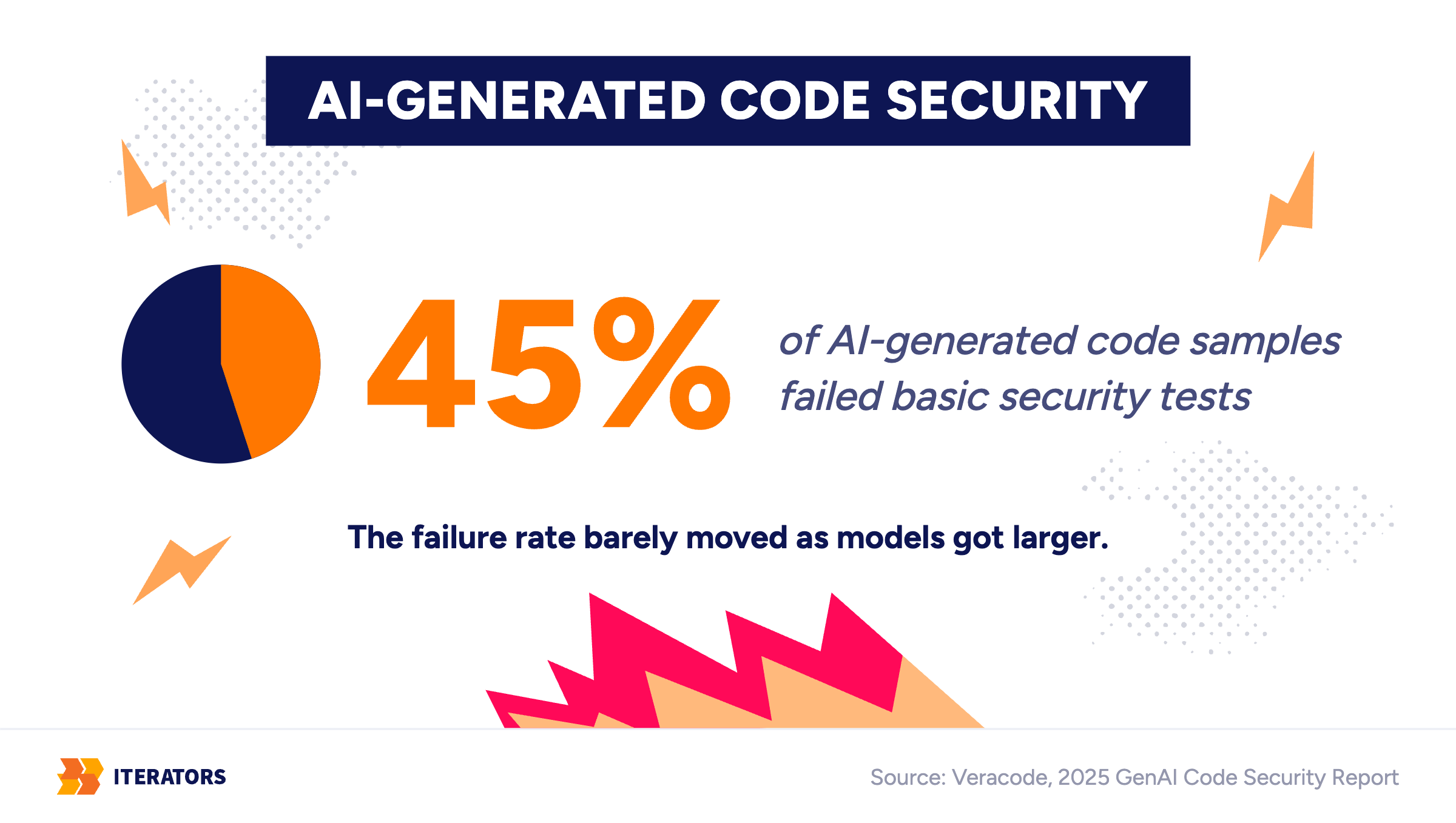
The security row deserves a second look, because it's the one that surprises people most. There's a reasonable assumption that newer, more capable models must write safer code. However, independent security research hasn't found that to hold. Veracode's 2025 GenAI Code Security Report found that roughly 45% of AI-generated code samples failed basic security tests. The failure rate barely moved as models got larger and more sophisticated. In short, bigger models made the software more impressive without making it reliably more secure. That makes sense once you see security as a decision rather than a coding skill. A model can write tidy, working code. Deciding what to protect, from whom, and how much it would hurt to lose it is engineering work nobody asked it to do.
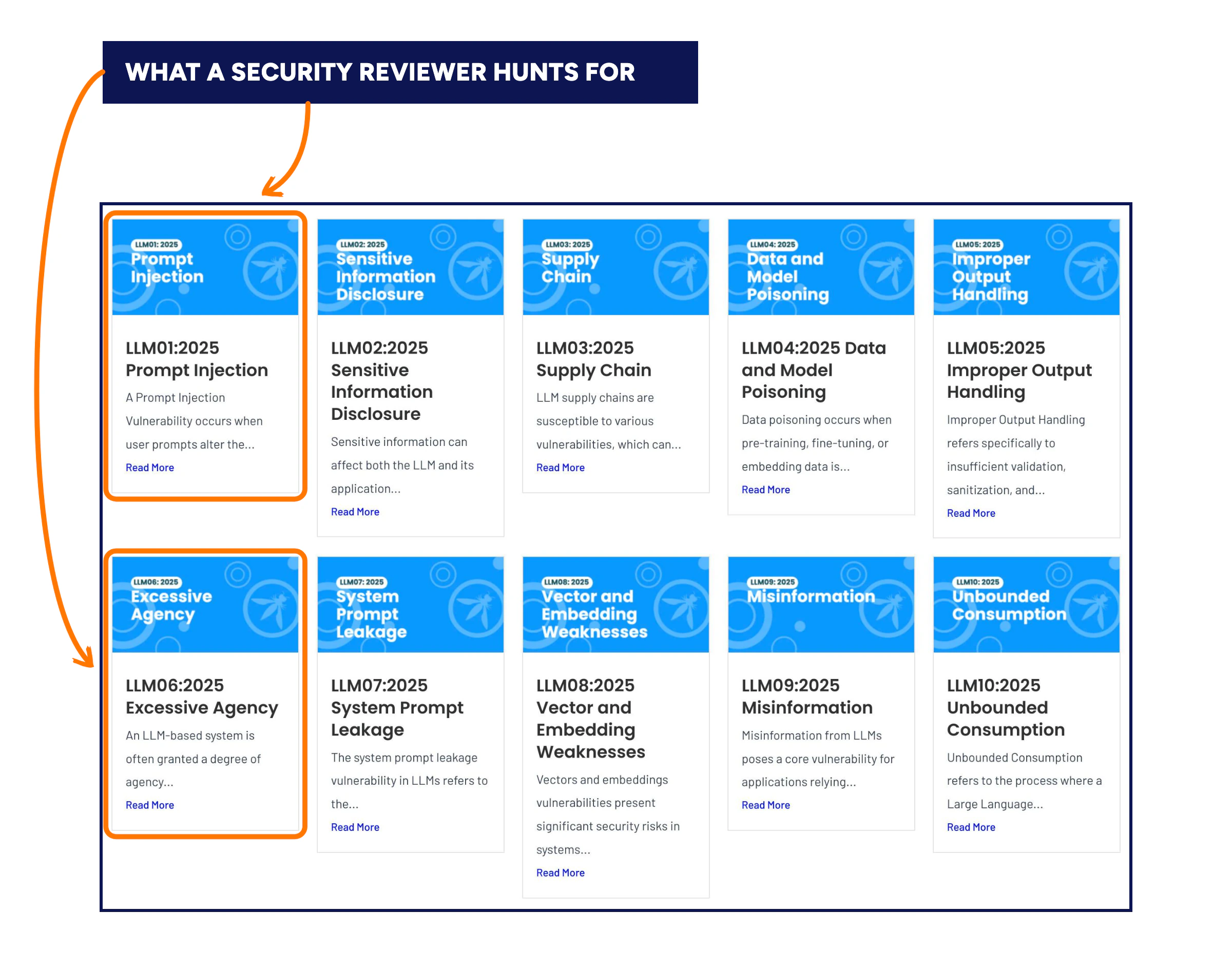
The OWASP Top 10 for LLM Applications spells out exactly what a security reviewer is hunting for in code like this. For example, there's prompt injection, where hidden instructions get smuggled into user input. Another is excessive agency, where an AI-connected feature can be tricked into doing something nobody intended. None of this is exotic. It's just the kind of thing you only start thinking about once someone makes you.
What Investors and Enterprise Buyers Actually Check
Due diligence doesn't look at your demo. It looks at what's underneath it. Then it asks whether the system can carry business risk, not just display a convincing screen. The specific questions vary, but in a vibe coding to production review they tend to circle the same handful of things:
- How is one customer's data kept separate from another's?
- What's the actual authorization model — not "logged in or not," but who can do what?
- Where do secrets and API keys (password-like credentials that let systems talk to each other) live, and who can see them?
- What happens when a third-party service goes down?
- Can anyone explain, start to finish, how the system is monitored and deployed?
- Is there a credible path toward something like SOC 2, the security and operational controls audit enterprise buyers often ask for?
None of these questions require your prototype to be perfect, only defensible. "The AI built it and it works" is a true sentence that answers none of them. Anyone who's sat through a security review at the deal-blocker stage will tell you it's usually the first sentence founders reach for.
Moving From Vibe Coding to Production: What the Transition Actually Involves
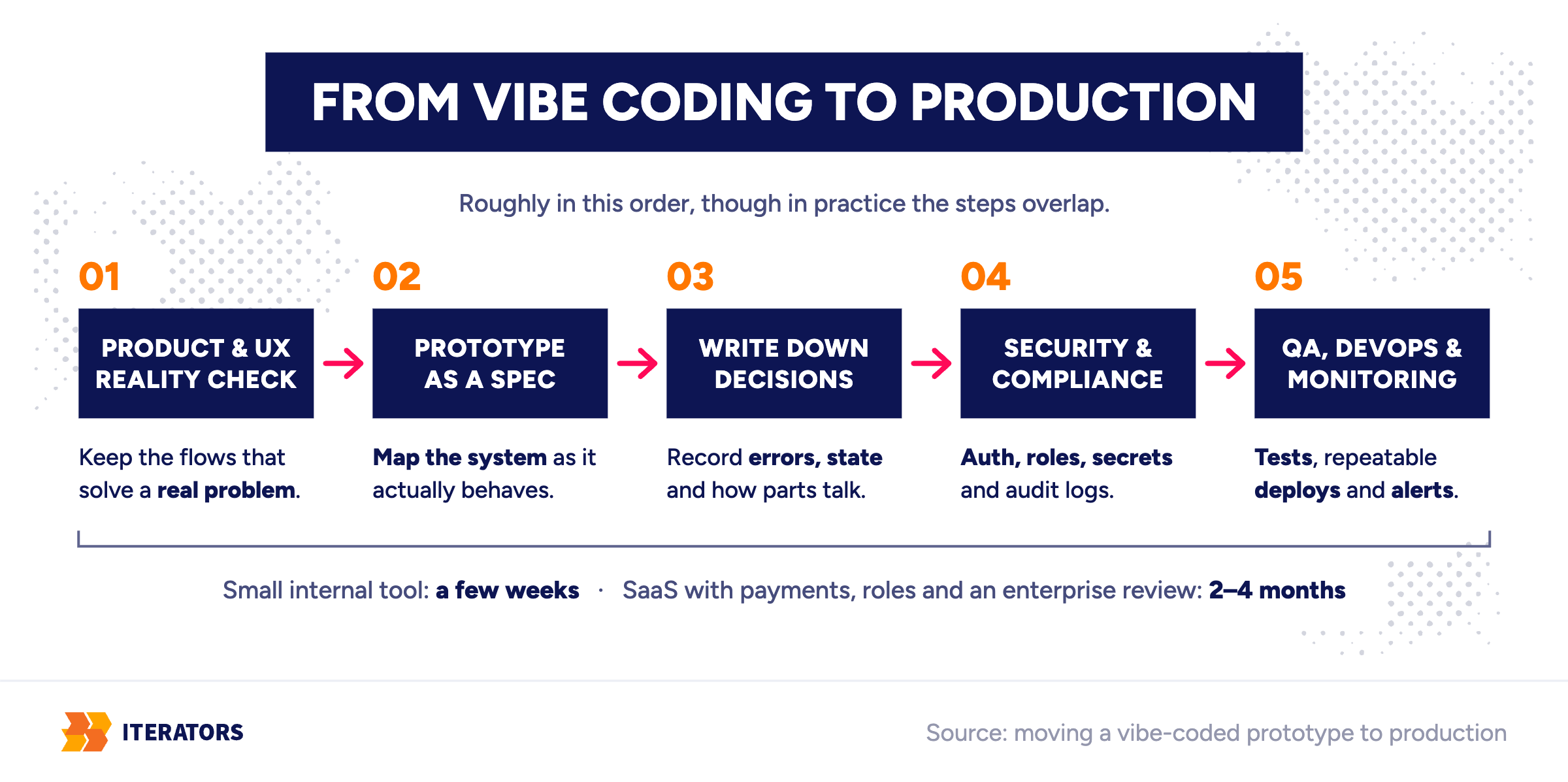
A messy AI-built prototype isn't an embarrassing secret. It's closer to a first draft — useful, occasionally brilliant in places, not something you publish as-is. The move from vibe coding to production is an engineering transition, though, not a setting you flip. It usually involves five things happening roughly in this order, though in practice they overlap. The time it takes varies less by the number of screens than by the amount of risk hiding underneath them. A small internal tool with a clear question might take a few weeks to stabilize. A SaaS product with payments, roles, customer data, and an enterprise security review can easily take two to four months.
Product and UX Reality Check First
Before anyone touches the backend, I want to know what question the prototype was actually trying to answer, and whether it answered it. A lot of vibe-coded apps skip this entirely. Someone had an idea, described it to an AI, and got a working version of the idea. But nobody checked whether the idea matched what a real user needed. That's the gap between "we have a plan" and "people actually use this." It doesn't close itself just because the plan now has a database behind it.
So the first pass isn't code review. It's figuring out which flows are solving a real problem and which ones are solving a problem nobody has. And which ones just look finished because a component library did a very convincing impression of a decision someone made. AI-generated interfaces are especially good at looking considered when nobody considered anything. That's its own quiet risk. A confident-looking screen hides the fact that no one tested whether it actually works for a real person doing a real task. This is, not coincidentally, exactly what a UX audit is built to surface.
Treat the Prototype as a Specification, Not a Foundation
Here's the thing I most want founders to hear. Once you know what's actually worth keeping, the default move isn't to rebuild from zero. It's to treat the prototype as a living specification. Map the system as it actually behaves, not as anyone intended it to. Identify which flows are critical, who owns which piece of data, what assumptions about scale got baked in by accident.
One of our own developers put this better than I could, talking about prototyping in general: "When you do proper prototyping, you can build parts that are future-proof. Otherwise, you need to scrap absolutely everything and start fresh with all the learnings and understanding you've gained." That's really the choice. If pieces were built with care, you keep them and build around them. Often that happens in stages, replacing one part of the system at a time while the rest keeps running. That's safer than one risky swap of everything at once. If nothing was built with care, you still keep the learning, even when none of the code survives it. I've written more about when a prototype is worth keeping versus starting over elsewhere, so I won't repeat the whole argument here.
Write the Engineering Decisions Down
This is the step that actually stops the drift, and it's less glamorous than it sounds. Once the system is mapped, someone has to make the engineering decisions the prototype skipped. How are errors handled? Where does state live? How does one part of the system talk to another? Then those answers get written down. Engineers have a format for this, architecture decision records: short notes on what was decided, why, and what was rejected. In an AI-assisted codebase they matter even more, because they're the only memory a new session has. Put the conventions in the files your AI tool reads at the start of every session, and Thursday's session finally knows what Monday decided. The AI still writes the code. A person decides what the code should add up to.
Security and Compliance, the Boring Part That Matters
This is the least exciting section in this entire piece. It's also the one that ends careers if it gets skipped:
- Authentication done properly (proving someone is who they say they are)
- Authorization that actually maps to roles (what they can do after that), instead of one shared admin password
- Secrets (API keys, tokens, and passwords the system uses) that live somewhere other than a text file
- Audit logs (records of important actions)
- Real separation between tenants (separate customer accounts sharing the same system), if you have more than one customer
Frameworks like NIST's Secure Software Development Framework exist specifically to turn this into a checklist instead of a vibe. That's more or less exactly what this phase needs, security pun fully intended.
QA, DevOps, and Knowing When Something Breaks
QA here mostly means tests (automated checks that tell you when old things break) on the paths that actually matter. It doesn't mean full coverage for its own sake. The DevOps part is the machinery around shipping and running the app. That means a deployment process that doesn't depend on one person's laptop being configured a particular way. It also means logging (records of what happened) and monitoring (alerts when something starts misbehaving). When something breaks — and something will — you hear about it from a dashboard instead of an angry email.
The AWS Well-Architected Framework is a reasonable reference point here. You don't need to follow it to the letter, though. It's useful as a list of the things people forget to ask about until they're the reason a launch slips. This is also roughly where software quality assurance stops being a nice-to-have. Instead, it becomes the thing standing between you and a 2 a.m. incident call.
When to Bring In Developers
There's a reasonable moment to bring in engineers on the way from vibe coding to production, and it's not always "as soon as possible." A prototype you're still actively learning from doesn't need a production team yet. Instead, it needs more conversations with users. The moment usually arrives with paying users, a launch date, or an enterprise buyer running a security review. Or with a fundraise that has technical diligence attached, or a second developer who needs to understand the codebase. Sometimes it's just a prototype that's become too valuable to throw away and too fragile to trust with anything new.
Most founders' first instinct at this point is to hire developers to fix the AI code. That's a fair instinct, but not quite the right first question. The AI already writes code fine. What's missing is someone who makes the engineering decisions and holds the system to them. That's a different hire than another pair of hands typing.
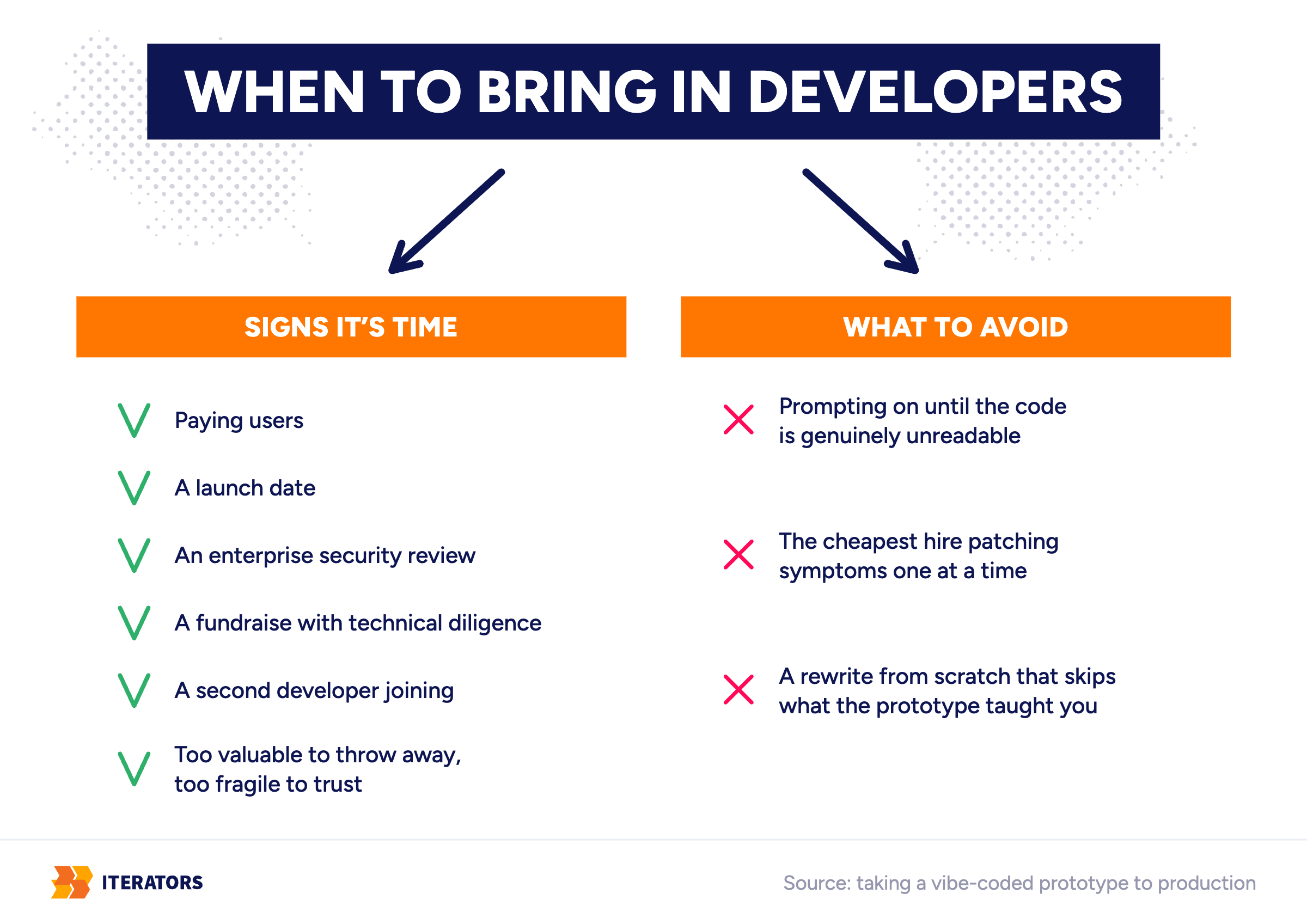
What I'd avoid: continuing to prompt your way forward until the codebase is genuinely unreadable. Every week adds interest to a debt someone will eventually have to pay down. Map the architecture first, even roughly. I'd also avoid hiring whoever's cheapest to patch symptoms one at a time. That's exactly how you end up with the duplication problem described earlier — just with a human adding to it instead of an AI. And I'd avoid rewriting from scratch without first extracting what the prototype actually taught you. Otherwise you've paid twice for the same lesson.
How We Help With Vibe Coding to Production
This is where we come in, and I'll say it plainly rather than dress it up. Our software prototyping work covers both ends of this. We can build a prototype around an actual hypothesis from the start. Or we take one that already exists and turn it into a real specification and a production plan. If your app is genuinely on fire right now, there's emergency support for that specific kind of panic. If you just need more experienced hands alongside your existing team without hiring a department, that's a different conversation worth having too. But the starting point for any vibe coding to production engagement is almost always the same. Figure out what the prototype actually proved before you decide what to build next.
What This Has Looked Like for Us
I'll give you two examples from our own work, at opposite ends of this timeline. I think the contrast says more than another paragraph of advice would.
For SCHWARTZ.AI, we built an AI invoice analysis prototype as a Corporate Innovation Pilot. It was aimed at exactly one workflow, the process of booking cost and purchase invoices, which was slow and inconsistent. We also ran UX workshops and usability tests alongside building the model itself. The real question wasn't "can AI read an invoice." It was "will the people actually using this trust and adopt it." That's a prototype built around a specific question, which is the whole point.
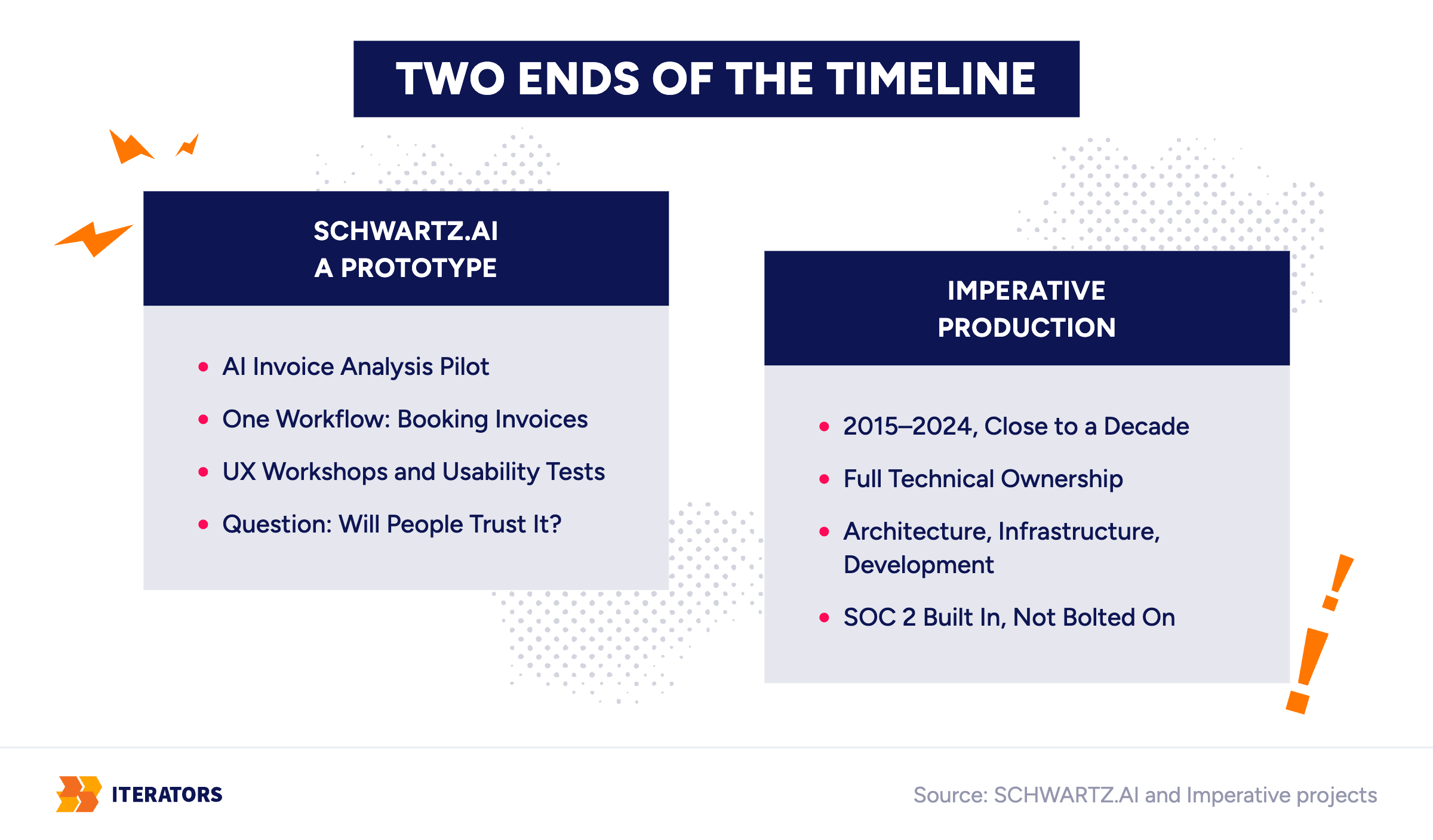
Imperative sits at the other end entirely. We worked with them for close to a decade, from 2015 to 2024, holding full technical ownership of their peer-coaching platform. That covers architecture, infrastructure, ongoing development, and eventually SOC 2 Trust Services Criteria. Those were built into the platform from the inside, not bolted on afterward. That's what the far side of the architecture wall actually looks like in practice. That took years of deliberate ownership rather than one big rebuild.
Treating the Prototype Like Production
None of this makes vibe coding a mistake. It got you a working idea in a weekend, which used to take months. That's a genuinely new capability that didn't exist a few years ago. The actual, costly mistake is assuming that because it works, it's finished. And then pushing the same code forward instead of asking what it already taught you.
AI can get you to "it works." Getting to "it keeps working, with real users, real money, and someone besides you able to explain how" is a different job, done by people. I keep thinking about that difference, because it's a decisions problem more than a coding one, and solving it starts by taking the prototype seriously enough to learn from it instead of either worshipping it or throwing it away.